
I recently helped a customer run a DR drill where the source database lived in Phoenix (us-phoenix-1) and the customer wanted to restore from backup into Ashburn (us-ashburn-1) to validate their recovery approach. This post summarizes what worked, what broke, how we troubleshot it, and what I’d recommend to anyone implementing the same pattern.
Although cross-region restore has many trade-offs as a DR approach, and may not be the best option compared to alternatives like Data Guard (which typically offers better RTO and RPO), the customer chose cross-region restore primarily for cost reasons:
- Data Guard keeps a standby running, which means ongoing compute/storage consumption.
- Cross-region restore keeps backups and restores only when needed—typically cheaper.
My goal was to make the restore as seamless and repeatable as possible, even if it’s not the lowest-RTO design.
Enable Automatically Backup
For this DR drill we used OCI Autonomous Recovery Service to manage backups. I strongly recommend automation here; manual backup processes are where DR plans quietly fail.
For details about Autonomous Recovery Service configuration, please see Configure Recovery Service Document
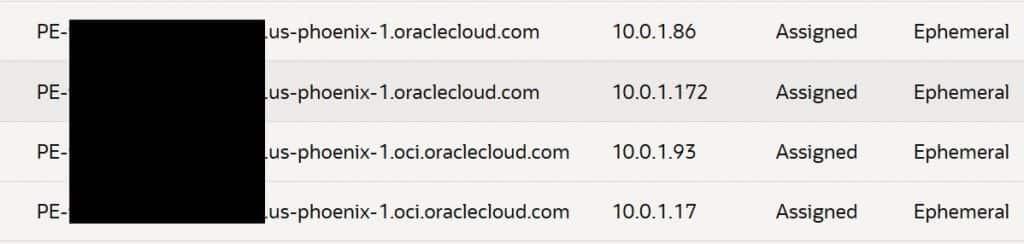
Once Recovery Service is enabled, OCI creates private endpoints in the database VCN/subnet. Those endpoints have FQDNs that follow the region domain—e.g. *.us-phoenix-1.oraclecloud.com. If you’re only restoring in the same region, OCI’s VCN resolver can resolve these private service names without drama.
In a cross-region restore, the target VCN (Ashburn) won’t automatically know how to resolve private endpoint names that “belong” to Phoenix—so capture these details early. You might find there are few sets of private endpoints have been created, make sure you capture all the endpoint’s root domain since it might be varied. In our case, we had us-phoenix-1.oraclecloud.com and us-phoenix-1.oci.oraclecloud.com.
Cross-region network setup (DRG, Route Table, Security List and DNS)
Cross-region operations usually fail for one of two reasons: routing or DNS. Routing is often straightforward; DNS is where the “it should work” assumptions break.
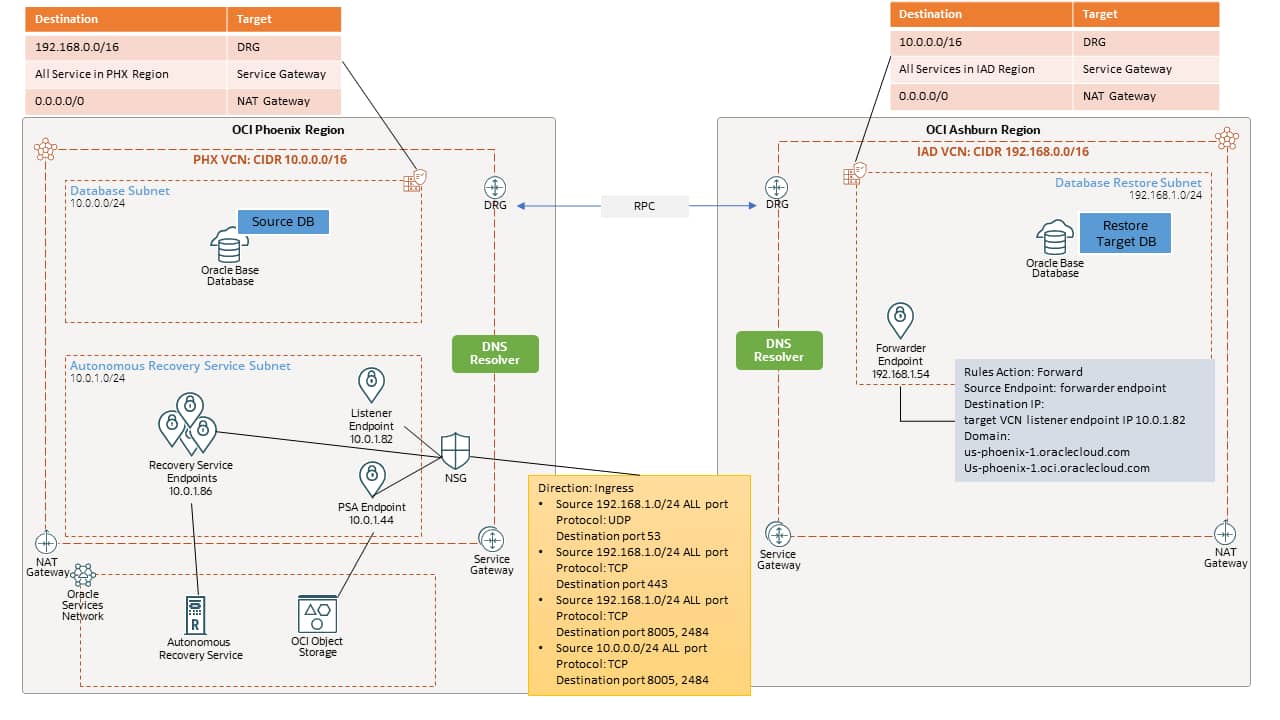
We implemented standard OCI cross-region connectivity with DRGs in both region and attached to the VCNs, then established peering connection between the two. All the routing between the two region’s VCN are configured automatically with default DRG route tables and route distributions. At minimum, each region’s VCN would need route table with rule to route to remote VCN CIDR with DRG as the target, a route rule to OCI managed services via Service Gateway and outbound public route using NAT Gateway.
Each region’s VCN route tables needed, at minimum:
- Routes to the remote VCN CIDRs with target DRG
- Service Gateway routes (to reach OCI-managed services privately where applicable)
- NAT Gateway route for outbound public access (if your design requires it)
Don’t forget about the Security List. Initially (for testing), we allowed broad ingress from the remote VCN to isolate “is it firewalling?” from “is it DNS/routing?”. Later we tightened it down (more on that in later section). But early on, the goal was simply to get a restore to complete.
Normally, at this point, cross region network should be efficient to operate, however in our case when restoring from cross region, one critical part that needs extra attention is the DNS peering.
Because the database backup is stored in Autonomous Recovery Service. The restore process need to access the backup cross region. Recovery Service private endpoints in Phoenix resolve using Phoenix VCN DNS context. When the restore is initiated in Ashburn, the Ashburn VCN must be able to resolve those Phoenix private names.
OCI supports this with DNS resolver endpoints. A listener endpoint needs to be created in the source VCN (10.0.0.0/16) to listen incoming DNS query that is forwarded from the target VCN (192.168.0.0/16).
- In Phoenix (source): create a Listener endpoint in the VCN DNS resolver.
- In Ashburn (target): create a Forwarder endpoint and a forwarding rule that sends queries for the Phoenix domain to the Phoenix listener IP (10.0.1.82).
Instead of enumerating every endpoint hostname, we forwarded the root domains that are used for Recovery Service private endpoints:
- us-phoenix-1.oraclecloud.com
- us-phoenix-1.oci.oraclecloud.com

At this stage, everything looked correct: routing worked, peering worked, DNS forwarding was in place. We triggered the restore.
The Failure (restore stopped at ~60%)
The restore job started normally. About ~20 minutes in, it failed around 60% with a generic restore error!
The restore operation failed due to an unknown error. Refer to WorkRequestId LaunchFromBackupSurrogateKey-ocid1.dbbackup.oc1.phx.xxxxxxxxxxxxxxxxxxxxxx
This is a common and frustrating pattern: restore workflows are multi-step pipelines, and the top-level error often doesn’t tell you which dependency failed.
Fun Starts – Troubleshooting
Where should we start? My first thought was peering and routing, but we quickly validated that wasn’t the issue. The DRG route table for the VCN attachments showed the expected routes between the two regions’ VCN CIDRs, and basic connectivity checks (where applicable) between database instances also succeeded using ping.
Next, we checked DNS peering for Recovery Service private endpoints. Looking up the Recovery Service private endpoint domain from Ashburn instance approved that DNS forwarding is working. Target system can resolve Recovery Service private endpoint in Phoenix.
[root@customdb ~]# nslookup raphxp008-3.rs.br.us-phoenix-1.oci.oraclecloud.com
Server:         169.254.169.254
Address:        169.254.169.254#53
Non-authoritative answer:
Name:   raphxp008-3.rs.br.us-phoenix-1.oci.oraclecloud.com
Address: 10.0.1.97
Finally, we found the real clue on the target side. The failing message on the database node log was effectively:
"DCS-10001:Internal error encountered: DcsException{errorHttpCode=InternalError,\n msg=Internal error encountered: DCS-10403:GET object \"/tmp/TempTdeDownload_11759636976274928570/tmp.tar.gz\" from \"https://swiftobjectstorage.us-phoenix-1.oraclecloud.com/v1/"
That was the “aha” moment.
The restore in Ashburn wasn’t only talking to Recovery Service private endpoints—it was also trying to access Object Storage in Phoenix. We confirmed by trying to reach the endpoint from the Ashburn side and hitting DNS resolution errors for swiftobjectstorage.us-phoenix-1.oraclecloud.com
[opc@test ~]$ curl -v https://swiftobjectstorage.us-phoenix-1.oraclecloud.com/
* Could not resolve host: swiftobjectstorage.us-phoenix-1.oraclecloud.com
* Closing connection 0
curl: (6) Could not resolve host: swiftobjectstorage.us-phoenix-1.oraclecloud.com
Root Cause & Fix
The database was using Oracle Managed Keys for TDE (default). In this model, the database wallet is Oracle-managed and stored in an Oracle-managed Object Storage location. During cross-region restore, the target DB in Ashburn still needed to fetch wallet-related artifacts from Phoenix Object Storage and could not resolve the Phoenix Object Storage hostname. So even though we forwarded DNS for Recovery Service private endpoints, we did not handle DNS for Phoenix Object Storage endpoints.
Now, we know the problem, we first tried to solve it with local DNS constructs (e.g., private views pointing to default resolvers), but that doesn’t help when the problem is that the target VCN simply can’t resolve a hostname that it doesn’t know how to route/resolve in the first place.
We created a Private DNS Zone in Ashburn, attached it to the Ashburn VCN’s default private DNS view, and added A records for the Phoenix Object Storage endpoint:
- Zone/record for: swiftobjectstorage.us-phoenix-1.oraclecloud.com
- A record targets: the IPs returned by doing a nslookup from a Phoenix host that could resolve it.

After that, the Ashburn-side restore workflow could resolve the Phoenix object storage endpoint and proceed. This is a practical workaround, but you should consider how you’ll maintain it (monitoring, documentation, periodic validation), and align with Oracle networking/DNS best practices for your environment. The IPs for the object storage hostname potentially changeable over time and it is public IP address.
Thanks to the recent release of OCI Private Service Access (PSA), we can simplify Object Storage DNS resolution. By creating a PSA in the Phoenix VCN for the Object Storage service, the Phoenix VCN can resolve the Object Storage hostname using the private DNS resolver. Then, the target database instance in Ashburn can resolve the Object Storage domain by forwarding DNS queries to the Phoenix DNS Listener endpoint using the forwarding rules we already put in place.
With this approach, we no longer need to manage A records (public IP addresses) for the Object Storage hostname in a private DNS zone. Instead, requests resolve to—and traverse via—the private IP of the PSA endpoint.
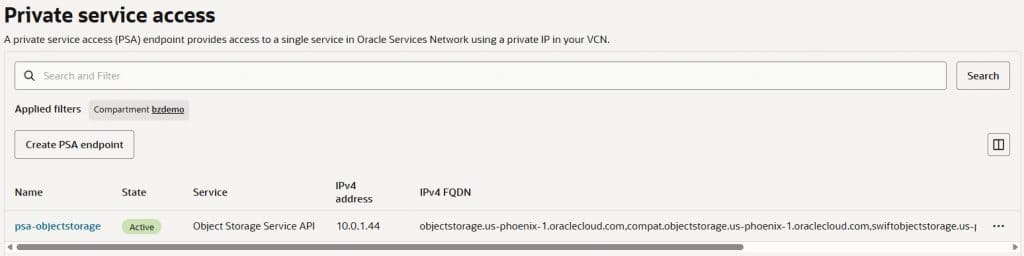
We can validate that the Object Storage hostname can be resolved from target database instance in Ashburn using the private IP address (10.0.1.44) of the PSA endpoint.
[opc@customdb ~]$ nslookup swiftobjectstorage.us-phoenix-1.oraclecloud.com
Server:         169.254.169.254
Address:        169.254.169.254#53
Non-authoritative answer:Name: swiftobjectstorage.us-phoenix-1.oraclecloud.com
Address: 10.0.1.44swiftobjectstorage.us-phoenix-1.oraclecloud.com canonical name = swiftobjectstorage.us-phoenix-1.oci.oraclecloud.com.
Tightening security after it worked (NSG)
Once the restore succeeded, we went back and removed the “wide open for testing” rules from security list and created Network Security Group with rules only open specific ports that are needed for restore to work.
To identify the actual ports used, we relied on OCI VCN Flow Logs. This made it clear what traffic was truly required. In our case, we observed usage of:
- 8005 and 2484 (Database Recovery Service required ports)
- 53/UDP (DNS forwarding)
- 443/TCP (API calls to Object Storage)
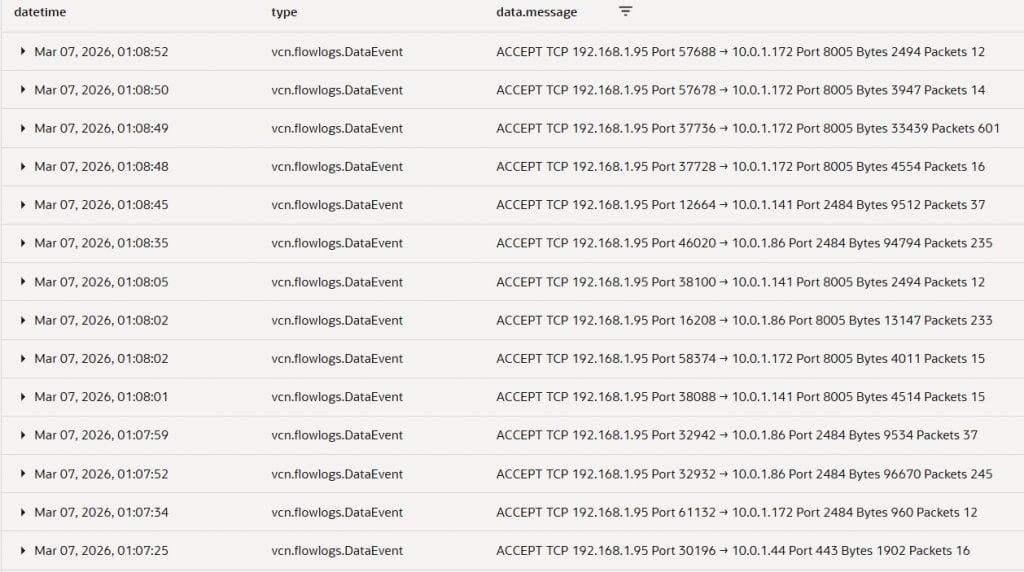
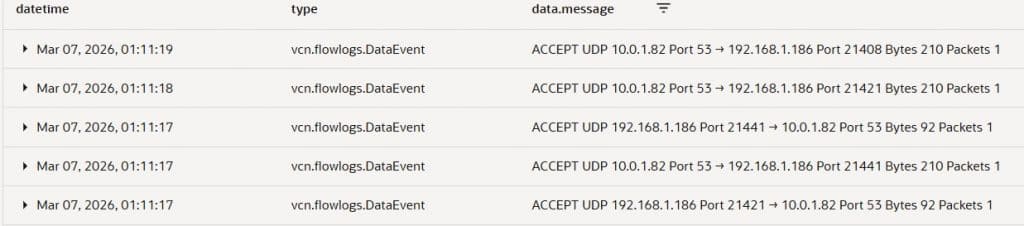
Creating NSG is straight forward, with the Flow Log, you can just follow the message in the log to create rules with the source and target IPs, ports, and protocols in the source Phoenix region VCN.
NSG Ingress Rule:
- Stateless: No
- Source: 10.0.0.0/24 | Destination Port: 8005, 2484 | IP Protocol: TCP
Allow ingress from Phoenix Database Subnet to connect to Recovery Service port 8005 2484. - Source: 192.168.1.0/24 | Destination Port: 8005, 2484 | IP Protocol: TCP
Allow ingress from target Ashburn Database Subnet to connect to Recovery Service port 8005 2484. - Source: 192.168.1.0/24 | Destination Port: 53 | IP Protocol: UDP
Allow ingress from target Ashburn VCN DNS forward to Phoenix DNS Listener endpoint. - Source: 192.168.1.0/24 | Destination Port: 443| IP Protocol: TCP
Allow traffic from Ashburn Region VCN to call Phoenix Object Storage Service API using PSA.
Then you will need to attach the NSG to the VNICs, first is the Recovery Service private endpoints. You can attach the NSG from the Recovery Service Subnet. Second VNIC is the source Phoenix VCN’s DNS Listener endpoint. Lastly, attach the NSG to the PSA endpoint for the Object Storage Service API.
This was the phase where the environment went from “it works” to “it works and can pass a serious security review.”
What changes if you use Customer-Managed Keys (CMK)?
If instead of Oracle Managed Keys you use Customer-Managed Keys in OCI Vault, your dependency shifts:
- You must ensure Vault key replication so the target region can use the key material appropriately.
- A Dynamic Group includes the resource in the compartment and policy to allow Dynamic Group to use Key and Vault
- Dynamic Group Matching Rule:
Any {resource.compartment.id = 'ocid1.compartment.oc1……'}
- IAM Policy:
Allow dynamic-group 'Default'/'dynamic-group-name' to manage vaults in tenancyAllow dynamic-group 'Default'/'dynamic-group-name' to manage keys in tenancy
- Dynamic Group Matching Rule:
In practice, using customer managed key can be cleaner for cross-region designs because you explicitly control the key lifecycle and replication strategy—but it adds governance steps (Vault configuration, IAM policies, replication verification, etc.).
Practical checklist
If I will do this all over again, here is the checklist I will go through to ensure all operations are seamless.
- Decide upfront: Oracle Managed Key vs CMK and understand cross-region implications.
- Enable Autonomous Recovery Service backups and record Recovery Service private endpoint FQDNs and Root domain(s) involved.
- Build peering + routing validate with simple connectivity tests.
- Implement DNS forwarding for Recovery Service-related domains.
- Validate Object Storage name resolution cross-region (this is what surprised us).
- Option 1: Use private zone to resolve the object storage name with A record.
- Option 2: Create Private Service Access endpoint for Object Storage Service. (Recommend)
- Run the restore.
- Use Flow Logs to confirm minimal required ports, then lock down with NSGs.
Conclusion
Cross-region restore can be a cost-effective DR option in OCI, but it comes with operational details that are easy to overlook—especially around DNS and service dependencies during the restore workflow. In our case, peering and routing were necessary but not sufficient: the restore also required the target region to resolve and reach Phoenix Object Storage to retrieve TDE wallet artifacts when using Oracle Managed Keys.
The key takeaway is to treat cross-region restore as an end-to-end dependency exercise: validate Recovery Service endpoint resolution, Object Storage name resolution, and then use VCN Flow Logs to tighten security with NSGs once the workflow succeeds. If you’re implementing this pattern, adopting Private Service Access (PSA) for Object Storage, and building a simple pre-flight checklist will make your DR drills far more repeatable and far less surprising.
Related Documents