
This new capability enables one-to-many message delivery from a single OCI Queue, while preserving the pull-based consumption model customers rely on.
With fan-out and filtering, you can now:
- Deliver a single message to multiple independent consumers
- Apply selective filtering per consumer group
- Maintain deterministic delivery semantics
- Preserve backward compatibility
- Scale high-throughput application-to-application (A2A) workloads
Why This Matters
In event-driven systems, you often need to:
- Send one event to multiple microservices
- Route specific events to specific services
- Avoid duplicating producers
- Preserve message durability and visibility controls
Without native fan-out, customers typically:
- Create duplicate queues
- Implement routing logic in application code
- Build custom dispatchers
- Introduce operational overhead
OCI Queue Fan-out with Filtering eliminates this complexity.
What’s New?
Consumer Groups
Consumer groups are now first-class OCI Queue resources that enable fan-out.
Each consumer group:
- Represents an independent pull-based consumption path
- Can optionally define a filter expression
- Maintains independent visibility and delivery attempts
- Can be enabled or disabled
- Is secured using IAM
When fan-out is enabled, messages published to a queue are evaluated against all consumer groups.
Primary Consumer Group (Backward Compatibility)
When you enable fan-out on a queue:
- A Primary Consumer Group is automatically created
- It receives all messages
- It cannot be deleted
- It does not support filters
- It can be disabled if needed
This ensures existing applications continue to work without any changes.
Message Filtering
You can now apply SQL-like filtering expressions to consumer groups.
Filtering is evaluated:
- At publish time
- Based on message attributes (not message body)
- Using logical operators and comparison operators
Supported filtering includes:
- Key presence:
:region - String equality:
:type = "order" - Numeric comparisons:
:age > 40 - Logical operators:
AND,OR,NOT - Functions:
hasPrefix(),hasSuffix()
If no consumer group matches a message:
- The message is dropped
- A metric is emitted
- The message cannot be retrieved later
This ensures deterministic and predictable behavior.
How It Works
Under the hood:
- A message is published to the queue.
- The service evaluates all consumer group filters.
- The message is logically delivered to matching consumer groups.
- The payload is stored once and reference-counted.
- The message is deleted only after all matching groups consume it.
This design:
- Avoids message duplication
- Preserves performance
- Scales cleanly
- Maintains cost efficiency
Step-by-Step: Enabling Fan-out and Filtering
Below is a walkthrough using the OCI Console.
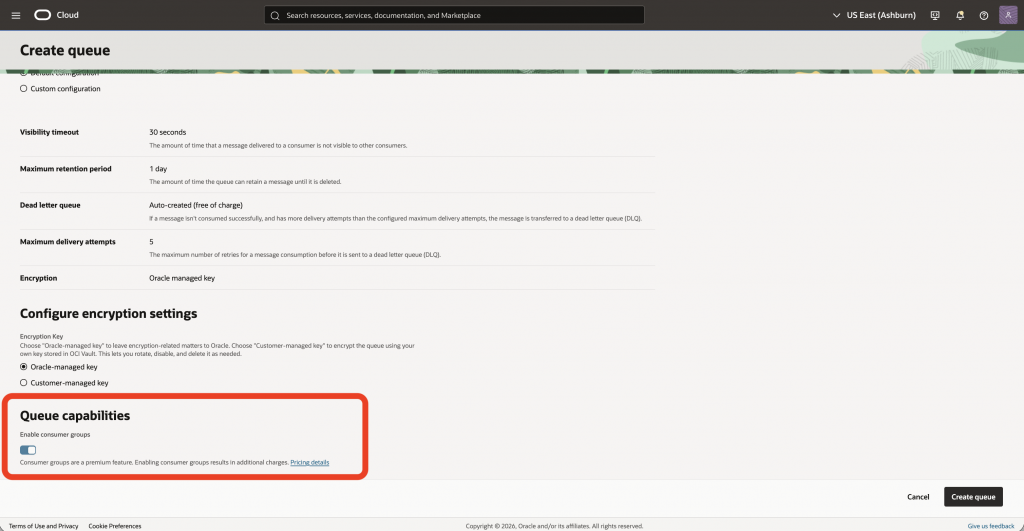
Step 1: Create a Queue
In the OCI Console:
- Navigate to Developer Services → Queues
- Click Create Queue
- Provide a queue name
- Choose configuration (default or custom)
- Under Queue capabilities, enable:
Enable consumer groups
This activates the fan-out capability.
Step 2: View the Primary Consumer Group
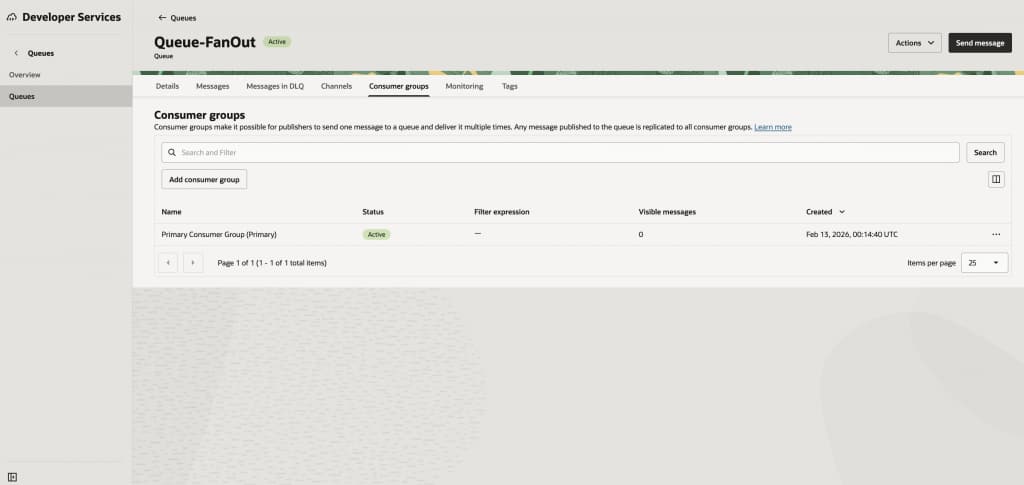
After the queue is created:
- Navigate to the queue
- Open the Consumer groups tab
You’ll see:
- Primary Consumer Group (Active)
- No filter expression
Step 3: Create a Secondary Consumer Group with Filtering
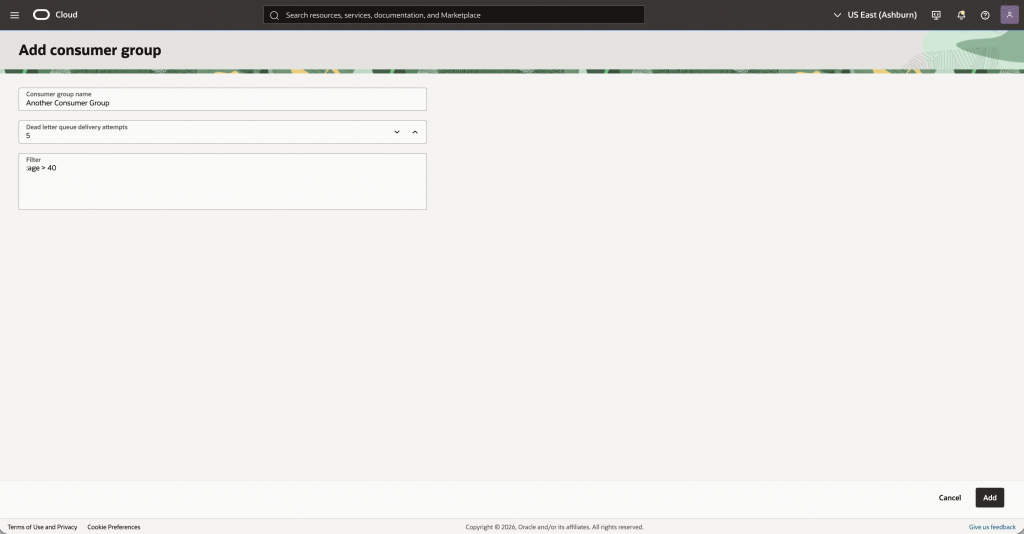
To enable selective delivery:
- Click Add consumer group
- Enter a name (for example, “Another Consumer Group”)
- Optionally configure DLQ delivery attempts
- Add a filter expression
Example:
:age > 40
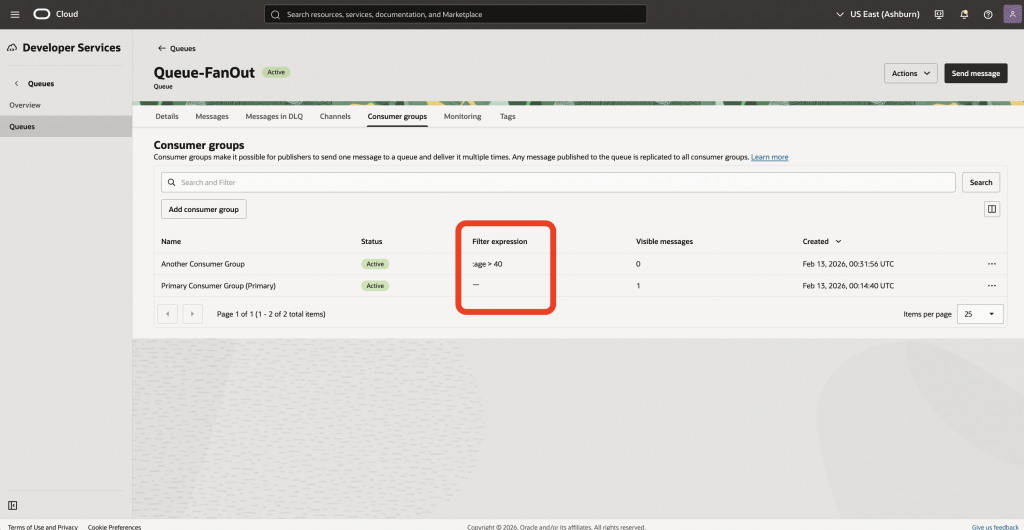
Now you have:
- Primary Consumer Group (receives all messages)
- Secondary Consumer Group (receives only messages where age > 40)
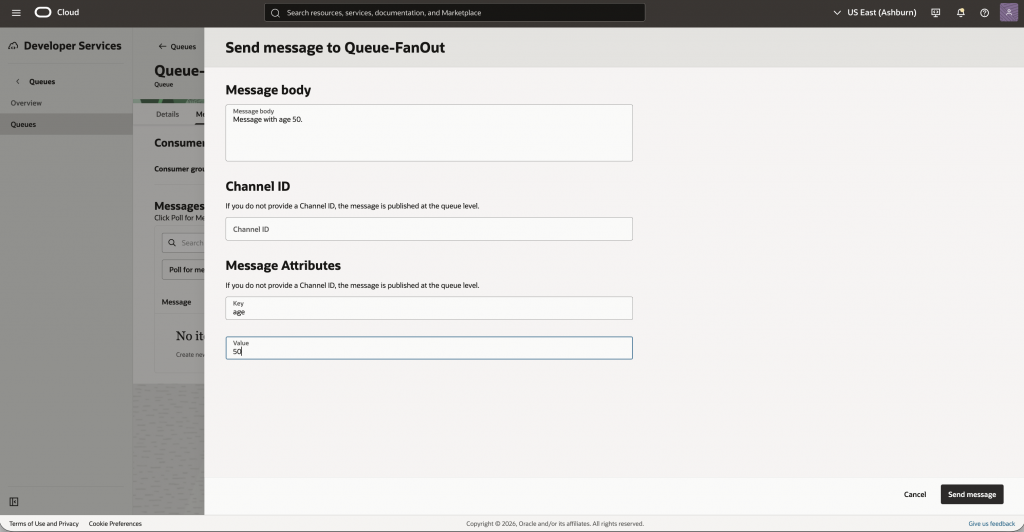
Step 4: Send Messages with Attributes
- Send a few messages
- Provide message body
- Add message attributes
Example:
- Key:
age,Value:50 - Key:
age,Value: 60 - Key:
age,Value:30
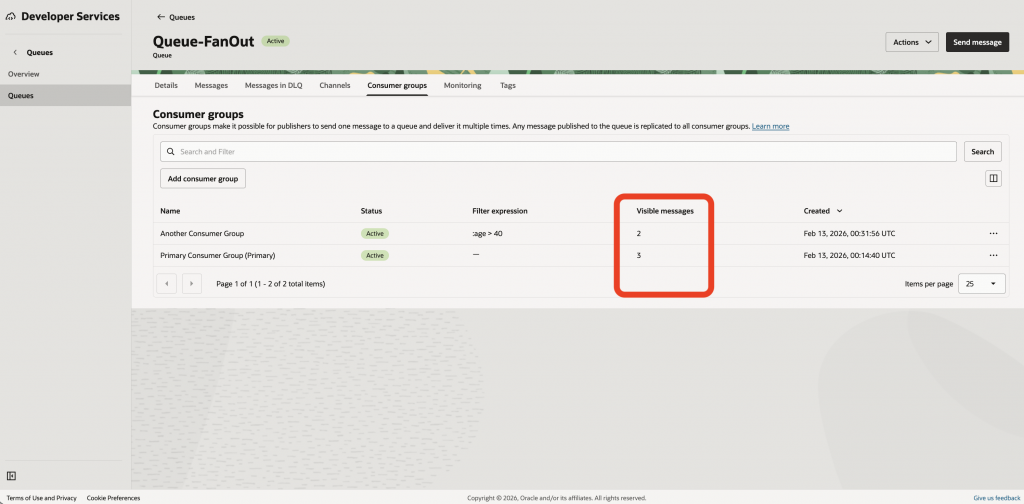
After sending 3 messages:
- The Primary Consumer Group receives all 3 messages (as there is no filtering)
- The filtered consumer group receives 2 messages (because 50 > 40)
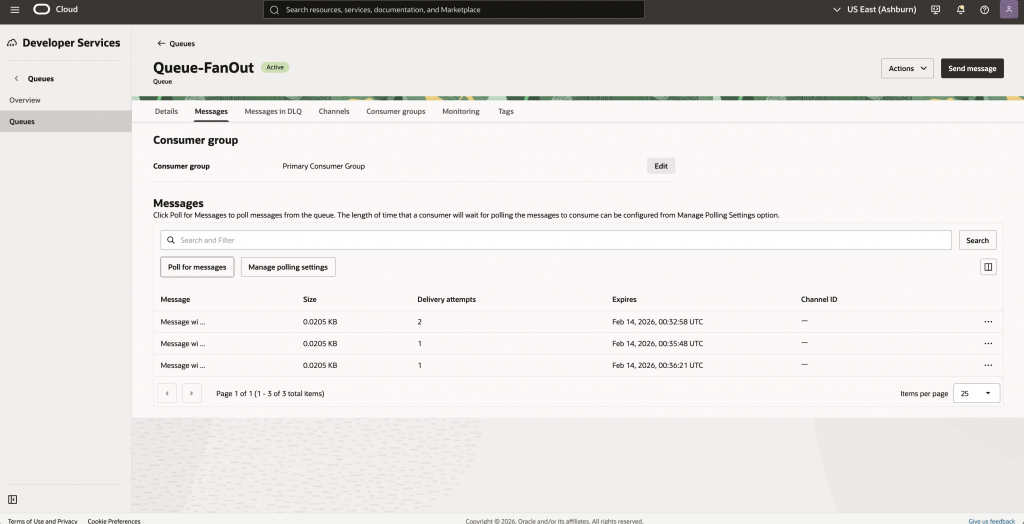
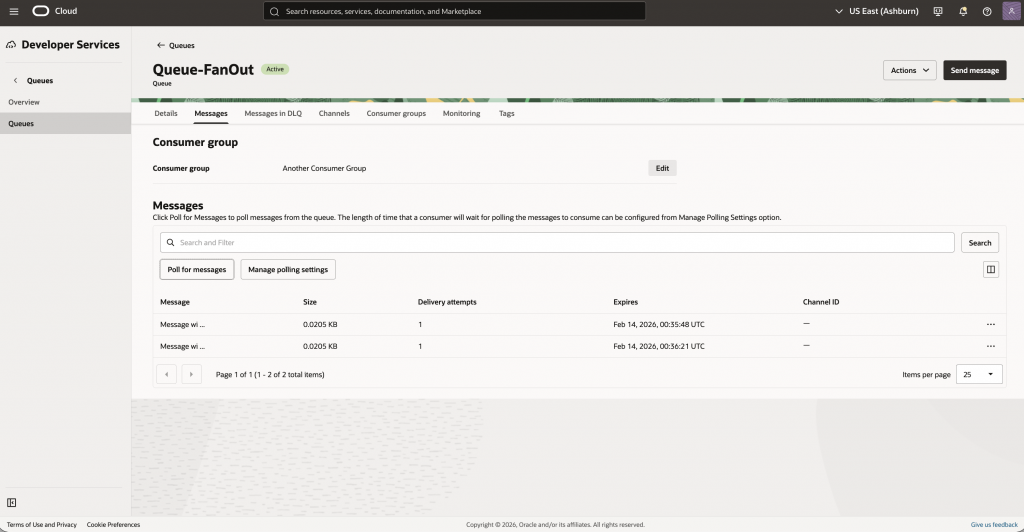
Step 5: Observe Message Delivery
When polling messages from:
- Primary Consumer Group → All messages visible
- Filtered Consumer Group → Only matching messages visible
Delivery Guarantees and Drop Semantics
It’s important to understand filtering behavior:
- Filters are evaluated only at publish time.
- If the Primary Consumer Group is disabled and no other consumer group matches:
- The message is dropped.
- A metric is emitted.
- The message cannot be recovered later.
This ensures predictable, deterministic routing.
IAM and Security
Consumer groups are first-class IAM resources.
You can:
- Allow specific dynamic groups to consume from specific consumer groups
- Grant fine-grained access
- Separate queue administration from fan-out configuration
Example:
allow dynamic-group AppConsumers to use queue-pull in compartment MyCompartment where target.consumer-group.id = '<consumer_group_ocid>'
Use Cases
Microservices Routing
Send one event to:
- Billing
- Fraud detection
- Notifications
- Analytics
Each service consumes independently.
Priority Routing
Route high-priority messages to one service:
:priority >= 5
Multi-tenant Systems
Use attributes like:
:tenantId = "tenantA"
Performance Characteristics
- Pull-based consumption (REST API)
- Low latency delivery (p90 < 500 ms)
- Up to 1 MB message size
- Independent consumer scaling
- Shared retention across consumer groups
Why This Is Powerful
OCI Queue Fan-out with Filtering combines:
- The simplicity of queues
- The flexibility of pub/sub
- The determinism of pull-based consumption
- Enterprise-grade IAM control
All without requiring a separate messaging service.
Get Started Today
OCI Queue Fan-out with Filtering (Consumer Groups) is now available.
To try it:
- Create a queue
- Enable consumer groups
- Add filtered consumer groups
- Send messages with attributes
- Observe selective delivery
Learn more in the OCI Queue documentation.
We’re excited to see what you build.