
Today we are introducing the Essbase MCP Server, a Model Context Protocol integration that exposes Oracle Essbase operations as AI-callable tools. Built on the Essbase Python API and FastMCP, the server lets MCP-compatible assistants such as Claude, GitHub Copilot, and other agents discover and invoke Essbase tasks through natural language.
With the right profile and credentials, users can ask an assistant to list applications, run a calculation script, browse outline members, query data, or manage security resources — while administrators retain control through read-only defaults, access profiles, audit logging, output limits, and confirmation requirements for destructive actions.
What Is the Model Context Protocol (MCP)?
MCP is an open standard, originally developed by Anthropic, that defines how AI models interact with external tools and data sources. Think of it as a universal adapter: an AI assistant that supports MCP can discover available tools, understand their parameters, and invoke them during a conversation. The protocol supports multiple transports, including stdio for local integrations and streamable-http for remote deployments.
By wrapping the Essbase Python API in an MCP server, we make Essbase operations discoverable to MCP-compatible AI assistants through a structured tool catalog. The assistant sees each tool’s name, description, and parameter schema, and can call it on your behalf when appropriate.
Architecture
The Essbase MCP Server is part of the unified oracle-data-studio MCP server. On startup, it authenticates to your Essbase instance using credentials from environment variables, CLI arguments, or a config file. The server then registers 30 task-oriented Essbase tools in a single module.
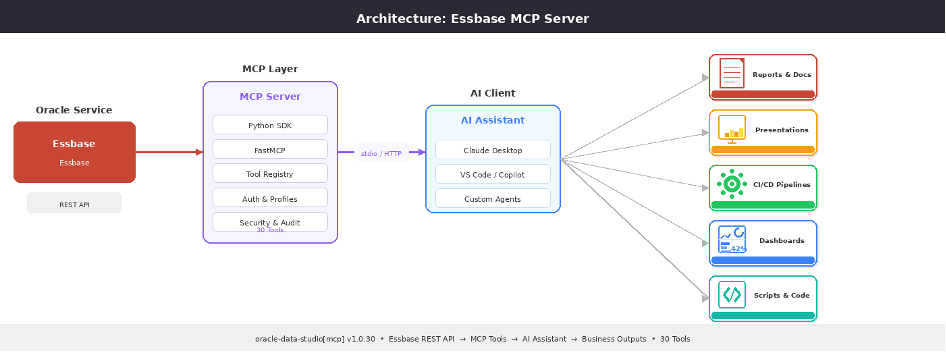
The server uses composite, task-oriented tools. Each composite tool groups related operations behind an action discriminator parameter. For example, essbase_manage_application(action=’list’|’get’|’create’|’delete’) handles all application lifecycle operations in a single tool. This reduces tool-catalog noise, reduces prompt-token usage, and makes the AI assistant’s tool selection more reliable.
Getting Started
Installation
The MCP server is included in the oracle-data-studio package:
pip install oracle-data-studio[mcp]The package requires Python 3.10 or later.
Configuration
Configure your Essbase connection using environment variables:
export ESSBASE_URL=https://essbase-host:443
export ESSBASE_USER=admin
export ESSBASE_PASSWORD=your_password
Secure Credential Storage
For production environments, credentials can be stored securely using the built-in configuration CLI, which prompts for passwords interactively and stores them in the OS keyring:
# Store Essbase credentials securely
oracle-data-studio-config set essbase \
    --url https://essbase-server \
    --user admin
# (prompts for password securely)
Credentials are resolved in this order: CLI arguments, environment variables, OS keyring, config file, then defaults.
Running the Server
Start the server in stdio mode (the safer default for local desktop integrations) or streamable-http mode (for remote access):
# stdio mode: default for local desktop integrations
oracle-data-studio-mcp --profile admin

# HTTP mode with auth (binds to loopback by default)
MCP_AUTH_TOKEN=my-secret oracle-data-studio-mcp \
    --transport streamable-http --port 8000
Conversational Examples
Once the MCP server is connected to your AI assistant, you can interact with Essbase naturally:
Exploring Your Environment
You: “Which applications are running on the Essbase server?“
The assistant calls essbase_explore and returns a formatted summary of all apps, their statuses, databases, and storage types.
Running Calculations
You: “Run the CalcAll script on Sample.Basic and let me know when it’s done.“
The assistant calls essbase_run_calculation to launch the calc script, poll until completion, and report the result.
Querying Data
You: “Show me sales by product for Q1.“
The assistant constructs an MDX query, calls essbase_query, and presents the results in a table.
Managing Security
You: “Create a read-only filter on the West region for the finance team.“
The assistant calls essbase_manage_filters(action=’create’) with the appropriate member expression and group assignment in a single operation.
Security Profiles
The MCP server supports three access profiles that control which tools an AI assistant can use:
- viewer (default) — Browse-only: list, get, search, download. No mutations.
- analyst — Read plus execute: run queries, execute jobs, validate scripts. No deletes.
- admin — Full access: create, update, delete all resources.
# Default (viewer - safe for shared environments)
oracle-data-studio-mcp

# Analyst mode
oracle-data-studio-mcp --profile analyst

# Full admin access
oracle-data-studio-mcp --profile admin
Security Hardening
The v1.0.30 release introduces comprehensive security hardening across the MCP server:
- Credential redaction: All error responses are stripped of passwords, tokens, OCIDs, and filesystem paths before being returned to the AI assistant.
- Streamable-HTTP hardening: Non-loopback bind requires MCP_AUTH_TOKEN or explicit opt-in, preventing accidental exposure on open networks.
- Default profile is viewer: The server starts read-only by default. Administrators must explicitly opt in with –profile admin.
- Audit logging: All mutating tools receive single-line INFO audit entries, providing a clear trail of who changed what and when.
- Destructive action confirmation: Delete operations require a
confirmparameter matching the resource name, preventing accidental deletions. - Output bounding: Query results are capped at a configurable max_rows to prevent token explosion in AI assistant contexts.
Tool Catalog
The Essbase MCP Server provides 30 composite tools organized into three categories:
Discovery and Querying
| Tool | Description |
|---|---|
essbase_explore | Application and database discovery |
essbase_describe_database | Detailed database metadata |
essbase_query | MDX queries with bounded results |
essbase_export_data | Data export via grid operations |
essbase_browse_outline | Outline member browsing |
essbase_search_members | Member search by keyword |
essbase_outline_metadata | Outline settings and introspection |
essbase_server_health | Server status and diagnostics |
essbase_get_logs | Application log retrieval |
essbase_get_script | Script content retrieval |
Outline, Calculation, and Data
| Tool | Description |
|---|---|
essbase_edit_outline | Batch outline modifications |
essbase_run_calculation | Execute calc scripts |
essbase_load_data | Data load jobs |
essbase_deploy_workbook | Workbook deployment |
Administration
| Tool | Description |
|---|---|
essbase_manage_application | Create, delete, rename, copy, start, stop apps |
essbase_manage_database | Database lifecycle operations |
essbase_manage_script | Script CRUD operations |
essbase_manage_files | File catalog operations |
essbase_manage_connections | Connection management |
essbase_manage_datasources | Datasource management |
essbase_manage_db_settings | Database settings and statistics |
essbase_manage_drill_through | Drill-through report management |
essbase_manage_locks | Lock management |
essbase_manage_sessions | Session management |
essbase_manage_users | User provisioning and roles |
essbase_manage_groups | Group management |
essbase_manage_filters | Security filter management |
essbase_manage_variables | Substitution variables |
essbase_manage_jobs | Job management |
essbase_manage_security | Bulk security operations |
What’s Next?
The Essbase MCP Server opens up a new paradigm for Essbase administration. In future posts, we will explore:
- Building custom AI workflows that combine Essbase operations with data from other Oracle services
- Using the MCP server with Claude Desktop for hands-free Essbase management
- Automating incident response: AI-driven monitoring and remediation of Essbase performance issues
Resources
- Install:
pip install oracle-data-studio[mcp] - MCP Specification: https://modelcontextprotocol.io
- Essbase REST API: https://docs.oracle.com/en/database/other-databases/essbase/21/essrt/
Part of the oracle-data-studio package, licensed under the Universal Permissive License v 1.0. Copyright © 2025, 2026 Oracle and/or its affiliates.