
AI assistants are good at language and reasoning, but they can’t touch your data until you give them tools. The Oracle Data Studio MCP Server does exactly that — it exposes Oracle Essbase, Data Studio on the Oracle Autonomous AI Lakehouse, and Oracle Data Transforms as tools an AI assistant can call through natural language. Ask “what changed in the West region last quarter, and build me a cube to analyze it,” and the assistant browses your tables, picks the right query engine, runs the calculation, and explains the result — all through governed, least-privilege tools.
It’s now part of the official Oracle MCP repository, and it ships on PyPI. This post shows what it is, how to run it, and how it keeps your data safe.
What is the Model Context Protocol?
The Model Context Protocol (MCP) is an open standard that lets AI assistants discover and call external “tools” over a simple JSON-RPC interface. Instead of hard-coding an integration into each assistant, you run one MCP server; any MCP-compatible client — Claude Desktop, ChatGPT, Codex, VS Code / GitHub Copilot — can then use its tools. The Oracle Data Studio MCP Server is that bridge between an assistant and your Oracle data services.
One server, three services
Most MCP servers wrap a single system. This one spans the Data Studio surface:
- Essbase (~30 tools) — explore the server, browse and edit outlines, run MDX queries and calculations, manage applications, databases, users, security, and jobs.
- Data Studio on the Autonomous AI Lakehouse (~17 tools) — annotation-aware SQL, analytic views, insights, catalog browse/search, cloud data loads.
- Data Transforms (~18 tools) — describe projects, run and schedule pipelines, manage connections, dataflows, and data loads.
- Cross-domain analytics (a few routing tools) — given a question and a fact table, recommend the right engine (table, analytic view, or Essbase cube) and hand back the exact next step.
Under the hood it wraps the oracle-data-studio Python SDK, so every tool is a thin, LLM-friendly operation over a supported, tested API — not a raw passthrough. The server speaks two transports: stdio for a local desktop assistant, and streamable HTTP (with native TLS) for a shared, networked deployment.
Architecture
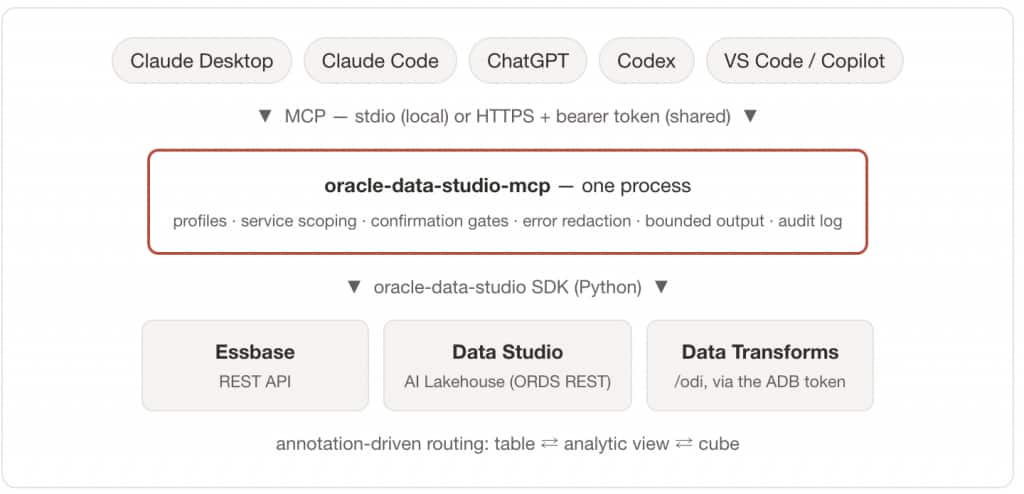
A request flows through four steps. The assistant calls a tool over MCP — stdio when the server runs on your machine, HTTPS with a bearer token when it’s shared. The server decides what that client can even see (profile plus service scoping) and gates destructive actions behind confirmation tokens. The tool then executes through the oracle-data-studio SDK against the service’s REST API, using the connection you configured. Results return redacted and bounded, and every mutation is audit-logged. The server itself is stateless — scale or segment access by running separate profiled instances from the same install.
Getting started
Install. The server ships with the oracle-data-studio package on PyPI:
pip install "oracle-data-studio[mcp]"Supply connections by CLI argument, environment variable, the OS keyring, or a config file — resolved in that priority order. To store them once (passwords go to the OS keyring, never to disk; URLs and usernames to ~/.oracle-data-studio/config):
oracle-data-studio-config set adp \
  --url 'https://<adb-host>.adb.<region>.oraclecloudapps.com' --user ADMIN
oracle-data-studio-config set essbase \
  --url 'https://essbase-host:443' --user admin
Run — for a desktop assistant (stdio). Add it to your assistant’s MCP config; for Claude Desktop, claude_desktop_config.json:
Desktop clients don’t inherit your shell environment — put credentials in the env block, or use the config store above.
{
  "mcpServers": {
    "oracle-data-studio": {
      "command": "oracle-data-studio-mcp",
      "args": ["--transport", "stdio", "--profile", "analyst"],
      "env": {
        "ESSBASE_URL": "https://essbase-host:443",
        "ESSBASE_USER": "admin",
        "ESSBASE_PASSWORD": "…"
      }
    }
  }
}
Run — for a shared deployment (HTTPS). Serve over streamable HTTP with native TLS — assistants that require HTTPS (Claude, ChatGPT) connect directly, no reverse proxy needed:
oracle-data-studio-mcp --transport streamable-http \
  --host 0.0.0.0 --port 8443 --profile analyst \
  --auth-token "$MCP_AUTH_TOKEN" \
  --ssl-certfile /path/cert.pem --ssl-keyfile /path/key.pem
MCP_AUTH_TOKEN is a shared secret you generate yourself — for example python -c "import secrets; print(secrets.token_urlsafe(32))". The server never writes it to disk; it lives in your environment (or the --auth-token flag), every request must present it as Authorization: Bearer <token>, and a non-loopback bind refuses to start without one.
Clients connect to https://<host>:8443/mcp with that bearer header.
Connect from Claude Code. Local (stdio) — the CLI launches the server itself:
claude mcp add oracle-data-studio \
  --env ESSBASE_URL=https://essbase-host:443 \
  --env ESSBASE_USER=admin --env ESSBASE_PASSWORD=… \
  -- oracle-data-studio-mcp --transport stdio --profile analyst
Or point it at the shared HTTPS deployment:
claude mcp add --transport http oracle-data-studio \
  https://<host>:8443/mcp \
  --header "Authorization: Bearer $MCP_AUTH_TOKEN"
Connect from OpenAI Codex. Codex sends a bearer token from an environment variable:
codex mcp add oracle-data-studio \
  --url "https://<host>:8443/mcp" \
  --bearer-token-env-var MCP_AUTH_TOKEN
or in ~/.codex/config.toml (the section header must be mcp_servers, with an underscore):
[mcp_servers.oracle-data-studio]
url = "https://<host>:8443/mcp"
bearer_token_env_var = "MCP_AUTH_TOKEN"
In either CLI, verify with /mcp — the tool list should show the profile-filtered Data Studio tools. (Client CLI flags evolve; confirm against each client’s current documentation.)
The server is also packaged in the official Oracle MCP repository (github.com/oracle/mcp, under src/oracle-data-studio-mcp-server/) for one-line launching with uvx oracle.data-studio-mcp-server.
What it looks like in a conversation
Once connected, you work in plain language and the assistant chooses the tools:
- “List the tables in my Lakehouse and describe the sales fact.” → it browses the catalog, reads the table and column annotations (units, aggregations, join hints), and summarizes the model.
- “Total sales by region for last quarter.” → it asks the routing tool for the best engine and runs the query against the table, an analytic view, or an Essbase cube — whichever the annotations point to.
- “What data pipelines do I have, and did the last run succeed?” → it explores your Data Transforms workspace, lists each project’s dataflows, and checks the job history for the latest run’s status.
- “Build a cube from this fact table so I can slice it.” → it detects a multidimensional schema and walks the build.
- “Explain how this calc script works.” → it fetches the calc script or member formula and translates it into plain business language instead of dumping code.
Security and access profiles
Because the server can reach real data, safety is wired in at the framework level:
- Three access profiles —
viewer(17 read-only tools, the secure default),analyst(23, adds query/run), andadmin(all 69). Set with--profile; run the narrowest one the use case needs, and the assistant only ever sees that tool set. - Credentials in the OS keyring — never written to disk; error messages are redacted to strip passwords, tokens, connect strings, and paths.
- Confirmation gates on 20-plus destructive actions — a delete or drop requires the caller to echo the exact resource name, which blocks prompt-injected mutations.
- Bounded output — query results and logs are capped so a broad request can’t flood the model’s context.
- Fail-closed networking — a non-loopback bind requires a bearer token (or an explicit acknowledgment), and TLS is served natively.
- Audit logging on every mutation.
The identity that reaches each backend is a configured service account gated by the bearer token; per-user OAuth pass-through is on the roadmap.
Doesn’t 69 tools blow up the context window?
Every advertised tool costs context, so the surface is kept small by design: the 69 composite tools already replace 300-plus one-endpoint passthroughs, profiles trim what the model sees (viewer 17, analyst 23), and only configured services advertise tools at all — an Essbase-only viewer deployment exposes just 5 tools (~2 KB of schema). Results are bounded too. The big number is the opt-in ceiling, not the default.
Tool reference at a glance
| Service | Tools | Examples |
|---|---|---|
| Essbase | ~30 | essbase_explore, essbase_query, essbase_run_calculation, essbase_edit_outline, essbase_manage_application |
| Data Studio (AI Lakehouse) | ~17 | adp_run_query, adp_query_analytic_view, adp_build_analytic_view, adp_generate_insights, adp_browse_catalog |
| Data Transforms | ~18 | dt_run_pipeline, dt_describe_project, dt_manage_schedule, dt_manage_dataflow |
| Analytics routing | a few | analytics_recommend_source, analytics_promote_to_cube |
Every tool, its parameters, and the minimum profile that exposes it are documented in the API reference.
Resources
oracle-data-studioon PyPI —pip install "oracle-data-studio[mcp]"- Oracle MCP repository — github.com/oracle/mcp (
src/oracle-data-studio-mcp-server/, launch withuvx oracle.data-studio-mcp-server) - Model Context Protocol specification — modelcontextprotocol.io
- Companion post: Essbase MCP Server