
One of the challenges with a large database deployment is deciding how much storage to provision. Allocating capacity for several years of growth can leave resources unused, while starting smaller is practical only if the infrastructure can expand without disrupting applications.
With Autonomous AI Database on Dedicated Exadata Infrastructure, customers do not have to make that tradeoff. Exadata Cloud Infrastructure is elastic, allowing storage servers to be added incrementally as database requirements grow.
This provides a straightforward path from hundreds of terabytes to petabyte scale without migrating the database or taking applications offline.
Start with the Storage You Need Today
The maximum storage that can be allocated to an Autonomous AI Database depends on the storage assigned to its Autonomous Exadata VM Cluster and the capacity available on the underlying dedicated Exadata infrastructure.
An elastic Exadata configuration can begin with 3 storage servers and expand incrementally to as many as 64. On Exadata X11M and X11MV, each storage server provides 64 TB of usable database storage. This represents approximately 192 TB with the initial three storage servers and up to 4 PB with 64 storage servers.
Customers do not need to provision all that capacity at the outset. They can begin with the storage required for current workloads and add storage as data volumes, retention requirements, and application usage increase.
This turns storage planning into an incremental process. Instead of estimating the maximum database size years in advance, customers can align infrastructure capacity with actual growth.
Expand Storage Online
When an Autonomous AI Database approaches the storage available in its environment, customers can expand the underlying Exadata infrastructure through the Console or APIs.
The process has two primary steps:
- Add one or more Exadata Storage Servers to the dedicated Exadata infrastructure.
- Make the additional storage capacity available to the associated Autonomous Exadata VM Cluster.
Once the new capacity is available to the VM cluster, it can be allocated to Autonomous AI Databases as needed.
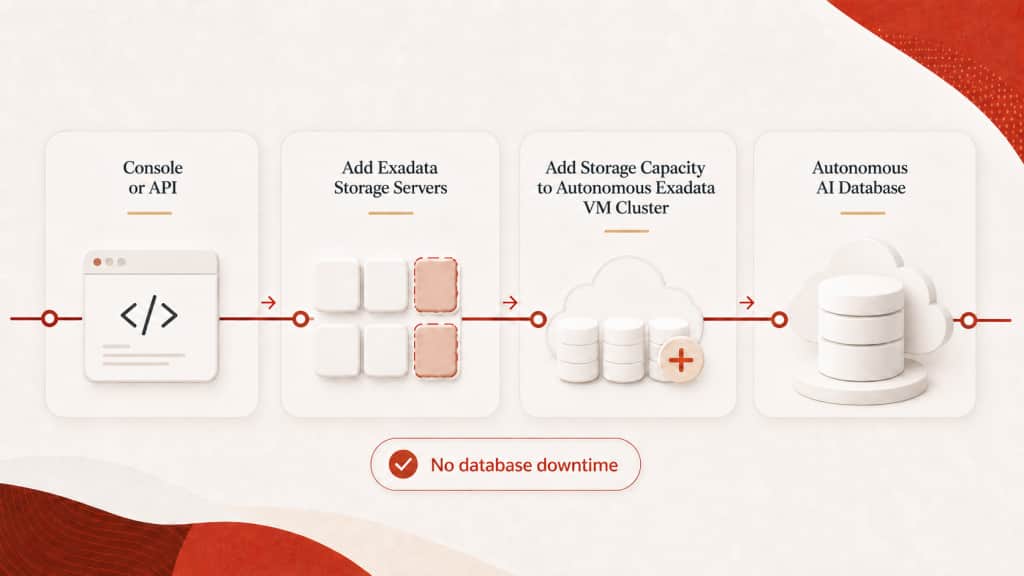
Adding storage servers does not require database downtime. Applications continue running, and there is no need to provision a separate Exadata environment, restore the database from backup, or migrate it to a larger system.
For example, consider an Autonomous AI Database approaching the capacity of its original infrastructure. Rather than planning a database migration, the customer can attach additional storage servers to the existing Exadata infrastructure and add the new capacity to the Autonomous Exadata VM Cluster.
The result is a larger storage foundation for Autonomous AI Database without changing platforms or moving data to another environment. What might otherwise become a migration project remains an online infrastructure expansion.
More Storage Also Means More Flash Cache
Adding storage servers provides more than additional database capacity. Each Exadata Storage Server also contributes flash resources to the infrastructure.
Autonomous AI Database uses Exadata Smart Flash Cache to automatically cache frequently accessed data. Applications receive the high I/O rates and fast response times of flash without requiring administrators to identify objects for caching or manage data placement manually.
As storage servers are added, the amount of flash available within the dedicated infrastructure also increases. This can benefit workloads with large or growing active data sets, including transaction-processing systems, analytics applications, and AI workloads that repeatedly access frequently used data.
For example, an application may have sufficient database storage but experience rapid growth in its active data set. Adding storage servers can provide room for future data while also increasing the flash resources available to support frequently accessed information.
Storage expansion can therefore address two requirements at the same time: capacity for continued database growth and additional flash cache for I/O-intensive workloads.
Scale Down When Requirements Change
Storage requirements do not always move in one direction.
A migration may require temporary capacity while old and new data coexist. A seasonal application may retain additional information for a limited period. A consolidation project may later move databases away from the infrastructure.
Supported Multi-VM Exadata configurations allow eligible storage servers to be removed when their capacity is no longer required.
Before a storage server can be removed, the infrastructure must have enough available capacity for the data already in use. At least three storage servers must remain, and additional eligibility conditions can apply based on the configuration and how the storage has been allocated.
These safeguards protect existing workloads while giving qualifying environments the flexibility to reduce excess infrastructure when requirements change.
Plan Database Growth in Practical Steps
An organization might begin with three storage servers for its initial Autonomous AI Database workloads. As more applications move to the service, it can add storage servers to accommodate the additional data.
Further expansion might support longer retention periods, new analytics applications, or AI initiatives with larger data sets. If requirements later decrease and sufficient capacity is available, eligible storage servers can be removed.
The databases remain on the same dedicated Exadata foundation throughout this lifecycle. Customers can:
- Begin with the storage required for current workloads.
- Add storage servers online as database and flash requirements grow.
- Remove eligible excess capacity when it is no longer needed.
This provides a practical way to support long-term database growth without repeatedly redesigning the environment or moving databases between systems.
Elastic Infrastructure for Petabyte-Scale Databases
Autonomous AI Database automates database operations such as patching, backup, recovery, and scaling. Elastic Exadata Cloud Infrastructure extends that flexibility to the underlying storage foundation.
With Exadata X11M and X11MV, customers can begin with three storage servers providing approximately 192 TB of usable database storage and expand incrementally to 64 storage servers providing up to 4 PB.
Expansion is performed online through the Console or APIs. Databases and applications remain available, and each additional storage server also increases the flash resources within the infrastructure.
For organizations expecting their Autonomous AI Databases to grow beyond hundreds of terabytes, the path is straightforward: begin with the capacity required today, expand the Exadata infrastructure online as demand grows, and continue scaling on the same platform without provisioning the maximum configuration in advance.
Autonomous AI Database on Dedicated deployments are available on OCI Public Cloud, Oracle Database@AWS, and Oracle Database@Azure.