
Today we are rolling out a set of UX updates to Autonomous AI Database on Cloud@Customer and Autonomous AI Database on Dedicated Infrastructure.
These changes are designed to improve navigation, reduce duplicate management surfaces, and provide clearer visibility into common Exadata infrastructure across Autonomous AI Database and Exadata Database Service environments. We are also introducing several usability enhancements based directly on customer feedback.
Here is a quick overview of what is changing.
New Autonomous AI Database Cloud@Customer Landing Page
We have introduced a dedicated landing page for Autonomous AI Database on Cloud@Customer.
Previously, Autonomous AI Database and Exadata Database Service resources were grouped together under the Oracle Exadata Database Service on Cloud@Customer landing page. As more customers deploy both services side by side, navigating between resources has become increasingly difficult.
With this update:
- Autonomous AI Database on Cloud@Customer now has its own dedicated landing page
- Exadata Database Service resources remain under the Oracle Exadata Database Service on Cloud@Customer page
- Common infrastructure resources such as Exadata Infrastructure and Backup Destinations remain accessible through cross navigation links
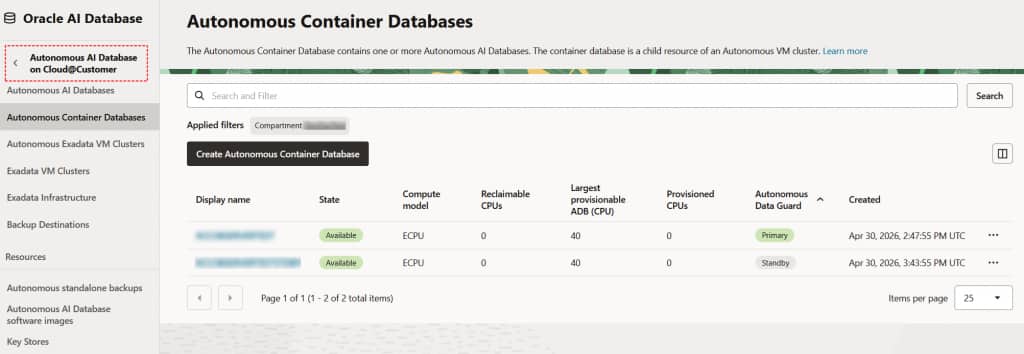
To help with the transition, existing users will see a temporary console banner pointing to the new Autonomous AI Database landing page.
The goal is simple: to make it easier to quickly find and manage the resources you use every day.
Exadata Infrastructure Redirects from Autonomous AI Database to Exadata Database Service
In OCI Public Cloud, Exadata Infrastructure could previously be managed from both the Autonomous AI Database on Dedicated Infrastructure (ADB-D) and Oracle Exadata Database Service on Dedicated Infrastructure (ExaDB-D) landing pages.
Starting today, Exadata Infrastructure management is handled exclusively within Exadata Database Service.
If you navigate to Exadata Infrastructure from the Autonomous AI Database Dedicated page, the console automatically redirects you to the corresponding ExaDB-D infrastructure page.
This removes duplicate infrastructure management surfaces and provides a clearer separation between database management and infrastructure management workflows.
There are no changes to infrastructure capabilities or workflows. The goal is to simplify navigation and reduce confusion in common Exadata environments.
Autonomous VM Cluster Visibility on Exadata Infrastructure Page
We have updated the Exadata Infrastructure details page under Oracle Exadata Database Service on Cloud@Customer to display Autonomous Exadata VM Clusters alongside Exadata VM Clusters.
You can now view both Exadata VM Clusters and Autonomous VM Clusters directly from the same infrastructure page without switching between services.
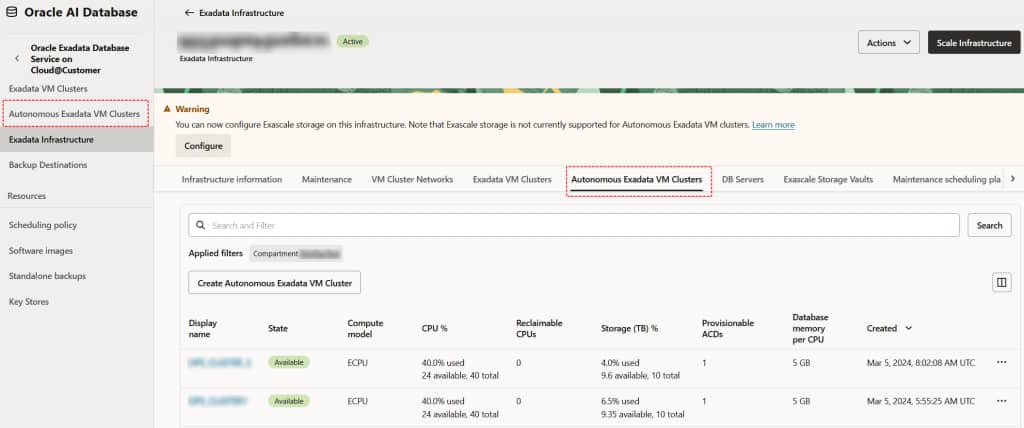
This provides a more complete view of shared Exadata environments and makes it easier to understand overall infrastructure allocation and resource usage before making infrastructure changes.
Service-specific actions continue to remain within their respective service landing pages.
If you navigate to Autonomous Exadata VM Clusters from the Exadata Database Service on Cloud@Customer page, the console automatically redirects you to the new Autonomous AI Database on Cloud@Customer landing page.
Database Version Visibility on Autonomous Container Database and Autonomous AI Database List Pages
We have added a new Database Version column to the Autonomous Container Database and Autonomous AI Database summary pages for both Autonomous AI Database on Cloud@Customer and Autonomous AI Database on Dedicated Infrastructure.
This allows customers to quickly identify which database Release Update (RU) version each database is running directly from the list view.
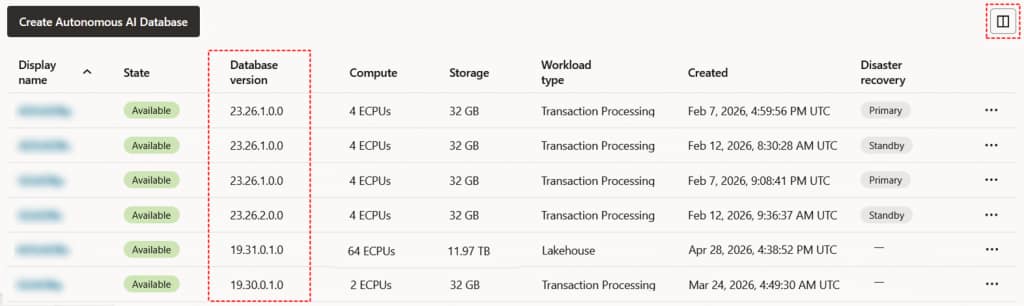
As a result, users can now more easily identify databases running 19c versus 26ai and determine which databases may require patching without needing to open individual database details pages.
By default, the Database Version column is hidden. To display it, click the Manage Columns icon in the upper-right corner of the table and select Database Version.
Patch Version Column Added to Autonomous Container Database Maintenance History
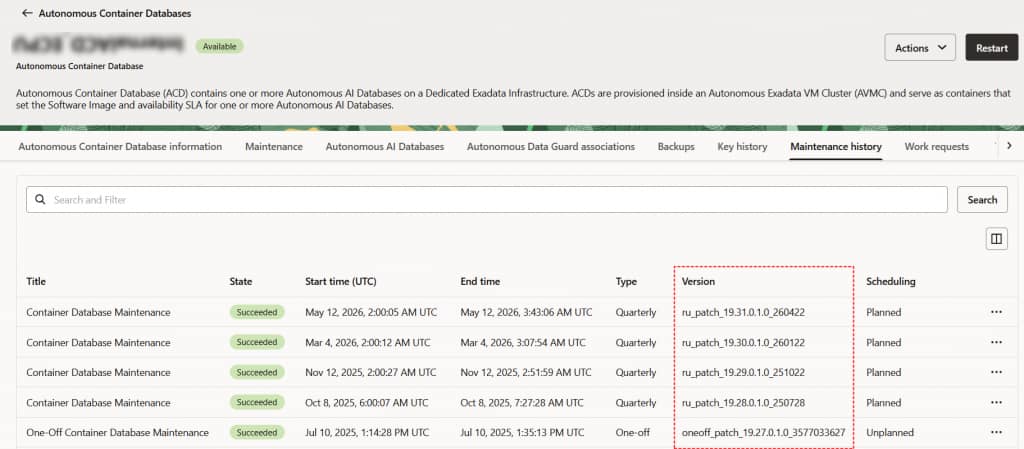
We have also added a new Version column to the Autonomous Container Database Maintenance History table for both Autonomous AI Database on Cloud@Customer and Autonomous AI Database on Dedicated Infrastructure.
The new column surfaces patch version information directly within the maintenance history table:
- Quarterly patches display the RU version
- One-off patches display the Patch or Bug ID
Previously, this information was only available within maintenance run details. With this enhancement, customers can now review maintenance history and patch versions directly from the summary table view.
What Is Not Changing
These updates do not introduce API, provisioning, IAM permission model, or functional behavior changes.
The updates are focused entirely on console UX and navigation improvements. They are part of an ongoing effort to simplify Autonomous AI Database and Exadata management, particularly in environments where services share the same Exadata infrastructure.
Autonomous AI Database on Dedicated deployments are available on OCI Public Cloud, Exadata Cloud@Customer, Oracle Database@AWS, and Oracle Database@Azure.