
In Part 1, you used an AI-assisted modernization workflow to analyze the Customers and Orders modules from the Oracle Forms sample application. The process examined the Forms XML, checked database dependencies, identified reusable business logic, and produced a functional requirements specification, traceability matrix, and modernization report to build a modern Oracle APEX application.
Sample Forms
This demo uses the Summit Sample Forms application, specifically the Customers and Orders modules shown below.
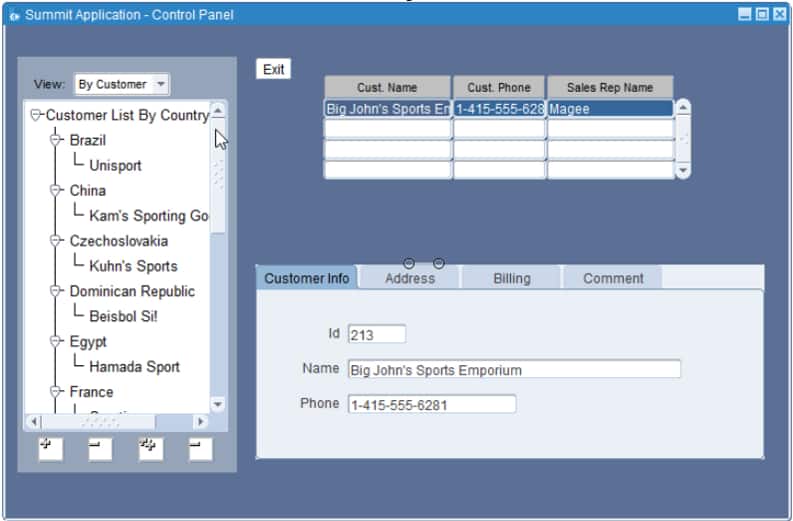
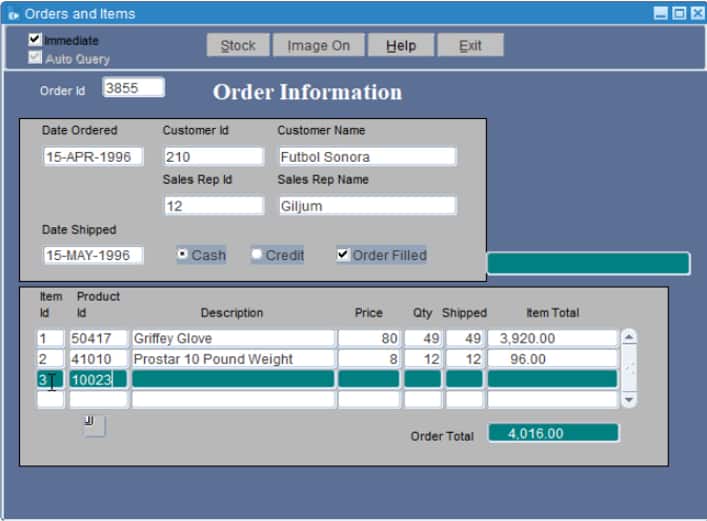
At a high level, the application should provide:
- A Customer Workbench for searching and maintaining customers.
- An Orders Workbench for locating and creating orders.
- An Order Detail page showing the selected order and its items.
- Drawer forms for customers, orders, and order items.
- A Product Inventory page showing stock by product and warehouse.
- Use the provided database functions and procedures for payment validation, shipping-date validation, item-number generation, product defaults, and order-total calculations.
Prerequisites
In addition to the prerequisites listed in Part 1, you need the following:
- Access to an Oracle APEX 26.1 Environment
Download or provision your free Oracle AI Autonomous Database in OCI. - Install the APEXlang skills in your AI coding agent
Refer to Getting Started with Oracle APEX Development in VS Code. - Generate the schema metadata file.
The Oracle database schema metadata used in the forms, including tables, columns, data types, keys, constraints, indexes, and business rules inferred from Forms and Database. This file was generated in Part 1. - Generate the functional requirements document for the Summit Sample Application.
This is the specification for the APEX application you generated in Part 1.
Review the functional requirements document
Now that you have the functional requirements document in natural language, review it to ensure that the requirements are complete and, most importantly, to identify processes that can be enhanced, simplified, or discarded because they are no longer relevant to the business.
If you go through the document, you might notice a few things that could enhance the app significantly and you also want to be more precise about the APEX components used in the application. Here are some examples:
- Navigation simplified
From> The system shall provide global navigation entries for:
– Customer Workbench
–Customer Directory
– Orders Workbench
–Order Detail
– Product Inventory
– Administration / Reference Data
To> The system shall provide global navigation entries for
– Customer Workbench
– Orders Workbench
– Product Inventory
– Administration / Reference Data
The standalone Customer Directory page was removed because its functionality was consolidated into the Customer Workbench. Order Detail was removed from global navigation, but it remains a contextual page opened from the Orders Workbench. - Customer Workbench expanded
From> The system shall provide a Customer Workbench page for browsing and filtering customers.
The Customer Workbench shall support filtering customers by country and by sales representative, replacing the Forms hierarchical tree behavior with APEX-native filters, Faceted Search, or a Tree region.
To> The system shall provide a Customer Workbench page for browsing, filtering customers, creating and updating customers. The Customer Workbench shall support filtering customers by country and by sales representative, replacing the Forms hierarchical tree behavior with APEX-native filters, Faceted Search with a Classic Report.
Be precise about the requirements and the APEX components you want to use for your application. - Useful homepage
From> The default landing page shall provide quick access to customer search, order search, recent orders, and open orders.
To> The default landing page shall provide a useful dashboard for end users. Use APEX charts to show relevant business data.
Since this will create the application homepage, it makes sense to build a useful dashboard with relevant KPIs.
Modernization from Forms to APEX Skill
Modernization projects differ across organizations. Each organization may need specific rules, behaviors, and guardrails that can be applied across multiple modules or applications. Get the skill and adapt it to your organization’s needs.
The modernization skill treats the functional requirements and schema metadata created in Part 1 as authoritative inputs. Before generating an application, the skill defines the modernization workflow including:
- Identify the business processes, entities, transactions, validations, calculations, reports, and master-detail relationships.
- Reconcile those requirements with the database schema and existing business logic.
- Design a native APEX user experience using components such as Faceted Search, Classic Reports, Smart Filters, Interactive Reports, forms, drawer pages, LOVs, validations, computations, and dynamic actions. Here you can define how specific Forms components will be converted in APEX for all the applications your organization modernizes.
- Exclude Forms-specific implementation details such as canvases, windows, keyboard triggers, alerts, tree controls, and navigation built-ins.
- Create a traceability matrix connecting each requirement to its database evidence and target APEX component.
- Generate the APEX application using APEXlang and validate it with the APEX compiler before import.
The goal is to preserve the business process and the Oracle Database investment, not to reproduce the Oracle Forms user interface. For example, a Forms master-detail module can be
- A master-detail editing experience when the business process requires inline editing. In APEX, an Interactive Grid can provide a similar behavior.
- A two-stage page experience. Users can have an overview through a workbench page where they can browse and filter the records. Creating or selecting a record opens a detail page that displays a parent summary and its associated child records. In APEX, you can use a Faceted Search Page + Classic Report + Drawer pages to support this behavior.
For this blog post, the skill will use the second option for every master-detail component in the Forms modules. Organizations can adapt this rule and add many others that fit their own usability and governance standards.
Skill outputs
Once application generation is requested and the workspace inputs are known, the skill will generate the following output files:
.apexlang/application-spec.mddefines the pages, business workflows, validations, navigation, and database dependencies..apexlang/app-ux-contract.jsondefines page composition, master-detail context, actions, LOVs, refresh behavior, and acceptance tests.- Generated APEXlang application
application.apx- Page
.apxfiles - Shared components
- Navigation and breadcrumbs
- LOVs
- Forms and reports
- Validations, computations, processes, and dynamic actions
- Validation evidence
- Local validation reports when available
- Compiler-truth audit
- SQLcl/APEX validation transcript
- Runtime preflight and validate-only reports
- Import and runtime evidence when explicitly authorized and performed
Conditional outputs
- Refined FRS or requirements addendum when requirements are incomplete or contradictory
- Gap and missing-input report when safe generation is impossible
- Optional PL/SQL package specification and body when reusable transactional business logic is needed
- Evidence-backed exclusion list for obsolete Forms components and built-ins
The skill also reports an exact completion status:
BLOCKEDVALIDATED-BUT-NOT-IMPORTEDIMPORTED-BUT-NOT-RUNTIME-VERIFIEDCOMPLETE
Run the skill
You can invoke the skill with a prompt similar to the following:
Modernize the Customers and Orders Oracle Forms application using Oracle APEX.
Use:
- customers-orders-spec.md as the functional requirements
- schema_metadata.md as the authoritative schema metadata
- the modernize-oracle-forms-to-apex and APEXlang skills
Important:
- Workspace: <F2A>
- Deliver a complete APEXlang app and make sure it’s importable.
- Name of the app: Customers and Orders App – Skill
- Show the elapsed time and effort required to create the app
Import and test the app
Interesting findings
1. Clear cache for navigation menu
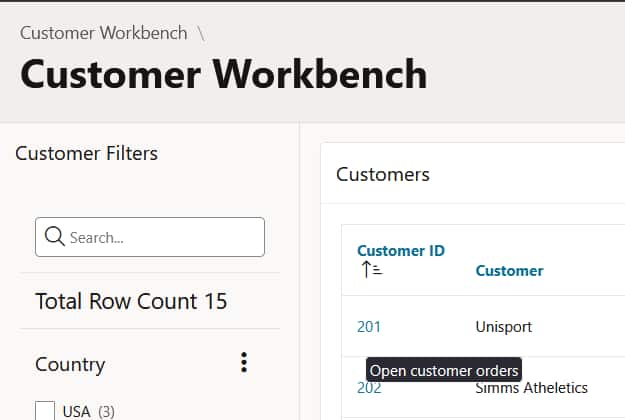
When a user opens a customer’s orders from the Customer Workbench and then navigates to the Orders Workbench through the navigation menu, the customer context remains cached. As a result, the page displays only that customer’s orders. To fix this, clear the cache for the Orders Workbench page in the Navigation Menu entry.
2. Considering foreign keys and constraints
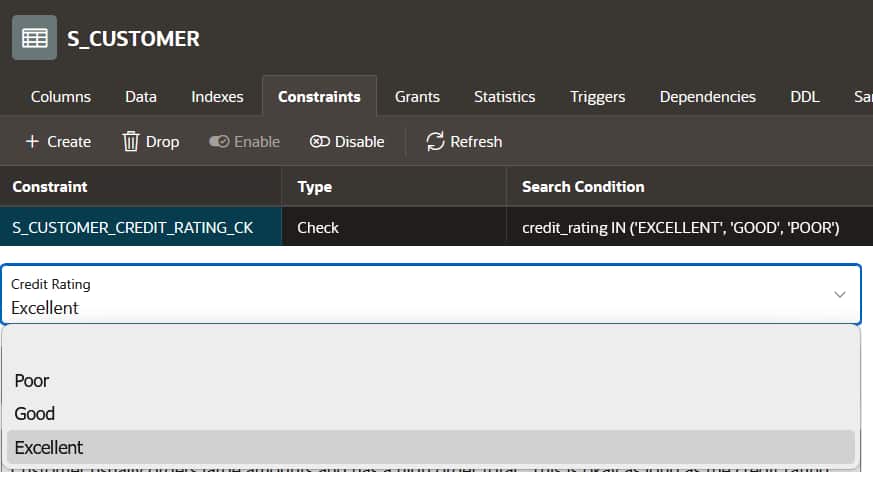
It’s well known that APEX automatically creates a list of values when the table column source form has foreign keys associated, and those values are correctly created. In addition, the table S_CUSTOMER has a check constraint for the credit_rating column, and the allowed values were automatically included as a select list in the Customer Form page.
3. Reusable business logic
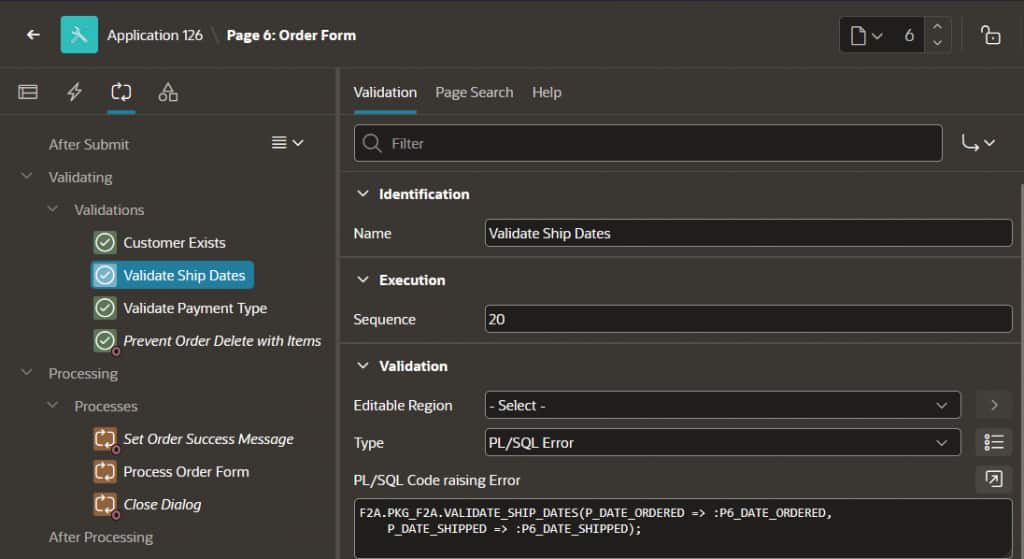
The Orders form page successfully incorporates the relevant logic identified by the agent in Part 1 and documented in the functional requirements document. It validates shipping dates and payment type and prevents users from deleting orders that have associated items.
Summary
The result is not a screen-for-screen Forms conversion. It is a native APEX application that preserves the important business process:
- Customers remain connected to their orders.
- Orders remain connected to their items.
- Product selection provides meaningful defaults.
- Credit and shipping rules remain enforced.
- Item numbers are generated automatically.
The repeatable modernization pattern is:
Analyze → Specify → Reconcile → Design → Generate → Validate → Import → Test
That is how functional requirements become a modern Oracle APEX application, while preserving the value of the existing Oracle Database investment.