
In the previous blog post, MCP + AI: Helping You Modernize Your Oracle Forms Apps to Oracle APEX, you saw how MCP for Oracle Database can help with some of the most important parts of a modernization project:
- Understand the form’s logic and business purpose.
- Verify that the required database objects exist in the target schema
- Identify and move reusable business logic to the Oracle AI Database.
If we translated this into a structured modernization workflow, the tasks look like this:
- Check Database Objects Availability
- Check Business Logic
- Create a Supporting Package (if needed)
- Generate a Functional Requirements Specification
- Generate a Modernization Report for APEX Devs
That is exactly the kind of repeatable, structured work that an AI agent is good at.
So in this post, let’s go one step further: instead of using a long prompt every time, let me show you how to package this workflow into an agent that can help accelerate Oracle Forms modernization projects in VS Code.
For this example, I use the Summit Sample Forms application, specifically the Customers and Orders modules.
Why use an agent for this?
Modernization projects are rarely blocked by one major problem. More often, they are slowed down by many small, repeated tasks:
- reading legacy Forms logic
- deciding what business logic should stay in the database
- documenting what should be rebuilt in APEX
- creating deliverables that the development team can actually use
You can do all of this with prompts alone, but prompts are hard to standardize across a team. An agent gives you a repeatable workflow with defined inputs, expected outputs, guardrails, and quality checks.
Consistency is the real value.
The input files
Before running the agent, I prepare three types of input files.
1. Convert the FMBs to XML
For this example, use:
- Customers_fmb.xml
- Orders_fmb.xml
These XML files allow the agent to inspect Forms triggers, program units, referenced objects, and embedded business logic.
See this [Forms to APEX] Converting FMBs to XML blog post for the step-by-step instructions.
2. An example specification document
I also provide a reference specification document so the agent has a target structure for the functional requirements output:
This provides the agent with a template for organizing and writing the new APEX requirements.
Once these files are ready, the agent has enough context to begin meaningful modernization analysis.
The agent
This oracle-forms-migration.agent.md agent is designed to analyze Oracle Forms XML files, validate database dependencies in the target schema, identify reusable business logic, optionally generate a supporting PL/SQL package, and produce a set of modernization artifacts for an Oracle APEX implementation.
This is not a generic “convert my app” prompt. It is a structured migration workflow encoded as an agent.
Prerequisites
To follow this approach, you need a few things in place.
Development environment
- VS Code
- An AI provider extension configured in VS Code
- SQL Developer extension with MCP for Oracle Database access
Project inputs
- Oracle Forms exported as XML
- A specification template or reference requirements document
Connectivity and configuration
- Database connectivity to the target schema
- Credentials or keys for your AI provider. For this blog post, the Codex model gpt-5.4 was used.
What this agent actually does
One important point about this agent is that it is explicit about both inputs and outputs. It expects the required input files to be present. If they are not, it should stop with a preflight failure rather than continue with an incomplete context.
The agent is designed to produce these outputs:
- customers-orders-spec.md – A functional requirements specification for the APEX application.
- traceability_matrix.md – A mapping between Forms logic, business intent, database objects, and APEX implementation targets.
- modernization_report.md – A technical report that summarizes validation results, reusable logic, risks, and recommendations.
- A supporting PL/SQL package, when reusable business logic justifies it.
It does not just “analyze” the legacy app. It produces deliverables that analysts and developers can actually use.
How to use this agent in VS Code
The workflow in VS Code is straightforward.
- Open VS Code.
- Put the input files in your working folder, including the agent.
- Make sure your AI provider and database connectivity are configured.
- Invoke the agent from your chat workflow using a prompt such as:
Run this oracle-forms-migration.agent.md agent to analyze the Oracle Forms in the folder: Customers_fmb.xml and Orders_fmb.xml. - Run the analysis.
After running the agent, review the generated output files, including the modernization report. In this example, most of the database objects referenced by the forms were available in the schema.
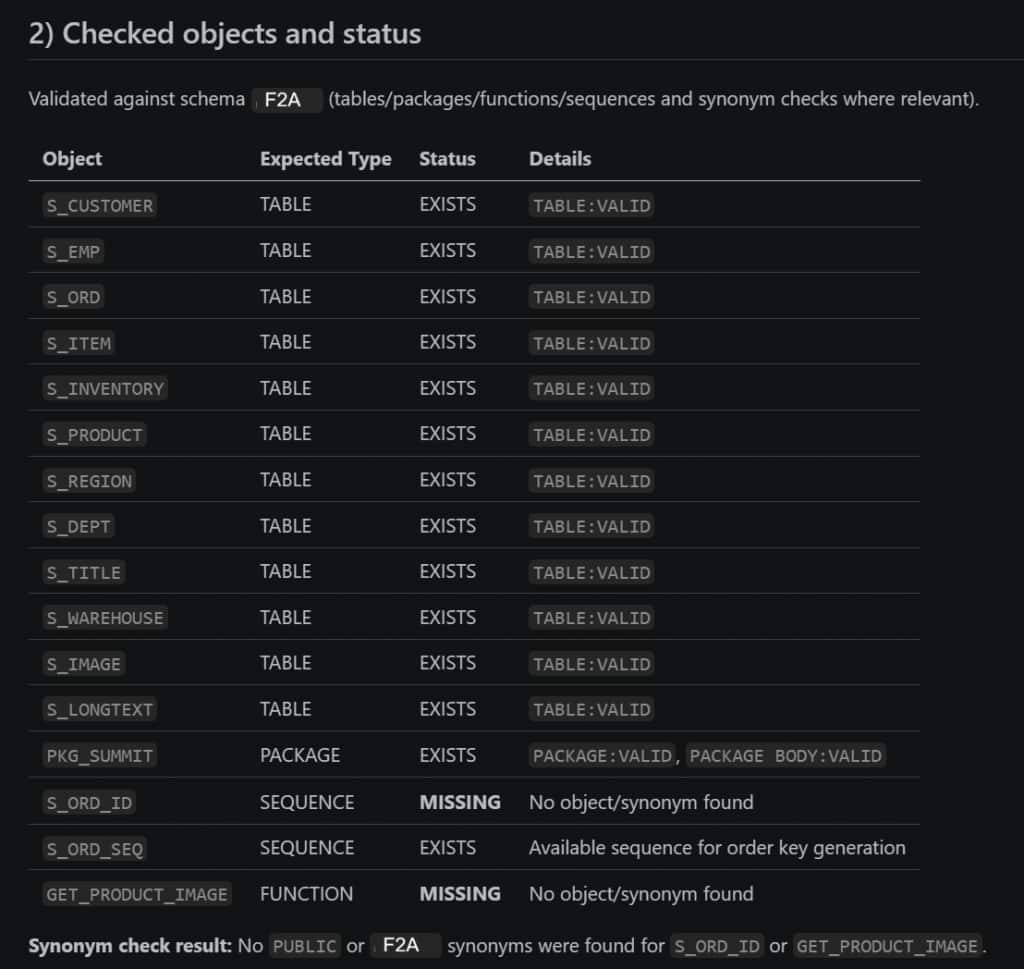
A few objects, however, were not available in the schema. In the Open Issues section, you can see the issue along with a possible remediation.

In the detected business logic inventory, you can find the Forms-derived business logic extracted from triggers and program units, the reusable logic already present in the schema, and possibly a new supporting package containing business logic moved from Forms into a reusable database layer.
You can also review the logic classification section, which helps identify:
- components that need to be reimplemented in APEX
- APIs that can be reused
- logic that should be discarded or refactored
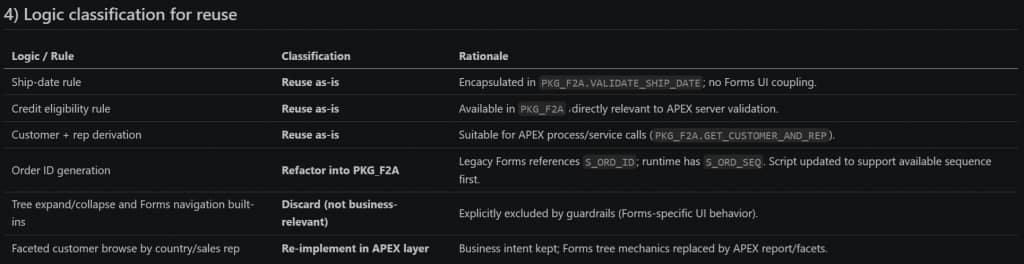
Finally, there are best practices and recommendations for the modernization.
What makes this agent valuable
The strongest part of this design is that it does not assume every Forms artifact should be migrated directly. A good modernization effort is not about recreating Oracle Forms screen-for-screen. It is about preserving business behavior while redesigning the application for APEX.
This agent helps with that by separating business logic from Forms-specific behavior. It avoids carrying over things that do not belong in a modern APEX application, such as:
- canvas and window behavior
- item-level UI mechanics
- Forms-specific navigation built-ins
- boilerplate LOV logic that does not represent real business rules
- obsolete technical artifacts that no longer matter
Instead, it focuses on the logic that does matter and helps classify it into one of four buckets:
- reuse as-is
- refactor into a supporting package
- re-implement in the APEX layer
- discard because it is not business-relevant
Recommendations
After working through this pattern, here are a few recommendations:
- Do not think of this file as just a saved prompt. Treat it as a starting point that your team can adopt, refine, and improve over time.
- The agent needs enough access to inspect schema objects and relevant source code, but that does not mean it should run with broad privileges. For most of the analysis, read-oriented access is the safer default. If you want the agent to generate or validate a supporting package, treat that as an intentional and reviewable step.
- Review the traceability matrix. It connects Forms triggers and program units to business intent, validation status, reuse decisions, and APEX implementation targets.
- If you generate a supporting PL/SQL package, keep it focused on business logic that truly belongs in the database.
- Even a well-designed agent should not be treated as the final authority on page design, security, authorization, transactional boundaries, or user experience. Its job is to accelerate discovery, validation, and documentation so the APEX team can make better decisions faster.
What is next?
In the next blog post, you will learn how to use the functional requirements specification produced by this agent to help build the new APEX application.
Summary
This approach helps to turn Oracle Forms modernization into a repeatable workflow with required inputs, defined outputs, validation steps, traceability, and clear deliverables.
In VS Code, that becomes especially useful because the agent lives alongside the project artifacts and can be reused across modernization efforts. Instead of rebuilding the same long prompt for every project, you capture the process once and improve it over time.
If you are modernizing Oracle Forms to Oracle APEX, this kind of agent is more than a productivity trick. It gives your team a more consistent modernization process, better validation, clearer traceability, and more useful handoff artifacts for the APEX developers who will implement the new application.