

with Inputs from
 | Yashashree Patankar Principle Member of Technical Staff, Oracle Analytics Engineering |
 | Anisha Gelly Principle Solutions Architect, Oracle Analytics Customer Excellence |
Introduction
Oracle Fusion AI Data Platform is a family of prebuilt, cloud-native analytics applications for Oracle Fusion Cloud Applications that provide ready-to-use insights to help improve decision-making. It is extensible and customizable, allowing customers to ingest data and expand the base semantic model with additional content.
The Fusion AI Data Intelligence data pipeline provides a powerful framework with advanced features designed to streamline and optimize data workflows. By harnessing its capabilities, you can boost operational efficiency, gain precise completion estimates, and expedite the availability of critical data for informed decision-making.
Organizations today face increasing pressure to share curated data with external stakeholders, partners, and systems while maintaining security, governance, and operational efficiency. You can now use Data Augmentation Scripts (DAS), a newly introduced feature in Fusion AI Data Platform, that simplifies how enterprises distribute governed data to external targets.
What are Data Augmentation Scripts?
Data Augmentation Scripts (DAS) are a declarative ETL language that lets Fusion AI Data Platform users build custom data pipelines. Data applications built using this feature are fully integrated and managed within Fusion AI Data Platform’s SaaS infrastructure, thereby extending all the benefits of an Oracle-managed analytics platform to your tailored solution.
- DAS covers all aspects of building a commercial analytics data model. It’s an IDE with developer-friendly essential tools with a high degree of automation built into it. So, developers can now execute instruction-driven pipeline actions across all stages of Fusion AI Data Platform (Extract, Transform, and Publish).
- It’s in a simple, human-readable format, empowering even citizen developers to build data pipelines programmatically. A high-level of ETL abstractions simplifies how to develop and deploy an application, such that domain experts with or without deep technical ETL knowledge can also safely build analytics insights for their business users on their own.
- DAS facilitates rapid application deployment, which improves your ability to serve analytics solutions to your business users (or customers, if you’re a Fusion AI Data Platform implementation partner). It has a high-level of ETL abstractions such as built-in functions and supports user-built functions as well.
- It’s built for robustness and scalability. DAS supports Oracle data sources (Fusion and NetSuite) as well as third-party data sources and customizations.
What’s Data Share?
Data Share enables you to publish governed data directly from the Fusion AI Data Platform “factory”—your prebuilt data models for ERP, HCM, SCM, and other enterprise applications—to external applications and data platforms with ease. Released in late 2024, this feature represents a significant advancement in how organizations can operationalize their data distribution strategies.
Data Share is designed with enterprise requirements in mind, offering several important capabilities:
- Full and incremental data refreshes: Choose between full refresh, incremental refresh, or Frequent Data Refresh (FDRv2 only) to minimize data movement and reduce processing overhead.
- Zero impact on pipeline performance: Data Share operations run independently of your core data pipeline processes, ensuring that sharing activities don’t affect critical data integration workflows.
- Flexible format support: Data is shared in Delta table format and Parquet file format, providing compatibility with modern analytics platforms and data lakehouse architectures.
- Enterprise-grade governance: Leverage the same data quality, lineage, and security controls that govern your source data models.
How Data Share works
The Data Share workflow is designed for simplicity and efficiency.
- Within Fusion AI Data Platform, you can access Data Share through the configuration menu under the Data Configuration tile. The interface allows you to browse available data tables from your functional areas and select specific targets for data distribution.
- This feature supports multiple target types, including both functional data tables and custom data configurations.
- You can apply filters by target type, target connections, or entity status to quickly find the datasets you need to share.
- Frequently refreshed tables (using the FDRv2 feature) are also supported as a limited availability feature (announced in 25.R4 release).
Once configured, Data Share handles the complexity of extracting, formatting, and delivering data to your specified destinations. Currently, Fusion AI Data Platform supports the following external systems for the Data Share feature-
- OCI Object Storage (OSS)
- Oracle AI Data Platform
- Azure Data Lake Storage
In future releases, we will continue to add more external systems to this feature.
Extending Data Share with custom augmentation through DAS
For advanced use cases requiring data transformation before distribution, users can create custom data augmentation scripts to enhance their Data Share workflows. These scripts can intercept the standard Data Share process, apply business-specific transformations, calculations, or enrichments to the Fusion AI Data Platform datasets, and then export the augmented data to custom target data stores of your choice.
This approach is particularly valuable when external systems require data in specialized formats, need additional derived metrics not present in the standard Fusion AI Data Platform models, or when you want to combine multiple datasets into consolidated exports.
Data Augmentation Scripts give you complete flexibility to tailor your data distribution to meet specific customer requirements or analytical use cases while still leveraging the governed foundation of your Fusion AI Data Platform data models.
Export datasets from Fusion AI Data Platform to custom targets
Here’s a step-by-step guide that walks you through exporting datasets from Oracle Fusion Data AI Platform to a custom target, such as OCI Object Storage, using a Data Augmentation Script deployment.
Prerequisites:
- Access to Fusion AI Data Platform Console with appropriate permissions (e.g., Data Share, DAS creation)
- Target connection configured (e.g., OCI Object Storage bucket)
- Familiarity with Data Augmentation Scripts for creating datasets
Step 1: Create a target connection
- Navigate to Administration Console and then Connections or Data Share.
- Create a target connection for your custom storage (e.g., OCI Object Storage).
- Configure connection details:
- Name: (e.g.) Multi-OSS Sync
- Enter credentials, bucket path, and other OCI details.
- Test and save the connection.
Step 2: Configure the target dataset
- In the target connection settings, define the Target Dataset properties (e.g., schema, format such as parquet/ csv).
- Ensure the connection supports multi-OSS sync for your alternate data store.
- Save the configuration.
Step 3: Create a custom data configuration (for the DAS application)
- Open Data Augmentation Scripts (DAS) in Fusion AI Data Platform.
- Create a new DAS application.
- Add datasets:
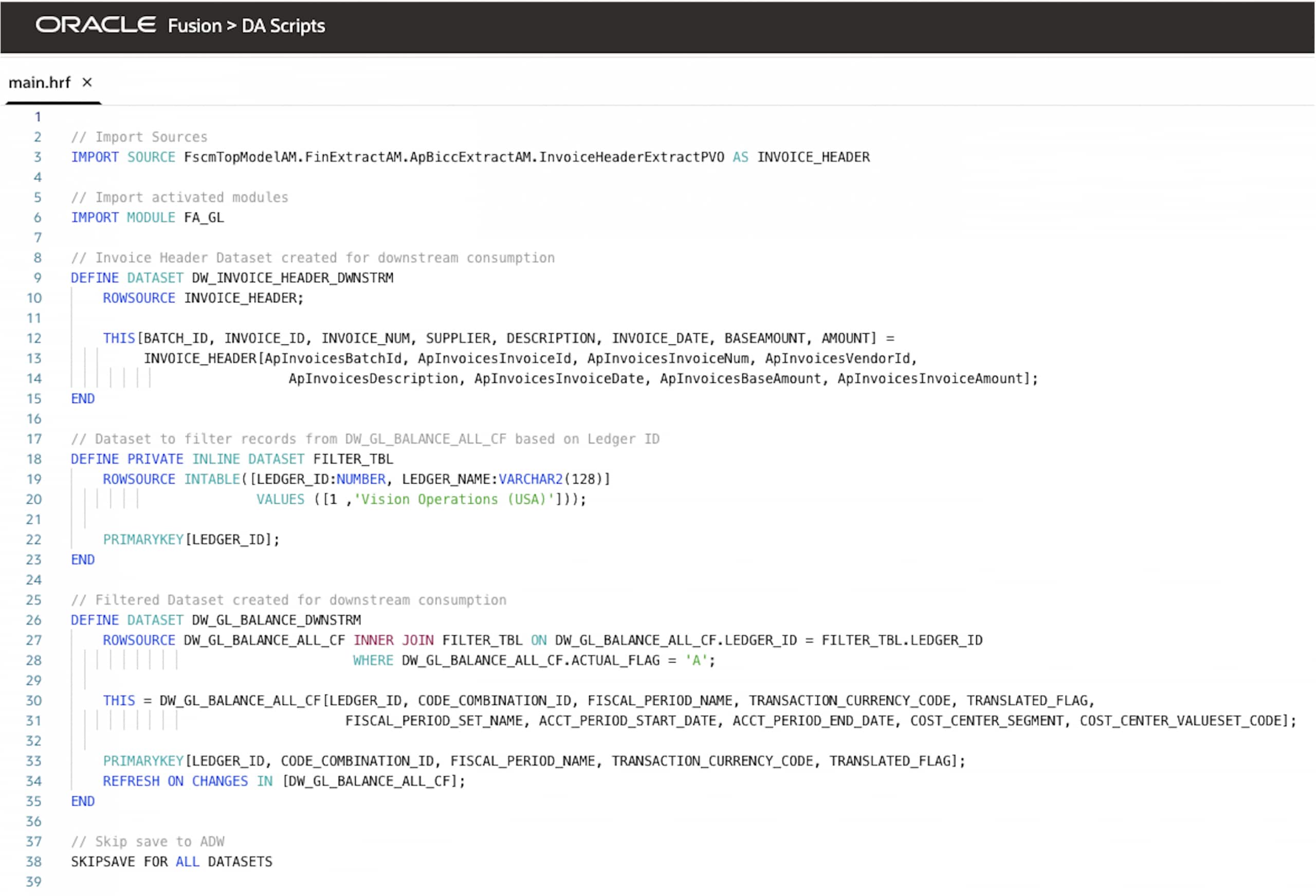
- Dataset 1: DW_INVOICE_HEADER_DWNSTRM
Source: Invoice Header view
(FscmTopModelAM.FinExtractAM.ApBiccExtractAM.InvoiceHeaderExtractPVO)
- Dataset 2: DW_GL_BALANCE_DWNSTRM
Source: GL functional area FA_GL
- Apply the SkipSave command to all datasets.
This prevents saving datasets to default Autonomous AI Data Lakehouse, and they will now route to the alternate data store configured in step one (create a target connection).
- Optionally, you can specify exact datasets for the alternate store using targeting logic in the DAS application.
Example:
SKIPSAVE FOR DATASETS [DW_GL_BALANCE_DWNSTRM]
This saves DW_GL_BALANCE_DWNSTRM in the alternate store and saves all other datasets in the default store.
Here’s the full script for this use case.
Step 4: Deploy the DAS Application
- Review the DAS application for any errors.
- Click Deploy (Publish) and confirm deployment success.
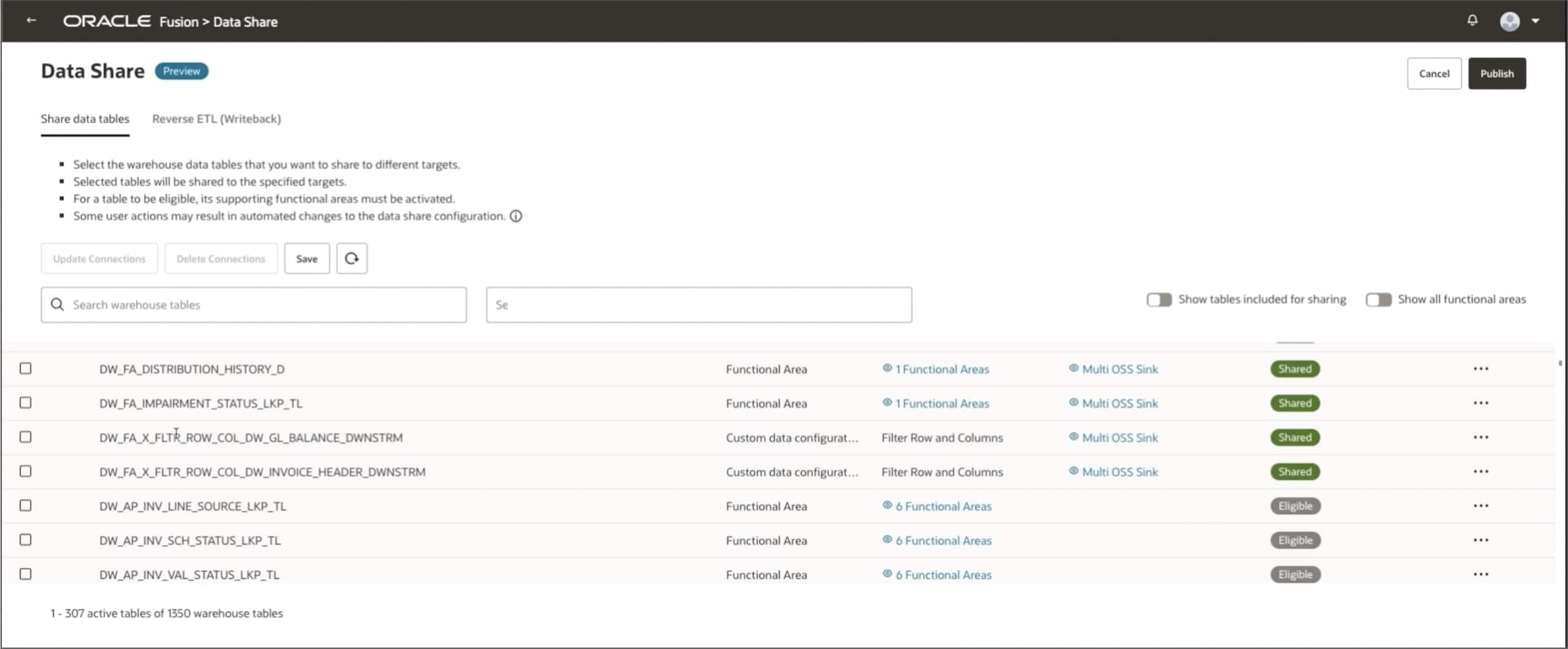
Step 5: Access Datasets in the Data Share tile
- Return to the Administration Console and then open the Data Share tile.
- Scroll down to locate the two newly published datasets.
Step 6: Select the Datasets and configure the target
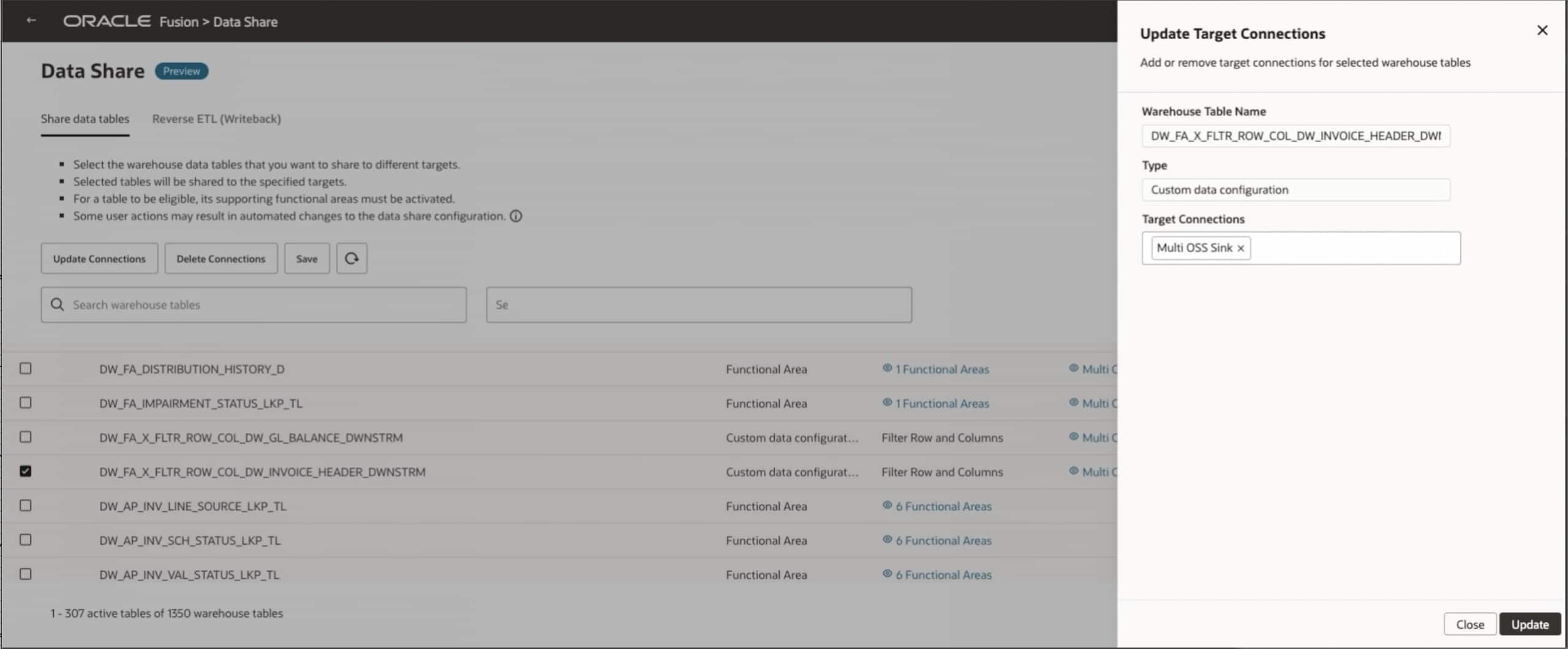
- Use the checkboxes to select the desired tables (i.e. both datasets).
- In the right-side panel, edit the Target Connection by selecting the multi-OSS Sync from step one (create a target connection).
- Verify settings (e.g., no ADW save, route to OCI Object Storage).
Step 7: Trigger the Data Share and export
- Click Publish to initiate the Data Share action.
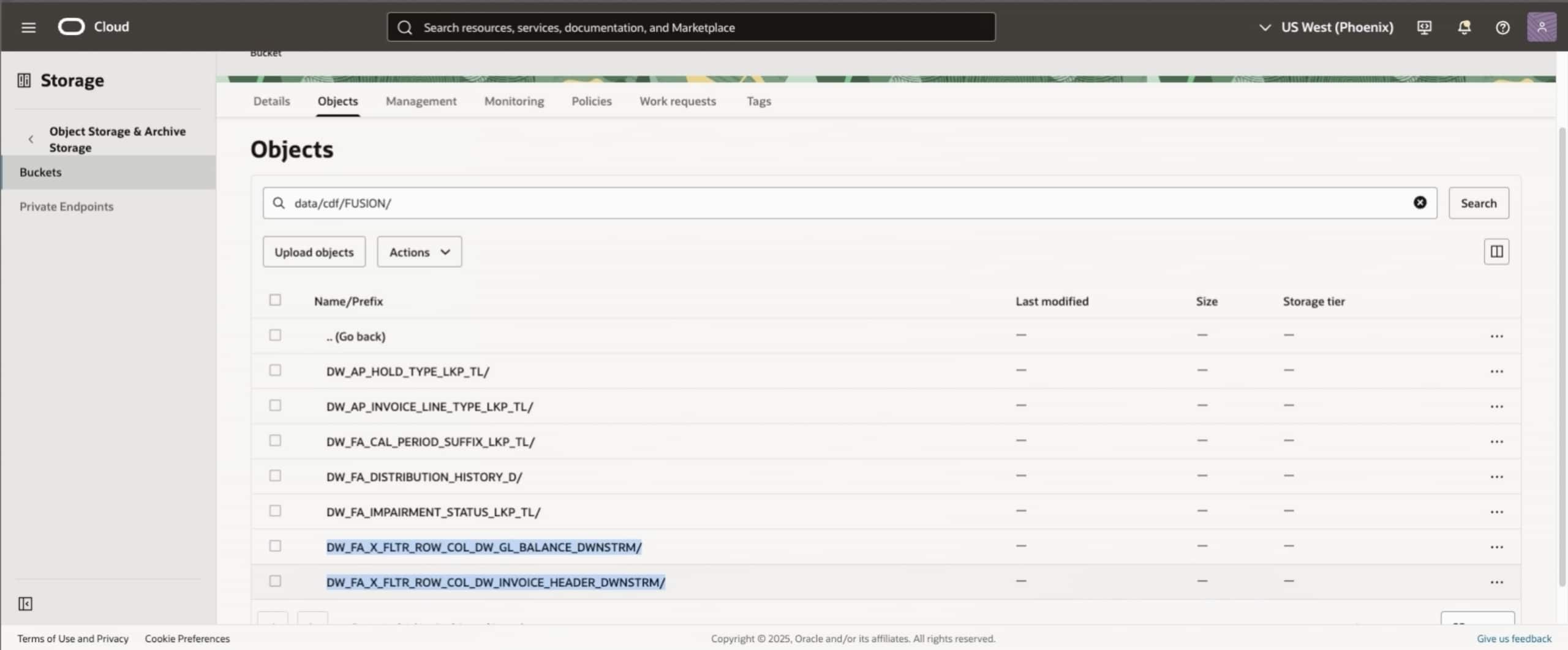
- Monitor the job status (datasets will sync and be created in the target (i.e., OCI Object Storage).
- Verify that the two selected tables are now present in the target system.
Verification and troubleshooting
- Check logs in the Administration Console by navigating to Data Share, and then Jobs for errors (e.g., connection issues, schema mismatches).
- Verify the expected outcome: Datasets are exported to the custom target and there aren’t any duplicates in Oracle Autonomous AI Lakehouse.
Common Issues
| Issue | Fix |
| SkipSave doesn’t work | Ensure the command is applied to all datasets in the DAS app. |
| Tables don’t appear | Republish the DAS app and refresh the Data Share tile. |
| Sync fails | Validate OCI credentials and bucket permissions. |
Next steps
Schedule recurring syncs with Data Share schedules if needed. For advance configurations, see the Fusion AI Data Platform documentation or contact your Oracle representative.
Related resources
Call to Action
We want your feedback! If you have a suggestion or discover an issue while working through this feature, connect with your Center of Excellence counterpart to let them know. We’ll make every effort to incorporate your request. Look for our posts in the Oracle Analytics Community, where you can also ask questions and share your comments.