

This article describes how protected bundles can help you package, share, and deploy reusable assets in Fusion Data Intelligence through a controlled approval workflow.
Key Contributors-
- Sanoj Antony – Lead Principal Platform Software Engineer, Fusion Data Intelligence
- Avinash Marathi Bheemalinga– Principal Solutions Architect, Analytics Customer Excellence
- Abhiram Gujjewar – Product Manager, Fusion Data Intelligence
Oracle Fusion Data Intelligence (FDI) gives teams a managed analytics foundation with prebuilt pipelines, a curated warehouse, semantic models, security, and ready-to-use content. Most customers and partners also extend that foundation; they configure data pipelines, add data augmentations, refine the semantic model, build workbooks, create security roles, and package reusable implementation assets.
Bundles are the mechanism that FDI provides to move those application artifacts from one environment to another. Protected bundles build on that foundation by adding a governed sharing experience for reusable bundles that are discoverable, but not freely importable by everyone.
Protected bundles are available with the 26R2 (June 2026) Oracle Fusion Data Intelligence platform update. Availability can vary by tenancy, entitlement, and feature settings, so administrators should confirm that both the Bundle Repository and Protected publishing options are visible in the FDI Console.
Bundles 101
An FDI bundle is a point-in-time snapshot of application artifacts such as configurations and customizations. Bundles capture metadata and application artifacts; they aren’t a mechanism for moving transactional data.
You can use bundles to:
- Package custom development from a development or test environment.
- Promote approved changes to production.
- Keep environments synchronized.
- Back up selected application artifacts.
- Restore artifacts after an issue.
- Share implementation accelerators or reusable solution patterns.
Think of a bundle as a managed package. A bundle definition describes what should be captured; generation creates the snapshot, publishing or exporting makes it available, importing brings it into the target environment, and deployment applies the artifacts after validation.
What Is a Bundle Definition?
A bundle definition is the first step in creating a bundle. It’s the instruction set, blueprint, or template that tells FDI which entities and artifacts to capture. Bundle definitions can be broad, such as an all-inclusive definition, or specific, such as a definition focused on a selected set of configurations, semantic extensions, security artifacts, or content.
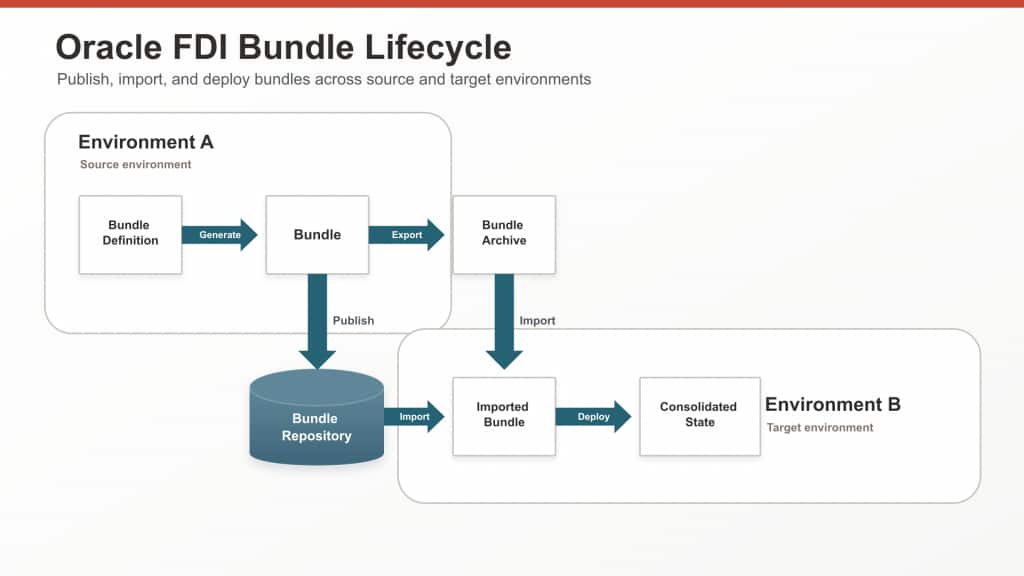
When a user generates a bundle, FDI acts on the bundle definition and captures the current state of the selected artifacts. The generated bundle can then be exported, published, imported, and deployed in another environment.
Bundle Types Available Today
FDI supports several bundle types so teams can package only the artifacts they need:
| Bundle type | What it is used for |
|---|---|
| Data Config Bundle | Pipeline parameters, priority datasets, functional area activation metadata, data augmentations, and data applications. |
| Semantic Model Bundle | Semantic model custom components such as system extensions, user extensions, external applications, and related security configurations. |
| Security Bundle | Group-to-application-role assignments, custom application roles, and custom data security. |
| Content Bundle | Oracle Analytics Cloud content such as folders, projects, workbooks, key metrics, analyses, report parameters, and data applications such as Configurable Account Analysis. |
| Composite Bundle | A bundle that combines one or more other bundle types so they can be managed together. |
| Environment Bundle | A broader environment-level package used to restore or revert to a known application-artifact state. |
| Application Bundle | A package for applications such as Pipeline Builder applications, including content, data augmentation scripts, semantic model extensions, and security. |
The best bundle type depends on what you are moving. For example, a semantic model change should usually travel as a Semantic Model Bundle, while a reusable package that includes data configuration, semantic extensions, and content may be better handled as a Composite or Application Bundle.
What Is the Purpose of Protected Bundles?
Bundle Repository sharing already gives publishers two useful options:
- Private bundles are shared within the same tenancy.
- Public bundles are broader and can be visible to anyone with a particular SKU.
These sharing options work well for tenancy-specific distribution and broad SKU-based availability, but curated reusable assets often need something more precise. A partner package, regional solution, industry accelerator, or Oracle-authored starter bundle may need to be visible to selected customers while still requiring owner review before use.
With protected bundles, a publisher can make a bundle visible to the intended audience, provide the metadata and terms needed for evaluation, and require an access request before the bundle can be imported. Consumers can discover the listing and review the details, but they can’t import the package until access is approved.
Who Should Use Protected Bundles?
Protected bundles are most relevant to these groups:
- Bundle owners and publishers who want to distribute reusable FDI assets with governance.
- FDI administrators who need to import and deploy approved packages into their environments.
- Implementation partners and consultants who build repeatable assets for multiple customers or projects.
Business users can’t publish or deploy bundles themselves, but they benefit from the outcome: faster rollout of curated content, metrics, workbooks, semantic extensions, and business-ready configurations.
When Should You Use Protected Bundles?
Use protected bundles when simple file sharing or open repository publishing isn’t enough. Good use cases include:
- Sharing an implementation accelerator with selected customers or regions.
- Publishing a bundle that requires review before use.
- Providing a reusable package with specific terms of use.
- Controlling full access while still making the bundle discoverable.
- Providing a repeatable way to request, import, and deploy curated assets.
For routine movement between your own development, test, and production environments in the same tenancy, a regular bundle or private shared bundle might be enough. Use the protected flow when distribution needs an explicit approval step.
Publisher Checklist
Before publishing, importing, or deploying a protected bundle, confirm these basics:
- The Bundle Repository is available in the FDI Console, and the protected publishing options are enabled for your environment.
- The publisher has the required administrative privileges to create, generate, and publish bundles.
- The target administrator has the required privileges to import and deploy bundles.
- Source and target environments are version compatible. In general, the target must be on the same version as the source or on a higher version.
- Source and target environments have compatible entitlements, enabled features, and configured sources. Sources can point to different URLs, but the required source systems, tables, and columns must be valid in the target.
- Required target connections already exist. Data Config bundles can include extract configuration, but connection details must be configured in the target environment.
- Required functional areas are activated, and data is available before deploying the semantic model, content, composite, or environment bundles. If needed, deploy a Data Config bundle first to align pipeline configuration and activation metadata.
- Only deployed or activated data augmentations and configurations are included in Data Config bundles.
- Bundle size is within the documented limit. Oracle documentation recommends keeping bundles under 1GB in size.
- For protected bundles, the publisher has added clear metadata, supported SKUs or regions, documentation, usage guidance, and terms of use before publishing.
The Protected Bundles Workflow
The protected bundles workflow has three phases: publish, approve, and deploy.
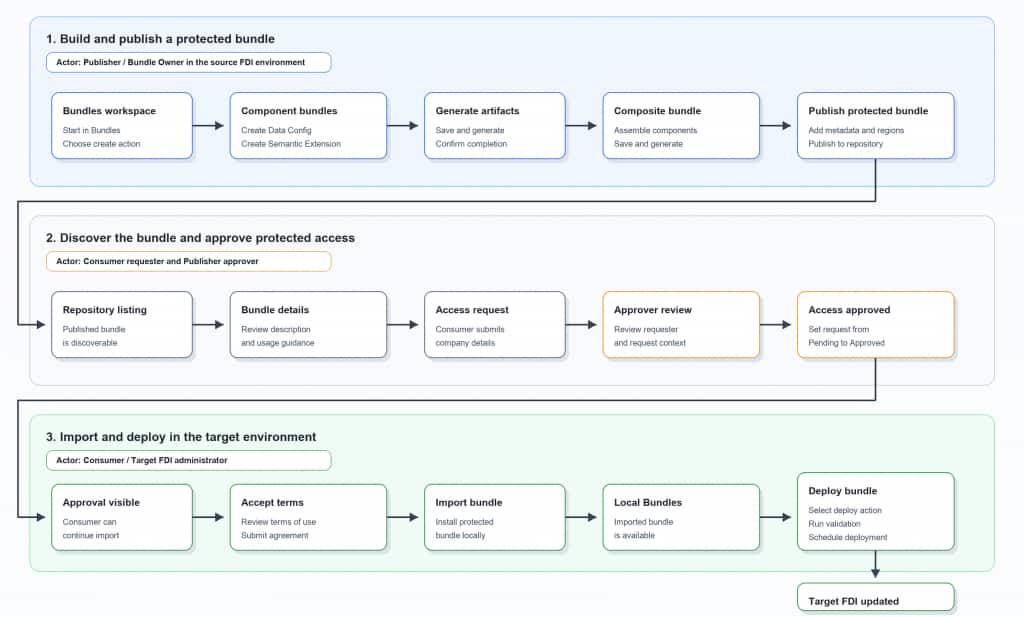
1. Build and Publish the Protected Bundle
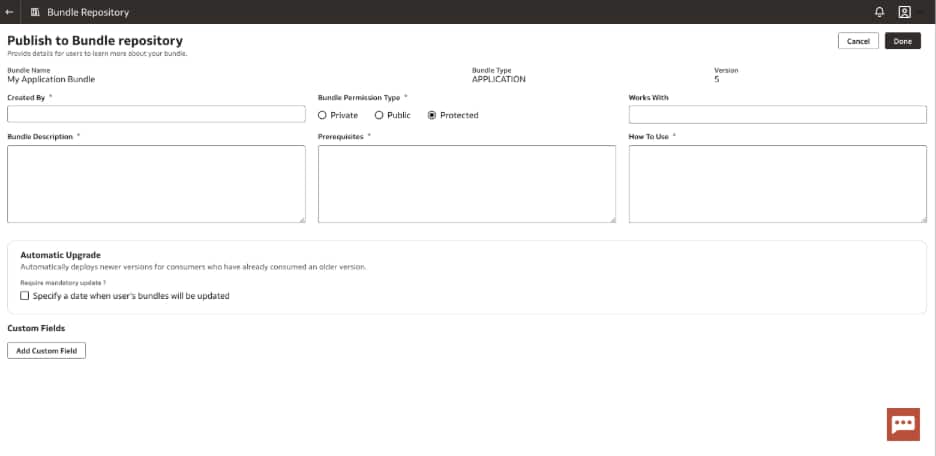
The publisher starts in the Bundles workspace of the source FDI environment, creates the required component bundles, generates the artifacts, and assembles related assets into a Composite Bundle when they should travel together. At publishing time, the publisher selects the protected option and adds metadata, terms, documentation, supported regions or SKUs, and usage guidance.
Generated bundles are visible to the publisher in My Bundles. A protected listing is visible to consumers based on the publishing scope, but protected access replaces direct import until a request is approved.
2. Discover the Bundle and Approve Access
The bundle appears in the repository so a consumer can discover it. The consumer reviews the listing, reads the description and usage guidance, and submits an access request with the required company or request context.
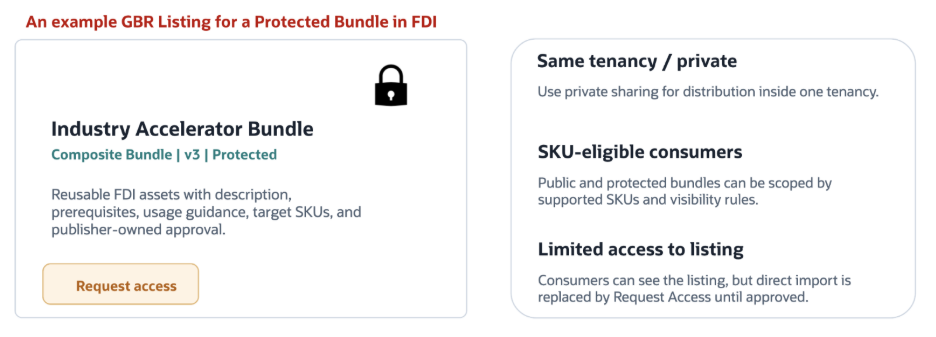
The publisher or bundle owner reviews the request and approves access when appropriate. This keeps the sharing experience self-service for consumers while still giving the owner control over who can import the protected package.
3. Import and Deploy in the Target Environment
After approval, the target administrator accepts the terms, imports the bundle into the local FDI environment, and deploys it from Local Bundles. Imports from the Bundle Repository land in Local Bundles; they are not downloaded as separate bundle archives.
Before deployment, FDI validates the bundle, then the administrator can run or schedule the deployment.
Best Practices for Bundle Publishers
- Keep bundles focused. Smaller, purpose-built bundles are easier for consumers to understand and easier for administrators to validate and troubleshoot.
- Use the right bundle type for the job. For example, use Data Config Bundles for pipeline and activation metadata, Semantic Model Bundles for semantic extensions, Content Bundles for workbooks and analytics content, and Composite Bundles when related bundle types need to move together.
- Sequence deployments thoughtfully. Deploy Data Config Bundles before content, semantic, composite, or environment bundles when the target needs pipeline setup or functional area activation first.
- Plan for data augmentation merge behavior. If the same data augmentation exists in both source and target, make sure the types match. When compatible augmentations are merged, target data takes precedence and is not overwritten.
- Include security deliberately. Add applicable security configuration to Semantic Model and Content Bundles and remember that user-to-group assignments may need to be reviewed or reassigned after deployment.
- Treat Protected Bundles like productized assets. Use meaningful names, clear descriptions, version notes, prerequisites, support contacts, and usage guidance.
Call to Action
Start with one high-value reusable asset: an industry accelerator, regional analytics package, partner solution, or internal starter bundle. Package it with a focused scope, validate the import and deployment path in a non-production environment, and then use the protected publishing workflow to make it discoverable while keeping access controlled.
Related Resources