

Use AI Concierge to find dashboards, check data refresh status, and request administrator help when needed.
Key Contributors:
- Kiriti Mukherjee – Director of Product Management, Oracle Fusion Data Intelligence
- Prat Sharma– Platform Software Engineer, Oracle Fusion Data Intelligence
- Avinash Marathi Bheemalinga– Principal Solutions Architect, Analytics Customer Excellence
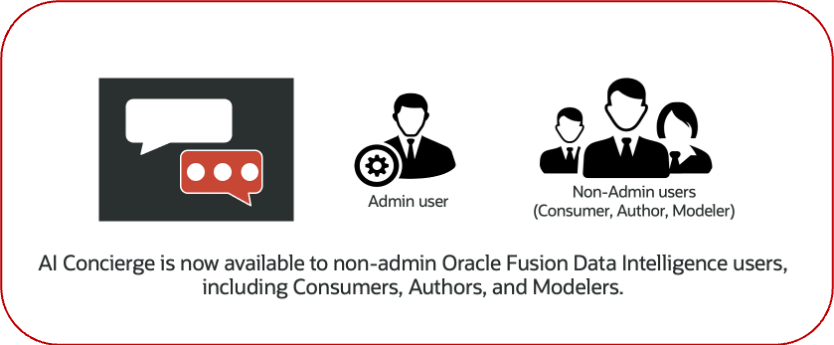
AI Concierge is available to all FDI users. Read-only access to AI Concierge is available to all FDI users who don’t have administrator privileges, including roles such as Consumer, Author, and Modeler.
For administrators, AI Concierge continues to provide guided support for managing the FDI environment, including configuration needs, functional area activation, and refresh-related information. By giving non-admin users read-only access to AI Concierge, administrators can reduce repetitive support requests and receive clearer, more complete requests when setup or configuration action is needed.
Non-administrator access is read-only and doesn’t allow users to perform setup or administrative actions. In this article, “non-admin users” and “business users” refer to FDI users who don’t have administrator privileges.
For non-admin users, AI Concierge provides a guided way to explore FDI pipeline activity and to understand how data moves through FDI.
- It can help users identify the right dashboard and understand which subject area or functional area is involved.
- Users can also check data refresh-related information and prepare the right request when an administrator’s action is needed.
- Non-admin access is read-only and they can’t perform setup actions.
Why this matters for business users
FDI users often know the business question they want to answer, but not always where that answer lives. A finance user may want to understand AP balance trends. A recruiting leader may want to improve hiring velocity. An operations user may want to know whether refreshed data is available before reviewing a dashboard.
FDI users who aren’t administrators usually start with a business question:
- Which dashboard should I use to analyze AP balances?
- Where can I see supplier payment trends?
- What options do I have to increase hiring velocity?
- Has the latest data refresh completed?
- When is the refresh expected to finish?
These questions are typically sent to administrators as emails or service requests. Administrators then need to interpret the business need, identify the dashboard or data availability issue, and respond with the next steps.
AI Concierge reduces that dependency. Users can ask questions directly in FDI and receive contextual guidance. When the question can be answered from available content, AI Concierge points the user to the relevant dashboard, KPI, or analysis area. When administrator action is required, AI Concierge helps explain what needs to be enabled or configured.
How non-admin users can access AI Concierge
Non-admin users access AI Concierge using the same URL as the Fusion Data Intelligence instance used by FDI administrators. They don’t need a separate AI Concierge URL.
- Go to your existing Fusion Data Intelligence instance URL.
- Sign in with your normal FDI account.
- Type your question using natural language in the prompt box.
The important difference (vs FDI Administrator access) is the experience that non-admin users see after signing in. For non-admin users, only AI Concierge is available at the FDI Admin Console link. Administrative pages and setup actions remain restricted to users with the appropriate privileges.
This gives business users a lightweight way to ask questions without giving them administrative access.
What FDI non-admin users can do with AI Concierge
With AI Concierge, non-admin users can:
- Ask natural-language questions about the data they need.
- Find dashboards and KPIs related to a business question.
- Understand which subject area or functional area supports a dashboard.
- Learn whether administrator action is required before a dashboard can be viewed.
- Generate a clear request to send to an administrator.
- Ask about data refresh status and estimated completion times.
- Explore available analysis options for business goals such as improving hiring velocity.
Read-only Access and Security Boundaries
AI Concierge gives non-admin users a self-service way to ask questions and find guidance, but it doesn’t expand their FDI privileges.
For example, non-admin users can’t perform any of the following actions:
- Activate any functional areas
- Change pipeline parameters
- Modify security, setup, or configuration
- Access dashboards or data beyond their assigned privileges
Let’s look at a few examples of tasks that non-admin users (or business users) can perform in FDI.
1. Find the right dashboard for a business question
One of the most useful scenarios for non-admin users is dashboard discovery. A user can ask a question in natural language, such as:
How are AP balances trending for a particular supplier over last eight quarters?
AI Concierge responds with suggested KPIs and dashboards that may answer the question.
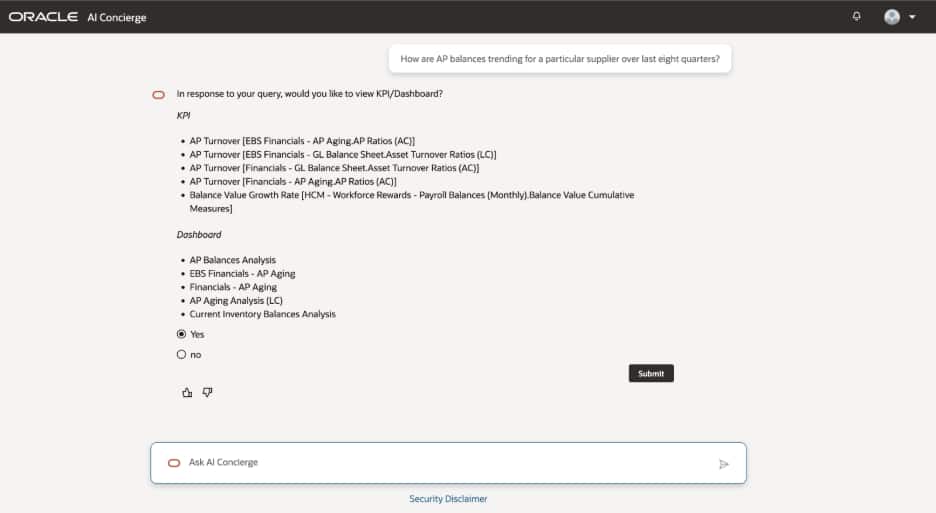
This helps users move from a business need to a reporting destination without needing to know the dashboard catalog in advance. Instead of searching through menus or asking an administrator which dashboard to use, the user can describe the analysis that they need.
AI Concierge can also answer direct navigation questions. For example:
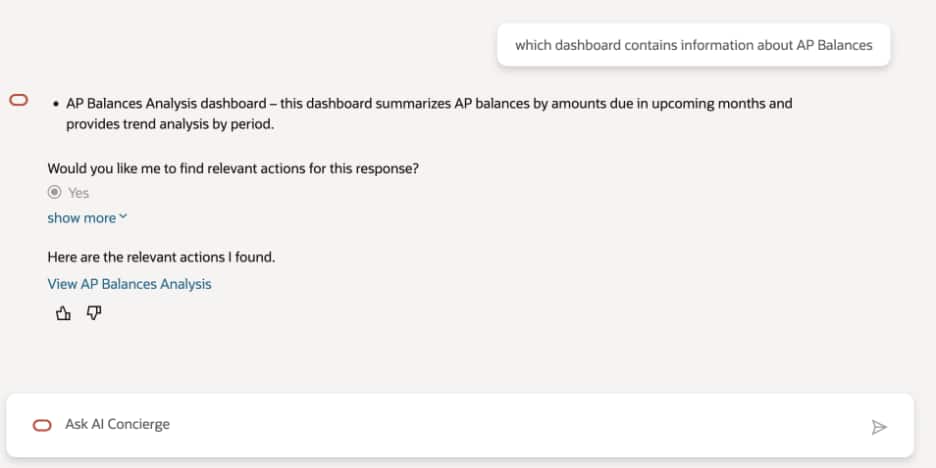
Which dashboard contains information about AP Balances?
In response, AI Concierge identifies the AP Balances Analysis dashboard as the place to find AP Balances information.
2. Understand what needs to be activated
Sometimes the right dashboard or analysis depends on functional areas that aren’t yet activated in the FDI environment. A non-admin user might not have permission to activate those areas, set up pipeline parameters, or perform configuration steps.
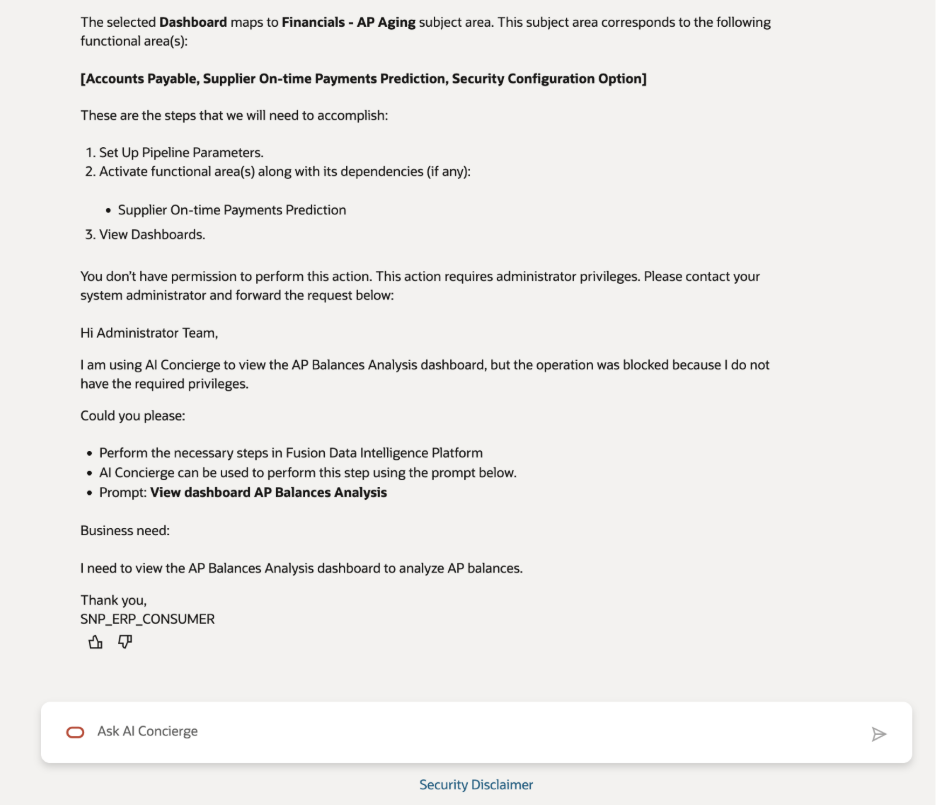
AI Concierge helps bridge that gap. When the selected dashboard maps to a subject area and functional area that requires administrative action, AI Concierge explains what’s needed. In the AP Balances example, the response identifies the related subject area and functional areas, then lists the required steps:
- Set up pipeline parameters.
- Activate the required functional area and dependencies.
- View dashboards.
Because the user doesn’t have administrator privileges, AI Concierge also explains that the action requires an administrator.
3. Prepare a clear request for the administrator
When the user needs an administrator to take action in support of the business query, AI Concierge generates a ready-to-send message for the administrator, including the dashboard that the user wants to access, the prompt they used, and the business need behind the request.
This is valuable for the following reasons:
- The business user doesn’t need to translate the technical requirement into administrator language.
- The administrator receives a more complete request, including the intended dashboard, functional area, and business context.
- The organization avoids repeated back-and-forth just to understand what the user is trying to analyze.
A generated request might include wording such as:
I’m using AI Concierge to view the AP Balances Analysis dashboard, but the operation was blocked because I don’t have the required privileges. Perform the necessary steps in FDI.
It can also include the original prompt and a short business need, making the request easier for administrators to evaluate and prioritize.
4. Get guidance beyond finance dashboards
AI Concierge isn’t limited to one subject area. Users can ask broader business questions across the content available in their FDI environment. For example, a user may ask:
I want to increase my hiring velocity. What options do I have?
AI Concierge can suggest relevant dashboards, metrics, subject areas, and reporting approaches. In this example, it points to Talent Acquisition analytics and recommends metrics such as Time to Hire, Time to Fill, bottleneck analysis, requisition progress, application progress, open requisitions, offer activity, and hire rate KPIs.
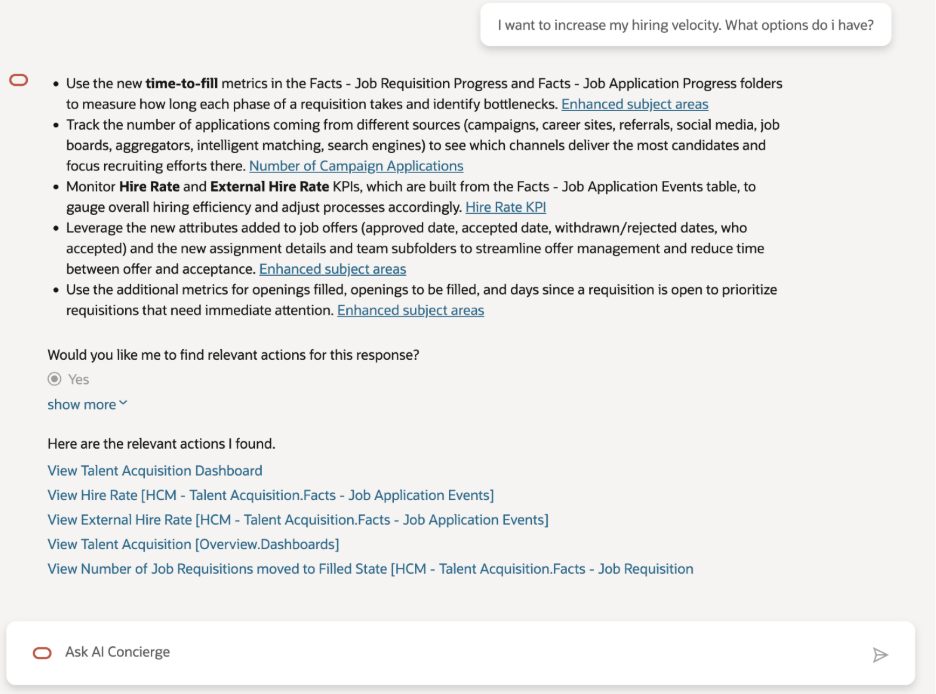
This response is useful because users might not know the exact dashboard name; they might know only the outcome that they want to improve. AI Concierge helps connect that outcome to available analytics.
5. Answer refresh and pipeline status questions
Non-admin users often need to know whether data is ready before they begin analysis. Instead of sending a message to an administrator, they can ask AI Concierge questions such as:
- Has the latest data refresh completed?
- When will today’s data refresh complete?
- What is the data pipeline status today?
- What is the estimated refresh completion time?
These answers help users decide whether to proceed with analysis, wait for the latest data, or follow up if refresh activity appears delayed.
This reduces operational overhead for FDI administrators. Instead of answering repeated refresh-status questions from many users, administrators can let AI Concierge provide the first level of guidance directly in the product.
What this means for FDI users
Making AI Concierge available to all Fusion Data Intelligence users gives business users a simpler way to start their analytics workflow. They can ask a question in natural language, find relevant dashboards and KPIs, check refresh status, and understand when administrator action is needed, all without requiring administrator privileges.
For administrators, AI Concierge can reduce repetitive support requests by helping users self-serve common questions about dashboard location, data availability, refresh timing, and required activation steps. When administrator action is needed, users can prepare a clearer request with the right business context.
The result is a smoother FDI experience: business users spend less time searching or waiting for basic guidance, while administrators can focus on configuration, governance, and higher-value support.
Call to Action: AI Concierge in Fusion Data Intelligence
Sign in to your FDI instance and try AI Concierge with a business question, such as which dashboard to use, whether refreshed data is available, or what administrator action is needed to access a dashboard or functional area.
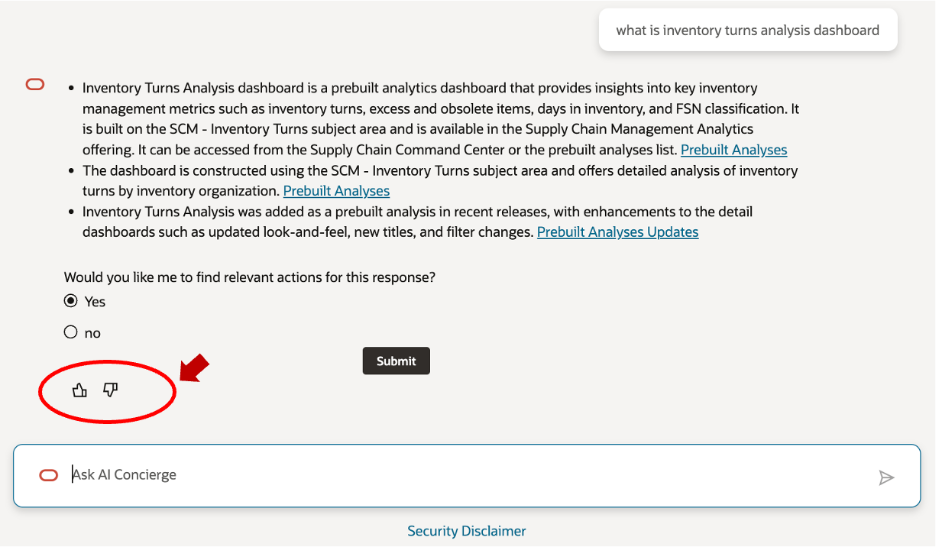
As you use AI Concierge, provide feedback on responses with thumbs up or thumbs down (highlighted in the screenshot below) and add comments when you want to share more context. Your feedback helps improve the experience for business users.
To learn more, exchange tips, and follow future updates, join the AI Concierge user group on Oracle Communities.
References
- A simple demo: how to activate a functional area in FDI using AI Concierge
- Join the Oracle Communities AIC user group to learn more, ask questions, and provide feedback.