
With contributions from
Anurag Sinha, Senior Director FDI Engineering
Introduction
Oracle Fusion Data Intelligence (FDI) is a family of prebuilt, cloud-native analytics applications for Oracle Fusion Cloud Applications. It brings together packaged analytics, governed business metrics, workbooks, semantic models, and embedded AI so finance, HR, supply chain, and customer experience teams can turn trusted operational data into ready-to-use insights faster.
FDI is also extensible and customizable, allowing organizations to add external data, expand the base semantic model, and tailor analytics to their business requirements. This combination of prebuilt content and flexibility is what makes FDI powerful for enterprise analytics.
That strength creates a familiar adoption challenge. As the content library grows, users don’t only need more data. They need a faster way to find the right subject area, metric, workbook, or starting point at the exact moment they need to answer a business question.
The discovery challenge
On a typical Monday morning, an analyst must prepare a quick brief on supply chain risk exposure before a leadership call. She knows the data exists in FDI. She opens the analytics environment, browses folders, checks workbook names, reviews metric descriptions, and still isn’t confident she’s found the best starting point.
She did everything right; the challenge isn’t with the user. The challenge is the gap between the way business users express intent and the way analytics platforms organize content.
A user might ask: “What workbooks help me understand attrition trends in APAC?” The platform may organize the answer through subject areas, dimensions, metric definitions, security roles, and workbook metadata. Both are speaking about the same business need, but they’re using different languages.
Why the gap matters
FDI provides broad analytical coverage across major business pillars. That breadth helps organizations accelerate time to value because users can start from prebuilt content instead of building every report from scratch. But breadth alone doesn’t guarantee discoverability.
When users can’t quickly locate the right content, they often recreate existing assets, depend on specialists for simple discovery tasks, or abandon a question before analysis begins. Over time, that friction becomes a tax on user adoption and a barrier to building a stronger data-driven culture.
The opportunity is clear: make content discovery feel as natural as asking a knowledgeable colleague where to start.
What changes with natural language query
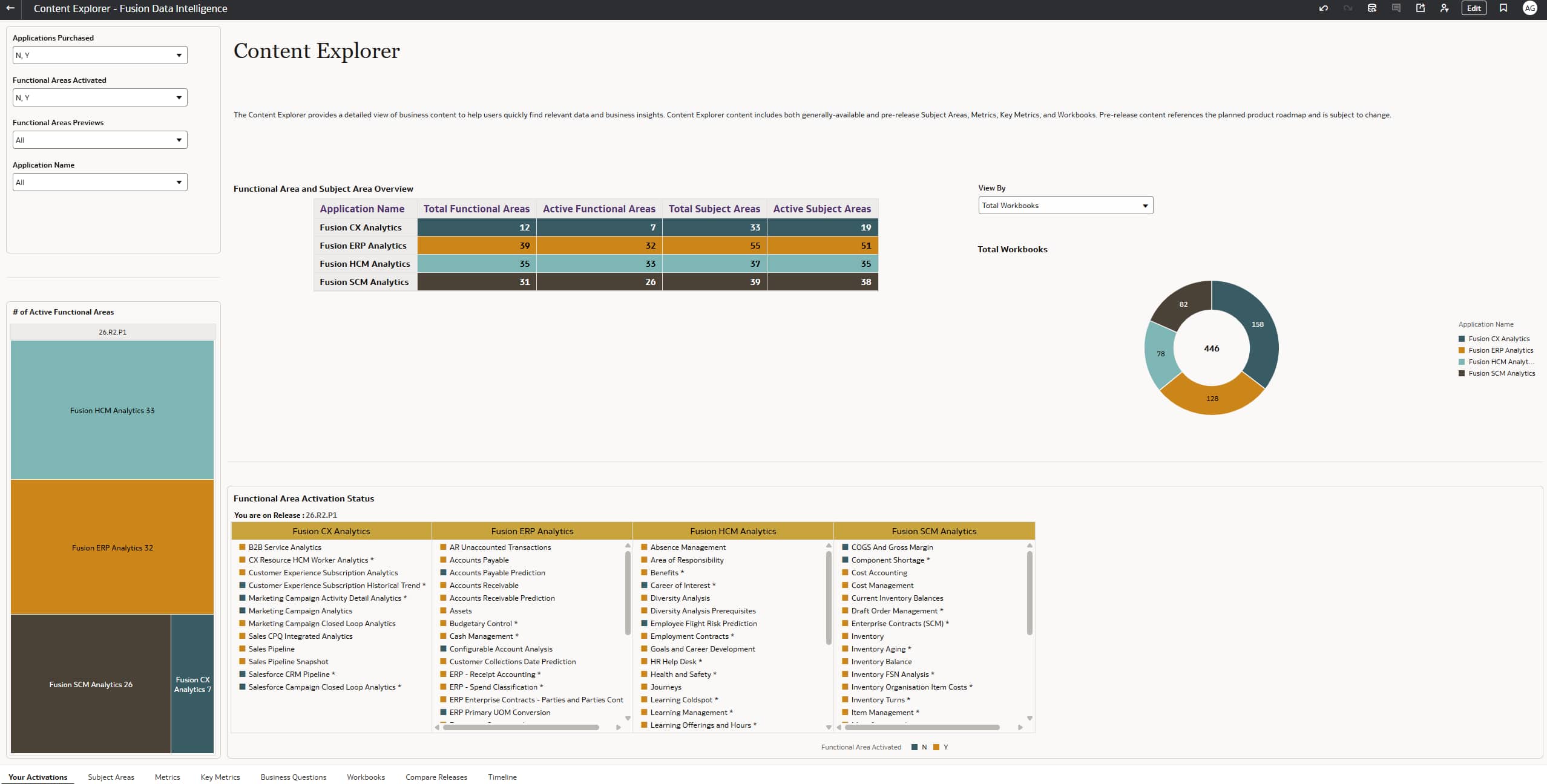
The Content Explorer experience in FDI helps close this discovery gap by letting users ask questions in natural language. Instead of starting with exact object names, folder paths, or technical nomenclature, users start with the business question they already have in mind.
FDI interprets the question against available business content, including subject areas, metrics, and workbooks, and returns relevant results that help users move from discovery to analysis with less friction.
This makes the experience especially useful for report authors, analysts, administrators, and functional users who know what they want to understand, but might not yet know which FDI asset best supports that question.
Example questions users can ask
Natural language discovery works best when users frame questions the way they would ask a colleague. For example:
– What content is available with AP Aging?
– What metrics are available for inventory?
– Which subject areas can help analyze revenue variance by region?
– What can I use to understand supply chain risk exposure?
How it works, step by step
1.LAUNCH CONTENT EXPLORER FROM WHERE YOU WORK
From the workbook authoring experience, users can open Content Explorer and stay close to the analysis flow. This reduces context switching and helps authors move from discovery to action without leaving their work behind.
2.ASK IN PLAIN LANGUAGE
Users type a question in everyday business language. The query can be broad, such as asking what content is available for a process area, or specific, such as asking for metrics or workbooks related to a named business topic.
3.REVIEW RELEVANT RESULTS
FDI returns relevant content based on the question, helping users identify candidate subject areas, metrics, and workbooks. The result set becomes a guided starting point rather than a list of disconnected objects.
4.MOVE DIRECTLY INTO ANALYSIS
After users identify the right workbook or content area, they move into analysis faster. The time between “I need to find something” and “I’m ready to analyze it” becomes much shorter.
How this supports adoption
Natural language discovery is more than a convenience feature. It supports a broader adoption strategy for FDI by lowering the skill threshold for finding and reusing trusted content.
– Accelerates time to insight by helping users find relevant content faster.
– Promotes reuse of prebuilt and governed assets instead of duplicating reports.
– Reduces dependency on administrators and experts for routine discovery questions.
– Improves confidence because users can start with FDI assets that are aligned to the platform metadata.
– Strengthens user adoption by making self-service analytics easier to access.
Best practices for rollout
To maximize impact, introduce Content Explorer as part of your FDI enablement plan rather than treating it as a standalone search feature.
Summary
FDI gives organizations a strong foundation of prebuilt, extensible analytics content. Natural language query makes that foundation easier to navigate by aligning the discovery experience with the way users naturally think and ask questions.
When users can find the right content quickly, they’re more likely to use the platform, reuse trusted assets, and move from questions to insights with confidence. That’s how organizations reduce friction, expand data literacy, and unlock more value from their FDI investment.
Call to Action
Try Content Explorer in your FDI environment using questions from your own business processes. Start with common requests from your users, review the returned subject areas, metrics, and workbooks, and share feedback through your Center of Excellence or Oracle Analytics Community channels.
We want your feedback. If you have suggestions or discover an issue while working with this experience, let your Center of Excellence counterpart know so the team can continue improving the discovery journey for all FDI users.
Related resources:
Explore Oracle Fusion Data Intelligence Content