

Configure the end-to-end path from Fusion HCM Areas of Responsibility to governed analytics access in FDI.
Introduction
Oracle Fusion Data Intelligence (FDI) is a family of prebuilt, cloud-native analytics applications for Oracle Fusion Cloud Applications that provides ready-to-use insights to help improve decision-making. Its security model helps organizations deliver trusted analytics while ensuring that users see data appropriate to their role and organizational scope.
Area of Responsibility (AOR) security in Oracle Fusion Cloud HCM extends this governed model into FDI. By aligning Oracle Fusion Cloud HCM Person Security Profiles, data roles, and user AOR assignments with FDI security configuration, organizations can apply access automatically across analytics content. This article provides a practical walk-through for configuring AOR-based security from Oracle Fusion Cloud HCM through to FDI. It’s part of the AOR security series; begin with the overview article for the broader architecture and use this guide for the implementation details.
| Before you begin: Confirm that the required Oracle Fusion Cloud HCM data roles, Person Security Profiles, and user AOR assignments are available. Test the configuration with a representative user before moving it into broader use. |
Configuration at a glance
The implementation follows five connected activities:
- Configure Person Security Profiles and associate them with Oracle Fusion Cloud data roles.
- Assign the appropriate AOR values to users.
- Run the HCM Security Configurations functional area in FDI.
- Confirm that the AOR application data roles are provisioned and mapped to FDI groups.
- Validate that reporting results are filtered to the user’s authorized AOR scope.
Step 1: Configure Oracle Fusion Cloud HCM Prerequisites
AOR security begins in Oracle Fusion Cloud HCM. The Person Security Profile defines the organizational scope that a user can access, while the associated data role makes that profile available for provisioning into FDI.
Create the Person Security Profile
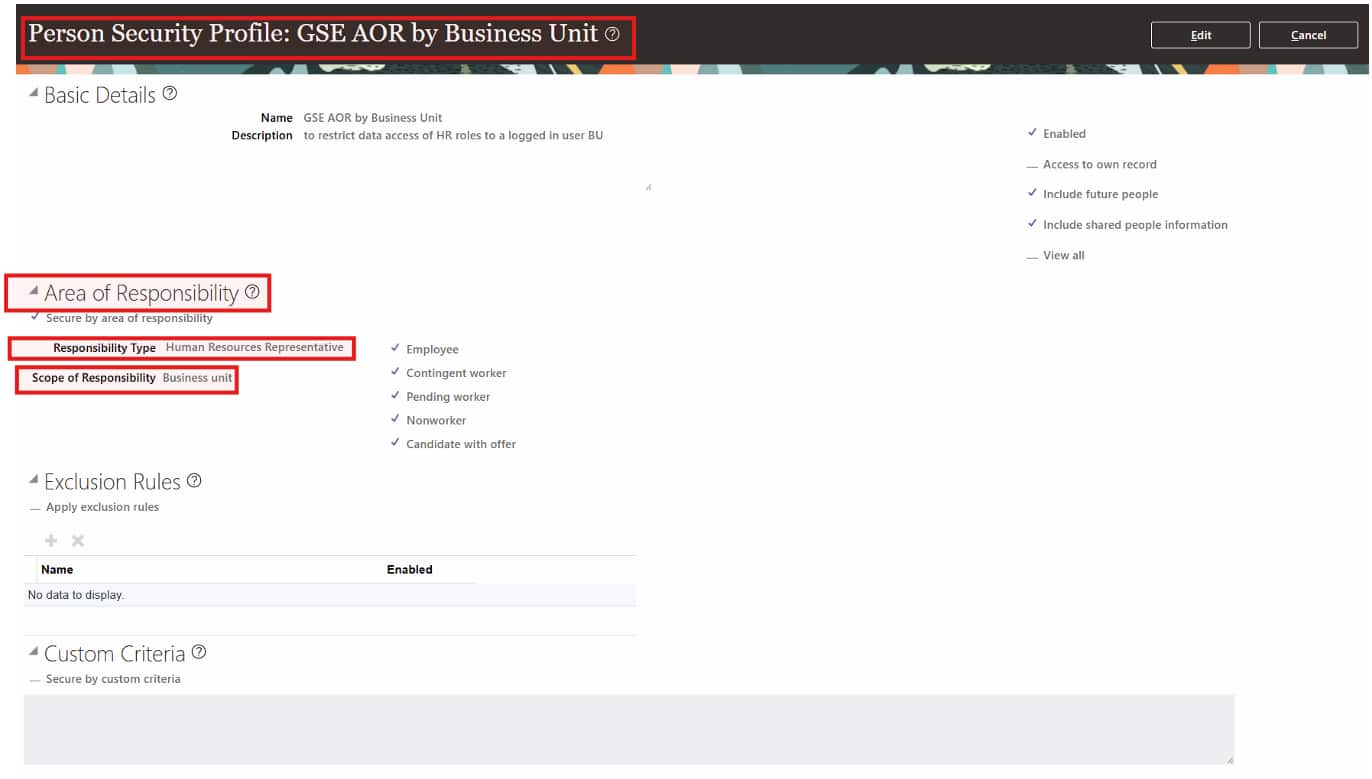
In the AOR section of the profile, define the Responsibility Type and Scope of Responsibility. These values determine the access dimensions that are carried into the analytics security model.
| Important: Don’t use leading or trailing spaces in the Security Profile Name. This can prevent the expected security configuration from being created. |
For example, a HR representative with Business Unit scope can be configured with the profile name GSE AOR by Business Unit, Responsibility Type Human Resources Representative, and Scope of Responsibility Business Unit.
Associate the profile with an Oracle Fusion Cloud HCM data role
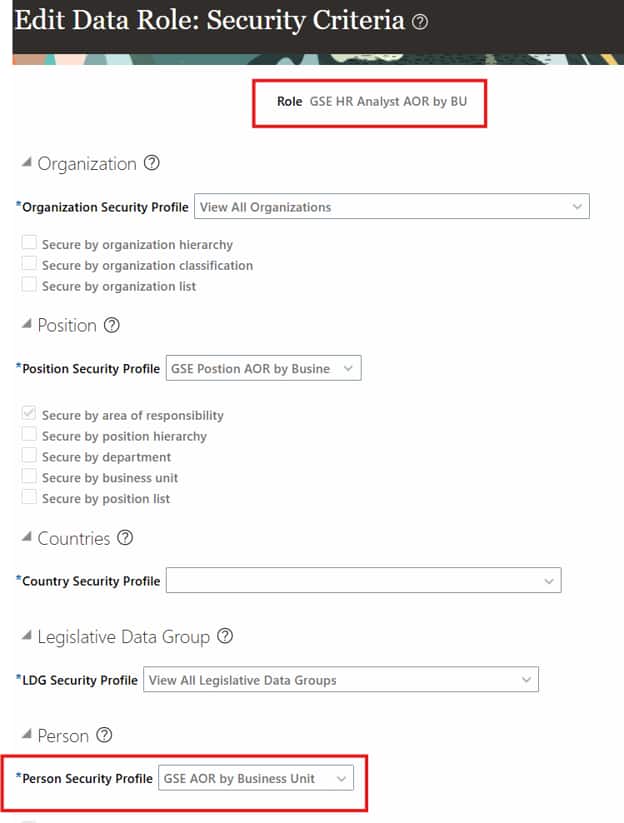
Associate the Person Security Profile with the appropriate Oracle Fusion Cloud HCM data role. Only profiles linked to a data role are considered for automatic AOR-role provisioning in FDI.
Assign the AOR to the user
Assign the relevant AOR to each user who requires the access. The assignment must align with the Responsibility Type and Scope of Responsibility defined in the Person Security Profile.
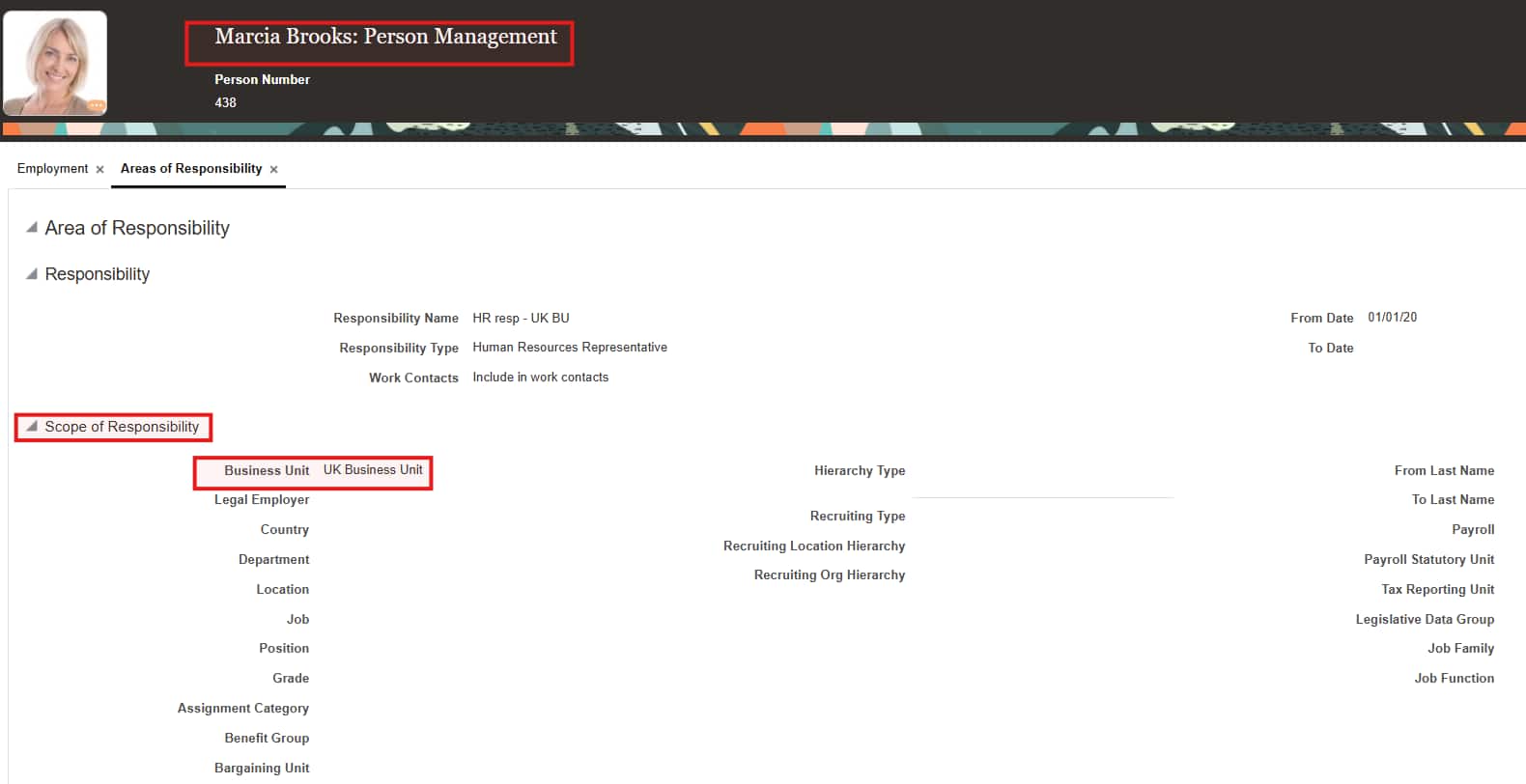
Design note: AOR assignments can address workforce structures such as Job, Position, and Grade in addition to the prebuilt FDI dimensions of Business Unit, Department, Location, and Country.
Step 2: Enable security configuration and provision roles in FDI
After the Oracle Fusion Cloud HCM setup is complete, enable FDI to extract the required security metadata, then verify that the corresponding roles are provisioned and mapped.
Enable the HCM Security Configurations functional area
Activate the Security Configuration functional area pipeline. It extracts AOR metadata from Oracle Fusion Cloud HCM and loads it into the Autonomous Data Warehouse associated with Oracle Fusion HCM Analytics. The data is available through the DW_ASG_RESPONSIBILITY_D synonym in the OAX_USER schema and refreshes with the configured pipeline schedule.
In the FDI Console, navigate to Data Configuration and complete the following steps:
- Select the Human Capital Management application tile.
- Select the HCM Security Configurations offering.
- Select the Security Configuration Functional Area.
- Click Next, review the selections, and click Next again.
- Select Run Immediately and click Finish.
Verify automatic role provisioning
FDI automatically provisions AOR application data roles from Oracle Fusion Cloud HCM Person Security Profiles that use Responsibility Type and Scope of Responsibility. If the profile includes custom criteria, exclusions, or assignment-type selections, create a supplemental custom role in FDI for those additional conditions.
Important: Only Person Security Profiles associated with Oracle Fusion Cloud HCM data roles are eligible for automatic provisioning in FDI.
Map provisioned roles to an FDI group
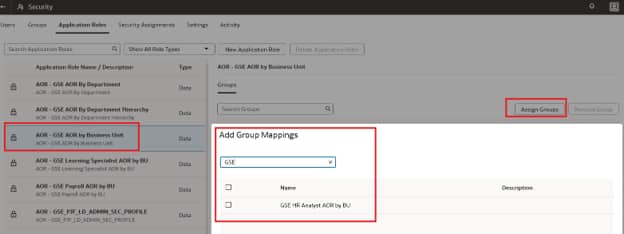
FDI creates an application data role by prefixing the Oracle Fusion Cloud HCM Person Security Profile name with AOR –. Synchronize the corresponding Oracle Fusion Cloud HCM job roles with FDI security groups, then assign the provisioned data role to the correct group in the Security area of the FDI Console.
Step 3: Validate seamless AOR security in analytics
Once the configuration is complete, users access reports and dashboards normally. FDI evaluates their assigned application roles, retrieves the allowed values for secured dimensions, applies the resulting filters at query time, and returns only the data that the user is authorized to view.
| User experience: AOR security is transparent to business users. The same governed rules are applied consistently across supported analytics content without requiring users to add report-level security filters. |
How AOR Security Works in FDI
When a user creates a report or dashboard in FDI, the system automatically:
- Identifies the user’s application role assignments.
- Retrieves the allowed values for each secured dimension.
- Applies filters to the query to restrict data to authorized values.
- Returns only the data the user has permission to view based on AOR assignments.
The following subject areas aren’t secured by the AOR-based data roles:
- HCM – Talent Acquisition
- HCM – Succession Management
- HCM – Diversity Analysis
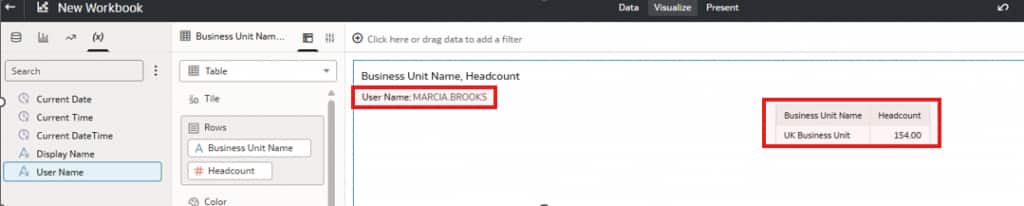
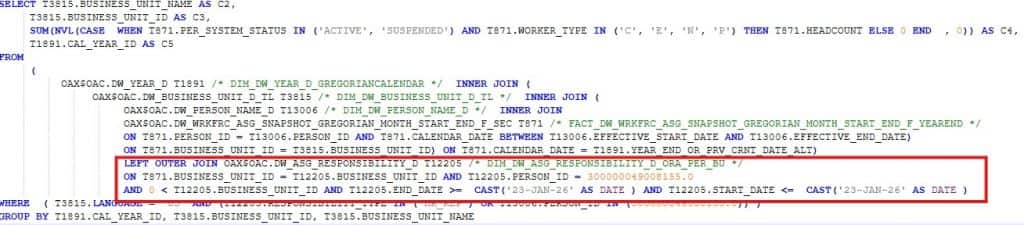
Use the session log to confirm that the AOR criteria are applied as a query filter
Conclusion
AOR-based security provides a scalable way to carry Oracle Fusion Cloud HCM responsibilities into FDI analytics. With the right Person Security Profile, data-role association, user assignment, FDI extraction, and group mapping, organizations can give users relevant insights while protecting sensitive workforce data.
Call to Action
Start with a representative AOR persona, complete the steps in this walk-through, and validate the resulting access in an HCM analysis. Now that you have read this article, share your results, questions, or ideas in the Oracle Analytics Community.
For more information about Oracle Fusion HCM Analytics, see the Help Center Documentation.