

How Least Restrictive Access brings together supervisory hierarchy and Area of Responsibility access in FDI.
Introduction
Oracle Fusion Data Intelligence (FDI) is a family of prebuilt, cloud-native analytics applications for Oracle Fusion Cloud Applications that provides ready-to-use insights to help improve decision-making. It brings together a managed data pipeline, a governed semantic model, and prebuilt analytics content so that organizations can make decisions from trusted business data.
As organizations extend HCM access models to reflect real-world responsibilities, analytics security must do the same. A Line Manager might also have an Area of Responsibility (AOR) that extends access beyond the supervisory hierarchy. This is common for HR Business Partners, HR Directors, and other leaders who manage a team while supporting a broader organization.
This article walks through how to configure FDI so that these users can see the data they’re entitled to across both roles. It focuses on the Least Restrictive Access setting, which combines applicable Line Manager and AOR-based access rather than limiting the user to the narrowest scope.
This is the second article in the AOR security series. For the prerequisite Oracle Fusion Cloud HCM configuration, role provisioning flow, and FDI security setup, see Part 1: Enabling AOR-Based Security in Oracle Fusion HCM Analytics: A Detailed Walkthrough.
The business scenario
Consider Albert Harris. Albert is a Line Manager and an HR Business Partner in the Healthcare US Business Unit. His Line Manager role gives him access to the employees in his supervisory hierarchy. His AOR assignment, Healthcare US Business Unit Representative, gives him a broader Business Unit scope through the Human Resources Representative responsibility type.
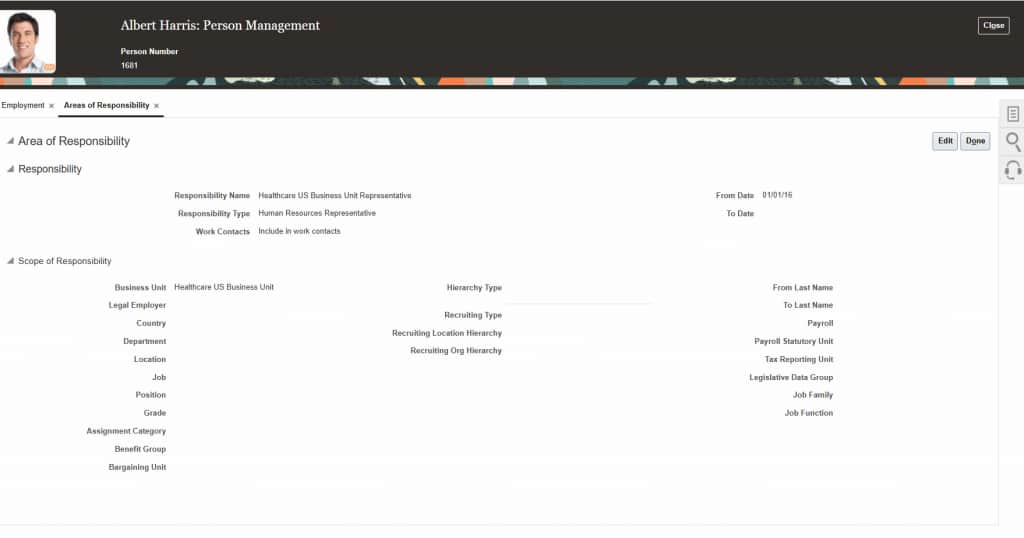
| Prerequisite: The AOR Person Security Profile must be associated with a data role in Oracle Fusion Cloud lHCM. FDI can then auto-provision the relevant security profile and map it to a job group. For the full prerequisite flow, refer to Part 1 of this series. |
Why Most Restrictive Access doesn’t meet this requirement
By default, FDI uses Most Restrictive Access when a user has multiple applicable security roles. In practice, this means the system returns only the data that satisfies the most limiting filter. For Albert, that’s his Line Manager hierarchy.
When Albert runs a Headcount by Business Unit analysis, he sees six employees—the direct and indirect reports in that hierarchy.
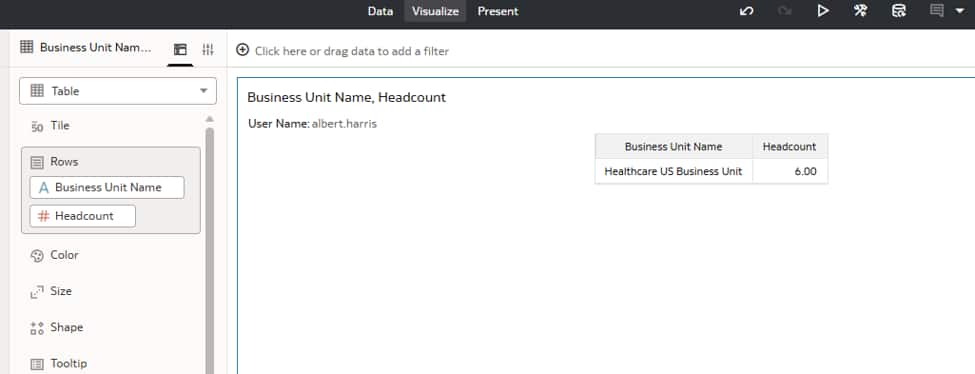
| Why this matters: Albert’s AOR is intended to give him visibility into the Healthcare US Business Unit, not just his own reporting chain. The default result is secure, but it doesn’t reflect the full scope of his responsibilities. |
Use Least Restrictive Access to combine role-based access
Least Restrictive Access changes the way FDI evaluates multiple security roles. Instead of intersecting the filters, it returns the union of the access granted by each applicable role. The Line Manager hierarchy remains active, and the AOR Business Unit scope remains active; the user receives the combined result.
| Attribute | Most Restrictive Access | Least Restrictive Access |
| How access is evaluated | FDI returns only data that meets every applicable role-based filter. | FDI returns data allowed by any applicable role-based filter. |
| Outcome for Albert Harris | 6 employees: the Line Manager hierarchy is the narrower scope. | 145 employees: the Line Manager hierarchy and AOR Business Unit scope are combined. |
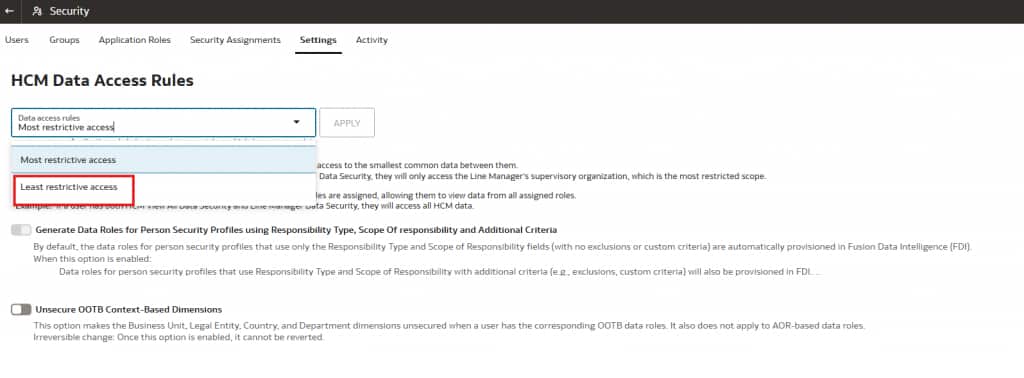
| FDI setting | Select Security, Settings, HCM Data Access Rules, and Most restrictive access | Select Security, Settings, HCM Data Access Rules, and Least restrictive access |
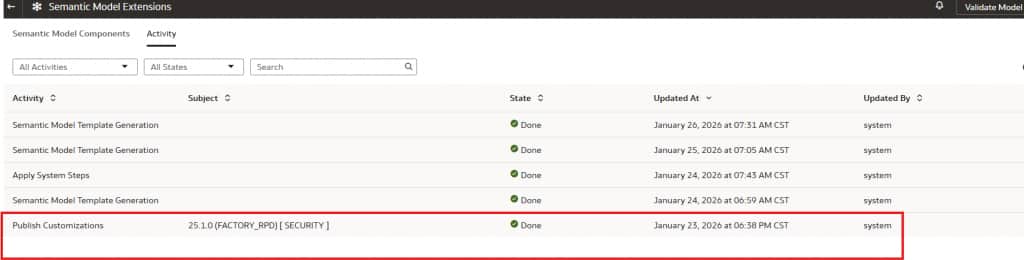
After applying the setting, publish the security customization so that the change is reflected in the semantic model.
After the setting is applied and the semantic model customization is published, Albert’s Headcount by Business Unit analysis returns 145 employees—the full Healthcare US Business Unit population available through his AOR assignment.
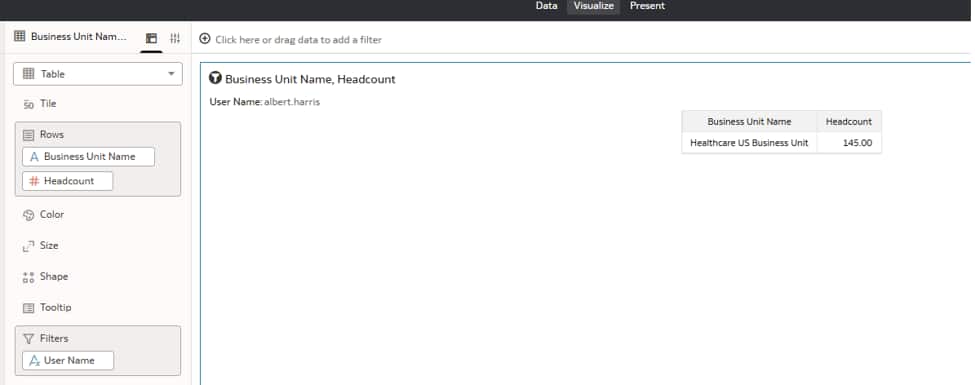
What FDI is evaluating
Least Restrictive Access doesn’t disable a security dimension. FDI evaluates the Line Manager hierarchy filter and the AOR Business Unit filter in the same query, then returns the broader combined result. The execution log below shows both dimensions participating in the evaluation.
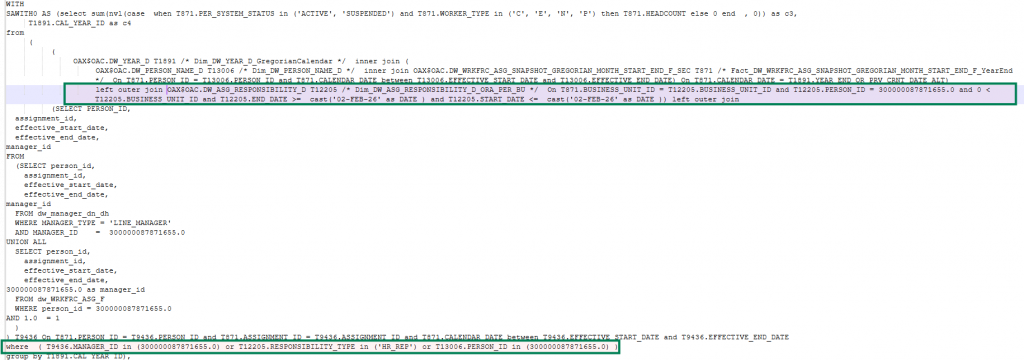
| Result: Albert can see the employees in his own organization and the employees in other managers’ organizations within the Healthcare US Business Unit, exactly as his combined Line Manager and AOR responsibilities require. |
Configure the combined access model
Use the following sequence to enable and validate combined Line Manager and AOR-based access in FDI.
1. Confirm the Fusion HCM setup. Assign the Line Manager role and confirm that the user has the appropriate AOR assignment, including the correct Responsibility Type and Scope of Responsibility.
2. Run the security configuration pipeline. In Fusion Analytics Console, navigate to Data Configuration, then Human Capital Management, HCM Security Configurations, and Security Configuration Functional Area, then run the pipeline immediately.
3. Verify role provisioning in FDI. Confirm that both the Line Manager role and the AOR-based data role are provisioned and mapped in FDI. Select Security, then Application Roles.
4. Set the data access rule. Navigate to Security, Settings, and HCM Data Access Rules. Select Least restrictive access and click Apply.
5. Publish the security customization. In the Activity area of Semantic Model Extensions, confirm that Publish Customizations for the [SECURITY] update completes with the status Done.
6. Validate the user experience. Sign in as the affected user and run a Headcount by Business Unit analysis. Confirm that the result includes both the supervisory hierarchy and the AOR-assigned Business Unit scope.
| Important: Publishing the customization is required. A change to HCM Data Access Rules doesn’t take effect until the semantic model is republished. In he Activity area of Semantic Model Extensions, look for the Publish Customizations entry carrying the [SECURITY] tag and confirm the status is Done. |
Key considerations
- Most Restrictive Access is the default. It returns the narrowest result when multiple role-based security filters apply.
- Least Restrictive Access returns the combined access granted by applicable roles. It’s also useful when a Line Manager has HR View All data access as an HR Analyst.
- For AOR-based access, the Person Security Profile must be associated with a data role in Oracle Fusion Cloud HCM so that it can be auto-provisioned in FDI.
- If an AOR profile includes exclusions or custom criteria beyond Responsibility Type and Scope of Responsibility, you might need a supplemental custom role in FDI.
Troubleshooting
| Issue | What to check |
| The user sees only their Line Manager headcount. | Verify that HCM Data Access Rules is set to Least restrictive access and that Publish Customizations has completed successfully. |
| The AOR data role isn’t provisioned in FDI. | Confirm that the Person Security Profile is associated with a data role in Oracle Fusion Cloud HCM. Unlinked profiles aren’t provisioned automatically. |
| The user sees no data. | Confirm that the Security Configuration pipeline completed and that the manager hierarchy is populated in ADW (DW_ASG_RESPONSIBILITY_D). |
| Headcount remains 6 after the setting is changed. | Confirm the completed [SECURITY] publish in the Activity Area of Semantic Model Extensions. Re-run the security pipeline if required. |
| The AOR scope is broader than expected. | Review the Person Security Profile scope in Oracle Fusion Cloud HCM. Exclusions or custom criteria can require a supplemental custom role in FDI. |
Conclusion
Combining Line Manager and AOR-based security in FDI helps organizations align analytics access with real-world responsibilities. Users can retain access to their supervisory hierarchy while gaining the broader visibility granted by their AOR assignment.
For HR Business Partners, HR Directors, and other leaders who span management and AOR responsibilities, Least Restrictive Access provides a governed way to deliver a complete analytics view without weakening existing security controls.
Call to Action
Apply the configuration in this article to a representative Line Manager and AOR persona, then validate the resulting access in your HCM analytics content. For additional guidance, review the Oracle Fusion Data Intelligence security documentation and the first article in this AOR security series.
Now that you have read this article, try the approach in your environment and share your results, questions, or ideas in the Oracle Analytics Community.
For more information about Oracle Fusion HCM Analytics, see the Help Center Documentation.