

Understand how Area of Responsibility access flows from Fusion HCM to governed analytics in FDI
Introduction
Oracle Fusion Data Intelligence (FDI) is a family of prebuilt, cloud-native analytics applications for Oracle Fusion Cloud Applications that provides ready-to-use insights to help improve decision-making. Its governed security model helps ensure that people see the analytics content and data appropriate to their role and organizational scope.
Area of Responsibility (AOR) security extends this foundation for Oracle Fusion HCM. It enables organizations to define access around a person’s responsibility for a business unit, department, legal employer, or other supported scope, then carry that access into FDI analytics.
This overview introduces the AOR security model, explains the end-to-end configuration flow from Fusion HCM to FDI, and points you to the companion articles for detailed implementation scenarios.
Explore the AOR security series
Use this overview to understand the overall approach, then select the article that matches your implementation requirement.
- Enabling AOR-Based Security in Oracle Fusion HCM Analytics: A Detailed Walkthrough — configure the Fusion HCM prerequisites, role provisioning, and FDI security flow.
- Enabling AOR-Based Security for Line Managers and AOR-Based Personas — combine supervisory hierarchy access with AOR-based access by using Least Restrictive Access.
Series navigation: Additional AOR implementation articles can be added here as they are published, creating a single entry point for the full AOR security series.
What are Areas of Responsibility?
In Oracle Fusion Cloud HCM, Areas of Responsibility define the organizational scope for which a person is responsible. The associated person security profile determines the records that the person can view and act on. This approach can improve security performance and reduce the number of profiles and data roles that administrators need to manage as responsibilities change.
| Key idea: AOR-based access lets analytics security reflect the organizational responsibility already defined in Fusion HCM, rather than requiring users to manage security filters in each report or dashboard. |
For details, see the documentation for assigning areas of responsibilities and guidelines for securing person records using AORs.
The AOR Security Configuration Flow: From Fusion Applications to FDI
AOR security is configured in Fusion HCM and then synchronized to FDI. The flow combines HCM data roles, user-to-role mapping, person security profiles, and user AOR assignments with the FDI security configuration and application-role mapping.
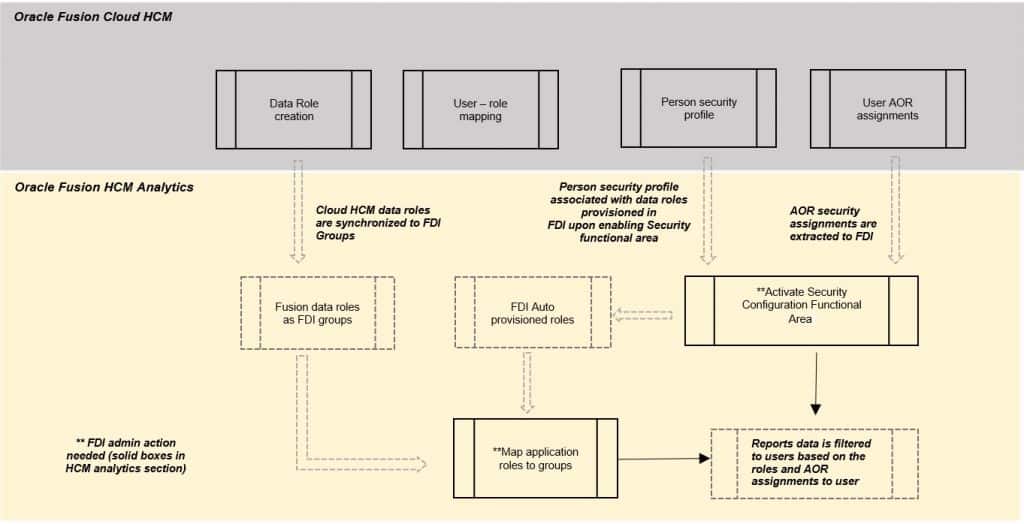
At a high level, configure the Fusion HCM security prerequisites, activate the HCM Security Configurations functional area in FDI, confirm that the required roles are auto-provisioned, and map the application roles to the appropriate FDI groups.
How AOR Security Works in FDI
When a user runs a report or opens a dashboard, FDI applies AOR-based access automatically. The user doesn’t have to select or maintain security filters in analytics content.
- FDI identifies the user’s assigned application roles.
- It retrieves the user’s AOR values for the supported dimension or dimensions defined in Fusion HCM.
- It applies the corresponding data filters at query time.
- It returns only the data that the user is authorized to view based on those assignments.
What Users Experience
- Seamless access: Users open reports and dashboards as usual, without selecting security filters.
- Automatic filtering: Analytics content is filtered to the user’s authorized organizational scope.
- Consistent security: The same AOR rules apply across supported reports and dashboards.
Conclusion
AOR-based security in FDI provides a scalable way to align analytics access with the responsibilities maintained in Fusion HCM. By carrying the person security profile and AOR assignment through to FDI, organizations can protect sensitive data while giving users the insight needed to perform their roles.
Call to Action
Start by validating a representative AOR persona’s Person Security Profile, data role association, and AOR assignment. Then use the detailed walkthrough to configure the FDI security flow, test representative access, and share your results or questions in the Oracle Analytics Community.
For more information about Oracle Fusion HCM Analytics, see the Help Center Documentation.