
Beginning in Oracle Analytics Server (OAS) version 5, metadata related to Oracle Analytics is stored in the BIPLATFORM and MDS schemas created by the Repository Creation Utility (RCU) in an Oracle Database. Therefore, database Recovery Manager (RMAN) backups are an important component to the recovery of your Oracle Analytics Server environment. This post describes the process to recover a lost folder using a database RMAN backup for OAS in OCI Marketplace and on premises.
As a best practice, store the RCU schemas in a separate database from your application data to enable faster backup and recovery in the event of an issue such as accidentally deleting a folder. For more details see Oracle Documentation.
Oracle Analytics Server (OCI Marketplace) Procedure
This procedure was tested using Oracle Cloud Infrastructure, Oracle Analytics Server 6.4 (created in Marketplace) and Oracle RDBMS 19.14.
Assumptions
Ensure regular RMAN backups are configured for your RCU database. Restoring the RCU database to a point in time prior to the folder deletion means that ALL the data in that database created AFTER that restore point will be lost. As a result, you should back up the database in its current state, prior to starting any recovery processes. For details on creating an on-demand backup, see this Oracle Documentation. For details on how to configure RMAN automatic backups to object storage, see this Oracle Documentation.
High-Level Steps
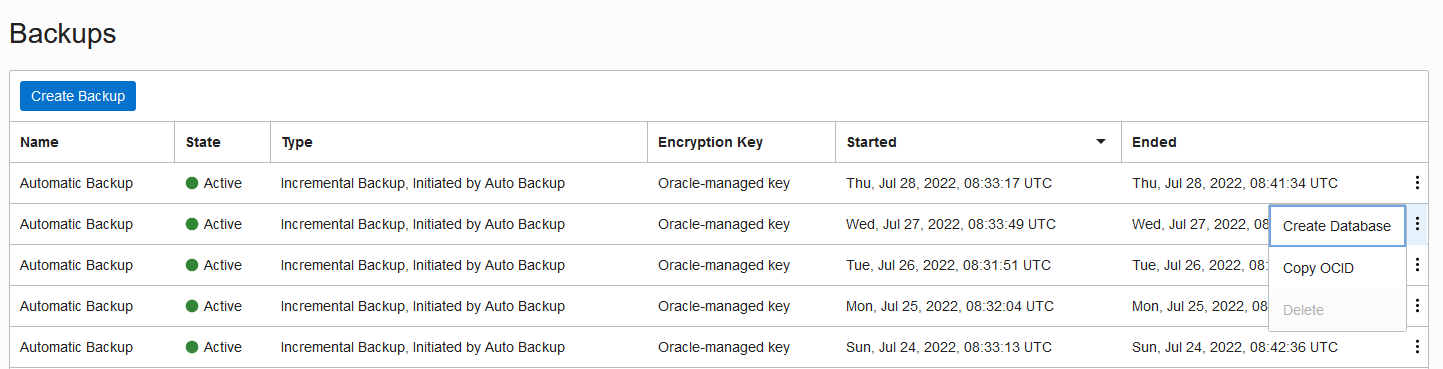
- In OCI Console, select Oracle Base Database, DB Systems, DB System Details, then under Databases select your database, Database Details and Backups. Select the prior day’s backup on the right side and click Create Database. Follow the prompts to restore this database to a new system.
- Once the database has been restored, obtain the PDB connection string of your restored database, select Oracle Base Database, DB Systems, DB System Details then select your database details and Pluggable Database Details, and PDB Connection.
- Ensure that your Oracle Analytics Servers are shut down using this command:
$DOMAIN_HOME/bitools/bin/stop.sh
- Update connection information as detailed in: “How To Change Your Oracle Analytics Connections When You Have Moved Your RCU Database To A New Host (Doc ID 2802991.1) “
Note: Be sure to save the original connection details from the old database where the folder was deleted.
- Re-start your Oracle Analytics Servers using this command:
$DOMAIN_HOME/bitools/bin/start.sh
- Either keep the RCU database on your newly restored system or
- Archive the missing folder to your desktop by clicking Catalog, then Archive.
- Repeat steps 4, 5, and 6 to re-configure the analytics server for the original RCU database.
- Upload the file that was downloaded from archive in the earlier step.
Oracle Analytics Server (On Premises) Procedure
Assumptions
Ensure regular RMAN backups are configured for your RCU database. Restoring the RCU database to a point in time prior to the folder deletion means that ALL the data in that database created AFTER that restore point will be lost. As a result, you should back up the database in its current state, prior to starting any recovery processes. For details on creating an on-demand backup, see this Oracle Documentation. This process assumes that RMAN channels are already configured in your Oracle database. For details on configuring channels see this Oracle Documentation.
High-Level Steps
- Ensure that your Oracle Analytics Servers are shut down using this command:
$DOMAIN_HOME/bitools/bin/stop.sh
- Shut down the PDB containing your RCU schema using this command:
SQL> alter pluggable database PDBRCU close; -
Determine the SCN value for the timestamp that you need to restore to (before the deletion) using this command:
SQL> SELECT timestamp_to_scn(TO_TIMESTAMP(’02-JUN-2022 19:00:00′, ‘DD-MON-YYYY HH24:MI:SS’)) scn from dual;
SCN
———-
80386267 -
Restore the PDB using commands such as these (replace your SCN value from above query):
RUN
{
SET UNTIL SCN 80386267;
RESTORE PLUGGABLE DATABASE PDBRCU;
RECOVER PLUGGABLE DATABASE PDBRCU;
} -
Open the PDB using this command:
RMAN> alter pluggable database pdbrcu open resetlogs; -
Re-start your Oracle Analytics Servers using this command:
$DOMAIN_HOME/bitools/bin/start.sh - Either keep the RCU database on your newly restored system or
- Archive the missing folder to your desktop by clicking Catalog, then Archive.
- Repeat steps 4, 5, and 6 to re-configure the Analytics Server for the original RCU database
- Upload the file that was downloaded from Archive in step above
Conclusion
Ensuring that you have backups of the database containing the metadata for Oracle Analytics is important to recover from human error such as accidentally deleting a folder. For more information, see the Oracle Help Center for administering Oracle Analytics Server or post a question in the Oracle Analytics forum on Cloud Customer Connect.