
Introduction
A workflow built and tested by one person often needs to keep running long after that person has signed out on a schedule, unattended, for months at a time. But authentication tied to an active user session doesn’t hold up once nobody’s at the keyboard. A workflow that reads from Object Storage in a notebook task can run fine when you click Run Now and fail every time the scheduler triggers it after 24 hours i.e. exactly same code, same task, because the identity behind it was only ever good for as long as your session was alive.
Run As is the mechanism that closes this gap. It lets you set the execution identity of a job explicitly be your own identity or a service account, so AI Data Platform resolves a durable, stored credential for that identity every time the job runs, whether a person clicked Run Now or a schedule triggered it.
Why execution identity matters
Workflow automation in AI Data Platform typically touches several systems in a single run: a job may read from a catalog, execute a notebook task, pull code from Git, and write to a downstream system. Each of those actions needs an identity that’s both authorized and available at run time, not just at build time. Run As gives that identity three properties:
- Governed access. The job runs with only the permissions granted to the selected identity, i.e. least privilege by construction.
- Operational continuity. A scheduled job’s authentication no longer depends on a person’s session being active.
- Accountability. Anyone who opens the job can see, immediately, which identity it executes as.
Two ways to run a job
AI Data Platform supports running a job as your own user identity or as a service account, and the right choice depends on where the workflow is in its lifecycle.
Run as your user identity is the default and is the natural fit while you’re building, testing, and iterating. At run time, AI Data Platform looks for a matching entry in your Credential Store; if one exists, the job uses it independent of your current browser session. If you don’t have a stored credential, AI Data Platform falls back to your IAM identity which is fine for a manual run, but that fallback is exactly what breaks on a schedule, since there’s no session for the scheduler to fall back on.
Run as a service account replaces your personal identity with a governed, non-person identity meant to outlive any one person’s session. AI Data Platform resolves the service account’s own stored credential on every run, so the job’s authentication no longer depends on who built it, whether they’re still on the team, or whether they’re logged in. Figure 1 shows the Run As section on a job’s Details tab, where the current execution identity here, a service account is set and can be changed. A service account only appears as a selectable option to users who already have permission to use its credential. When a job set to Run As a service account fires, it authenticates using that service account’s credential and the run shows up on the Runs tab with the service account listed as the identity that executed it, so you can always confirm after the fact which identity a given run actually used.
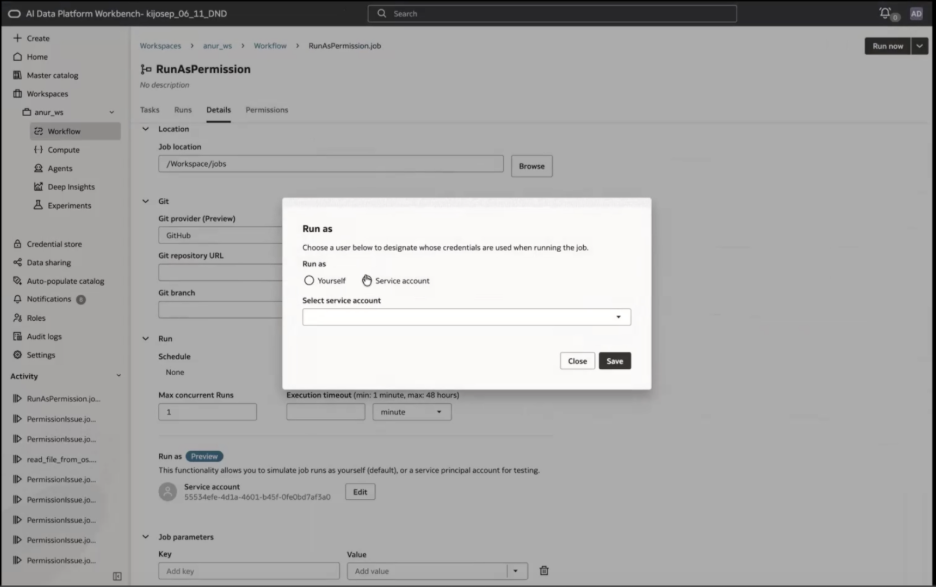
Figure 1 – Run As selector on a workflow job, showing a service account set as the execution identity.
Inside the Credential Store
Run As is only as good as the credential behind it, and that credential lives in Credential Store. Credential Store supports a few credential types, including a secret token and a Service account type built specifically for this use case. A service account credential captures the pieces needed to authenticate independent of any session: the service account’s user OCID, its API key fingerprint, the private key itself, the tenancy OCID, and the region.
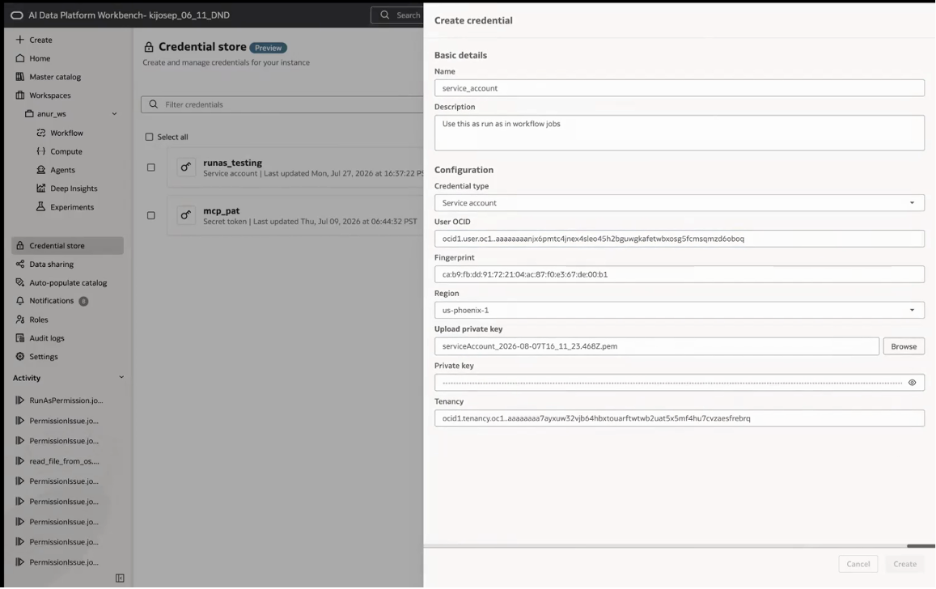
Figure 2 – A Service account credential in Credential Store
This is the detail worth calling out: simply pointing Run As at a different identity does nothing on its own. Run As only resolves a credential that already exists for that identity in Credential Store. If the selected user or service account has no stored entry in the credential store or if it gets deleted then the job has nothing to authenticate with, scheduled or not.
Granting access without granting impersonation
Run As doesn’t hand out blanket access. AI Data Platform applies a similar four-tier permission model – READ, USE, MANAGE, ADMIN to credentials, and other resources within a workspace. Read this blog for more information.
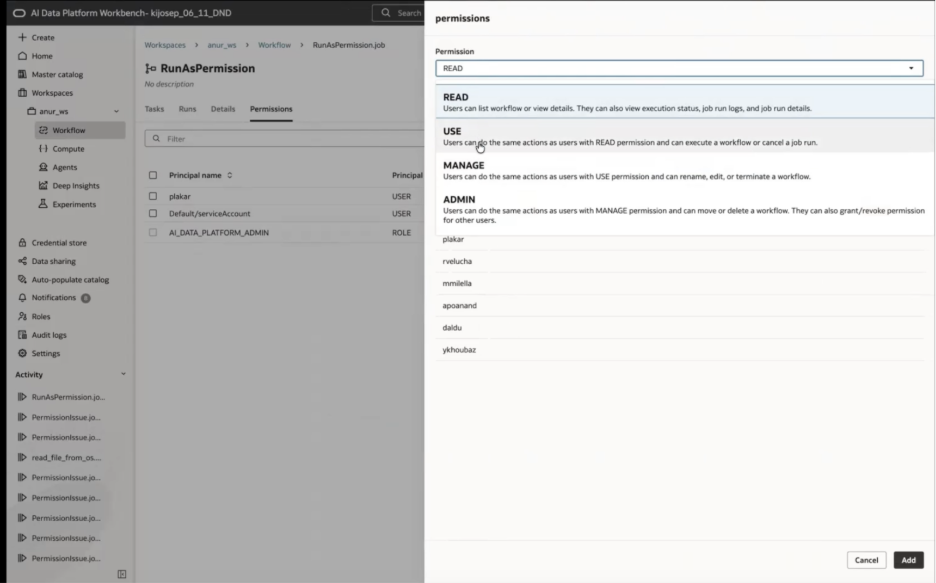
Figure 3 – Permission levels in AI Data Platform: READ, USE, MANAGE, and ADMIN, shown here on a workflow’s Permissions tab.
Turning on a service account for a scheduled job means granting access twice, to two different principals and this is the part that’s easy to miss. First, whoever configures the job needs permission to select the service account in the first place. Second, the service account itself becomes a principal the moment it’s chosen as Run As, and it needs its own access to execute i.e. it isn’t borrowing the job owner’s access, it’s using its own. To simply put,
- To let someone configure a job with a service account, a USE permission on the service account’s entry in Credential Store is required.
- For the service account to run the job once selected, a Service account needs explicit permissions on the resources it is trying to access, including its own credentials in Credential store.
That second grant is why a job’s Permissions tab in Figure 3 typically lists the service account as an entry, alongside any human collaborators, rather than inheriting whatever access the job’s owner happens to have.
This layered model is what keeps Run As from becoming an impersonation shortcut which means a service account is only ever available to people who’ve been explicitly granted the right to use it, and a service account needs explicit permissions at every layer it touches.
Setting up a service account for scheduled workflows
Getting a service account ready for production is a one-time setup:
- Create the service account in the OCI Console and generate its API signing key. Note the user OCID, fingerprint, and private key because you’ll need all three.
- Add the service account to the OCI group that carries the IAM permissions for the appropriate AI Data Platform instance.
- Add the service account to the AI Data Platform instance under the appropriate role.
- Register it in Credential Store as a Service account credential, using the OCID, fingerprint, private key, and tenancy captured in step 1.
- Grant permissions USE on the credential for whoever configures the job, and explicit permission on every resource the service account itself needs to reach including USE on its own entry in Credential Store for it to actually run.
- Set Run As on the job to the service account.
Summary
Run As turns execution identity into an explicit, durable part of a workflow’s design rather than a byproduct of who happened to submit it last. Build and test as yourself, then move production and scheduled jobs to a service account backed by its own stored credential in Credential Store. Layered permissions keep that credential usable only by the people who’ve been granted access to it, and because the credential doesn’t depend on an active session, the job runs the same way whether it’s triggered by hand or by a schedule.
Additional Information