
As AI and automation proliferate across enterprises, teams increasingly interact with products through REST APIs, command-line interfaces and SDKs, and AI-powered plugins. To make those interfaces easier to use with Oracle AI Data Platform, we introduced Ask-AIDP, a plugin for ChatGPT (Codex). Ask-AIDP is built on Oracle AI Data Platform’s CLI and REST API, and it helps teams create governed data environments, version notebooks and code, provision the right compute, run workflows reliably, promote changes across environments, and produce evidence when something fails.
Oracle AI Data Platform already provides the right programmatic foundation for this work. Its SDK repository includes the Oracle AI Data Platform CLI and Java, Python, and TypeScript SDKs for the platform’s public APIs. These interfaces let teams automate the everyday building blocks of AI and data delivery: workspaces, notebooks, workflows, clusters, catalogs, schemas, tables, bundles, and more.
Ask-AIDP brings those same platform interfaces into a conversational development workflow in Codex. A user can express the outcome they need, such as, “Create notebooks for this pipeline, run them in order, and collect the logs.” Ask-AIDP then uses the CLI, SDK, and OCI-signed REST calls needed to carry out that request. It does not introduce a separate Oracle AI Data Platform control plane or bypass Oracle AI Data Platform permissions. It makes the existing, governed interfaces easier to use interactively and keeps the resulting evidence available for review.
Oracle AI Data Platform supports CLI and SDK. Ask-AIDP builds on them.
The Oracle AI Data Platform CLI and SDKs are the underlying interfaces for Ask-AIDP:
- Oracle AI Data Platform CLI: Ask-AIDP can run any documented Oracle AI Data Platform CLI command through an argument-array interface. This is useful when a user needs a specific command or an operation that does not have a higher-level helper.
- TypeScript SDK: Ask-AIDP uses native SDK Git clients for workspace Git operations, such as pull, commit, push, branch, diff, merge, rebase, and reset. For ex, the plugin resolves a Git repository key from the workspace object metadata when possible.
- OCI-signed REST API: For advanced operations, Ask-AIDP can call documented Oracle AI Data Platform REST endpoints with OCI request signing. It checks the requested method and path against its generated REST catalog before it sends the request.
This design is intentional. A user gets a natural-language experience, but the actual work remains aligned to the platform interfaces, service validation, IAM policies, and Workbench permissions that administrators expect.
Why a ChatGPT and Codex plugin makes sense for enterprise teams
For enterprise customers, the value of conversational assistance is not simply that it can produce a command faster. The value is that it can help more users work consistently within the platform model that data engineering, platform, security, and governance teams have already established.
Consider the common gap between a data engineer who knows every command and a project team that knows the business outcome but does not work in the CLI every day. The engineer may understand exactly how to create a catalog, define a schema, upload code, create a job, and retrieve task logs. A data scientist, analyst, or application developer may know the result they need but not the correct command sequence or required resource identifiers. Ask-AIDP gives both groups a common interface while preserving the Oracle AI Data Platform operations underneath.
This is especially useful in enterprise environments for several reasons:
- Governed self-service: Teams can request common work through natural language while OCI IAM, Oracle AI Data Platform roles, service validation, and resource permissions continue to determine what can actually be done.
- Repeatable operational patterns: Common sequences such as notebook-to-workflow creation, medallion schema setup, Git-backed workspace onboarding, bundle deployment, and workflow repair can be executed in a consistent way instead of being reconstructed from memory.
- Faster onboarding: New team members can learn the intended Oracle AI Data Platform workflow through guided requests and dry runs before they need to master the full CLI surface.
- Better handoffs and support: The plugin can track jobs, export task outputs, and collect logs. That produces a clearer record for an operator, platform team, or support engineer when a run needs to be reviewed.
- A practical bridge to automation: A user can begin with a conversational request, inspect the generated command and request body, and then move the same pattern into a script, CI/CD workflow, or SDK-based application when it becomes a recurring process.
The plugin is therefore most valuable where the work is multi-step, shared across roles, and subject to governance. It reduces the friction of using Oracle AI Data Platform without hiding the operational model that enterprise teams need to control.
Enterprise use cases
Ask-AIDP is particularly useful for the following enterprise patterns:
- Environment and infrastructure setup: Create workspace structures, catalogs, schemas, volumes, AI Compute clusters, and role-aligned permissions for a new project or data domain. Teams can dry-run the proposed resource configuration before making a live change.
- Infrastructure as code: Use Ask-AIDP to discover the required CLI command or SDK request, validate the generated payload, and move the reviewed pattern into source-controlled scripts, deployment templates, or an internal platform service. The conversational interface accelerates creation; Git and CI/CD remain the system of record.
- Notebook and workflow automation: Upload a set of notebooks, create an N-notebook workflow, run it, track progress, retrieve task outputs, and collect logs. This is useful for repeatable ingestion, transformation, model-preparation, and validation pipelines.
- Medallion data pipelines: Establish bronze, silver, and gold schemas, create tables, and generate the SQL needed for CSV-backed sources that use a header row. Teams can use the same pattern to make data-layer ownership and promotion expectations explicit.
- Git and CI/CD delivery: Connect a workspace folder to a Git repository, pull approved code, review workspace diffs, create or deploy bundles, and promote a tested definition between development, test, and production environments.
- Operational remediation: Inspect a failed workflow run, identify failed tasks, repair the job run, and export supporting logs and outputs. This shortens the path from an alert to an evidence-backed recovery action.
- Agent and AI Compute operations: Create AI Compute for agent workloads, deploy agents, retrieve session traces, and use the same reviewed configuration patterns across environments.
What Ask-AIDP can help automate
Ask-AIDP combines a generic CLI interface with convenience tools for common Workbench workflows. For example, it can help teams:
- Create any number of sample notebooks, organize code into commented and focused cells, create a sequential workflow, run it, track task status, export outputs, and collect logs.
- Upload source code into a workspace or connect a Git-backed workspace folder to a repository.
- Create catalogs, external catalogs, schemas, managed tables, Delta tables, and initial table data. It also supports bronze, silver, and gold medallion schema setup.
- Create, inspect, and update AI Compute clusters for agent and deployment workloads.
- Create, deploy, list, and trace Oracle AI Data Platform agents.
- Create and deploy bundles, and repair failed workflow runs.
Here are a few examples of the requests a developer can make in Codex:
Use Ask-AIDP to create five sample notebooks, run them in sequence, and download the logs.Use Ask-AIDP to create bronze, silver, and gold schemas in my catalog, then create a managed Delta table in bronze.Use Ask-AIDP to dry-run creating an AI Compute cluster named inference-compute with one to three replicas.Use Ask-AIDP to create a bundle for this job and deploy it to my target workspace.Prerequisites
Before installing Ask-AIDP, install and configure the OCI CLI on the machine that runs Codex. The OCI CLI provides the standard local OCI authentication setup and a straightforward way to verify the profile that Ask-AIDP uses for signed Oracle AI Data Platform requests. This is a prerequisite for the recommended API-key authentication path.
- Follow the OCI CLI Quickstart for the current OS-specific steps, then run oci –version and complete the OCI configuration process.
- To configure the OCI CLI, add your API key.
The Oracle AI Data Platform CLI is a separate prerequisite. Install the current aidp-cli from the Oracle AI Data Platform SDK repository, ensure it is on PATH, and configure AIDP_CLI_BIN if it is installed elsewhere. Ask-AIDP uses the Oracle AI Data Platform CLI and SDK for Workbench operations, and it uses the OCI profile and API signing material configured through OCI.
Ask-AIDP Installation
The easiest way to install Ask-AIDP plugin is to prompt ChatGPT/Codex with:
Install/Update Ask-AIDP plugin from https://github.com/oracle-samples/oracle-aidp-samples/tree/main/ai/codex-plugins/plugins/ask-aidp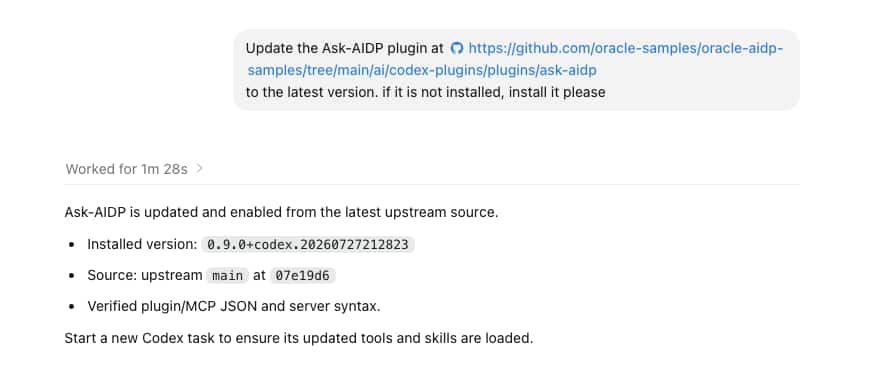
Figure: Ask Codex to update or install Ask-AIDP from the GitHub source, then verify the enabled plugin version. If the inline image is unavailable in your editor, open the linked full-size screenshot.
Alternatively, users can also install the plugin manually by following instructions posted on our Github site.
Configure the Oracle AI Data Platform connection
Ask-AIDP requires the same Oracle AI Data Platform endpoint, instance, workspace, cluster, and OCI authentication context used by the CLI and SDK. The plugin includes an aidp.env.sample file as a starting point. Each user should create their own aidp.env, replace placeholders with their environment values, and load it in the shell that launches Codex.
For example, the configuration typically includes:
export AIDP_ENDPOINT="https://aidp.<region>.oci.oraclecloud.com"
export AIDP_OCID="ocid1.aidataplatform..."
export AIDP_WORKSPACE_KEY="<workspace-key>"
export AIDP_CLUSTER_KEY="<cluster-key>"
export OCI_PROFILE="DEFAULT"
export AIDP_AUTH="api_key"
The Oracle AI Data Platform CLI must be available on PATH, or users can point the plugin to it with AIDP_CLI_BIN. For API-key authentication, users should follow Oracle’s API signing key process and use an OCI profile with the required IAM and Workbench permissions.
Step-by-step example: use Ask-AIDP in a Codex session
Once the plugin, CLI, and OCI profile are configured, working with Ask-AIDP follows a simple pattern: establish the Oracle AI Data Platform context for the session, then describe the outcome you want.
Step 1: provide the Oracle AI Data Platform environment context
Provide the endpoint, Oracle AI Data Platform instance OCID, workspace key, cluster key, OCI profile, and authentication mode in the Codex prompt. Ask-AIDP can use those values as the session context for the requested work as mention before.
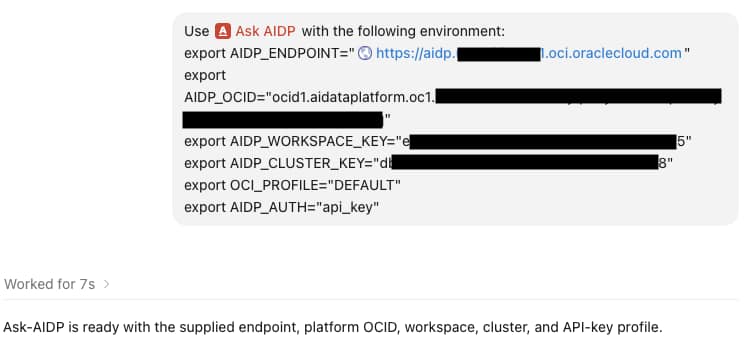
Figure: Ask-AIDP confirms the configured endpoint, instance, workspace, cluster, and OCI authentication profile. Identifiers are redacted in this example.
Step 2: ask Ask-AIDP to perform a task
Now describe the required outcome in business and technical terms. The plugin can determine the appropriate Oracle AI Data Platform CLI and SDK operations, create or update the required resources, and report the resulting notebook, data table, workflow job, run status, and evidence artifacts.
Write notebook code to clean and enrich the data in the support_triage_cmk_dev catalog.
Use the bronze schema, where there are two tables containing raw history and raw support cases.
Test the notebook code, then create a workflow that can run it.
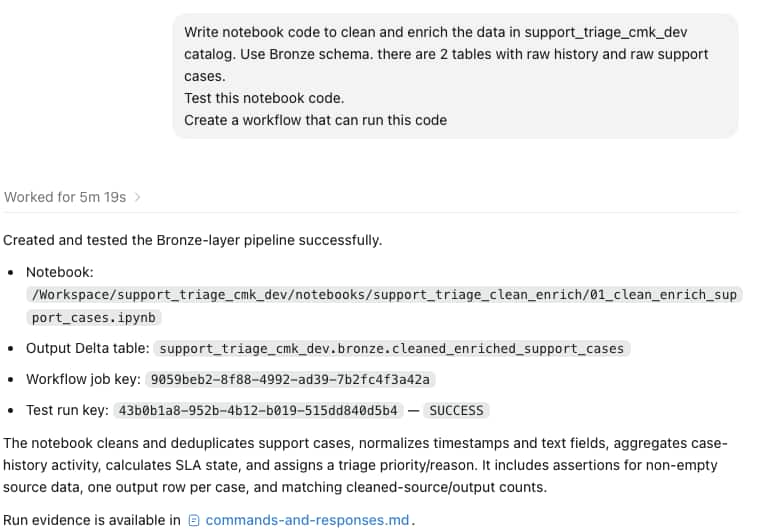
Figure: Ask-AIDP reports the created notebook, output table, workflow job, successful test run, and the evidence artifact for review.
For any create, update, deployment, or repair action, use a dry run first when you want to inspect the generated command and request body. For production work, preserve the reported job key, run key, logs, and commands-and-responses.md evidence with the change record or deployment ticket.
Keep the workflow governed
Ask-AIDP makes platform operations easier to express, but it does not make them less governed. Oracle AI Data Platform validates CLI requests, service-side permissions remain in effect, and OCI IAM controls access to the platform. The plugin does not generate OCI API keys, create IAM policies, or bypass resource permissions.
For longer-running work, Ask-AIDP writes local evidence that can include request JSON, CLI responses, task-output exports, cluster-log responses, and a summary of the run. This makes the conversational workflow useful for engineering teams that need to review what happened after a workflow, deployment, or repair action completes.
Final takeaway
The Oracle AI Data Platform CLI and Java, Python, and TypeScript SDKs give teams robust programmatic access to Oracle AI Data Platform Workbench. Ask-AIDP extends those same interfaces into Codex, so users can move from an engineering request to an auditable Workbench operation without manually assembling every command and request payload.
For teams already using Oracle AI Data Platform Workbench for notebooks, workflows, Git-backed projects, catalogs, and AI workloads, this provides a practical way to bring conversational assistance into an existing governed automation model.