
Oracle AI Database 23.26.1 introduced the datediff function. The syntax for this is:
datediff ( <unit>, <start date>, <end date> )
The units can be any period from years down to nanoseconds.
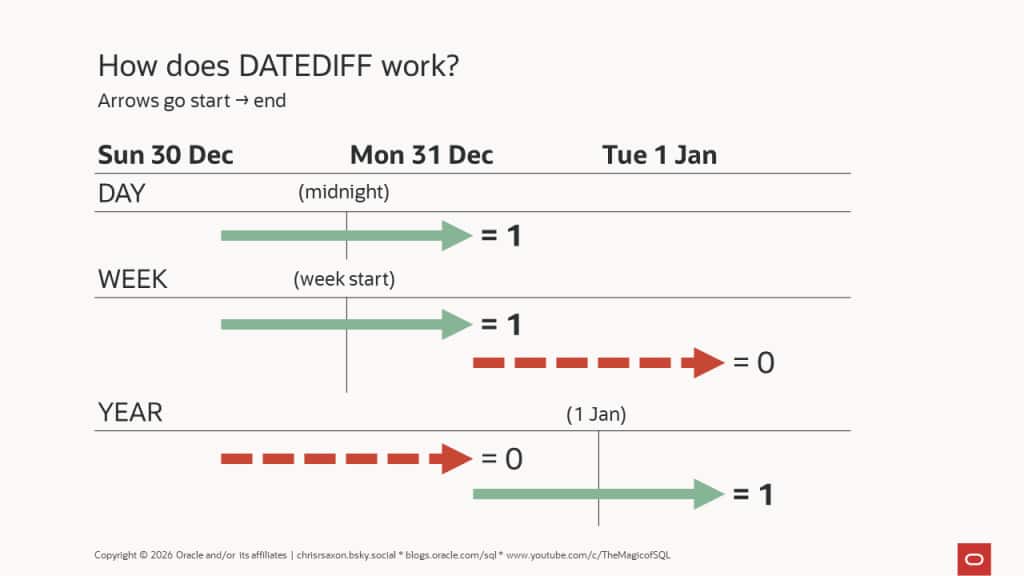
Despite the name, this function doesn’t calculate elapsed time between two dates. Rather, it counts the number of time unit boundaries crossed between two dates. This makes datediff unsuitable for age calculations or other calculations which need complete units.
If no boundaries are crossed, datediff returns zero. The result is negative when the end date is before the start date and positive when it’s after.
To see this, the following counts year boundaries. From 23:59:59 on 31 Dec 2025 to midnight on 1 Jan 2024, datediff returns -1 year. To 1 Jan 2025, it returns 0. To 1 Jan 2026, it returns 1:
This behaviour can lead to surprising results. For example, this compares the year, month, and day boundaries crossed from the end of 2025 to the start of 2026:
Despite only one second elapsing, all three calls return one. This is because the dates have crossed from:
- Year 2025 => 2026
- Month Dec => Jan
- Day 31st => 1st
This also applies to the time units quarter, hour, minute, and second. A notable exception is weeks. The 31 Dec 2025 is a Wednesday, crossing into Thursday 1 Jan 2026. These days fall in the same week by most definitions.
By default, the start of the week is determined by the session’s nls_territory settings. Monday is the ISO standard week start which is used by many countries. There are many exceptions; most notably the USA which considers Sunday the start of the week.
For example, crossing from 4th to 5th Jan 2026 goes from Sunday to Monday. Setting the territory to America means these days fall in the same week. When you change the territory to the UK, these now cross the boundary into a new week. To help you see this, the query includes to_char ( dt, 'D' ) which returns the day of the week number for the current NLS settings:
This means different environments can return different results for week calculations. It’s better to be explicit about which day you consider the start of the week. Use datediff‘s fourth parameter to do this.
The optional fourth parameter defines the start of week, quarters, and years. How this works depends on the input unit.
For weeks, the valid values are 0-7, where zero is the default and uses the NLS settings described above, Monday is 1, up to Sunday which is 7.
Setting the week start to 4 (Thursday) means the dates 31 Dec 2025 to 1 Jan 2026 now cross the Wednesday-Thursday week boundary:
For quarters and years, the valid values are 1-12. These numbers correspond to the first day of the month: January is 1, February is 2, and so on up to December which is 12. For quarters, values with a difference of three give the same result: e.g. using 2, 5, 8 or 11 all use the same quarter boundaries (February, May, August, and November).
Setting the year and quarter start to the first of February means starting on 31 Dec 2025 and ending a day later no longer crosses these boundaries:
For all other time units, the fourth parameter is invalid. Passing any value will raise an error.
Oracle AI Database also provides a synonym for datediff: timestampdiff. These two functions work identically. You can mix date and timestamp input values for both and they will handle time zone differences if present.
Time zone handling
If either input datetime to the *diff functions has a time zone, the database will first convert both to UTC, then compare the dates. For example, one second before midnight 1st Jan 2026 in New York (time zone offset -05:00) occurs after midnight on 1st Jan 2026 in London (time zone offset 00:00). When converted into UTC, both datetimes occur on the same day, month, and year.
Due to this, datediff returns zero when comparing these datetimes:
There’s one more consideration when filtering rows using the *diff functions: whether the query can use an index.
How indexes work with datediff
You can create indexes on datediff. But the database will only use them if the index exactly matches how you call datediff in the where clause. If you change the time unit or either of the dates the optimizer can no longer use the index.
This limits the use of datediff indexes. It’s better to rearrange the logic in the where clause so there are no expressions on the left-hand side column. This enables the optimizer to use standard indexes on this column.
For example, instead of using datediff to find rows that cross one year boundary like this:
where datediff ( year, start_date, end_date ) = 1Rewrite the condition like so:
where start_date >= trunc ( end_date, 'yyyy' ) - interval '1' year
and   start_date <  trunc ( end_date, 'yyyy' )
The database can now use a regular index on start_date. In general, to find a boundary count of N, test a half-open range on start_date is:
- Greater than or equal to the start of the relevant unit for
end_date - N. - Less than the start of the same unit for
end_date - ( N - 1 ).
This rearrangement also enables you to emulate datediff functionality on earlier releases of Oracle AI Database.