Views are a great way to create reusable SQL queries. But they have a frustrating restriction:
You can’t pass parameters to them!
This is particularly problematic if you want to filter queries with GROUP BY clauses or window functions. For example, this view gets the total number and salary of employees per department:
Say you want to restrict it to employees hired on or after a given date. But filtering happens before the grouping. So there’s no way to limit like this when querying the view. Either you need to recreate it (changing the result for everyone else querying the view, which is probably unwanted) or give up and copy the logic directly into your SELECT statement.
Oracle AI Database offers another way: macros. Available in release 19c (19.6), they received a big upgrade in release 23.26.4. Macros returning queries (aka table macros) are view-like objects that can accept parameters.
In this post we’ll see how you can use table macros to emulate parameterized views using:
We’ll also see how you can use macros to define column lists in the SELECT and GROUP BY clauses at call time. Then finish with a summary and cheat-sheet.
Create parameterized views with CREATE MACRO
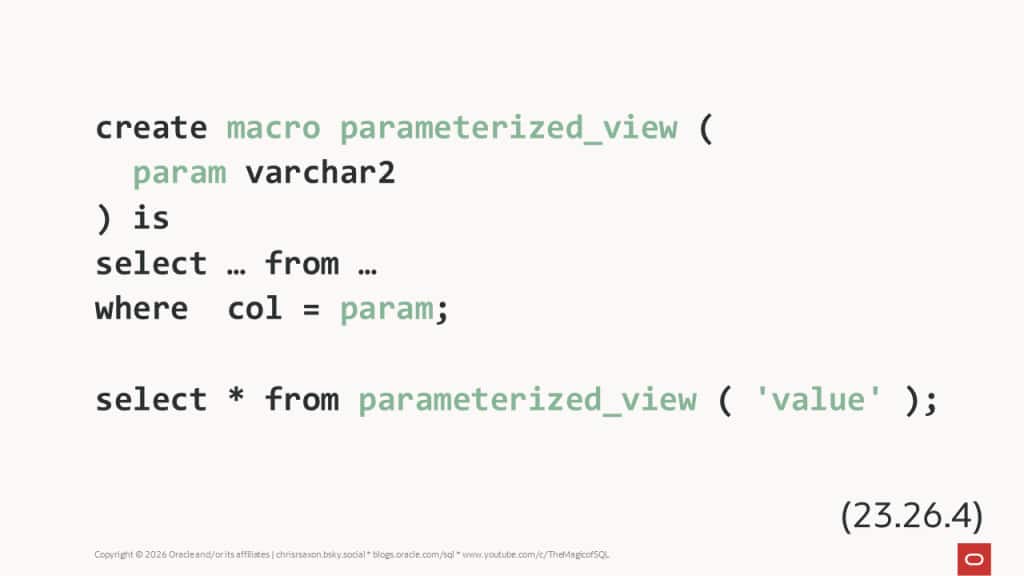
The CREATE MACRO command defines a SQL expression. The basic syntax is:
So, to make a macro that returns department totals, filtered by employee hire date, use:
You can then query the macro like a regular table or view in the FROM clause:
Though there is one detail to note. If a macro has no parameters, you must call it with parentheses. For example, this defines a macro that adds manager names to each department with no filters:
You can only use table macros in the FROM/JOIN clauses; using them in other places is restricted.
This update also includes other bugfixes and enhancements. Notably, before 23.26.4, you could not use macros in the WITH clause. This restriction is now gone:
CREATE MACRO is only available in release 26ai, if you’re still on 19c then you can use the PL/SQL function approach.
Create parameterized views with CREATE FUNCTION SQL_MACRO
In earlier releases, you can create macros with PL/SQL. To do this the function must:
- Return a string (
VARCHAR2orCLOB) - Have the
SQL_MACRO ( TABLE | SCALAR )clause (TheTABLE | SCALARoption is only valid in release 21c and higher; 19c defaults toTABLEmacros). - Return the SQL expression as text.
These implement the macros above using PL/SQL:
Note: the above uses GROUP BY department_id to ensure 19c compatibility; GROUP BY ALL was added in 23.9.
Note that the parameter name is part of the return string. The database effectively does a “find and replace” of it with the actual text of this parameter when you call it. So if you pass a column to the macro, that column becomes part of the final statement. Not the values within it. The same applies for bind variables, functions, etc.
DO NOT concatenate the parameter into the return string. The value of string parameters is NULL in the function body (to avoid SQL injection). For parameters with other data types, the macro body only sees their value during hard parses. So if you pass a bind variable and concatenate it into the return string, the SQL text has the bind value from that hard parse. The returned expression remains the same if you call the macro again with new bind values. Sooner or later this will give you unexpected results!
You call text-style macros in the same way as a native macro. Though – unlike macro objects – there is no syntax or permissions check at compile time. If you make a mistake in the query, you’ll only find out when you call the macro:
Whereas the corresponding CREATE MACRO fails at compile time:
This gives a big advantage to CREATE MACRO: screw up the SQL expression and you get a compile time error.
So at this point you may be wondering: if I’m on the latest release, what’s the point of text-style macros?
Compile time checking makes new style macros easier to verify and debug. They’re also more concise. So switching to the new syntax seems like a winner.
But there is still a use-case for text-style macros: passing column lists. For example, to define grouping or sorting columns at runtime.
Defining grouping columns at call time
The previous macros grouped employees by department. What if you want the same totals, but to be able to specify the grouping columns when calling the macro?
With text-style macros you can do this by adding a column list parameter with the DBMS_TF.COLUMNS_T type. This is an array of column names. Loop through them in the macro body to build up the grouping list and use this in the return string.
For example:
Then pass the list of names using the COLUMNS pseudo-operator when you call the macro:
You can’t pass column-lists to CREATE MACRO, making this one case where you’ll still reach for the classic macros.
Comparison
Views are a great way to define reusable SQL queries. They remain the go-to choice if you don’t need to parameterize the query.
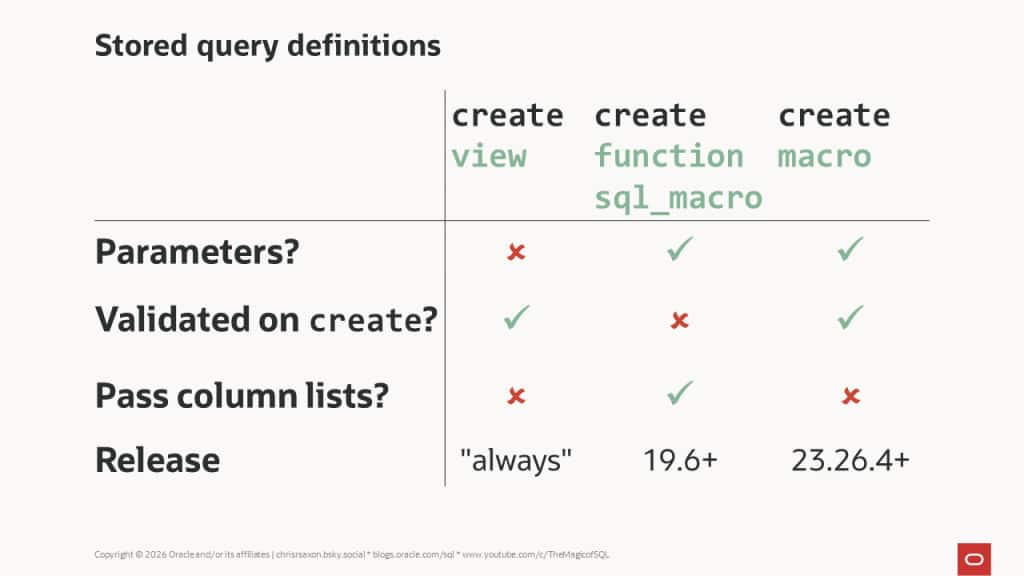
If you do need to parameterize the query you can use macros. The latest release makes these a first-class object with CREATE MACRO. Unlike classic CREATE FUNCTION macros, the database verifies the syntax and permissions at compile time.
Combined with simpler syntax, these are the best way to make most macros when you’re on release 23.26.4 or higher. However, when you want to construct column lists then classic macros are still the way to go.
Here’s a cheat sheet summarizing the differences: