You can get the first N rows in a data set with fetch first in Oracle AI Database. But what if you only want the Nth row?
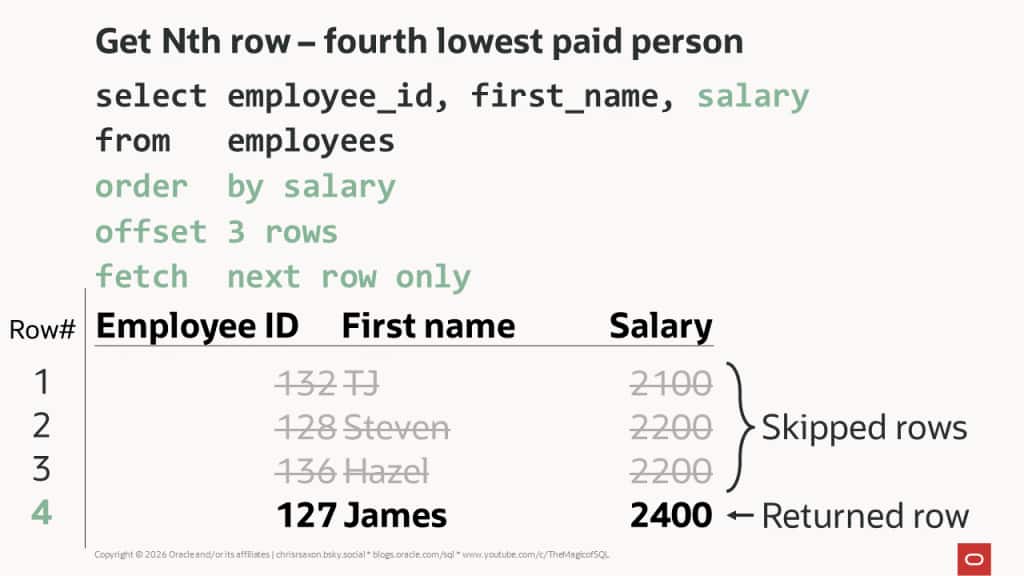
The offset clause enables you to bypass the first N rows in the results. So you can return just the Nth row by offsetting N-1 rows and returning the next row only.
For example, this finds the fourth lowest paid employee:
Note: this is for queries where you want to jump straight to the Nth row or value. If this is part of a pagination process where users have paged through the previous rows, avoid OFFSET. It’s more efficient to use keyset pagination.
Simple enough. But what happens if many people are paid the same?
When two rows have the same salary, their order is undefined. Salary is not unique, so the order by does not define a total ordering. You could get a different row each time you run the query even on static data. To overcome this, you can add unique columns to the sort to prevent duplicates or show all rows with the same value. For this post we’ll assume you want the latter.
In this case, there are several scenarios to consider:
- Get the Nth row and following rows tied with the Nth.
- Get every row with the same value as the Nth.
- Get all rows with the Nth distinct value.
While similar, these are all subtly different. To see the difference, consider the five lowest paid employees:
EMPLOYEE_ID FIRST_NAME               SALARY
----------- -------------------- ----------
        132 TJ                         2100
        128 Steven                     2200
        136 Hazel                      2200
        127 James                      2400
        135 Ki                         2400
Rows four and five have the same salary; this is the third lowest unique salary. The rows returned by each scenario are:
- If you request the fourth row, include the fifth; but requesting the fifth row won’t include the fourth.
- Returns both the fourth and fifth rows, regardless of which you request.
- Requesting the third lowest salary fetches both the fourth and fifth rows.
The first of these cases is unusual: typically you’d either want the Nth row alone or everything tied with the Nth. We’re including it for completeness. The second case is for when you want all rows tied with the one at position N. The final scenario covers the case where you don’t know the position of the rows: you’re fetching by Nth distinct value instead.
We’ll briefly cover performance considerations for each of these. There’s a cheat sheet at the end if you want a quick summary.
Find the Nth row and following rows with the same value
To get the Nth row plus all following rows with the same sort value, switch to fetch next with ties. For example, the following tweaks the query above to find the fourth lowest paid person and includes the fifth row which has the same salary:
Tied rows are those with the same value for all the order by columns as the Nth. This approach only includes rows after the Nth in the results. It excludes earlier rows that have the same salary. This is the first scenario above.
For example, change the query to find the fifth lowest paid employee and you only get one row:
As with the query at the top of this post, which row you get is undefined. To always include all rows with the same salary, you need a different approach.
Find all rows with the same value as the Nth
You can get a value for the Nth row in a sorted result set with the nth_value window function. The following includes this function to show the salary for the fifth row:
Note that nth_value returns null before the fifth lowest salary. By default, the window includes all rows up to the current one, including ties. Until reaching rows with the same salary as the fifth, there is no Nth value to return.
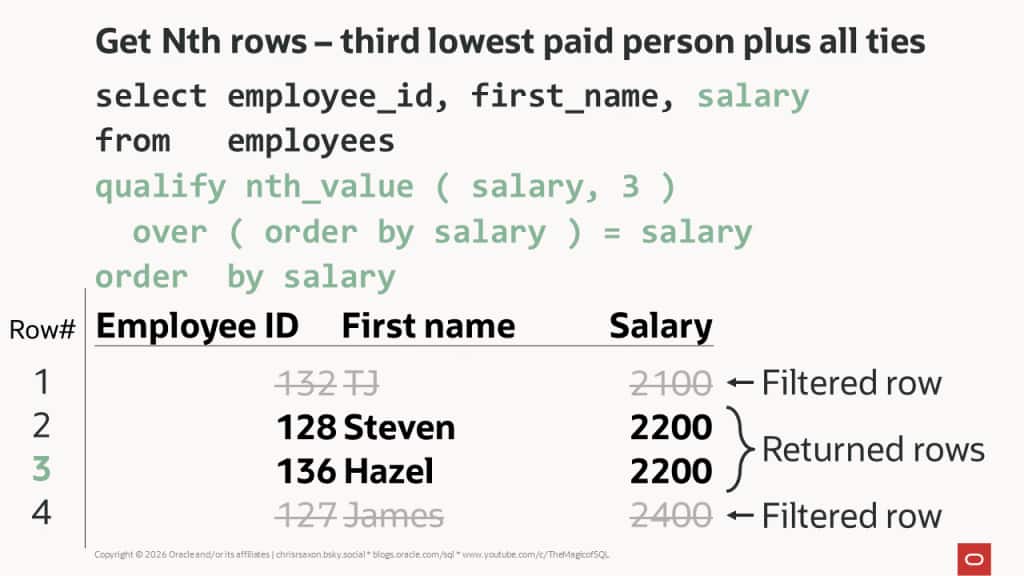
To return all rows with the same salary as the fifth row, check if nth_value equals the current salary.
You can’t use window functions directly in the where clause, so you need a different method. To solve this, Oracle AI Database 23.26.0 introduced the qualify clause. This lets you filter window functions directly, like the having clause filters aggregate functions.
This query uses qualify to get all the rows for everyone earning the same as the fifth lowest paid employee:
To do this on earlier releases, you need to calculate nth_value in a subquery. Then filter its output in the outer query. For example:
Find all rows equal to the Nth distinct value
The methods above find the row at position N. But what if you want rows with the Nth unique value; for example, everyone with the third lowest salary?
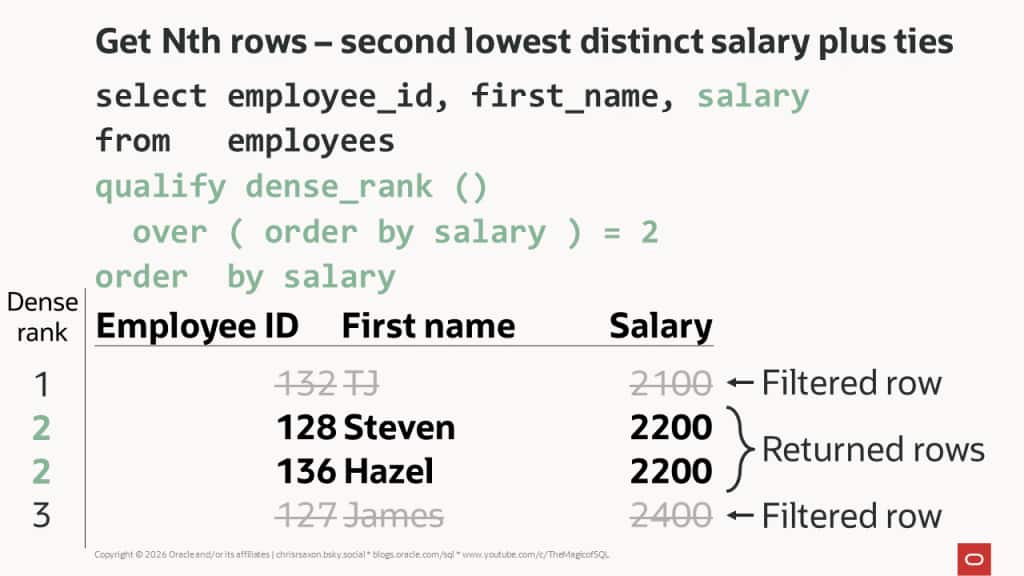
To do this, use dense_rank. This assigns consecutive integers; rows with the same sort value have the same rank. You should use this instead of the similarly sounding rank function. After tied rows, rank returns the row’s position, not the value’s position.
The following query uses qualify to filter dense_rank and find the rows with the third lowest salary:
As with nth_value, use a subquery on earlier releases.
Performance tuning Nth row queries
To get the Nth row or value, the database must process all the rows before it. To see this look at the A-rows in the query’s execution plan.
For example, this gets the row for the 30th lowest paid employee:
Notice that the A-rows column reports 30 rows for the window sort pushed rank operation.
This means queries with large values of N can take a long time to process. This applies whether you use offset or window functions. The database must read all the rows up to N, limiting your tuning options.
Sorting by indexed, mandatory columns may help. This enables the optimizer to scan the index instead of sorting the table. However, the database still needs to read the first N-1 entries which takes time. Put checks in your code to reject large values to prevent customers flooding your database with expensive Nth row or value queries.
If finding the Nth row is a common, performance-critical query, consider pre-calculating and storing this result. For example, by storing the ranks in a column. Bear in mind this moves the work to writes instead of reads. Whether this trade-off is worth it is something you’ll need to assess on a case-by-case basis.
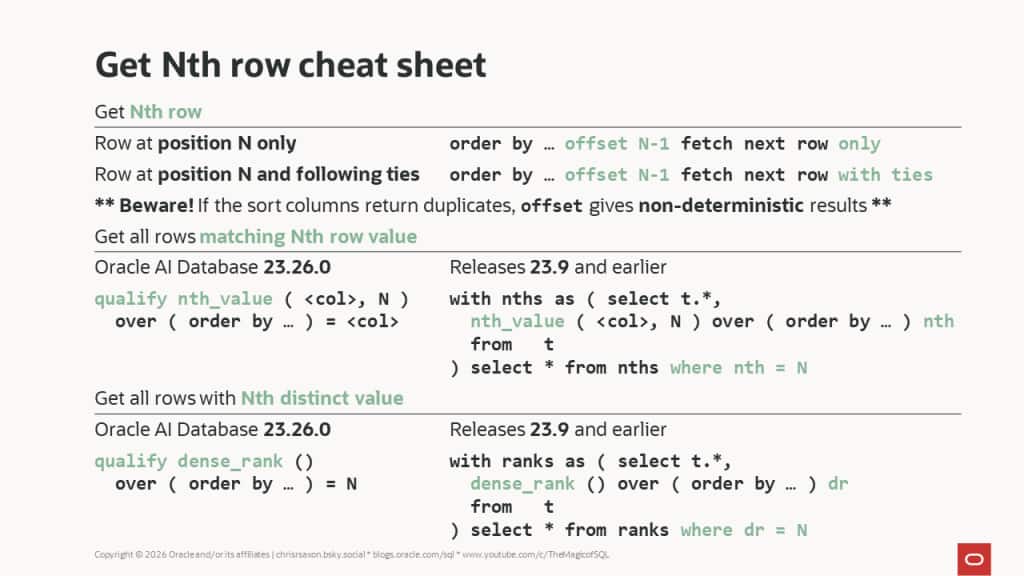
Get Nth row cheat sheet
To recap:
- Use
offset N-1 fetch next row onlyto get the row at position N only. - Use
offset N-1 fetch next row with tiesto include tied rows after N. - Use
nth_valueto get all rows matching the Nth row’s value. - Use
dense_rankwhen searching by distinct values.
Here’s a cheat sheet summarizing the methods in this post: