
The Solaris(TM) Cluster
3.2 update 2 release , also called Sun Cluster 3.2, introduces the
new feature called Zone Clusters,
which is also known as Solaris Containers Clusters, and
this blog introduces the reader to Zone Clusters. Here you will find
an overview that defines a Zone Cluster and identifies some important
reasons why you would want to use a Zone Cluster. Blogs should be
short and concise. So this will be the introductory blog. I plan to
provide a series of blogs, where each blog covers one important
aspect of Zone Clusters. Subsequent blogs will cover the major use
cases, a comparison of Zone Cluster versus other zone solutions, and
explanations of various aspects of the technologies that support a
Zone Cluster.
Now let’s begin by
defining the feature.
A Zone Cluster is a
virtual cluster, where each virtual node is a non-global zone.
Thus we are entering a
world where a set of machines (defined as something that can host an
operating system image) can now support multiple clusters. Prior to
this feature, there was exactly one cluster and we did not have a
unique name for that kind of cluster. The original cluster type has
as voting member nodes all of the global zones, which led us to apply
the name Global Cluster to
that kind of cluster. Starting with SC3.2 1/09 (also called update 2)
there will always be exactly one Global Cluster on a set of machines
that Sun Cluster software supports.
The
same set of machines can optionally also support concurrently an
arbitrary number of Zone Clusters. The number of Zone Clusters is
limited by the amount CPU’s, memory, and other resources needed to
support the applications in the Zone Clusters. Exactly one Solaris
operating system instance and exactly one Sun Cluster instance
supports the one Global Cluster and all Zone Clusters. A Zone Cluster
cannot be up unless the Global Cluster is also up. The Global Cluster
does not contain the Zone Clusters. Each cluster has its own private
name spaces for a variety of purposes, including application
management.
A Zone Cluster appears to
applications as a cluster dedicated for those applications. This same
principle applies to administrators logged in to a Zone Cluster.
The Zone Cluster design
follows the minimalist approach about what items are present. Those
items that are not directly used by the applications running in that
Zone Cluster are not available in that Zone Cluster.
A typical application A
stores data in a file system F. The application needs a
network resource N (authorized IP address and NIC combination)
to communicate with clients. The Zone Cluster would contain just the
application A, file system F, and network resource N.
Normally, the storage device for the file system would not be present
in that Zone Cluster.
Many people familiar with
the Global Cluster, will remember that the Global Cluster has other
things, such as a quorum device. The Zone Cluster applications do not
directly use the quorum device. So there is no quorum device in the
Zone Cluster. When dealing with the Zone Cluster, the administrator
can ignore quorum devices and other things that exist only in the
Global Cluster.
The Zone Cluster design
results in a much simpler cluster that greatly reduces administrative
support costs.
A Zone Cluster provides
the following major features:
-
Application Fault Isolation – A
problem with an application in one Zone Cluster does not affect
applications in other Zone Clusters. Those operations that might
crash an entire machine are generally disallowed in a Zone Cluster.
Some operations have been made safe. For example, a reboot
operation in a Zone Cluster becomes a zone reboot. So even an
action that can boot or halt one Zone Cluster, will not affect
another Zone Cluster. -
Security Isolation – An application
in one Zone Cluster cannot see and cannot affect resources not
explicitly configured to be present in that specific Zone Cluster. A
resource only appears in a Zone Cluster when the administrator
explicitly configures that resource to be in that Zone Cluster. -
Resource Management – The Solaris
Resource Management facilities can operate at the granularity of the
zone. We have made it possible to manage resources across the entire
Zone Cluster. All of the facilities of Solaris Resource Management
can be applied to a Zone Cluster. This includes controls on CPU’s,
memory, etc. This enables the administrator to manage Quality of
Service and control application license fees based upon CPU’s.
We recognize that
administrators are overworked. So we designed Zone Clusters to reduce
the amount of work that administrators must do. We provide a single
command that can create/modify/destroy an entire Zone Cluster from
any machine. This eliminates the need for the administrator to go to
each machine to create the various zones.
Since a Zone Cluster is
created after the creation of the Global Cluster, we use knowledge of
the Global Cluster to further reduce administrative work. At this
point we already know the configuration of the cluster private
interconnect, and thus can automate the private interconnect set up
for a Zone Cluster. We can specify reasonable default values for a
wide range of parameters. For example, a Zone Cluster usually runs
with the same time zone as the Global Cluster.
Once you have installed
Sun Cluster 3.2 1/09 on Solaris 10 5/08 (also called update 5) or
later release, the Zone Cluster feature is ready to use. There is no
need to install additional software. The Zone Cluster feature is
maintained by the regular patches and updates for the Sun Cluster
product.
So a Zone Cluster is a
truly simplified cluster.
Now, let’s talk at a
high level about why you would use a Zone Cluster.
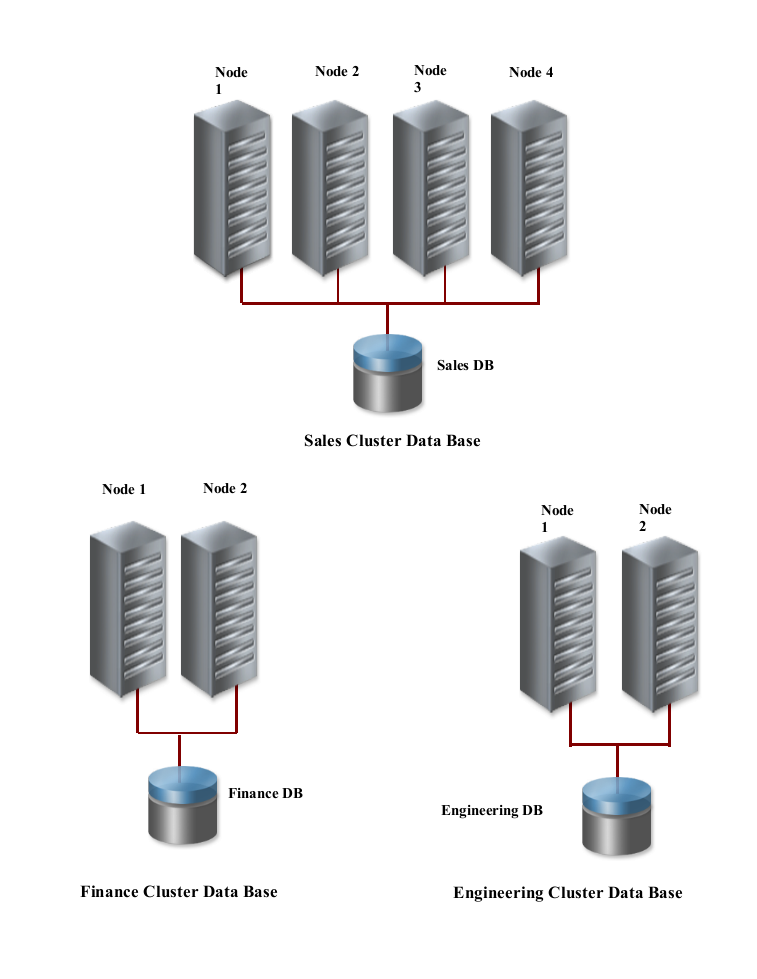
Many organizations run
multiple applications or multiple data bases. It has been common
practice to place each application or data base on its own hardware.
Figure 1 shows an example of three data bases running on different
clusters.
Moore’s Law continues to apply to computers, and
the industry continues to produce ever more powerful computers. The
trend towards ever more powerful processors has been accompanied by
increases in storage capacity, network bandwidth, etc. Along with
greater power has come improved price/performance ratios. Over time,
application processing demands have grown, but in many cases the
application processing demands have grown at a much slower rate than
that of the processing capacity of the system. The result is that
many clusters now have considerable surplus processing capacity in
all areas: processor, storage, and networking.
Such large amounts of
idle processing capacity present an almost irresistible opportunity
for better system utilization. Organizations seek ways to reclaim
this unused capacity. Thus, they are choosing to host multiple
cluster applications on a single cluster. However, concerns about
interactions between cluster applications, especially in the areas of
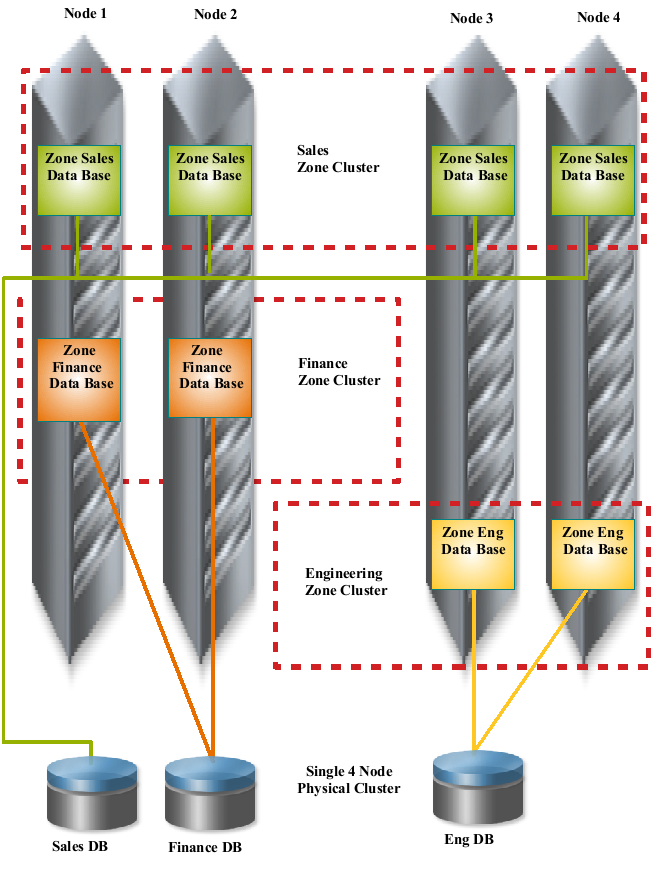
security and resource management, make people wary. Zone Clusters
provide safe ways to host multiple cluster applications on a single
cluster hardware configuration. Figure 2 shows the same data bases
from the previous example now consolidated onto one set of cluster
hardware using three Zone Clusters.
Zone Clusters can support
a variety of use cases:
-
Data Base Consolidation – You can
run separate data bases in separate Zone Clusters. We have run
Oracle RAC 9i, RAC 10g, and RAC 11g in separate Zone Clusters on the
same hardware concurrently. -
Functional Consolidation – Test and
development activities can occur concurrently while also being
independent. -
Multiple Application Consolidation –
Zone Clusters can support applications generally. So you can run
both data bases and also applications that work with data bases in
the same or separate Zone Clusters. We will be announcing certification of other applications in Zone Clusters in the coming months.
-
License Fee Cost Containment –
Resource controls can be used to control costs. There are many use
cases where someone can save many tens of thousands of dollars per
year. The savings are heavily dependent upon the use case.
Here
is an arbitrary example: the cluster runs two applications, where
each application takes half of the CPU resources. The two
applications come from different vendors, who each charge a license
fee where: Total_Charge = Number_CPUs \* Per_CPU_Charge. The
administrator places each application in its own Zone Cluster with
half the CPU’s. This reduces the number of CPU’s available to each
application. The result is that the administrator has now reduced
the Total Charge cost by 50%.
In future blogs, I plan
to explain how to take the most advantage of Zone Cluster in these
various use cases.
Please refer to this video blog that provides a long detailed explanation of Zone Cluster.
Dr. Ellard Roush
Technical Lead Solaris Cluster Infrastructure