Solaris Kernel Zones Verified Boot
Introduction

Oracle Solaris 11.3 introduces Kernel Zones Verified Boot.
To review, both Solaris Verified Boot and Kernel Zones were introduced in Solaris 11.2.
Solaris Verified Boot verifies the RSA digital signatures of Solaris kernel modules before execution. For more information, see my blog on
Solaris Verified Boot
Solaris Kernel Zones partitions Solaris into multiple virtual computers each running their own independent Solaris kernel
Solaris 11.3 extends Verified Boot functionality to Kernel Zones
Chain of Trust
Verified Boot is based on the chain of trust concept.
That is, don’t use software to perform verification until it is verified itself.
The following shows flow control for a Kernel Zone with Verified Boot enabled:
✓ Boot the Global Zone with Verified Boot and Immutable Global Zone enabled
↓
✓ Kernel Zone daemon kzhost verifies zvboot for a kernel zone instance
↓
✓ Kernel Zone zvboot verifies the initial Solaris kernel module unix
↓
✓ Solaris kernel module unix verifies/loads other kernel modules, starting with genunix |
Example
We’ll start off with a complete example to demonstrate Verified Boot on Kernel Zones. Here I will create a kernel zone with Verified Boot enabled then install and boot the zone.
Preliminaries
First verify Kernel Zones is hardware- and software-supported with this command:
zman $ virtinfo -c supported list kernel-zone |
Ooops. If this occurs, check if package brand-solaris-kz is installed with:
pkg info brand-solaris-kz
If not installed, then install:
pkg install brand-solaris-kz
In my case, brand-solaris-kz was installed.
However, for X86, you also need virtualization enabled in the BIOS.
BIOS menus vary, but for me it was under:
Advanced → CPU Setup → enable VT-d (or VT-x)
Let’s try again. After updating BIOS and rebooting:
zman $ virtinfo -c supported list kernel-zone |
Configuring Verified Boot Kernel Zones
Here I setup a new Kernel Zone I’ll call “zman-kz8” with Verified Boot enabled:
zman # zonecfg -z zman-kz8 |
The policy to use on failures is configurable with three policy settings: none, warning, and enforce:
none disables Verified Boot—that is do no verification before loading a kernel module
warning logs verification failures to the console and system log. The module is loaded and executed, however.
This is the default setting
enforce logs and does not load the module (the module fails to load)
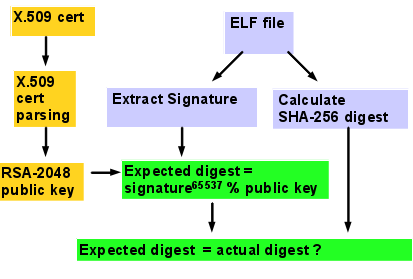 Verified Boot elfsign signature verification process |

It’s important to note that to fully enable Verified Boot, you must set the policy to enforce.
This will prevent corrupt and unsigned kernel modules from loading.
The warning policy provides no real security as it goes ahead and loads the module.
The main intent of warning is to alert system administrators of the presence of unsigned
or corrupt kernel modules before enabling the policy to enforce.
Corrupt kernel modules should be replaced and unsigned kernel modules should be signed by the
software provider or, if not possible, self-signed by you using elfsign(1)
(see “elfsign” under “More Information,” below).
Install
Now we can install and boot the kernel zone:
zman # zoneadm -z zman-kz8 install |
Boot
Now boot the zone and connect to the zone console:
# zoneadm -z zman-kz8 boot |
Initially Solaris in the kernel zone runs sysconfig and asks the usual questions about hostname, login name, passwords, and network configuration.
Then it boots:
Hostname: zman-kz8 |
As you can see Kernel Zones is booted with Verified Boot enabled.
We exit the console by quickly typing “~.”
Verified Boot allows third-party and self-signed kernel modules. Signing is performed by elfsign, but the public key X.509 cert must be configured for a kernel zone. The cert is specified using a URL and may be either a file in the Global Zone (file: URL) or accessible via the network in the Global Zone (http: or https: URL).
In the example below, I will change the policy of an existing zone to “warning” and add a local (Global Zone) cert file:
zman # zonecfg -z zman-kz8 |
Demo
Now that Verified Boot is enabled, I’ll show what occurs when loading kernel modules that are signed with a correct and incorrect (unauthorized) signatures.
zman /root # zlogin -C zman-kz8 |
Verified Boot Notes and Tips
Here’s some tips about using Verified Boot for Kernel Zones.
Usage error: if you get a “usage:” message at “add verified-boot” or “select verified-boot”, your version of Solaris is too old to support Verified Boot for Kernel Zones.
Memory: the host system should have at least 4 GBytes of available memory for the kernel zone (above what the Global Zone needs) or the system may “hang” during Kernel Zones installation (use prtconf(1M) to find how much memory you have).
Policy: The “policy” setting under verified-boot is optional. If left unspecified, Solaris uses the default value (“warning”).
Certs: certs are optional. They are needed for third-party and self-signed kernel modules signed with elfsign(1). For each RSA x.509 certificate, use “add cert” to add to the list of authorized certs.
You may also use “set cert=” followed by a list of certs in double quotes separated by “,”.
For the local “file:///” cert, the cert file must exist in the host filesystem (zone controller), not the guest, so the Global Zone can pass the cert to the zone guests.
Certs accessible from the Global Zone over the network can be specified with “http:” or “https:” URLs.
Migration: verified boot policy and cert settings transport with the zone when migrated to another system (whether live, warm, or cold migration).
Availability

Solaris Kernel Zones Verified Boot is available with Solaris 11.3 for newer SPARC and X86 platforms. SPARC T5, M5/M6, or newer platforms support Kernel Zones. X86 must have CPU Virtualization, available with Intel Nehalem or newer or AMD Barcelona or newer (Intel VT-x or VT-d, or AMD AMD-v).
More Information
Here’s some sources for further information. More documentation is available at docs.oracle.com
Verified Boot for Kernel Zones will appear in the Solaris 11.3 documentation under the Securing Systems and Attached Devices in Oralce Solaris 11.3 book at docs.oracle.com
Solaris Verified Boot is my blog article on Verified Boot that I wrote for Solaris 11.2. It has more information on Verified Boot concepts.
“Using Verified Boot”, Securing Systems and Attached Devices in Oracle Solaris 11.2
Oracle Solaris Kernel Zones (for Solaris 11.2)
Elfsign Signing on Solaris is a blog I wrote on elfsign and it’s use to self-sign objects.