
What now seems like a really really long time ago, I fiddled with the mwm window manager on a monochrome Sun 3/60 which was set up in our university library as a net-booted Xterminal. I spent some time customising it (nothing spectacular – I’d only been using Unix a few months). Elsewhere, in the computer science building, we had a number of Xterminals and Sun workstations using the CDE desktop. The window furniture was a similar look and feel to mwm, so they complemented each other well.
When I started working at Sun, I continued with the CDE, but we ended up using a call logging system which had a nasty habit of repeatedly popping up a window which said “Visualising window, please wait…”,and grabbing mouse and keyboard focus at the same time. It only persisted for a few short milliseconds before being removed from the screen (when the focus would return to the originally focused window), only to re-appear again a few milliseconds later, grabbing focus again. This flickering effect made the desktop unusable for around 30-60 seconds (depending on the speed of the system) at various points in the application’s life cycle.
The solution for me was to switch to a window manager called WindowMaker (later renamed “Window Maker” – the space was important for copyright reasons I think). This had the ability to confine applications (based on window title, X window class or a number of other attributes) to a particular screen and/or workspace within the screen. It was fairly lightweight, loaded quickly, low memory footprint, and I used it for a number of years. Sadly the development was incomplete (taking 7 years to move from v0.92.0 to v0.95.1), plus the move away from CDE made it harder to switch window manager automatically at login (I seem to remember it was done through the .xinitrc mechanism). So I moved to the supplied GNOME2-based desktop.
Now recently I’ve been playing with GNOME3, but I found it doesn’t support multiple monitors if Xinerama is not enabled. Personally I like the ability to switch each monitor separately to its own workspace (I know others don’t), so I don’t have Xinerama switched on. However, this leaves me with a wasted monitor.
How can I use it? Well, I run a second window manager on it of course. The only thing is, it’s not GNOME:
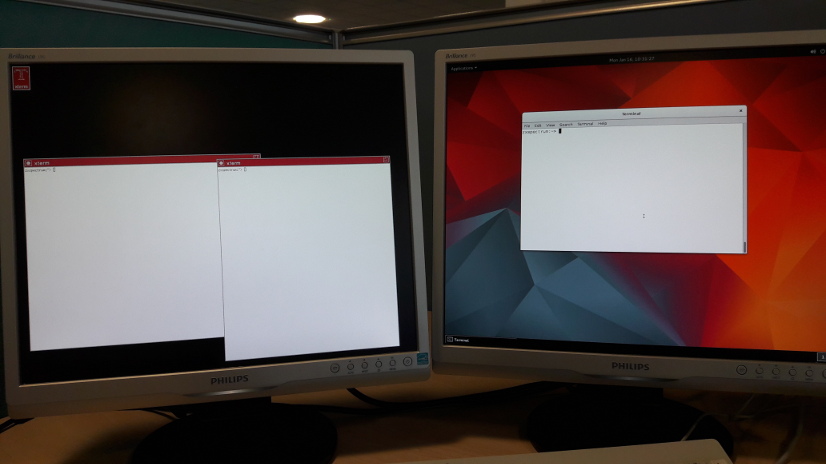
The left screen here (:0.1) is running twm, whilst the right (:0.0) is the gnome-shell. It’s a rather strange juxtaposition of the old and the new, but it’s workable once I got used to it. It does raise the odd eyebrow from people passing by my desk!