- We do not have our own IPS server (publisher)
- we use an IPS server to create an install service, and if we do not have our own IPS server, creating an install service from Oracle IPS server is time-consuming. (but this is not a big problem since we can download an ISO file to create service)
- we use an IPS server to install software packages on client, and if we do not have our own IPS server, installing OS from Oracle IPS server will be time-consuming.
- both AI server and client may not have an access to internet, or they can access internet only with a proxy. so without a bit modification we can not setup install service nor install software packages on client
- We can not specify disk layout, more languages(locales), software packages to be installed, auto reboot or not after installation…
- we can not specify a particular disk or an iSCSI lun to install OS
- there’s no OS mirror if we do not explicitly specify it
- we can not install more languages (locales)
- somebody may want to install a minimal server to harden his system for security concern, somebody may want to install GUI desktop for daily operations. but in a default installation, an solaris-large-server is installed, you can not “shrink” it and desktop will not be installed.
- somebody prefers tcsh (yeah it’s me), somebody likes Apache+MySQL+PHP and many GNU utilities (yeah it’s me again), we may wan to install those additional softwares during OS installation so that we do not have to manually deal with them later.
- We can not specify root password, network environment, default locale, timezone
- we can not specify root password before installation
- we can not add an additional user
- we can not set a hostname
- we can not choose this client to be up with DHCP or Fixed IP (with dns servers, default router)
- we can not specify a default language (locale), e.g., traditional Chinese, Korean, Japanese.
- we can not set timezone of the machine
- we can not register (or we do not want to register) our Solaris
- We can not specify a different OS or OS baseline to be installed, only the first install service we created can be installed on clients.
- we can only install the first OS we create by “installadm create-service”, in my previous article, it’s Solaris 11.2. however some software or hardware vendor may have certified a particular OS (for example, Solaris 11.1) only. (this can be done by creating a client )
- we can not specify a different OS baseline, e.g., 0.175.2.1.0.5.0, 0.175.2.2.0.7.0, for testing purpose. (this can be done by creating a manifest )
- we can only install the first OS we create by “installadm create-service”, in my previous article, it’s Solaris 11.2. however some software or hardware vendor may have certified a particular OS (for example, Solaris 11.1) only. (this can be done by creating a client )
- We can not automatically run a post-installation script for our specific configuration, such as,
- ssh/ftp/telnet root login (it’s a big security concern, I know)
- copy some personal files, such as .tcshrc to provide prompt, path and some useful alias for my preferred shell tcsh
- specify an FQDN (Fully Qualified Domain Name) to stop the annoying sendmail messages
Sep 8 08:33:40 toshiba-vbox sendmail[1526]: [ID 702911 mail.crit] My unqualified host name (toshiba-vbox) unknown; sleeping for retry
- (x86 only) We need to move cursor down with our finger to start automatic installation after this x86 client is up from PXE boot
- after client is up from PXE boot (takes more than 10 seconds) a GRUB menu is on console and requires us to move down cursor in 30 seconds to begin automatic installation, so if we are not standby here in about 40 seconds we will have to retry PXE boot to gain automatic installation. So, can we highlight the second entry in default? This is discussed in this article
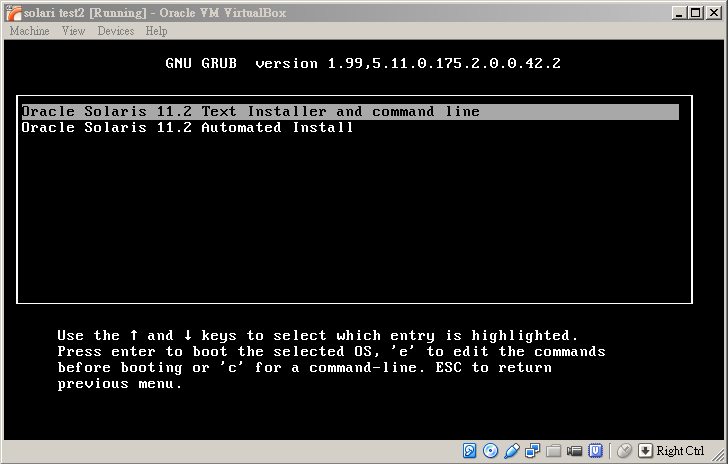
- after client is up from PXE boot (takes more than 10 seconds) a GRUB menu is on console and requires us to move down cursor in 30 seconds to begin automatic installation, so if we are not standby here in about 40 seconds we will have to retry PXE boot to gain automatic installation. So, can we highlight the second entry in default? This is discussed in this article
Customize your AI (1): understand what we lose in an all-default AI configuration

In the previous article we setup a very basic AI server, with all default values. Let’s talk about what we lose in this ALL-DEFAULT configuration so that we can understand what can be customized further.
Authors
Nikki Serapio
Previous post