
Quick Tip: Keep your Workflow process/task canvas clean and readable
As your Workflow Process or Task development grows more complex, keeping the canvas uncluttered can make authoring much more pleasant and efficient. Here’s a tip to help you maintain a tidy, attractive workspace.
The problem
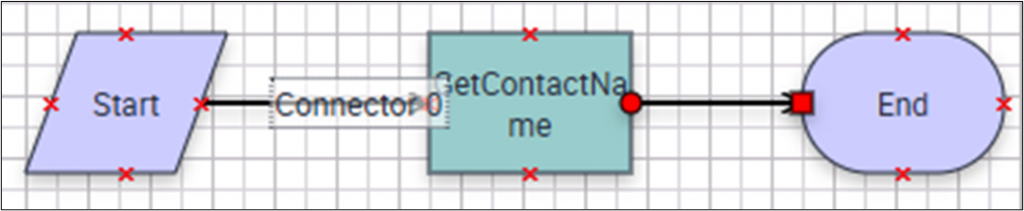
When you create connectors in your workflow, their names (like “Connector 0”) may display on the canvas, sometimes overlapping with other workflow steps and making the diagram harder to read.
The solution
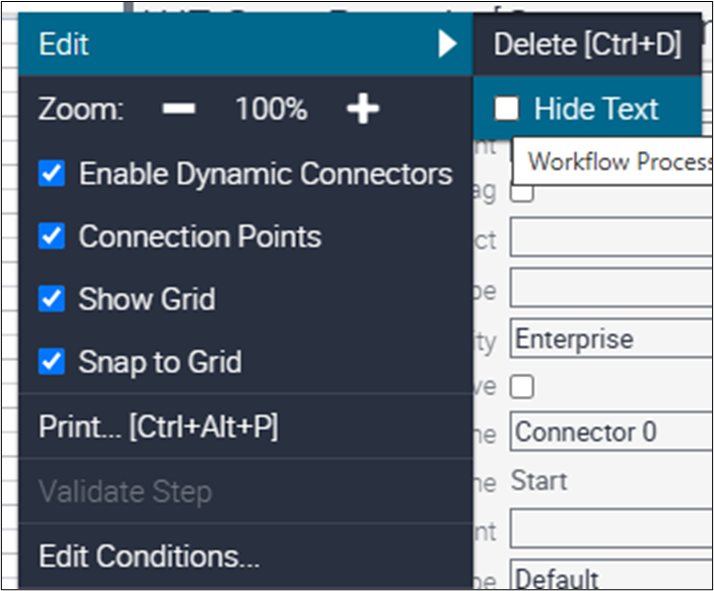
To hide unnecessary connector labels:
- Select the Connector with the label.
- Click the gear icon.
- Choose Edit > Hide Text.
Result
The label disappears from the canvas, giving you a cleaner view.

Note: If you want to display meaningful labels (such as “Yes,” “No,” or “Done” coming from a Decision step), you can follow these same steps, choosing to show the label when needed.
Pro Tip
When editing a workflow process or task in the Web Tools canvas, hide labels that don’t add value. Keep labels that convey meaning to maintain clarity and accessibility.
Try it now: Open your workflow in Web Tools and hide nonessential labels.