
Thank you to Manish Daga for the presentation on this topic.
Be sure to review the presentation in its entirety for detailed information on Hybrid BSO, case study results and performance tuning tips. The latest steps to convert to Hybrid BSO can be found in About Essbase in EPM Cloud.
Why Hybrid BSO?
- Hybrid BSO supports both BSO & ASO Capabilities (all BSO calcs with dynamic aggregations like ASO)
- Sparse and Dense Parent Members can be made dynamic
- Reduces database and application size
- Improves cube refresh performance
- Reduces time for data export and import
- Reduces AMW time
- Improves performance of business rules
- Improves usability
Converting PBCS To Hybrid BSO in EPBCS
- Convert PBCS App to EPBCS
- Select Application, then Overview, then Actions, then Convert to Enterprise.
- Must follow and honor all conversion steps and conversion considerations as documented in the EPBCS Administrator’s Guide.
- Enable Hybrid BSO
- Select Application, then Overview, then Actions, then Enable Hybrid Mode.
- Enabling Modules is Optional
- Also works with Custom Cubes
Enabling Hybrid BSO in EPBCS
An existing application can be converted to Hybrid by Enabling Hybrid Mode.
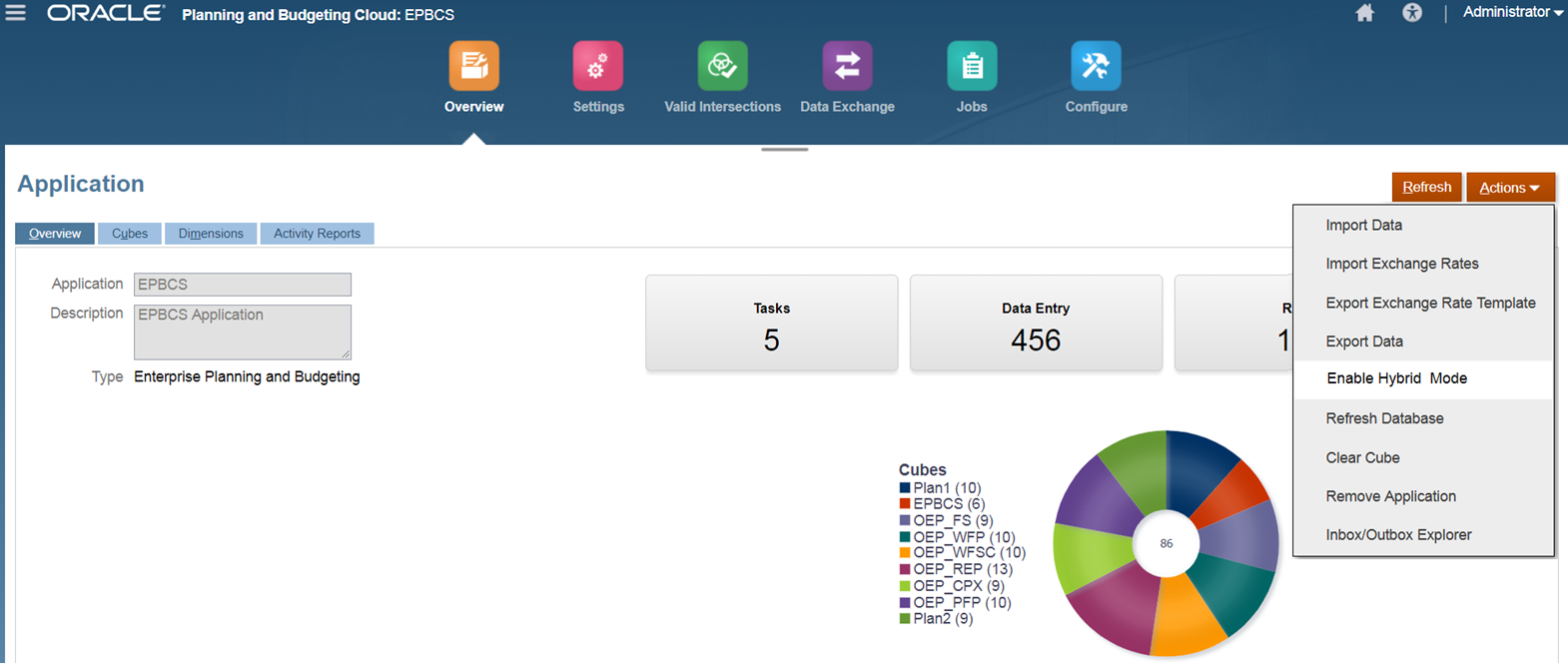
Note: For Planning and Budgeting applications, the Enable Hybrid option is not available. To enable it, you must first convert your application to Enterprise on the Application Overview page. (You need to be licensed for EPBCS to convert from PBCS to EPBCS.) After the conversion, the Enable Hybrid option will be displayed.
What Happens When Hybrid BSO is Enabled?
- Before enabling hybrid, best practice validations will be performed on the application. Any validation failure will need to be fixed before the app is converted to Hybrid.
- On successful validation, all EPBCS BSO cubes (seeded and custom) are enabled for Hybrid and the modules will be reinitialized so hybrid specific changes will be brought in.
- Certain sparse parent members are made dynamic in each of the out of box models/ dimensions
- Appropriate member formula is seeded
- Business rules are updated to remove rollup’s for dimensions which are dynamic
- Customizations done before conversion will be retained. You can restore customized member formulas and rules to factory version in case of any calculation issues.
- You can also make sparse parent members in other dimensions also dynamic (based on application size, planning and reporting requirements). Also, the rollup and other rules in each of the models can be modified based on which sparse parent members have been made dynamic
Comparison Between BSO and Hybrid BSO – Case Study
The goal of the case study was to analyze and compare the performance of EPBCS Financials in both Hybrid and Non Hybrid mode, tune the application to get the best out of Hybrid BSO and document and share the tuning tips.
- Test environment & application size – Use same hardware as what is available to customers with same Essbase configuration settings. Simulate customer scenario as closely as possible. Test both admin and end user flows
Starting on Page 9 of the presentation, you can review the detailed results of the case study; including Test Application Statistics in different modes and Performance Numbers.
EPBCS Hybrid BSO Tuning Tips
Lots of BSO Tuning Tips apply to Hybrid BSO. However, there are some new considerations as well.
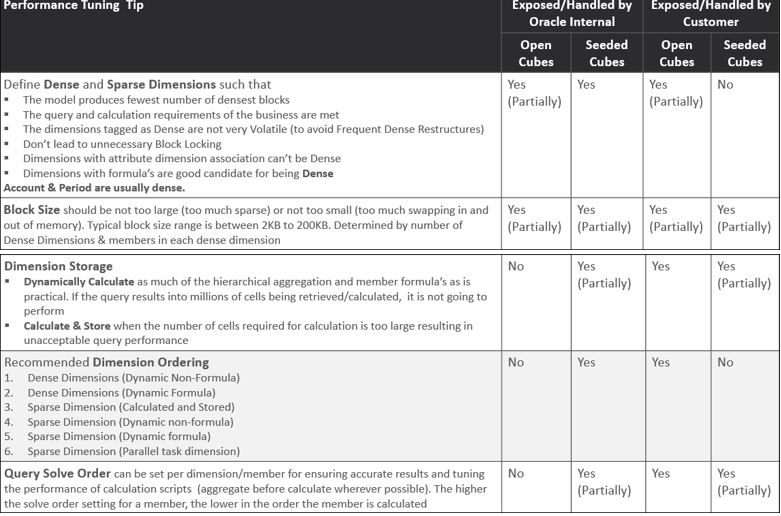
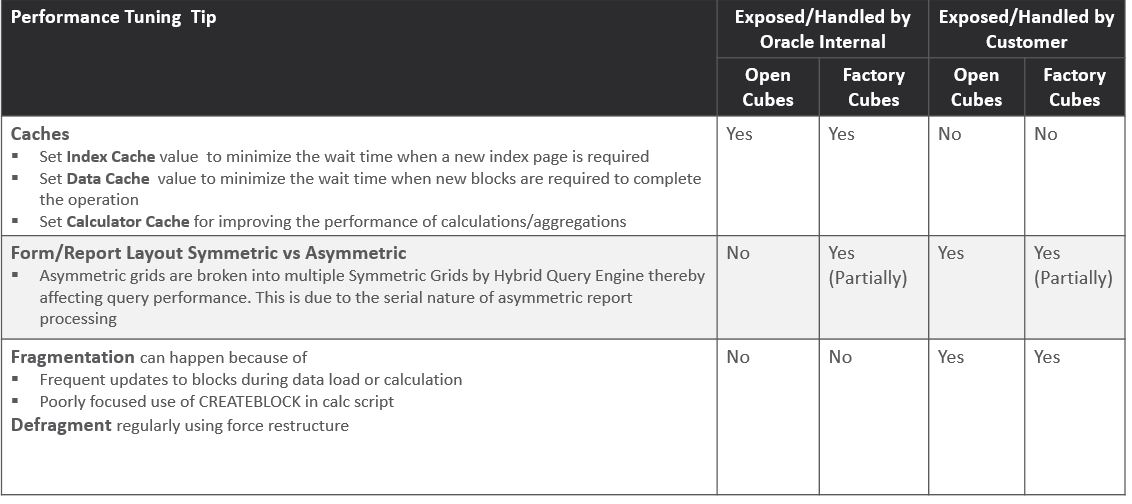
EPBCS Best Practices Framework
The following best practices are monitored/enforced during cube refresh:
- Block Size
- Number of Blocks
- Number of dense dimensions
- Max number of child members under any dynamic parent
- Max number of child members under any store parent
- Parents with single children for level 1 and above of dimensions
- Level 1 and above not set to dynamic calc/Label only in Dense dimensions.
- Usage of dynamic x-refs
Apart from this, the following additional best practices are monitored for modules
- Number of new rules that can be added per module
- Number of rules that can be modified
- Number of new forms that can be added per module
- Number of forms that can be modified
Refer to About Essbase in EPM Cloud for information on:
- Essbase Version that Supports Hybrid Cubes
- Essbase Version that Does not Support Hybrid Cubes
- Can I Upgrade to the Hybrid-enabled Essbase?
- What are the Implications if I Upgrade to Hybrid-enabled Essbase?
- Steps for Converting a Legacy Oracle Enterprise Planning and Budgeting Cloud or Planning and Budgeting Cloud Plus One Application to Use Hybrid BSO Cubes
- Enabling Hybrid-Enabled Essbase for Legacy Oracle Financial Consolidation and Close Cloud Environments
- How Do I Know if an Application has Hybrid BSO Cubes Enabled?
SUMMARY:
- Hybrid BSO provides multiple options for configuring/tuning applications
- Application size reduces significantly with Hybrid BSO because of dynamic sparse dimensions which has positive impact on performance & usability
- Making all sparse dimensions dynamic can be considered as an option for small size application
- A mixed approach with some sparse dimensions being store or some intermediate parents in sparse dimensions being store gives better performance for large size applications
- Hybrid BSO is definitely better than BSO but does NOT replace ASO for reporting purpose
- For very large-sized applications with large number of reporting dimensions and instantaneous aggregation/reporting requirements, Hybrid BSO- ASO with Smart Push & Aggregate Views in ASO can be leveraged
- EPBCS best practices framework monitors application health & provides advance warnings for taking corrective actions for ensuring Optimal Application Performance
References:
- Presentation – presented by Manish Daga
- About Essbase in EPM Cloud
- Conversion steps
- Conversion considerations
- Using Hybrid Aggregation
- EPM Cloud Documentation