
Project IDs often stay with an organization for years. Coming soon, Project Costing introduces configurable Project ID prefixes so organizations can make Project IDs easier to recognize at a glance. Administrators can define a prefix based on the business unit, project type, or the combination of both. The result is a project ID that carries useful context from the moment it is created.
Why this matters
A meaningful prefix helps teams identify key project details without opening the project definition. For example, prefixes can distinguish capital projects from internal projects, indicate the owning business unit, or include a fiscal-year designator.
- Support your organization’s numbering standards without customizing the core auto-numbering logic.
- Help teams identify projects more quickly in lists and transactions.
- Use effective-dated setup to align prefixes with fiscal years.
How configurable prefixes work
After selecting a prefix option on the Project Costing Installation Options page, define and maintain prefix rules over time in a new setup component. Choose the criteria that fits your business model:
- Business Unit
- Project Type
- Business Unit and Project Type
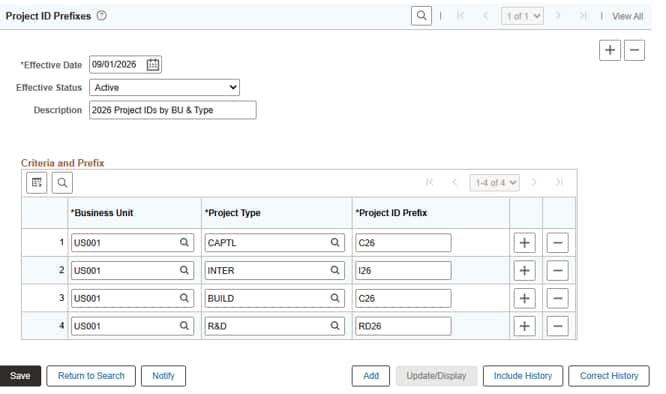
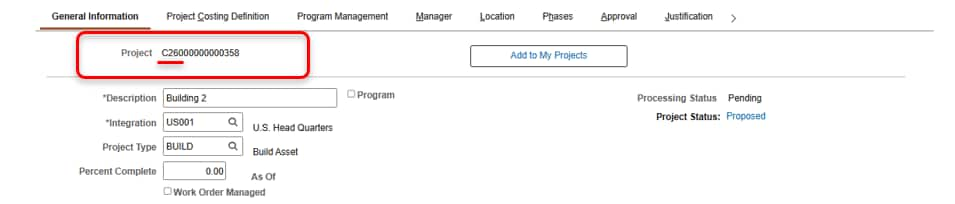
PeopleSoft applies the configured prefix when a new project uses NEXT for its Project ID and the project meets a matching rule. If no rule applies, PeopleSoft continues to generate the standard auto-numbered ID. Manual input of Project IDs remains available.
More control on Project General
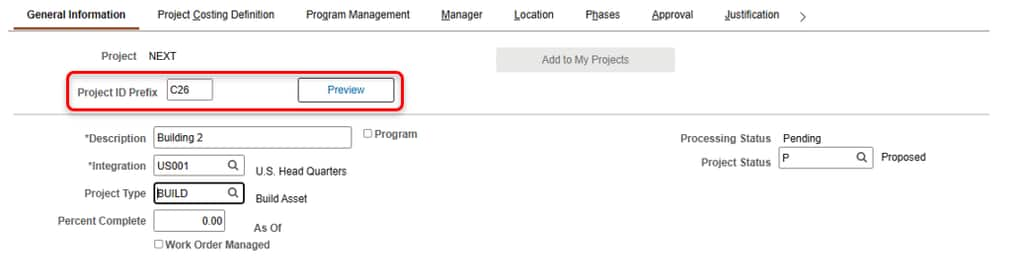
On Project General, users can preview the prefix that PeopleSoft will apply. They can also enter a different prefix when business timing calls for it, such as creating next fiscal year’s projects before the effective date of the new configuration. Your organization can use Page and Field Configurator to control who can see or change the preview and override fields.
Where prefixes are used
Prefix generation is enabled across the common ways that organizations create projects:
- Project General
- Fluid Project Request
- Copy Project
- The PROJECT_GENERAL Component Interface
Preview and override are available on Project General and override through the PROJECT_GENERAL Component Interface. Project Request and Copy Project apply the configured prefix but do not display preview or override options.
Prepare for the Upcoming Project ID Prefix Feature
Start by deciding which stable business attributes should appear in your Project IDs. Project IDs cannot be changed after Save. Avoid values that may change later. Then define your prefix rules, including any future effective dates, and decide which users should have override access. With a small amount of configuration, your Project IDs can become a clearer, more useful part of everyday work.