
PeopleSoft Expenses enhancements planned for an upcoming release will help employees capture mileage more easily, improve the handoff from proxies to employees, and give organizations greater control over corporate card transactions in the Wallet. This preview highlights how the planned capabilities can reduce repetitive entry and support more complete expense reporting.
More Flexible Mileage Entry
A day of business travel can involve several destinations. Today, recording each leg requires separate expense lines. Planned mileage enhancements will let employees capture a trip with multiple stops on a single expense line and select standard mileage for recurring journeys, such as travel between local offices.
A Trip Type selection will organize mileage entry around the journey being reported:
- Point to Point will support entry of a starting point and single ending point.
- Multiple Stops will let employees build a route through the Add Stops option.
- Standard Mileage will let employees select a route established by their organization.
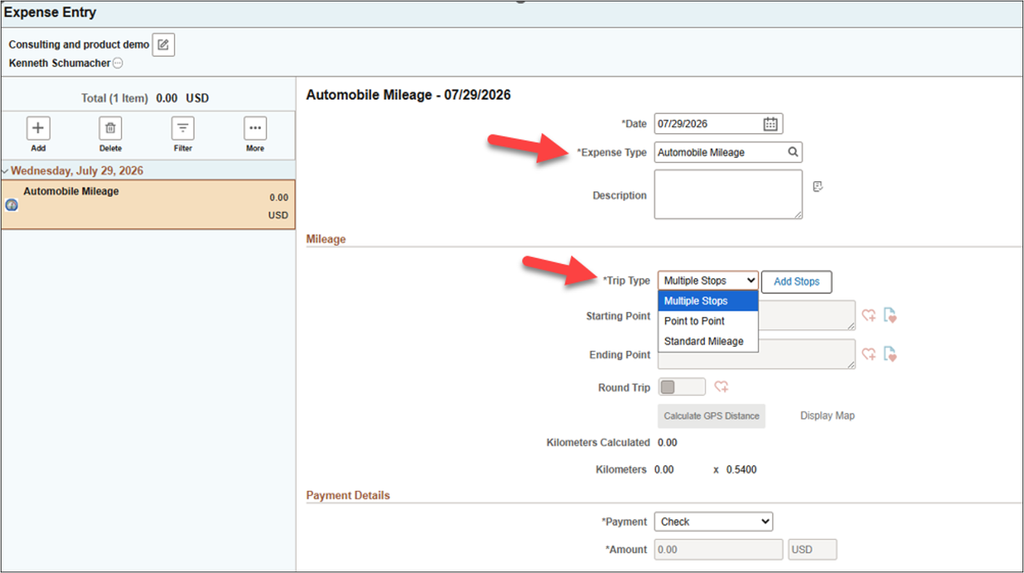
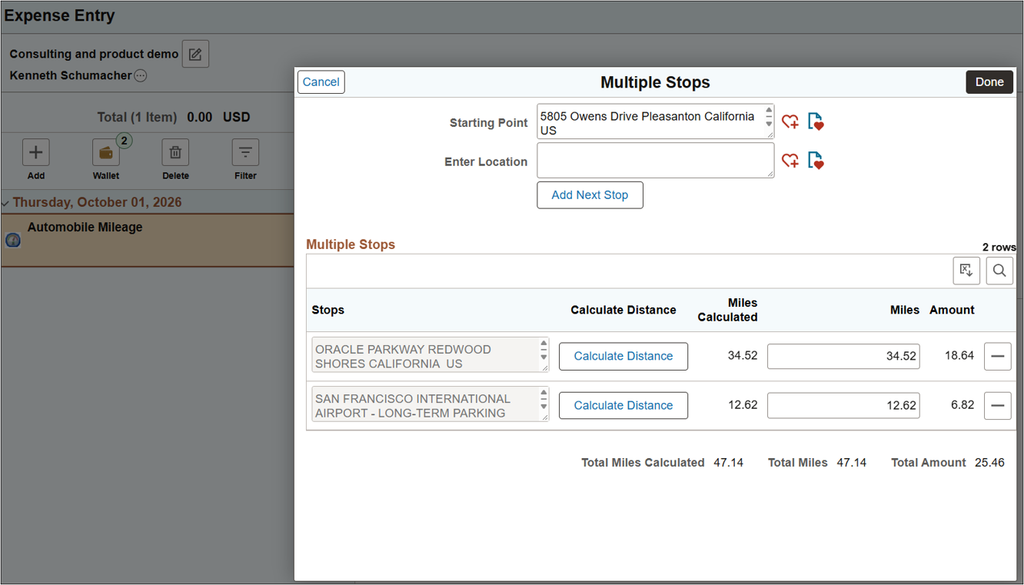
For multiple stops, employees will enter a starting point and add the destinations visited. The last stop will become the ending point. Distance can be calculated between stops using Oracle eLocations, or mileage can be entered manually. The individual distances will roll up to the total mileage on the expense line, keeping the journey together for review.
For example, an employee visiting two offices and a customer site could record those destinations as one trip on a single expense line. Favorite locations will help with address entry, and address autocomplete will be available when enabled. Organizations will enable multiple stops through the business unit Mileage Options selection.
Standard Mileage for Recurring Trips
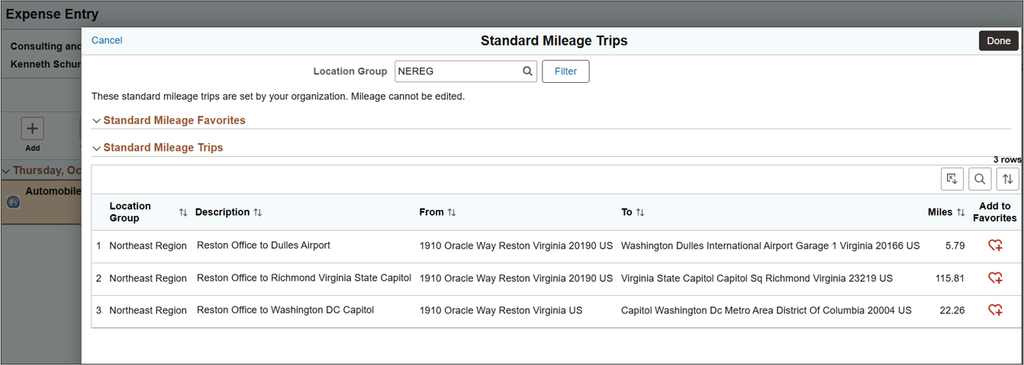
Administrators will be able to define standard routes with established mileage values and organize them by Expense Location Group. Employees will filter the available trips by location group, choose the appropriate route, and save frequently used standard trips as favorites for future selection. Administrators will lock mileage for the standard trip, helping to ensure employees use consistent distances for the same journey.
Together, the multiple stop and standard mileage enhancements are intended to simplify both varied itineraries and repeat travel while reducing the need to reenter familiar route information.
A Clearer Handoff from Proxy to Employee
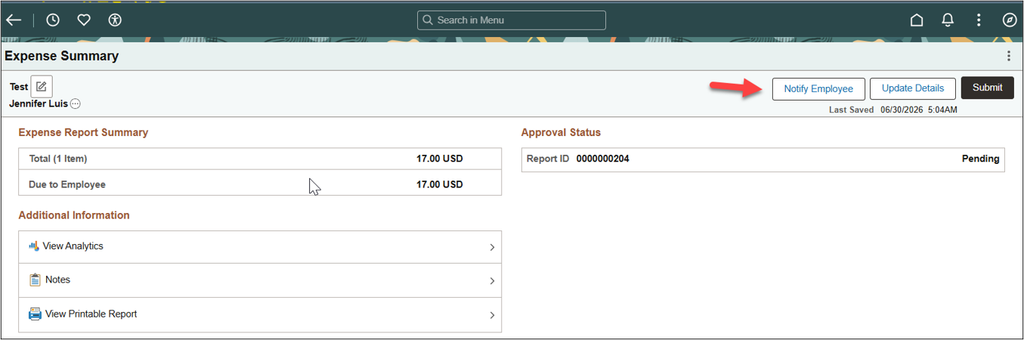
When a proxy prepares an expense report or travel authorization, the employee needs to know it is ready for review. A planned Notify Employee button will give proxies a direct way to make that handoff from within the document they have created.
The button will be available in proxy mode after the document is saved and before it is submitted. The notification will include a link to the expense report or travel authorization, so the employee can open it, review the details, make any needed changes, and save and submit when ready. This direct connection is intended to reduce separate follow-up messages and help documents move into approval more promptly, while keeping employees involved in reviewing expenses prepared on their behalf.
Proxies may still submit the expense report or travel authorization on behalf of the employee if required.
Notification delivery will support alerts, email, and text messages. The item can also appear in the Continue With section of the landing page.
Greater Control over Corporate Card Wallet Entries
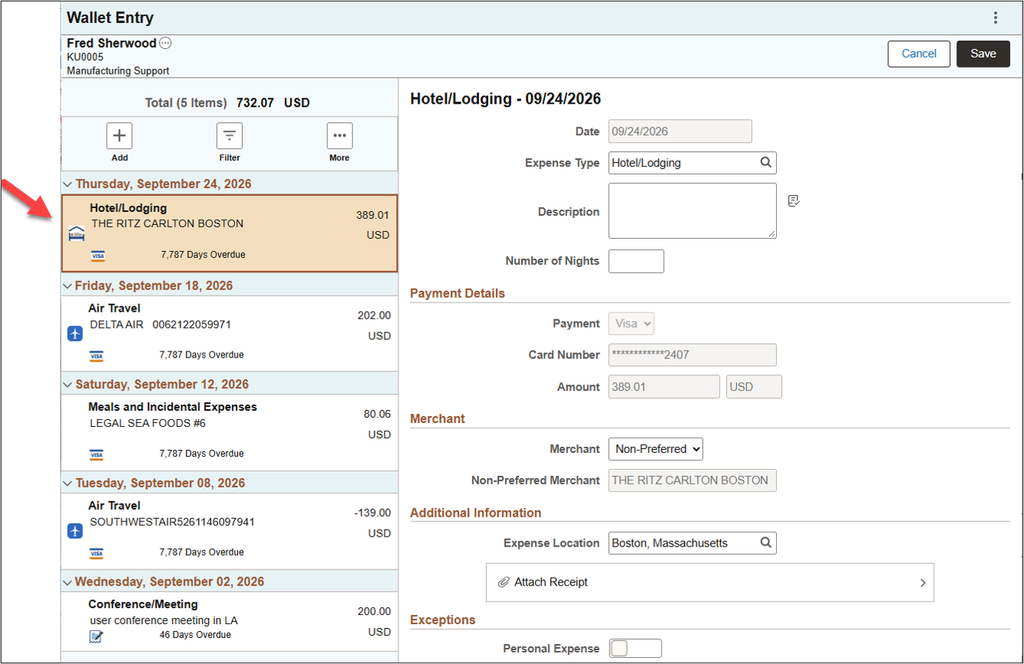
Organizations will gain a configurable option to control who can delete Wallet entries loaded from corporate card feeds. This will help keep card charges visible until they are addressed on an expense report.
Installation options provide three choices for allowing delete of wallet entries:
- All Users, preserving the existing deletion behavior by default.
- Expenses Admin, with a configurable role to identify who can delete loaded entries.
- No Delete, preventing deletion by anyone.
Manually created Wallet entries are not impacted.
For restricted transactions, the individual entry will hide the delete action. A bulk selection containing a protected entry will prevent deletion and display a message. Authorized administrators will retain access according to their employee permissions.
These planned controls will give organizations a practical way to align Wallet deletion permissions with their corporate card policies.
These planned enhancements will make everyday expense tasks easier while giving organizations greater consistency and control. Look for more details as the upcoming Update Image release approaches.