
Organizations create hundreds if not thousands of Purchase Orders each month. Once these Purchase Orders are fully received, invoiced, and paid, why are they still accessible and cluttering your system?
Depending on your organization’s document retention requirements, Purchase Orders may need to be retained for so many days, months, or even years. This doesn’t mean you have to needlessly sift through thousands of Purchase Orders on a daily basis. One of the main benefits of closing Purchase Orders is that they are intentionally excluded from the several search results but are still accessible via Purchase Order inquiry pages. The same benefit is achieved when running background processes, Closed or ‘Completed’ Purchase Orders are also excluded from further processing therefore processes will run faster. If your organization uses Commitment Control, additional benefits can be achieved by liquidating open encumbrances. Closing Purchase Orders is an optional process however when budgets are tight, closing Purchase Orders becomes a critical and necessary business process.
PeopleSoft provides multiple methods to close Purchase Orders. Each has a specific function and purpose. However, the Purchase Order Close action is secured and controlled by the Purchase Order Authorizations – User Preferences.
- Close Purchase Orders (PO_PORECON) – is a batch process that supports the closing of a specific Purchase Order, Purchasing Business Unit, or all Purchasing Business Units. It closes qualifying Purchase Orders based upon Business and Record level criteria. To close a Purchase Order, it must meet specific criteria such as Close, Cancel Days, PO Status, Activity Date, Match Status, and more. This process ensures all conditions are met and keeps everything in balance. The Close Purchase Order Report (POPO008) will identify which Purchase Orders will be impacted. The Close Purchase Orders process can close purchase order distribution lines, schedules, lines, and header in intervals. Distribution lines close first, followed by the schedules, lines, and finally the header. Therefore, it is possible to have a distribution line close before the rest of the purchase order.
- PO Close Short Workbench – provides the capability to close Purchase Orders that have an open receipt quantity. The intention is to reduce a PO Qty to the Received Qty for the continued processing of the Purchase Order. When this reduction occurs, a PO Change Order is created. If a PO Line has not yet been received, the user may also process this Line using the Close Short Workbench causing the PO Line to be Cancelled.
Using configurable PO Close Short Rules, the PO Close Short process:
- Creates a PO Change order transaction to set the purchase order schedule value equal to the total Receipt/Matched/Vouchered value for the purchase order schedule based on the close short set option when the Close Short flag is selected for the corresponding Purchase order line.
- Creates a PO line, schedules Cancel transaction for line, schedules that have not had any Receiving/Matching/Vouchering activity when other line schedules on the PO have had activity, and the Close Short flag is selected for the PO line.
- Creates a PO line Cancel transaction if a PO has not had any Receiving, Vouchering, or Matching activity, close days value has elapsed, and the Close Short flag is selected for the purchase order line.
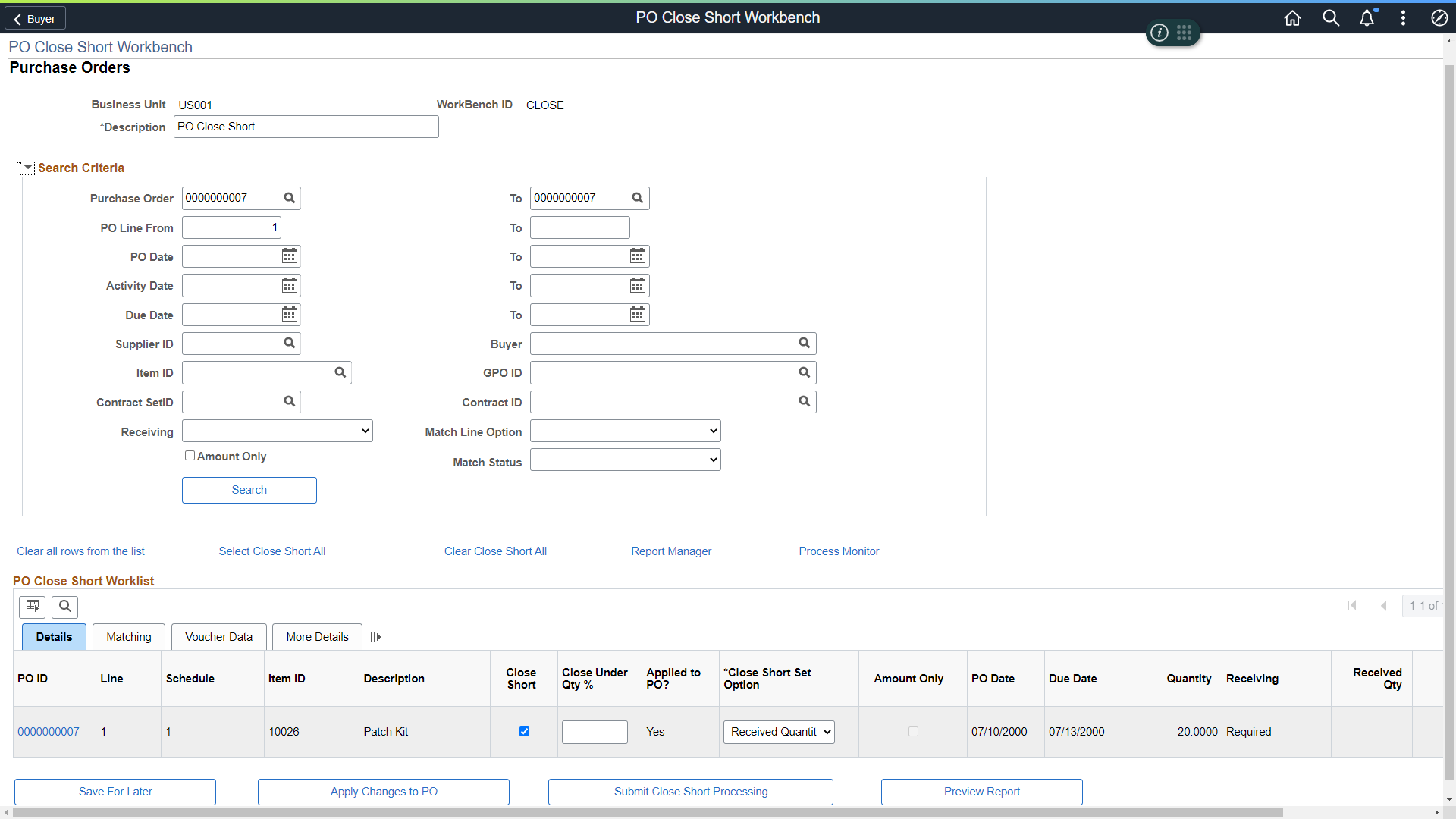
Figure 1 – PO Close Short Workbench
- The PO Close Short process (PO_CLSSHORT) – creates the batch purchase order change requests, but does not update the purchase order. The Process Change Orders batch program must be run subsequently to update the purchase orders. The Close Short process creates the change order transactions for the purchase orders. When a Procurement Contract is associated with the Purchase Order, the contract amounts and quantities are returned as well.
- Buyer’s WorkBench – provides several actions including the closing of Purchase Orders. Buyers with the appropriate security permissions can search, select, and even ‘Force Close’ specific Purchase Orders. Users should review the Purchase Order Log to understand why the Purchase Order didn’t meet the close criteria. Overriding nonqualified Purchase Orders can produce lingering issues to downstream transactions such as not updating PO Released Amounts/Quantity back to a referenced Procurement Contract. Buyers should research and take the necessary action to properly qualify the Purchase Order before choosing to override.
A new Purchase Order Close validation was incorporated with FSCM Image #40. This is a new Purchasing Business Unit Options setting that will recognize a PO Contract associated with a PO Line and will alert the user with an Error or Warning message. The error will prevent the user from force closing a PO line without returning the amount/quantity to the contract. Users must reduce the amount/quantity to the vouchered amount to release the amount/quantity back to the procurement contract.
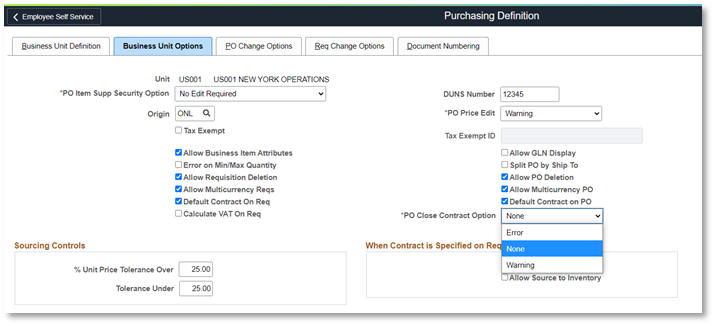
Figure 2 – PO Close Contract Option
Members from PeopleSoft’s Product Development and Product Strategy team recently presented a session at Reconnect Dive Deep ‘Getting The Most Out Of PeopleSoft’s Purchase Order Close Process’ Click here to watch the recording.