
Of the many critical processes in Supply Chain Management , the term “Replenishment” would surely grab one of the top spots !
PeopleSoft inventory replenishment is a very simple & effective process, wherein, once replenishment parameters such as reorder quantity options, the reorder point, reorder quantity, safety stock, economic order quantity are reached, replenishment of those items are triggered.
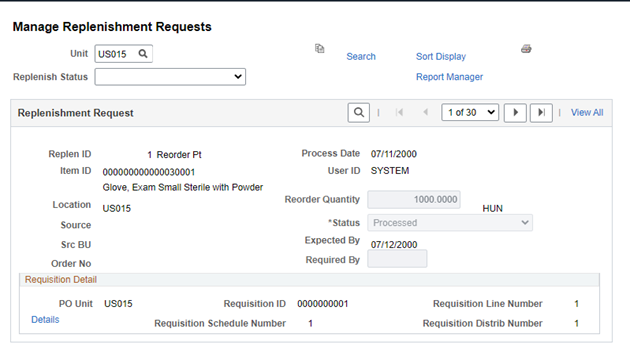
As a result of continuous improvements in PeopleSoft, effective with FSCM image 51 [GA 22nd July 2024], the “Manage Replenishment Request” page has been enhanced to provide more information to the user at a single glance. Critical parameters such as Item Manufacturer ID, Reorder Quantity Options, Reorder Quantity [EOQ /Safety Stock Quantity/Min-Max Quantity] are now added to this page for better visibility of the replenishment parameters. Based on the reorder Quantity Option that is defined on the Item replenishment page, relevant fields will be displayed on this page as well. In addition, users can also access the Business Unit Attributes for Item stock from this page.
Before enhancement
After enhancement

The Manage Replenishment Requests page provides more information, so a user can manage the replenishment with more information to assist in making better decisions.
Also Read: PeopleSoft’s Container Management – The tool for effective packing & shipping.