
In PeopleSoft Financials Update Image 57, Project Costing introduces a way to remove project costing interface transactions using PeopleSoft Data Archive Manager. Organizations can archive selected rows from the Project Costing interface table, delete them from the live table, and retain history for review or recovery when needed.
A Controlled Way to Correct Interface Loads
Many organizations load a high volume of Project Costing transactions using component interfaces and excel through the ‘Project Resource Interface Table’ (INTFC_PROJ_RES). A batch may be loaded in error, contain transactions in an error status, or otherwise need to be removed before further processing into the live Project Resource table.
This enhancement provides a repeatable online process for targeted cleanup, helping teams avoid ad hoc SQL requests to the database administrator to delete transactions from the interface table while preserving a record of what was removed. Customers determine which transactions to delete, making the capability flexible enough to support their own operational controls.
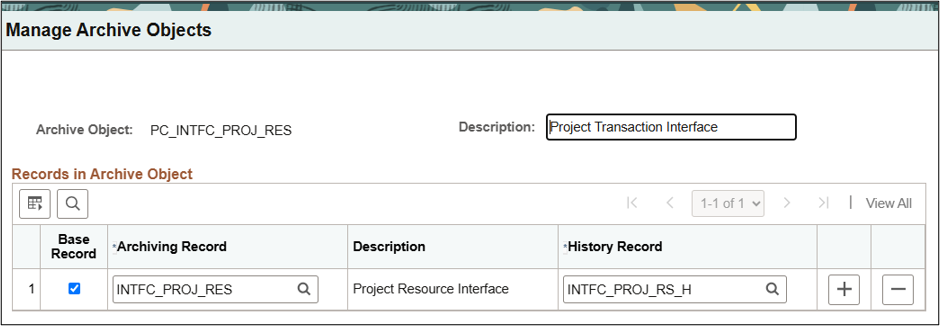
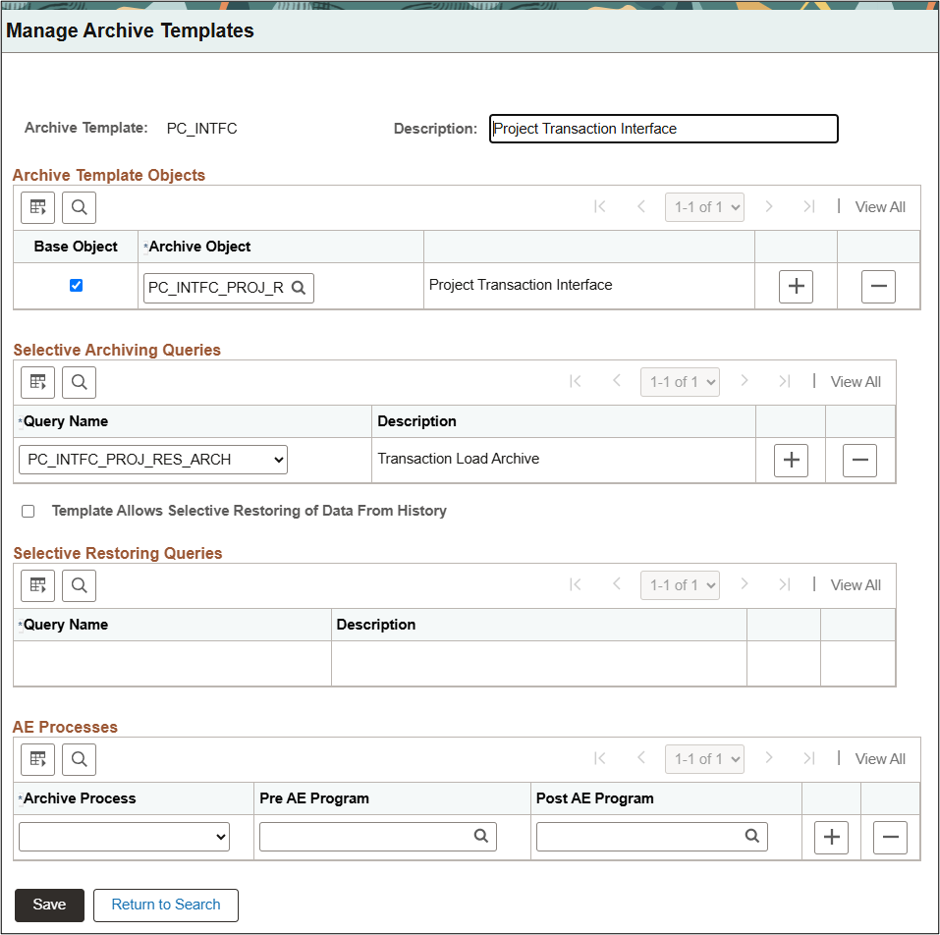
The delivered configuration includes:
- Archive Object
- Archive Templates
- Archive Query
- Archive Record to Store History
Archive First, Then Delete
The process is built on PeopleSoft Data Archive Manager. When users submit an archive job, they enter the parameters to act on. The process copies the chosen rows into a history table. Users can then run a delete process to remove those same rows from the live table.
Users can restore transactions from history to the live interface table if a removal needs to be reversed. Organizations can also remove historical rows when they are no longer needed, according to their retention practices. Select a ‘Process Type’ on the run control to:
- Copy selected pending interface transactions to history.
- Delete rows from the live Project Costing Interface table.
- Restore (rollback) archived rows from history to the live interface table.
- Delete archived rows from the history table.
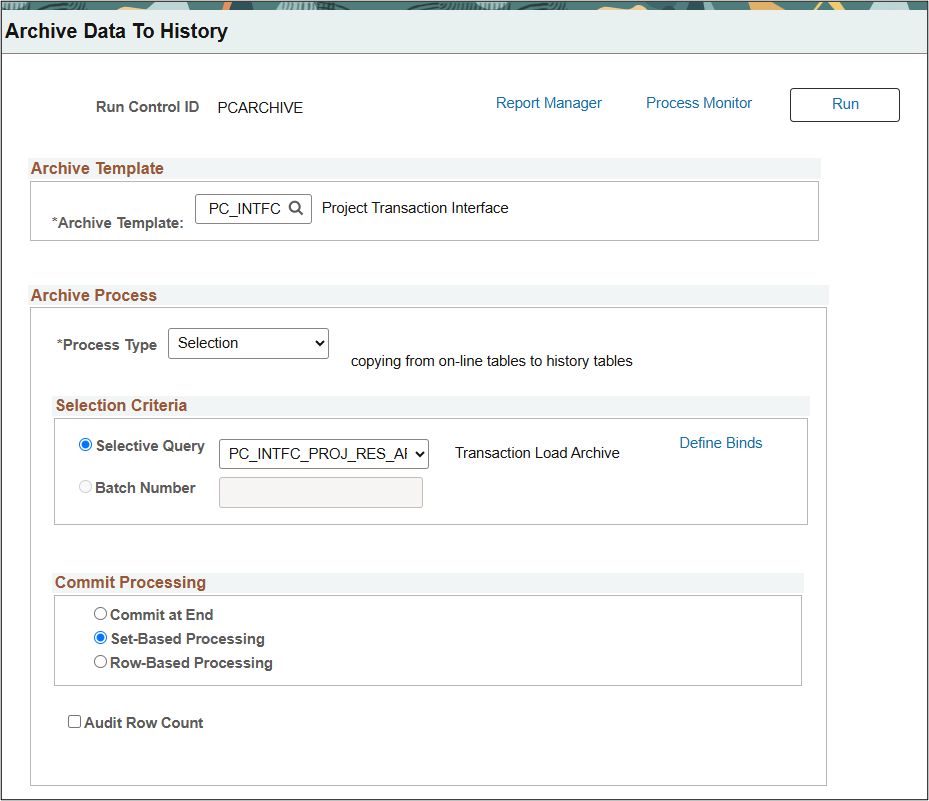
Prompts in the query become bind variables (e.g. prompts) on the run control page. The delivered query (PC_INTFC_PROJ_RES_ARCH) is constructed to select transactions by Interface ID and Interface Line Number. Customers may change the query to include additional prompts or other criteria to support their business process.
Control the Archive Prompt with Page and Field Configurator in PeopleTools 8.62
Concerned about your Project Costing users running an archive process for areas outside of Project Costing? The Page and Field Configurator enhancement in PeopleTools 8.62 gives organizations a way to control the archive template prompt available to users without creating a customization. The delivered PC_ARCHTEMP_VW view returns only the Project Costing Interface archive template. In Page and Field Configurator, select this view as a prompt value override to limit the template for your Project Costing users thus removing opportunities to select other archive templates.
This approach can help organizations give Project Costing power users access to the cleanup capability they need while reducing the risk of selecting an archive process outside their functional area. It complements your existing security model and operating procedures rather than replacing them.
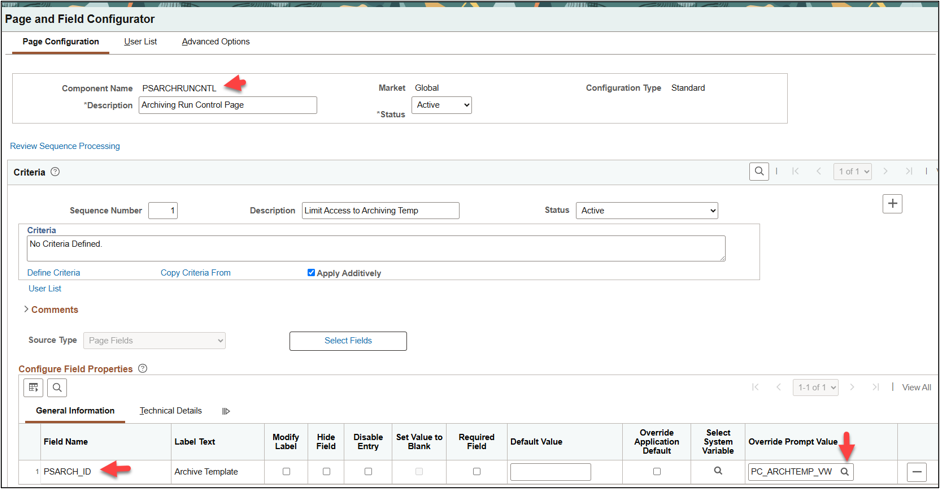
Identify the roles to which this prompt should apply using the Page and Field Configurator User List tab as criteria.
More Control and Better Traceability
With this Update Image 57 enhancement, organizations can manage pending Project Costing interface transactions through a delivered archive and delete process that is aligned with operational controls. Teams can correct unintended loads, retain visibility into deleted activity and restore data when necessary. By replacing manual cleanup with a structured workflow, Project Costing users gain a clearer path to keeping interface data accurate, manageable, and ready for the next step in processing.