
As organizations explore new ways to bring AI into PeopleSoft, many of the most valuable use cases begin with text fields. Consider Performance Documents and Notes, where employees and managers enter detailed feedback. AI can help summarize comments, improve clarity, suggest content, or highlight key themes. But until now, adding that kind of experience often required page customization.
The reason was simple: PeopleSoft Related Actions could not be added to long text fields.
Customers that wanted to place an AI “magic wand” beside a rich text field had to modify the page directly. One PeopleSoft customer, for example, explored using AI to summarize peer review feedback in PeopleSoft and needed a customization to add a button to the page.
With PeopleTools 8.63, that changes.
AI Enablement Through Configuration
The new Magic Button feature delivered in PeopleTools 8.63 extends Related Actions to support long fields, including rich text-enabled fields. This allows customers to place a configurable action icon directly beside the field without modifying the page definition.
When a user selects the Magic Button, PeopleSoft can invoke an Application Class service that performs the configured action. That action might summarize feedback, generate suggested text, improve wording, validate content, or connect to another AI-assisted process using a customer provided LLM.
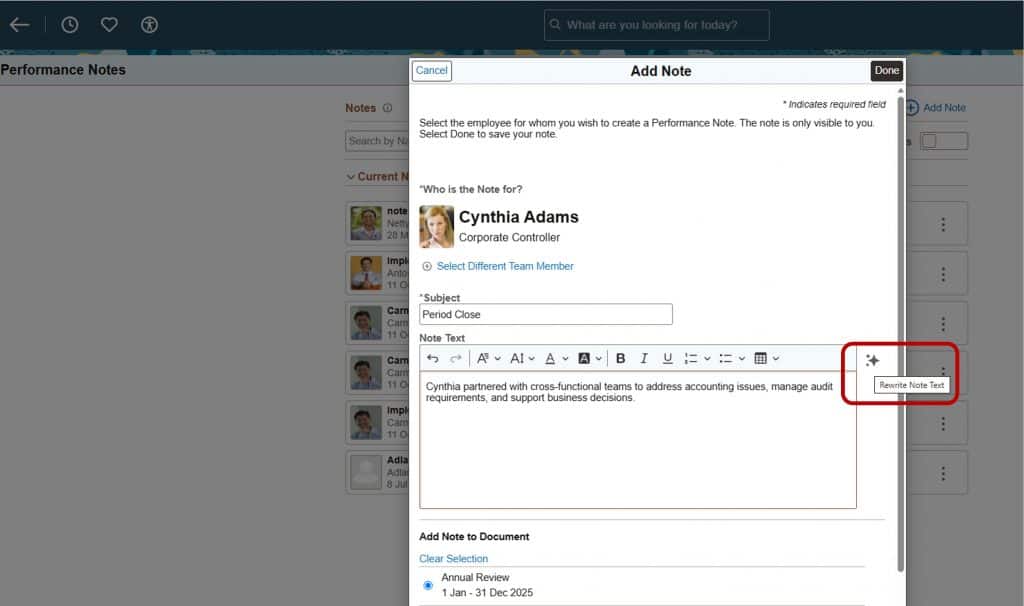
Instead of building and maintaining a custom button, customers can configure the experience through the Related Actions framework.
This is an important part of what we call AI Enablement in PeopleSoft: giving customers the infrastructure capabilities they need to introduce AI into existing business processes more quickly, on their own, and with less customization.
More Than an AI Button
Although AI use cases helped drive the need for this enhancement, the Magic Button is not limited to AI.
Customers can use it to invoke any configured Application Class logic associated with a field. That could include calculations, validations, lookups, automation, or other contextual actions.
When a field has one enabled Related Action, PeopleSoft can display the action as an icon rather than showing the related action as a single action in the pop-up menu. When multiple actions are available, the standard Related Actions menu remains available.
Why the Magic Button Matters
The biggest benefit is flexibility. Organizations can add contextual actions to long fields through configuration, reducing the need for page changes and making future maintenance easier. They can also choose an icon and help text that clearly communicate the purpose of the action.
For AI scenarios, that means customers can bring capabilities such as summarization and content generation directly into the transaction, beside the field where users are already working.
Closing Thoughts
The Magic Button is part of PeopleTools 8.63. It expands the possibilities for AI Enablement across PeopleSoft by making it easier to connect long, rich text-enabled fields with AI-assisted actions through configuration rather than customization.
That is the real magic: not simply adding a button but making AI easier to deploy where it can deliver the most value.