
Managing a large number of Items, price and specifications in an enterprise application can be a daunting task for a Procurement organization. The complexity is further increased with different Suppliers’ offering this information in different file and data formats. PeopleSoft provides a solution for this through the Catalog Management module.
PeopleSoft Catalog Management enables organizations and partners exchange catalog information electronically. This delivered capability helps organizations effectively manage Item specifications from multiple Suppliers and keep them up-to-date, accurate and searchable for easy access. Catalogs can reduce ordering errors, provide specific lists of product suggestions for requesters or departments and ensure users are only requisitioning approved Items.
Here are 5 steps to take advantage of PeopleSoft Catalog Management capabilities
1. Register and Maintain Catalog Partners
To start using PeopleSoft Procurement Catalogs, organizations should register Trading Partners and provide the necessary login credentials. Trading Partners with access to Catalog Management can extend the access to additional users within their organization and assign access privileges.
2. Import Partner Content
The Catalog Management business process begins when a Trading Partner provides a catalog source file with new offerings or updated prices. The Partner’s file is imported into the Catalog Management application.
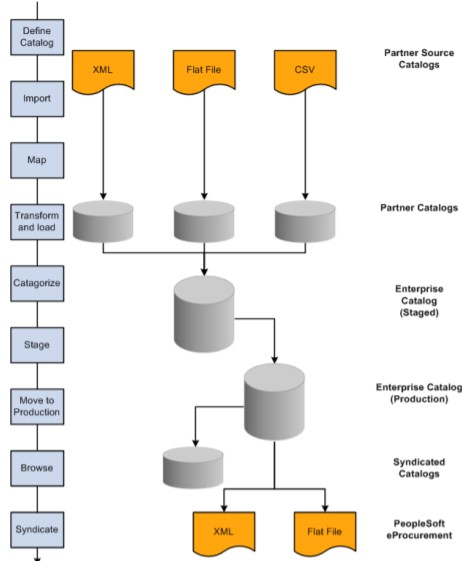
Organizations can define the file format the Partner will use to provide catalog information by defining the source using the setup component Maintain Catalog Sources. Catalog sources can be Flat Files, CIF, XCBL, CUP.
3. Mapping, Transforming, and Loading Partner Source Data
Imported Partner catalog information can be tuned further to make it compatible with enterprise catalogs. Partner data goes through the transformation before it’s loaded into the enterprise catalog. Organizations can define the catalog map rules to transform the data for their specific enterprise needs.
PeopleSoft simplifies the mapping process through the Auto Mapper capability. Organizations can use options such as transformations, translation sets and default value assignments to help Auto Mapper efficiently map Partner data. As an example, the Unit of Measure ‘Each’ in the Partner catalogs may be translated to ‘EA’ so the Enterprise catalog can recognize and consume it.
4. Categorize Partner Offerings
For easy access and further syndication of loaded catalog information, organizations can categorize the data as per their needs. With Catalog Management, you can create categories and category hierarchies either using the UNSPSC or PeopleSoft trees.
PeopleSoft offers Catalog substitution capability to automatically match partner’s categories with enterprise categories e.g., Enterprise category Notebook Computers matched with Partner category Laptops
The enterprise catalog definition associates the catalog with the mapping rules, categorization rules and other access rights for partners and enterprise administrators.
5. Stage and Move to Production
Organizations can stage the approved partner catalogs and associated categories before further processing. The Browse Staged Catalog option enables users to preview the data before it’s moved to production. Staged information can be edited manually if needed prior to moving it to production.
You can run the ‘Move to Production’ process to move the staged partner catalogs to production. Production catalogs can be viewed for a specific partner or a category hierarchy or by both. Catalog Management maintains versions of enterprise and Partner catalogs automatically and also gives an option to roll-back to a previous version of a catalog.
Organizations can be set up to move Production catalogs at a future date so they can be accessed by Purchasing and eProcurement in the desired time period.
Below is the detailed representation of the process outlined above.
Quick Items Load – A Quick Way to Catalog Usage!
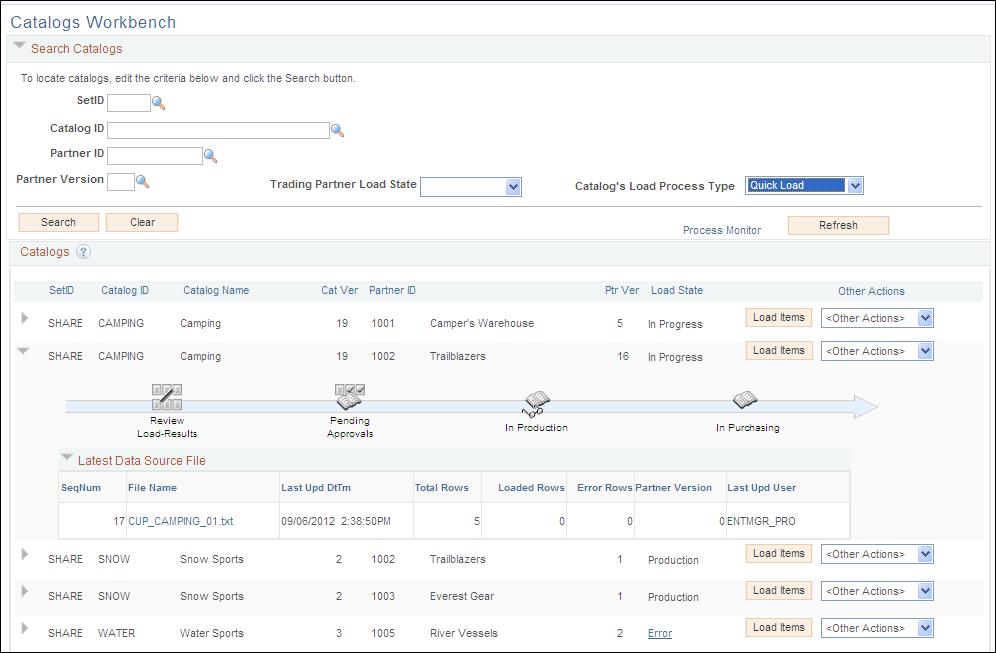
Catalog Management offers an easy way to accomplish all the above steps through the Quick Items Load process. This two-stage process namely ‘Loading’ and ‘Approval’ can be initiated in a single run to take the partner offerings from initial loading to Catalog Update Process (CUP) to make the catalog accessible from eProcurement.
The Catalog Management Workbench is a powerful tool for the enterprise to manage this process.
Catalog Management comes with delivered support for archival and purging of catalog data. Catalogs that are no longer required can be archived. Previously archived catalogs can be purged from system if needed.
PeopleSoft Catalog Management is a complete end-to-end solution for all your Catalog Management needs.
For detailed information about Catalog Management functionality and implementation requirements, please refer to the Catalog Management PeopleBook