
In 26D, Oracle Permitting and Licensing introduces capabilities that help agencies verify submitted applications, prepare planning and zoning reports, simplify incident reporting, review code enforcement inspection history, and record more precise inspection outcomes. From AI-assisted application verification to more flexible inspection results, these features help reduce manual work and support agency staff in their daily activities.
Here’s a closer look at five capabilities in the 26D update.
AI-Enabled Application Acceptance
Verifying submitted permit and planning applications requires staff to identify missing, incomplete, or inconsistent information and communicate the corrections applicants need to make. The Application Acceptance workflow agent supports this work by preparing verification results and notes for staff review.
After an applicant submits or resubmits a configured application, a Business Rules Framework rule automatically invokes the agent. It evaluates configured content, which can include custom fields, descriptions, attachments, and agency-defined validation instructions and supporting content.
Staff review the results on the application details page. In the standard configuration, staff decide whether to request resubmittal or continue normal acceptance processing. When staff request corrections, applicants can review the notes, update their applications, and resubmit. The agent runs again after resubmission, with previous results retained in the verification history.
Agencies must copy and configure the delivered workflow template and define the rules that invoke it for selected permit and planning application types.
This capability helps agencies identify issues earlier and communicate required corrections consistently, reducing rework while preserving staff oversight.
Application Status Report Generator for Planning and Zoning
Preparing planning and zoning reports often involves compiling application information from multiple sources and organizing it into a consistent narrative. The Application Status Report Generator for Planning and Zoning helps staff create a structured first draft.
Staff run a configured copy of the agent from AI Agent Studio using a valid Planning and Zoning application record ID. The generated draft summarizes available information such as parcels, fees, status history, projects, assignees, hearings, activities, and conditions.
Staff can review, edit, and refine the generated content before saving or publishing the report, including adding the planner’s analysis, rationale, and recommendation. Agencies can also add or remove data objects and adjust the report prompt and structure to meet local reporting needs.
By reducing manual report preparation, the agent helps agencies produce consistent, professional documentation while allowing staff to focus on reviewing information and making informed decisions.
Code Enforcement Incident Image Intake Assistant
Reporting a potential code violation involves describing the issue and providing the details needed to create an incident. The Code Enforcement Incident Image Intake Assistant simplifies this process by analyzing uploaded images and prepopulating incident information.
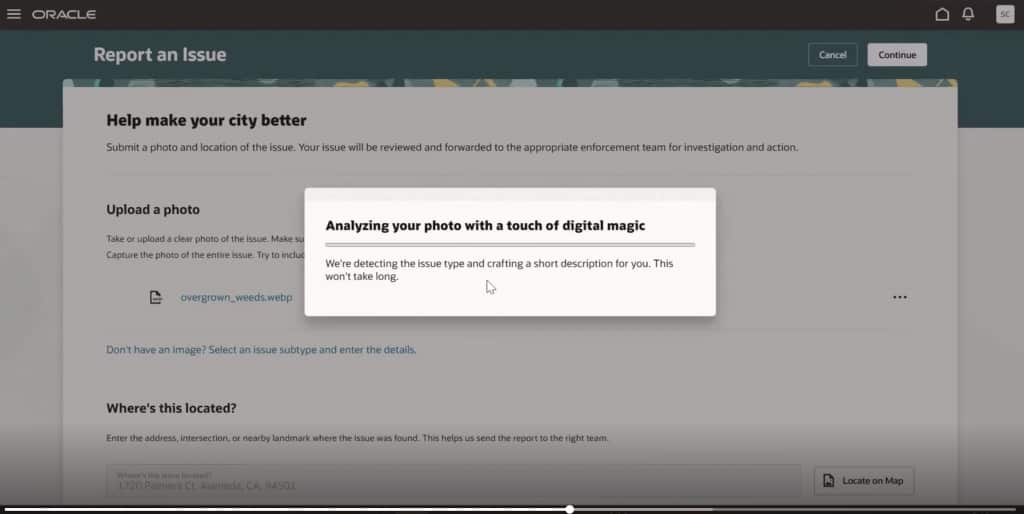
When enabled, the assistant operates within the Report Issue workflow for agency staff and registered public users. It generates a description of the scene, identifies potential violations, and maps the results to configured issue types. It also populates matching fields when the required information is present in the image.
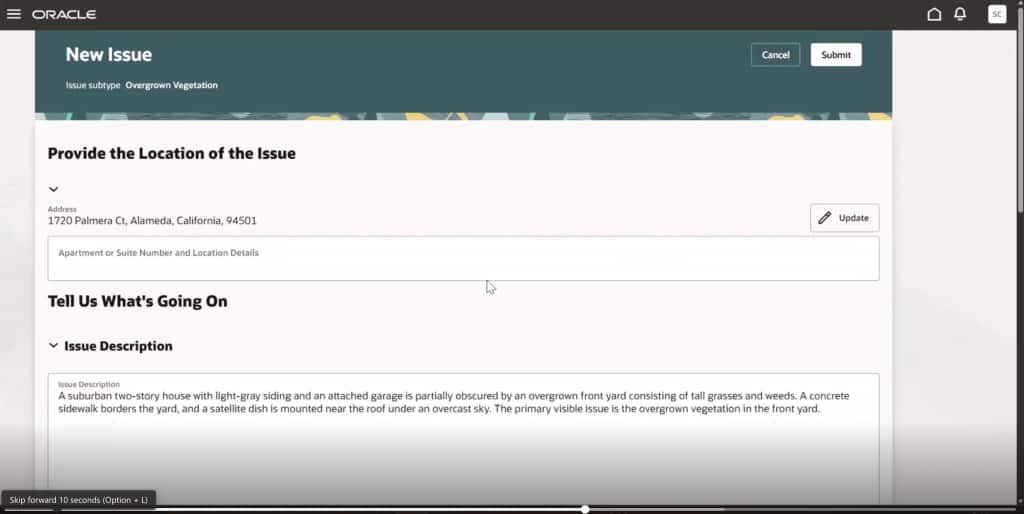
Users can review and change the generated description before submitting the incident, and they retain the option to complete the report manually at any stage. The quality and completeness of the populated information depend on the image analysis and the application’s configured issue types and fields.
This helps users create incidents more quickly by reducing manual data entry while preserving their ability to review and revise the report.
Code Enforcement Inspection Summary Assistant
Preparing for a code enforcement inspection can require reviewing prior inspections, violations, corrective actions, and comments. The Code Enforcement Inspection Summary Assistant brings this information into a concise overview for the selected inspection.
Code enforcement officers and other authorized staff can access the preinspection summary from the Inspection Tasks page, either while preparing for a scheduled inspection or while completing one. The read-only summary includes prior incident and case inspections, outcomes, code violations, corrective actions, notices, and comments.
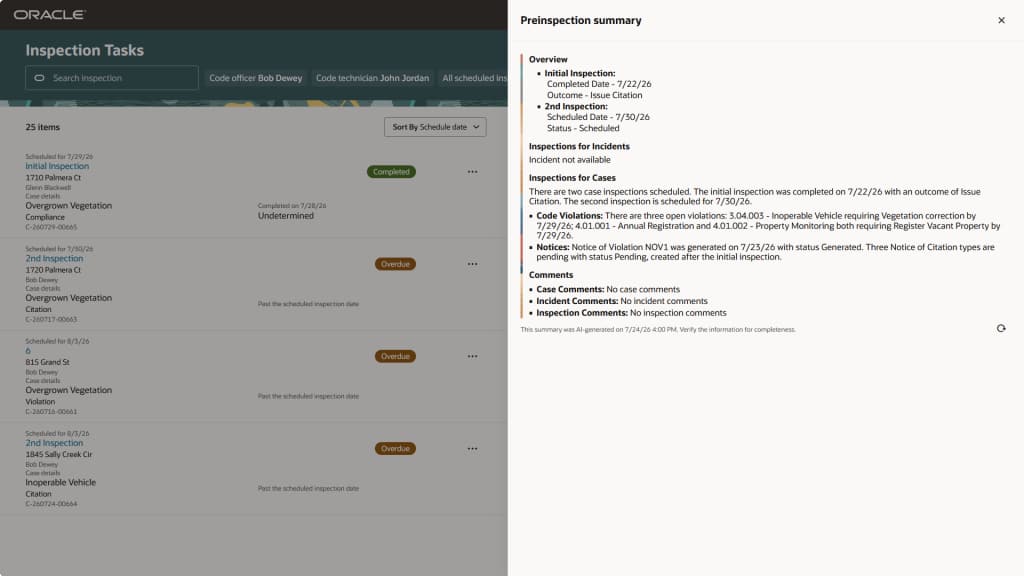
Users can also manually refresh the summary to see their latest updates.
By bringing relevant inspection history together, the assistant gives officers and staff a quick overview that helps save time when working on site.
Multiple Failed Inspection Result Options
An inspection outcome may need to distinguish a complete failure from a partial pass or incomplete inspection. Previously, an assessment type could include only one assessment mapped to the Fail system result. Oracle Permitting and Licensing 26D allows agencies to configure multiple assessment options with that result.
Each agency-defined assessment displays its own label to the inspector while following existing failed-inspection processing, including support for reinspection and any configured requirement to enter comments. For example, agencies can configure both Inspection Failed and Partial Pass as Fail results, allowing inspectors to record the appropriate outcome while supporting follow-up inspection activity.
When applying results to multiple inspections with the same assessment type, inspectors can select from all configured result options. For inspections with different assessment types, the application presents the common Pass and Fail results and identifies inspections that require an individual Fail assessment selection.
Agencies enable this flexibility through their inspection assessment type configuration. Pass remains limited to one code.
This enhancement helps agencies record partial or incomplete outcomes more accurately while preserving failed-inspection follow-up behavior.
Discover More in 26D
These five capabilities support application acceptance, report preparation, incident intake, and inspection work. These are just a few of the many features included in Oracle Permitting and Licensing 26D.
To learn more about the 26D update, explore these resources: