

Oracle AI Database 26ai delivers out-of-the-box Automatic Workload Repository (AWR) for Active Data Guard (ADG) standby database workloads, extending the same rich diagnostics provided to your primary databases to your standbys. Enterprise Manager (EM) 24ai adds end-to-end visualizations and workflows resulting in simpler operations and faster triage for mission critical read-only workloads. Many customers offload read-only workloads such as data extractions and reporting to ADG to maximize ROI on standby resources as well as keeping their primary databases free from any interference. Historically, diagnosing standby performance meant operational overhead or fallbacks like STATSPACK (missing ASH and AWR richness). With 26ai, the same performance diagnostics methodology used on primaries can be applied to standbys as well.
Drawbacks of prior solution
Unified Management Framework (UMF) was introduced in 12c to support capturing AWR on standbys but was operationally heavy. Administrators were required to define database links for every primary-standby pair which proved to be cumbersome and error-prone. During ADG failover events, additional manual intervention was required to keep snapshots working, which added ongoing operational overhead. UMF also came with several restrictions, such as mandating the use of SPFILEs and requiring explicit registration of standby databases before snapshots could be taken. Furthermore, UMF is limited to the CDB ROOT and does not support PDB-level operations, lacking support for cloud and multi-tenant environments.
Enhanced solution in Oracle AI Database 26ai
Oracle AI Database 26ai delivers out-of-the-box AWR for ADG standbys with no need for database links, SPFILEs, or explicit registration. With support at the CDB and PDB levels, it is designed to be a fully cloud-ready solution and suitable for multi-tenant deployments. Snapshot continuity is automatic across ADG failovers and AWR snapshot files are transported using the same proven redo transport channel. Housekeeping tasks (capture, transfer, import, and purge) are included as out-of-the-box automations, removing additional DBA setups. This automation is enabled by default in 26ai and is also available in Autonomous AI Database (23ai and above), as well as True Cache. EM 24ai complements this with UI-driven workflows built on the same AWR data for ADG environments.
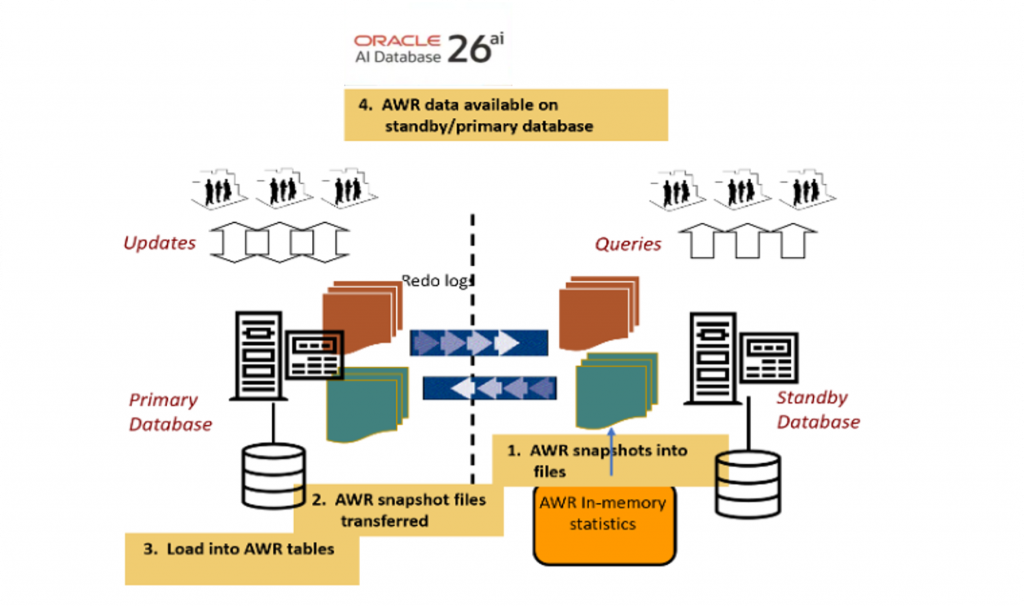
How it works – AWR for Active Data Guard workloads
Capture snapshots on the standby
- AWR snapshots are written to transient snapshot files (not directly to tables) on the standby, defaulting to
DB_CREATE_FILE_DEST. - Automatic hourly snapshots via MMON; manual snapshots are also supported.
- Each standby controls its own schedule, remaining resilient even if the primary is busy or down.
Transfer snapshots from standby to primary
- Snapshot files are shipped over the same hardened channel as redo without interference; no new setup or configuration required.
- Failed transfers are retried and eventually purged by a daily maintenance task to prevent disk bloat.
Load snapshots into AWR tables on the primary
- Autotask ingests the completed snapshot files every minute.
- Successful loads are marked
READY; corrupted files are markedNOT_USABLE. - Daily maintenance to purge old files.
- After redo propagation, AWR data is queryable from standard views on both the primary and standby.
Tooling works as-is
- Because data lands in standard AWR tables, existing scripts, reports, and EM 24ai dashboards work without change on both primary and standby databases.
Operational notes
- Scheduling: Auto-snapshot hourly (standby-controlled); transfer retries and purges daily; auto-import every minute on the primary.
- Space management: Snapshot files are transient and auto-purged; ensure
DB_CREATE_FILE_DESThas adequate headroom. - Role transitions: Snapshots continue automatically post failover – no manual steps required.
- Security and compliance: AWR may include SQL text and object names; enforce least-privilege access and align retention with corporate policy.
Turn standby AWR into a performance and capacity advantage
AWR on ADG standbys allows you to prove performance equivalence or pinpoint differences across multiple standbys, then use the same evidence to plan capacity with confidence as workloads grow or shift. You can collect the same AWR snapshots across each standby, then use existing AWR tools such as AWR Diff and Compare Period reports to compare similar time windows between standbys to quickly reveal differences in performance such as top wait classes/events, I/O latency and throughput, CPU consumption, and top SQL/plan behavior. By comparing these historical AWR trends, you can build baselines for normal versus peak periods and validate changes after, ultimately leveraging AWR data for capacity planning after comparing performance across standbys.
Summary
With AWR now available out-of-the-box for ADG standbys in Oracle AI Database 26ai (and Autonomous AI Database 23ai and above, as well as True Cache), teams can apply the same trusted AWR/ASH workflows on standbys as they do on primaries. This consistency accelerates triage of read-only spikes by quickly pinpointing top SQL, wait events, and I/O hotspots, while enabling safe offload of troubleshooting without touching the primary. It also streamlines change validation by comparing performance before and after plan or statistics updates when traffic is offloaded, supports capacity planning for end-of-month or quarter peaks, and aligns with cloud and multi-tenant deployments thanks to full PDB-level coverage. Operationally, the solution is simple: no database links, no manual failover steps, and no extra jobs; automatic retry and purge keep space usage in check.
Next steps: AWR for ADG standbys requires the Oracle Diagnostics Pack. Confirm licensing and ensure access controls and retention settings meet your organization’s security and compliance policies. EM 24ai can further simplify visualization and analytics using the same AWR data, with no changes to existing scripts or dashboards.