
Database administrators are responsible for more than database performance. They also need to understand whether database activity follows approved security policies and if critical automated jobs are operating as expected. Answering these questions often requires switching between SQL queries, scripts, and multiple management tools.
OCI Database Management continues to bring these common operational workflows into a unified experience. Attention Log Monitoring, the new SQL Firewall integration, Privilege Analysis, and Oracle Scheduler job management capabilities help database teams detect important database errors, assess database security posture, investigate potentially unauthorized SQL activity, review privilege use, identify unhealthy scheduled jobs, and manage common job configuration without leaving Database Management.
With these capabilities, you can:
- Monitor attention-log events and configure alarms for ORA events.
- Review SQL Firewall protection and violations for a managed database.
- Review used and unused privileges for a managed database.
- Drill into user, allow-list, trusted-context, and privilege details.
- Find, investigate, create, and update Oracle Scheduler jobs.
Attention Log Monitoring for Managed Databases
The attention log is a structured file that records critical and highly visible database events that require administrator attention. Monitoring it helps DBAs detect important conditions—such as internal errors, memory pressure, connectivity failures, or storage problems—before they become larger availability or performance incidents.
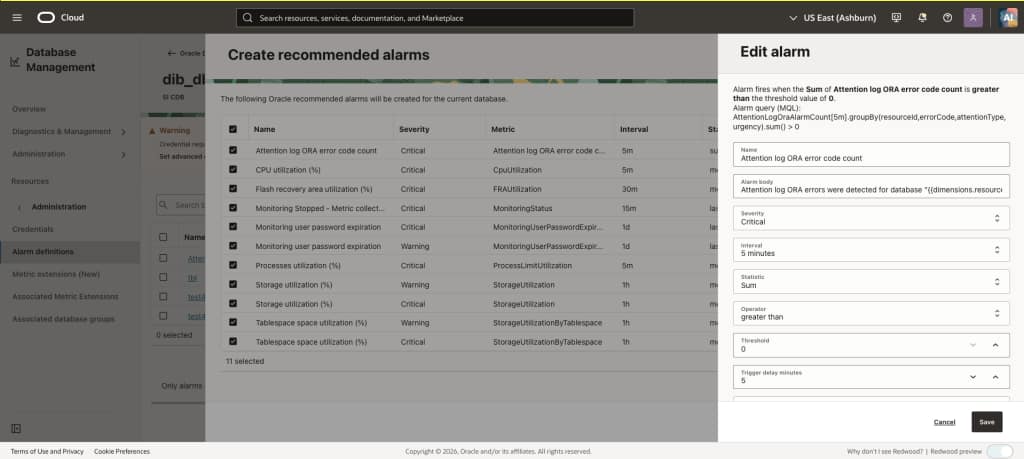
Database Management provides an attention-log metric that counts ORA-error occurrences written to the attention log and integrates it with OCI Monitoring. An out-of-the-box Oracle-recommended alarm makes it quick to enable monitoring for these ORA errors; administrators can also create an alarm with their own threshold and evaluation period. These metrics help teams monitor database health and quickly assess failures, while the Attention Log view and other diagnostic tools support investigation when an alarm fires.
Extend the Existing Security Experience with SQL Firewall
Oracle SQL Firewall is a built-in RDBMS security capability. While Oracle Data Safe provides centralized security policy management, OCI Database Management adds operational value by bringing SQL Firewall status, policy coverage, and recent activity into the DBA’s existing monitoring workflow connecting security visibility with day-to-day production database management.
SQL Firewall helps establish what trusted database activity looks like for each user and application. Administrators can capture observed SQL and connection context, generate allow lists, and choose how to handle activity that does not match the approved policy—observe it, allow it, or block it. This helps protect service accounts and application connections from unexpected use, compromised credentials, and unauthorized SQL execution while giving teams clear visibility into policy coverage.
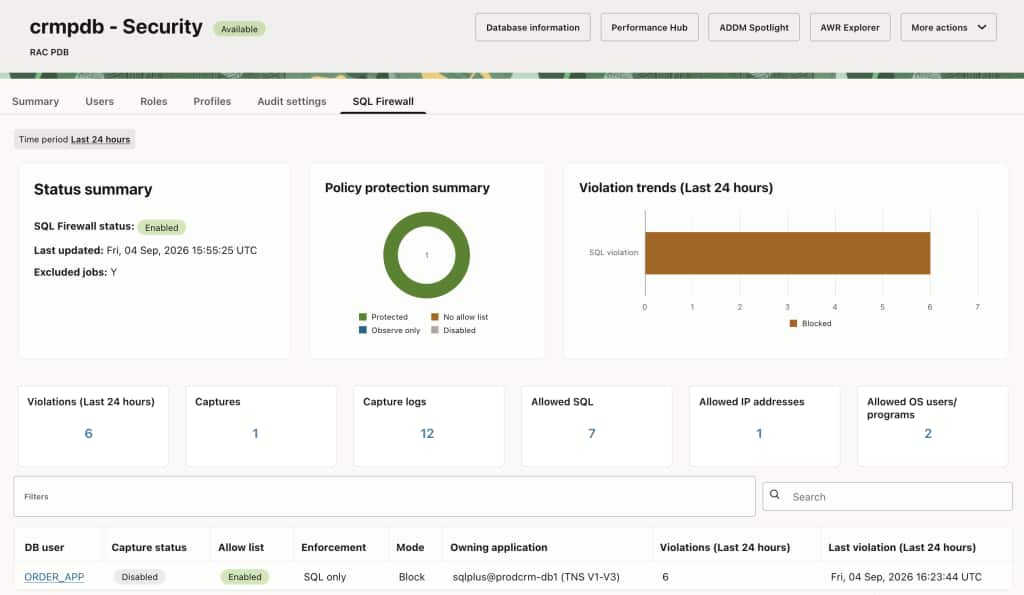
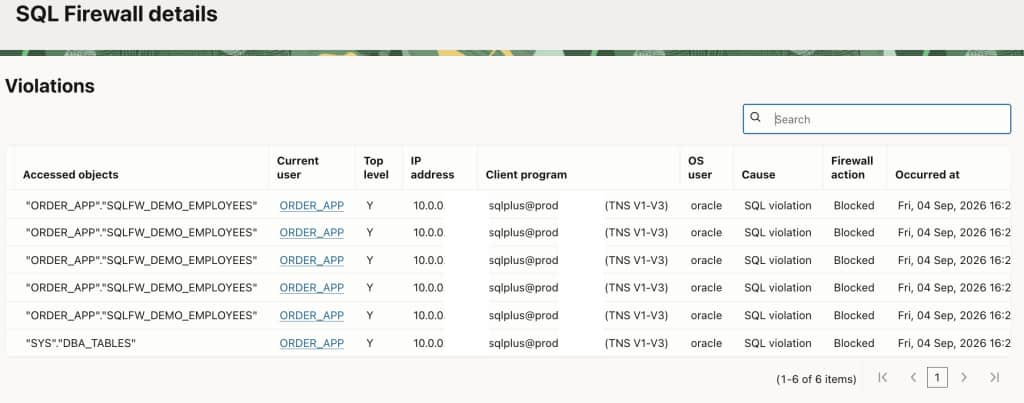
The SQL Firewall view summarizes enablement, protection coverage, recent violations, enforcement posture, and collection health for a managed database. Administrators can identify disabled protection, missing allow lists, incomplete captures, observe-only enforcement, blocked violations, or collection issues, then drill into an affected user without rebuilding the investigation through manual queries.
Database-level details include:
- Capture and allow-list status
- Enforcement mode
- Allowed or blocked violations
- Allowed SQL
- Trusted IP addresses, operating-system users, and client programs
This workflow helps security teams move quickly from a database-level posture gap to the user, SQL activity, or connection context that requires attention.
Privilege Analysis: Support Least-Privilege Security
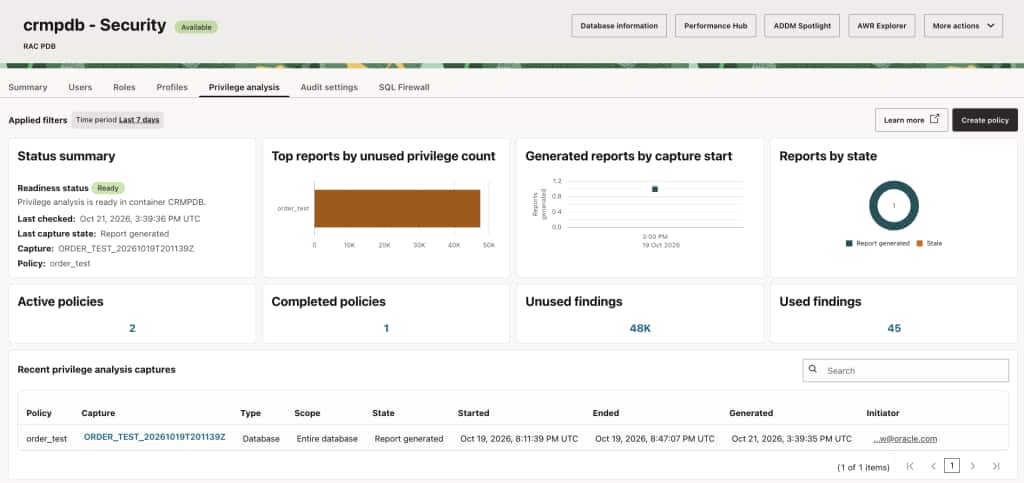
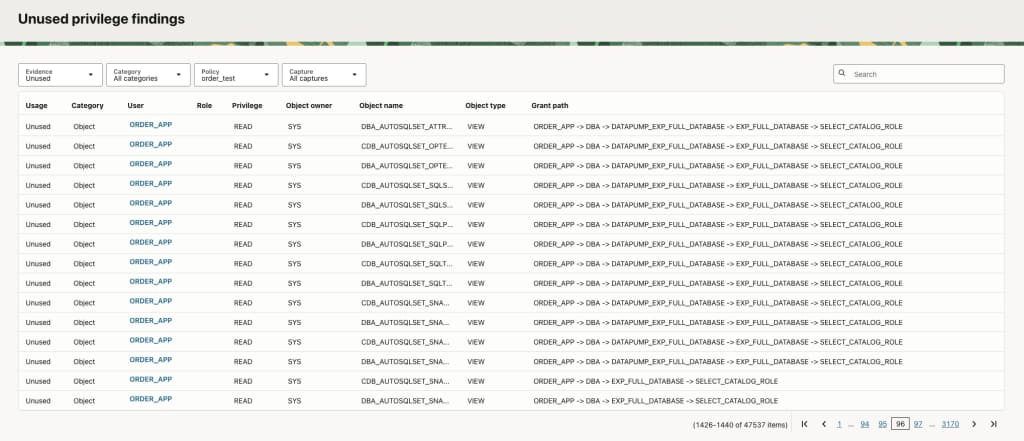
Privilege Analysis helps DBAs understand which system and object privileges users and applications actually use and which appear unused during a defined capture window. This evidence helps security teams identify excessive access, reduce unnecessary grants, and apply least-privilege practices without relying on assumptions.
Database Management provides a guided workflow to define a policy, select database-wide, role-based, context-based, or role-and-context analysis, run a capture, generate results, and review used and unused privileges for a managed database. Filters by user, role, privilege, and object help teams focus access reviews and plan remediation. Findings support review and planning to manage audit configurations effectively and reduce security risks in database access.
Monitor and Manage Oracle Scheduler Jobs
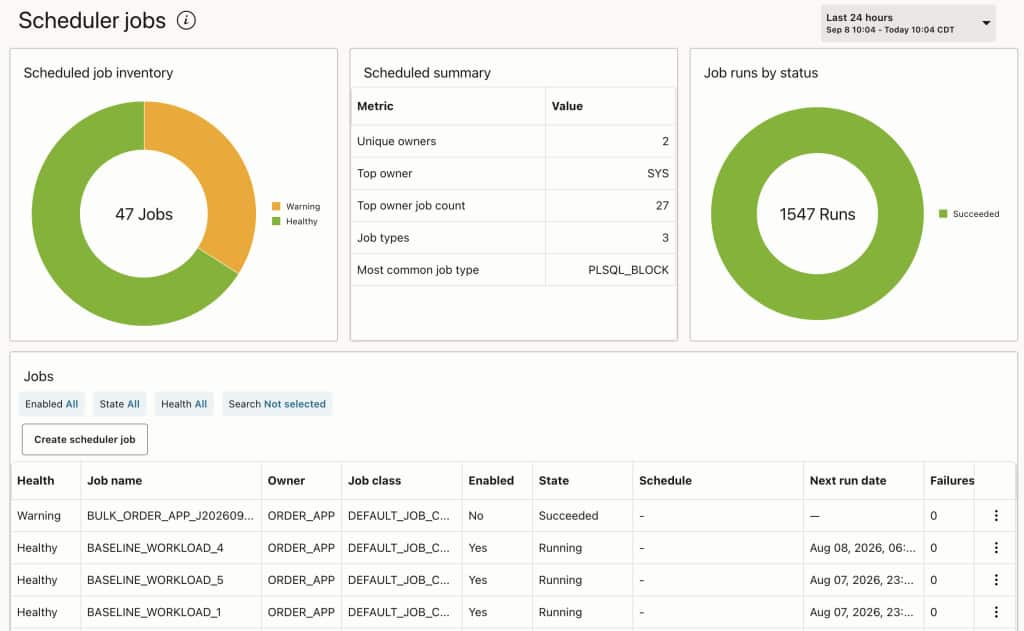
Oracle Scheduler (DBMS_SCHEDULER) jobs run maintenance, data movement, application processing, and other recurring operations. When jobs fail or stop running, DBAs need visibility to quickly identify the issue and take corrective action.
Database Management provides a searchable inventory of jobs for a managed database. Health and scheduler state make failing, disabled, or broken jobs easy to identify. Key details include owner, job name, schedule, next run time, last start time, failure count, and recent execution result.
Selecting a job shows its current configuration and available failure context, including Oracle error information. Administrators can update supported properties such as enablement, schedule, dates, execution settings, and comments. A guided workflow also supports creating common scheduler jobs without writing package calls manually.
Validation and database-originated errors help users correct configuration problems, while the managed-database authorization model controls access to view, create, and update operations.
Get Started
Try these new features out today in Database Management to monitor attention-log ORA errors through OCI Monitoring, review SQL Firewall posture and privilege use in Security, and manage Oracle Scheduler jobs from a managed database. Together, these capabilities help teams assess database health, investigate failures, protect database activity, and maintain critical automation.