
The MySQL team at Oracle is pleased to announce MySQL Workbench 26.10, the latest release of the new generation of our GUI administration and development tool for MySQL.
Following the introduction of the new MySQL Workbench 26.7 earlier this year, we’ve been busy adding capabilities and improving the experience for developers and DBAs.
This release focuses on security, with support for multi-factor authentication (MFA), advanced authentication methods, and post-quantum cryptography for TLS connections. We’ve also added a server log viewer and made improvements to MySQL Enterprise Backup integration.
Multi-Factor Authentication and Advanced Authentication
One of the biggest additions in MySQL Workbench 26.10 is support for the MySQL’s multi-factor authentication and non-password authentication methods, as well as other related enhancements.
The MySQL HeatWave cloud service and MySQL Enterprise Edition support many authentication methods beyond username and passwords. Depending on how your server is configured, authentication can involve multiple factors, hardware security keys, or external identity providers.
Workbench now fully supports these, both for connecting using them as well as configuring them in the user account administration interface.
Note: You can use any edition of MySQL Workbench to use and configure Enterprise Edition authentication plugins, but you must be connected to a MySQL EE or MySQL HeatWave Service instance to manage accounts that use them.
Connecting with MFA, WebAuthn etc
The Connection Editor has been extended to support connections that require up to three authentication factors.
You can now configure the authentication plugin used for each factor, along with any plugin-specific options. This includes authentication methods such as WebAuthn, PAM, and OCI authentication.
When connecting, Workbench handles the authentication process, prompting for additional passwords when required and displaying messages from authentication plugins.
For WebAuthn authentication, Workbench supports FIDO security keys, including the registration of authentication devices.
And if your authentication method doesn’t require a password, Workbench won’t ask for one unnecessarily.
Managing Users, Passwords and Authentication Factors
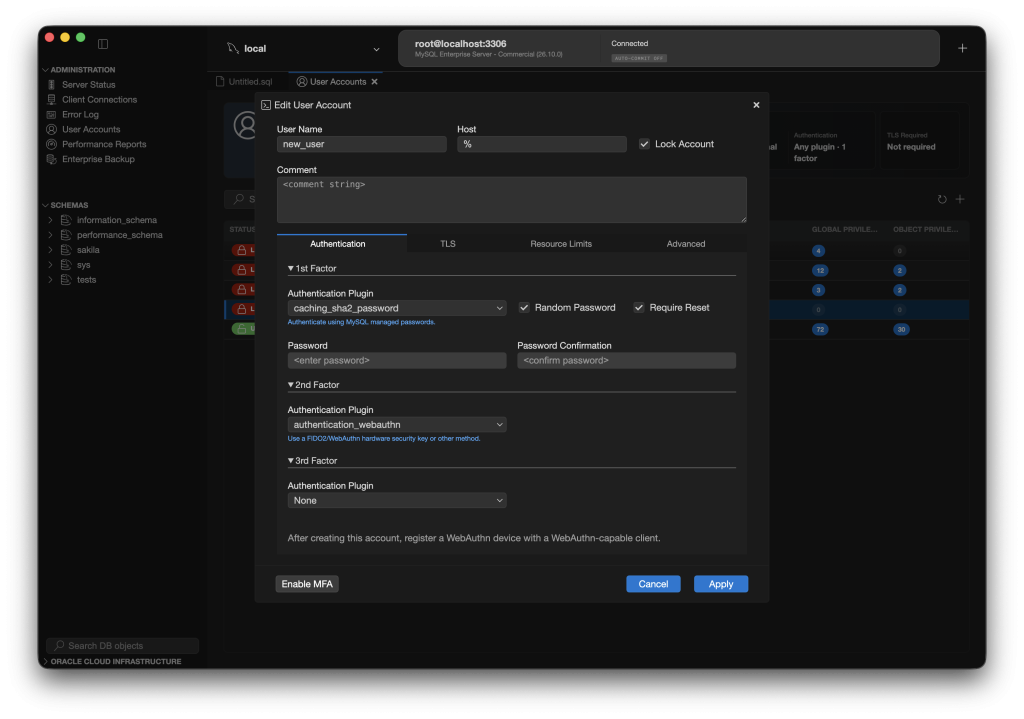
The User Editor has also been updated to support MFA.
DBAs can now create and modify MySQL accounts with multiple authentication factors, configure the authentication plugin for each factor, and manage plugin-specific options, all through the graphical interface.
We’ve also improved password management. A new Database → Authentication submenu provides commands for common password tasks for the current account:
- Reset a password
- Reset a password while retaining the previous password, enabling use of dual passwords
- Discard the previous password, when using dual passwords
These operations are also available from the User Accounts editor, allowing DBAs to reset passwords for other users.
Connecting with expired passwords is now properly handled. Workbench will now automatically prompt for a new password if your existing password expired.
Together, these changes make it easier to use and manage accounts using MySQL’s more advanced authentication capabilities without having to perform every operation manually through SQL or other clients.
Post-Quantum Cryptography for TLS Connections
Security improvements aren’t limited to authentication.
MySQL Workbench 26.10 also adds support for post-quantum cryptography for TLS connections to MySQL, leveraging the newly added capabilities in the MySQL Server and MySQL Shell.
Post-quantum cryptography is designed to protect encrypted communications against threats from future quantum computers. As organizations begin preparing for these threats, support in database connectivity tools becomes increasingly important.
Server Log Viewer
Troubleshooting a MySQL server often starts with looking at its logs.
MySQL Workbench 26.10 introduces a Server Log Viewer, making it easier to inspect server logs directly from the Workbench interface.
This brings another important administration task into Workbench, reducing the need to switch between different tools when investigating server issues.
MySQL Enterprise Backup Improvements
We’ve also made several bug fixes and improvements to the MySQL Enterprise Backup (MEB) integration.
Workbench provides a graphical interface for creating, scheduling, and restoring MySQL Enterprise backups. This release addresses issues in those workflows, improving reliability for DBAs using Workbench to manage their backups.
Downloads and More
Download MySQL Workbench 26.10 for Windows, macOS, and Linux from the MySQL Downloads page.
Source code for MySQL Workbench, MySQL Shell plugins, and MySQL Shell is available on GitHub.
Bugs and Feature Suggestions
File bugs and feature suggestions at bugs.mysql.com.