
MySQL HeatWave Service on Oracle Cloud Infrastructure (OCI) provides built-in telemetry and logging capabilities that help organizations monitor database activity, troubleshoot issues, and maintain operational health. These logs are valuable not only for operations and performance tuning, but also for governance and regulatory compliance, where audit logging can be essential for tracking database activity and supporting review requirements.
In this post, we show how to enable and configure MySQL HeatWave telemetry and logging, and how to use OCI Log Analytics to centralize, analyze, and manage that data. With the right setup, teams can gain deeper operational visibility, accelerate troubleshooting, and preserve the audit trail needed for compliance and security oversight.
Prerequisites
Before you begin, make sure the following requirements are met:
- MySQL HeatWave instance version 9.6 or later. Support is currently available for MySQL 9.6 and higher, with support for the latest MySQL 8.4 versions planned through a future backport.
- A standalone DB System. High availability (HA) deployments and systems with read replicas are not currently supported for this workflow.
- A DB System that is not on the Always Free tier, because Always Free resources do not support OCI Log Analytics.
- OCI Log Analytics enabled in the target region.
- Required IAM permissions and policies configured.
- Required networking in place, including private endpoints or a service gateway where applicable.
- Governance considerations reviewed, including log retention, access controls, and handling of sensitive data.
- Audit log filtering configured appropriately for SQL statements, based on your compliance and security requirements.
How to Enable MySQL HeatWave Telemetry and Send Logs to OCI Log Analytics
Enabling MySQL HeatWave telemetry and integrating it with OCI Log Analytics involves a few key setup steps. First, you need the required IAM policies so MySQL HeatWave can send logs to OCI Log Analytics. Next, you create the log groups that will store and organize the log data. Finally, you enable telemetry in the MySQL HeatWave DB System and choose which logs to export.
Once this setup is complete, OCI Log Analytics provides a centralized platform for searching, analyzing, and visualizing MySQL HeatWave logs for operations, performance troubleshooting, governance, and compliance.
Step 1: Configure IAM policies
Before MySQL HeatWave can send logs to OCI Log Analytics, the required IAM policies must be configured for the dynamic group associated with your MySQL HeatWave resources.
The following policies are required:
Allow dynamic-group MYSQL_DG to use loganalytics-log-group in compartment <compartment OCID>
Allow dynamic-group MYSQL_DG to {LOG_ANALYTICS_SOURCE_READ} in tenancy
Allow dynamic-group MYSQL_DG to use loganalytics-ondemand-upload in tenancy
Allow dynamic-group MYSQL_DG to use loganalytics-lifecycle in tenancy
These policies allow MySQL HeatWave to write logs to OCI Log Analytics, use the required log sources, and manage the uploaded log lifecycle.
Use a screenshot of the IAM policy configuration page showing the required policies for the dynamic group.
Step 2: Create log groups in OCI Log Analytics
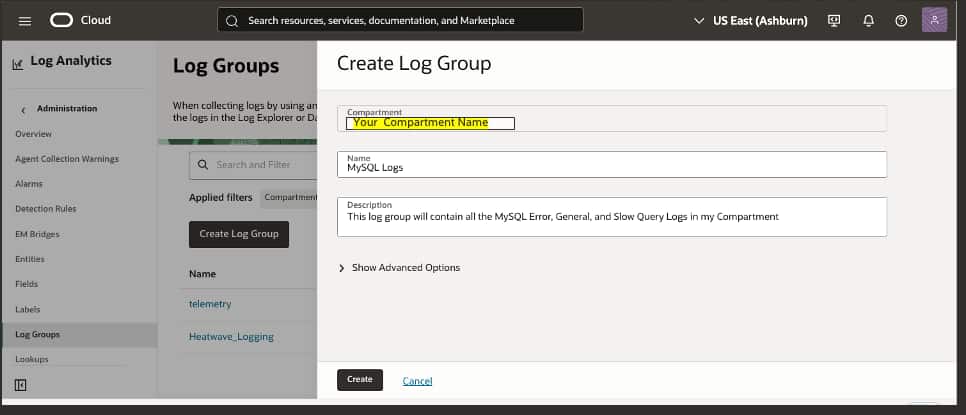
When logs are exported to OCI Log Analytics, they must be associated with a log group. Log groups are used to organize log data and control access for querying, dashboards, and lifecycle management.
To create a log group, navigate to:
Observability & Management > Log Analytics > Administration > Log Groups
Create one or more log groups based on your operational and governance requirements.
For example, many organizations will want to separate logs by audience and purpose. A DBA or operations team may need access to error logs and slow query logs for troubleshooting and performance analysis, while audit logs may need to be restricted to security, risk, or compliance teams. Using separate log groups makes it easier to apply role-based access controls and align log visibility with governance policies.
Observability & Management Log Analytics Administration Log Groups
Step 3: Enable telemetry in MySQL HeatWave
MySQL HeatWave can export the following log types to OCI Log Analytics:
- MySQL Error Log
- MySQL Slow Query Log
- MySQL General Query Log
- MySQL Audit Log
These logs support different use cases. Error logs and slow query logs are typically used for operations and performance troubleshooting. General query logs can help with activity analysis and debugging. Audit logs are especially important for governance and regulatory compliance, where organizations need a record of database activity for oversight and review.
Telemetry can be enabled either when a new DB System is created or after an existing DB System is already running.
Enable telemetry during DB System creation
When creating a new MySQL HeatWave DB System, open Advanced Options and scroll to the Telemetry section.
From there, select the log types you want to export and choose the target compartment and log group for each one. This is the most efficient approach when you want observability and audit logging in place from the beginning.
Enable or update telemetry for an existing DB System
You can also enable telemetry after deployment.
To configure telemetry for an existing DB System:
- Open the MySQL HeatWave DB System details page.
- Select the Telemetry tab.
- Click Edit Configuration.
- Choose the log type you want to enable.
- Select the target compartment and log group.
- Save the configuration.
This allows you to expand or adjust your logging configuration over time as operational, security, or compliance requirements evolve.
In Step 3: Enable telemetry in MySQL HeatWave, there are two good screenshot spots:
After Enable telemetry during DB System creation
Use a screenshot of the Create DB System flow with Advanced Options expanded and the Telemetry section visible.
After Enable or update telemetry for an existing DB System
When you create a new database – to enable logging you will open Advanced Options and scroll down to Telemetry
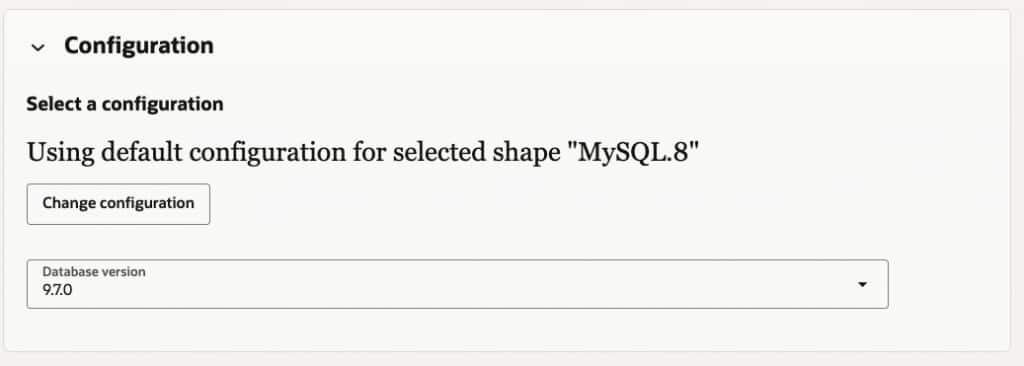
Define the enablement and mapping to Log Groups.
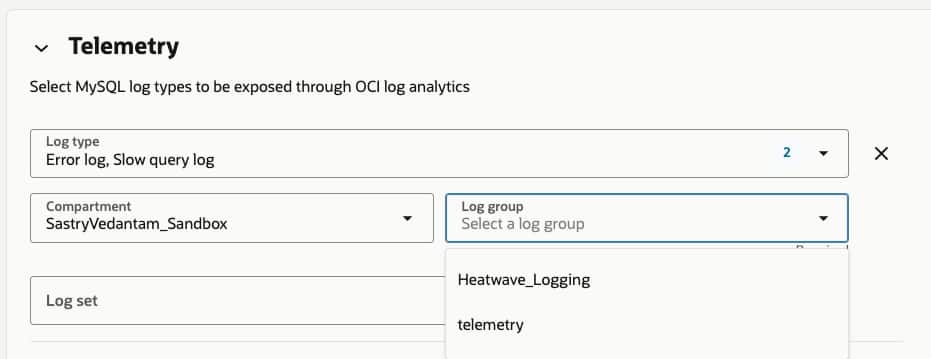
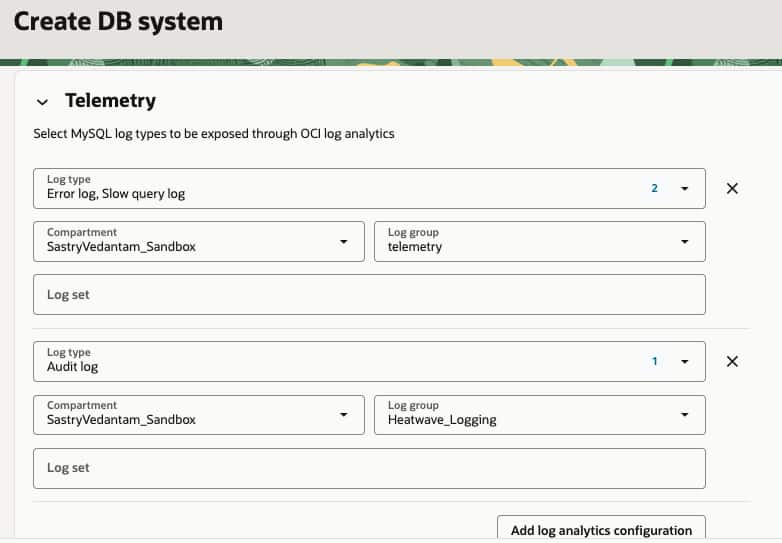
Note – if multiple
Step 4: Align log routing with operational and compliance needs
One of the advantages of this approach is that different log types can be routed to different log groups.
For example, error logs and slow query logs might be directed to a log group used by DBAs and operations teams, while audit logs are routed to a separate log group with access limited to security and compliance stakeholders. This separation helps enforce least-privilege access and supports governance requirements without limiting operational visibility.
This becomes especially important when audit logs are retained for regulatory or internal compliance purposes. In those cases, access controls, retention policies, and data sensitivity considerations should be part of the logging design from the start.
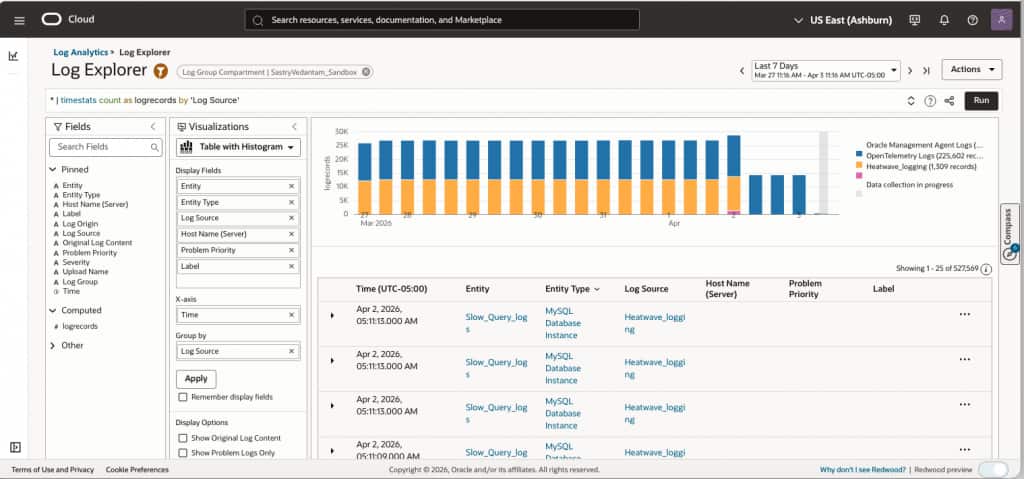
Step 5: Analyze MySQL HeatWave logs in OCI Log Analytics
After telemetry is enabled and logs are flowing into OCI Log Analytics, teams can begin using the service to analyze and act on the data.
OCI Log Analytics can help teams:
- investigate database errors and operational events
- identify slow query patterns and performance bottlenecks
- review database activity for troubleshooting and usage analysis
- centralize audit records for governance and compliance workflows
- build dashboards for ongoing monitoring and trend visibility
- use advanced analytics and anomaly detection features to accelerate root cause analysis
This centralized approach gives operations, security, and compliance teams a common platform for working with MySQL HeatWave log data instead of relying on disconnected tools or manual log inspection.
Analyze MySQL HeatWave logs in OCI Log Analytics
Why audit logging matters
Although error logs, slow query logs, and general query logs are valuable for day-to-day operations, audit logs often serve a different and equally important purpose.
In many organizations, audit logging is required to support regulatory compliance, internal governance, and formal review processes. Audit logs provide a record of database activity that can help demonstrate oversight, support investigations, and satisfy reporting requirements. For that reason, audit logging should be planned not only as an operational feature, but also as part of a broader compliance and risk management strategy.
When designing your logging approach, it is important to consider retention policies, access restrictions, and the sensitivity of the captured data, especially for audit-related records.
Conclusion
Enabling MySQL HeatWave telemetry with OCI Log Analytics gives organizations a centralized way to monitor database activity, troubleshoot issues, and analyze performance. It also helps preserve the audit trail needed to support governance, security oversight, and regulatory compliance.
As always, thank you for using MySQL!