
Connect catalogs, files, callbacks, MCP sources, and ontologies to natural language queries
A database can tell an AI model that TOTAL_SPEND is numeric and LAST_ORDER_DATE is a date. It can’t explain whether a “high-value customer” means lifetime spend above $50,000, or whether “at risk” also requires an open support escalation. Those meanings live in business glossaries, catalogs, policy files, ontologies, and applications. Semantic context for Select AI brings that business knowledge into natural-language-to-SQL prompts alongside database metadata, helping generated SQL reflect the terminology and rules your organization uses.
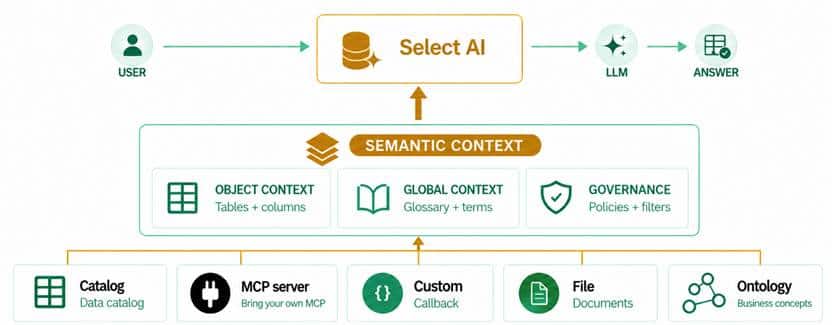
Business meaning is key
People describe the questions they need answered in business language. Schemas often use implementation names, while teams rely on agreed definitions for metrics, customer segments, time periods, and relationships. When those definitions aren’t available to a query, the same phrase can lead to different interpretations. A business glossary might define an “At-Risk Customer” as a high-value customer with no order in the past 90 days and an open support escalation. That definition gives Oracle Select AI and your chosen LLM useful context for a prompt such as “List at-risk customers by region.”
Semantic context complements schema metadata such as table and column names, data types, comments, constraints, annotations, and profile instructions. It can add terms, metric definitions, object descriptions, business rules, and relationships. Object-level context can help support automated object discovery. You can use one source or combine several, and profiles without semantic context continue to use their existing behavior.
Choose the source that fits your knowledge
A semantic source is a configured place Oracle Select AI retrieves business information from. Use object scope for context associated with database objects, global scope for prompt-level or general business context, or a combination of the two. At prompt time, Oracle Select AI retrieves context from the sources attached to the active AI profile and combines it with the available database metadata.
Connect a data catalog
If your organization already maintains definitions in a data catalog, connect that source instead of copying the same descriptions into another system. Catalog integrations can provide business terms and object descriptions from supported providers such as Alation or Informatica. To configure an integration, identify the catalog data source that contains the relevant metadata and configure the appropriate credentials for access. Supported catalog integrations include Alation and Informatica.
In the following code example, we create semantic source objects for Alation and Informatica catalogs with their corresponding access details. Specifying scope as “all” indicates the source has both object and global scope.
BEGIN
  DBMS_AI_SEM.CREATE_SEMANTIC_SOURCE(
    source_name => 'SALES_ALATION_CATALOG_SOURCE',
    type        => 'catalog',
    attributes  => '{
      "provider": "alation",
      "scope": "all",
      "source_endpoint": "<ALATION_ENDPOINT>",
      "credential_name": "<ALATION_CREDENTIAL>",
      "data_source_name": "SALES_DATA_SOURCE"
    }'
  );
END;
BEGIN
DBMS_AI_SEM.CREATE_SEMANTIC_SOURCE(
source_name => 'SALES_INFORMATICA_CATALOG_SOURCE',
type => 'catalog',
attributes => '{
"provider": "informatica",
"scope": "all",
"source_endpoint": "<INFORMATICA_ENDPOINT>",
"credential_name": "<INFORMATICA_CREDENTIAL>",
"data_source_name": "SALES_DATA_SOURCE"
}'
);
END;Use a custom callback
A custom source calls PL/SQL functions that return semantic context. This option can support rules or metadata stored in application tables or other sources accessible to the database, or logic that selects context based on the requested database objects. Configure an object callback, a global callback, or both depending on your needs. A custom callback can retrieve context dynamically when invoked.
BEGIN
  DBMS_AI_SEM.CREATE_SEMANTIC_SOURCE(
    source_name => 'SALES_CALLBACK_SOURCE',
    type        => 'custom',
    attributes  => '{
      "scope": "all",
      "object_callback_func": "APP_SEMANTICS.GET_OBJECT_CONTEXT",
      "global_callback_func": "APP_SEMANTICS.GET_GLOBAL_CONTEXT",
      "params": {"domain": "sales"}
    }'
  );
END;
Return semantic items with a term or name, a definition, and the database objects the context applies to.
Retrieve context from a file
A file source can make a glossary, metric guide, or other business reference available as global context. The source can point to a database directory file or an object storage file. File content is processed and indexed with an AI profile that specifies an embedding model for vector indexing.
BEGIN
  DBMS_AI_SEM.CREATE_SEMANTIC_SOURCE(
    source_name => 'SALES_GLOSSARY_FILE',
    type        => 'file',
    attributes  => '{
      "scope": "global",
      "source_endpoint": "<OBJECT_STORAGE_FILE_URI>",
      "credential_name": "SALES_FILE_CREDENTIAL",
      "profile_name": "SEMANTIC_FILE_EMBEDDING_PROFILE"
    }'
  );
END;
Retrieve context through MCP
An MCP source connects semantic context to tools exposed by an MCP-compatible service. Use it when business knowledge is available through an existing service or when you want the source to retrieve context dynamically. A global tool returns general terms or definitions; an object tool can return context tied to a requested table or column. The response mapping tells Oracle Select AI which parts of the tool response contain the items, terms, and definitions.
BEGIN
  DBMS_AI_SEM.CREATE_SEMANTIC_SOURCE(
    source_name => 'SALES_GLOSSARY_MCP',
    type        => 'mcp',
    attributes  => '{
      "scope": "global",
      "source_endpoint": "<MCP_ENDPOINT>",
      "credential_name": "SALES_MCP_CREDENTIAL",
      "global_tool": {
        "name": "search_business_glossary",
        "arguments": {"domain": "sales"},
        "response_mapping": {
          "items": "$.results[*]",
          "term": "$.term",
          "definition": "$.definition"
        }
      }
    }'
  );
END;
For object tools, also map the returned object identifier and provide an object pattern containing ${owner} and ${name} so provider objects can be matched to database objects.
Use an ontology
An ontology represents business concepts and their relationships as structured knowledge. It can help describe how concepts such as customers, accounts, orders, and escalations relate to one another. Choose an ontology source when those relationships and concept definitions are maintained in an ontology rather than only as free-text descriptions.
-- Replace the marked key and value with the ontology integration settings
BEGIN
  DBMS_AI_SEM.CREATE_SEMANTIC_SOURCE(
    source_name => 'SALES_ONTOLOGY_SOURCE',
    type        => 'ontology',
    attributes  => '{
      "scope": "all",
      "<ONTOLOGY_SPECIFIC_KEY>": "<ONTOLOGY_SPECIFIC_VALUE>"
    }'
  );
END;
The scope controls whether that source contributes object context, global context, or both.
Attach sources to an AI profile
Creating a semantic source doesn’t automatically make it available to every prompt. Add one or more source names to the semantic_source attribute of the AI profile used for the request. The profile can reference sources owned by its owner or sources for which that owner has been granted access.
BEGIN
  DBMS_CLOUD_AI.CREATE_PROFILE(
    profile_name => 'SALES_PROFILE',
    attributes   => '{
      "provider": "<PROFILE_PROVIDER>",
      "credential_name": "<PROFILE_CREDENTIAL>",
      "semantic_source": [
        "SALES_CATALOG_SOURCE",
        "SALES_GLOSSARY_FILE"
      ]
    }'
  );
END;
The source owner controls the source configuration and credential. A grant enables another profile owner to attach and use the source; it doesn’t transfer ownership or share the source credential. A source owner can update or disable a source. A source cannot be dropped while it is attached to an active profile, subject to the documented restrictions for the applicable product release.
Inspect the context used for a prompt
Use SHOWCONTEXT to review the semantic context attached to a prompt before you investigate its generated SQL. The output can include object descriptions, column descriptions, and global business context. This can help you confirm that the profile is using the expected source and that the returned definitions match your intent.
SELECT AI SHOWCONTEXT 'List at-risk customers by region';For a useful validation loop, compare the same prompt with and without Semantic Context, inspect the context with SHOWCONTEXT, review the generated statement with SHOWSQL, and check the final results against known examples. This helps you catch missing definitions, mismatched object mappings, and ambiguous business rules before an application relies on the query.
Start with the knowledge you already trust
Semantic context for Oracle Select AI gives you a way to connect business knowledge to the profile that generates SQL. Use a catalog for centrally governed definitions, a file for reference material, a callback or MCP service for dynamically retrieved context, and an ontology for structured concepts and relationships. Start with a business phrase that has caused inconsistent interpretations, attach the source that defines it, and inspect how that context changes the generated SQL.
Resources
For more information, see: