
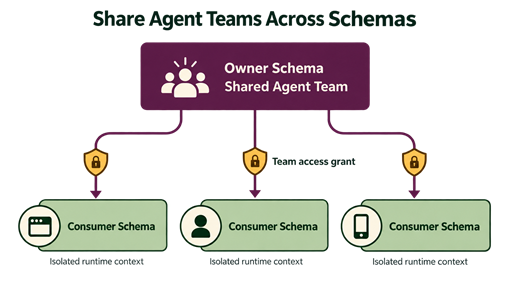
A useful agent workflow shouldn’t need to be rebuilt for every application schema. Oracle Select AI Agent Framework team sharing enables one schema to own a defined agent team and grant other users or roles permission to run it. Consumers invoke the shared team with a qualified name, while the owner keeps control of its agents, tasks, tools, prompts, and workflow design.
That division is important to help simplify reuse across schemas. You can make a proven workflow available to many applications without copying it, and each consumer can supply its own temporary execution context. You get one centrally maintained workflow, explicit database-controlled access, and consumer-specific runtime context without copying the team into every application schema.
Cross-Schema Reuse
Oracle Select AI Agent Framework enables you to create in-database agents that can reason over a request, call tools, and retain conversational context. A team can organize several of those elements into a sequential agent workflow or a dynamic supervisor agent workflow. In practice, platform teams often build one such workflow for a business capability such as account support, financial research, or incident analysis, while the applications that need it live in separate schemas.
Without a sharing mechanism, each consuming schema would need a copy of the team. Copies drift. A prompt fix, new task, revised tool instruction, or governance change may need to be repeated and retested. Sharing keeps the definition in one owner schema, so a change is made once in the owner’s schema and can be made available to authorized consumers without distributing the internals of the workflow.
Team Sharing
Team sharing separates three important aspects:
- Owner control. The owner authors the team and can update its composition, tasks, and tool configuration in one place.
- Consumer use. An authorized user or enabled role invokes the owner-defined team by using a qualified name such as OWNER.TEAM_NAME.
- Resource access. Team access permits use of that team. It does not independently grant access to the underlying agents, tasks, tools, credentials, profiles, tables, or custom functions.
This narrow scope is what enables this feature to support shared service scenarios. A team can encapsulate its workflow, while the database continues to apply the privileges required by the resources used during execution.
A Straightforward Shared Team Example
Consider a sales operations schema named SALES_OWNER that maintains PIPELINE_TEAM. The team has already been configured to summarize open opportunities. The owner has intentionally made two points configurable at runtime: the agent profile_name contains {llm_profile}, and a task instruction contains {report_audience}. An analytics application in a different schema needs the same capability. Instead of receiving a duplicate team definition, the application receives access to the existing team.
Connected as SALES_OWNER, the team owner grants access to the application schema:
-- Connected as SALES_OWNER
BEGIN
  DBMS_CLOUD_AI_AGENT.GRANT_TEAM_ACCESS(
    team_name         => 'PIPELINE_TEAM',
    user_or_role_name => 'ANALYTICS_APP'
  );
END;
Connected as ANALYTICS_APP, the consumer calls the shared team with the owner-qualified name:
-- Connected as ANALYTICS_APP
DECLARE
  l_result CLOB;
BEGIN
  l_result := DBMS_CLOUD_AI_AGENT.RUN_TEAM(
    team_name   => 'SALES_OWNER.PIPELINE_TEAM',
    user_prompt => 'Summarize open pipeline by region and flag deals closing this month.',
    params      => '{
      "attribute_variables": {"llm_profile": "ANALYTICS_APP_PROFILE"},
      "instruction_variables": {"report_audience": "regional sales managers"}
    }'
  );
  DBMS_OUTPUT.PUT_LINE(l_result);
END;
The code does not recreate PIPELINE_TEAM. It names the team in its owner schema and starts an execution. ANALYTICS_APP_PROFILE resolves the owner-authored {llm_profile} placeholder, while regional sales managers resolves {report_audience}. A supplied value has an effect only when the team definition contains the matching placeholder, so the owner decides which aspects of the workflow consumers can configure. The example assumes ANALYTICS_APP already has any separate privileges required by the profile, tools, data, credentials, and network resources the workflow uses.
Applications can also supply a conversation_id in params when they need to continue a specific conversation across stateless or pooled requests.
When access is no longer needed, SALES_OWNER can revoke the same team-level privilege:
-- Connected as SALES_OWNER
BEGIN
  DBMS_CLOUD_AI_AGENT.REVOKE_TEAM_ACCESS(
    team_name         => 'PIPELINE_TEAM',
    user_or_role_name => 'ANALYTICS_APP'
  );
END;
Isolated Runtime Configuration
Runtime variables give consumers room to adapt a shared workflow without editing permanent team metadata. The framework keeps three namespaces separate. Use instruction variables for values that belong in agent roles or task instructions, attribute variables for values such as profile names or tool parameters, and state variables for values that custom tools read or pass to later tools during an execution.
A call to RUN_TEAM creates a fresh execution layer. Its values override same-named session values for that execution and are cleared when the call returns. A team may also be activated for the current database session with SET_TEAM. Session values are replaced by the next session activation or cleared when the session ends. If an execution waits for human input, its effective execution values are saved with that execution and restored only when the same consumer resumes it. Conversation and execution ownership remain with the consumer that created or selected the conversation, so subject to the applicable access controls, another consumer cannot resume it merely by knowing a conversation or execution ID.
Security and Lifecycle Details to Plan For
Cross-schema execution uses a qualified team name. The access check occurs when a team is set, run, or resumed. Owners can grant access directly to a named user or to a role. Role-derived access follows the database session’s enabled-role behavior. Revoking access blocks later starts and resumes after the revoke completes, although an execution that was already admitted can reach its terminal state.
Team access is not a shortcut around resource privileges. If a shared team calls an owner-defined custom PL/SQL tool function, the consumer needs EXECUTE on that function. An invoker-rights (AUTHID CURRENT_USER) function also relies on the consumer’s privileges for the resources it accesses, while a definer-rights function uses the definer’s privileges according to normal Oracle AI Database semantics. Apply the same care to AI profiles, credentials, data, and network access that you would apply to any database application.
For session-level shared-team use through SET_TEAM, the consumer must grant the team owner permission to translate that consumer’s SQL:
GRANT TRANSLATE SQL ON USER ANALYTICS_APP TO SALES_OWNER;
Without this privilege, SET_TEAM fails with insufficient privileges. The direct RUN_TEAM pattern above provides a direct starting point when an application needs an isolated request.
A Practical Path to Adoption
Start with a team that already represents a stable, reusable business workflow. Keep the ownership boundary clear, identify the application users or roles that should invoke it, and use only intentional runtime placeholders. Test the direct grant, role grant, qualified-name requirement, revoke behavior, and any custom-tool privileges. If you use SET_TEAM, also test the SQL translation grant. For workflows that can wait for human input, test resume ownership and revoke behavior. This can help keep the shared team easy to maintain and can make its access model understandable to both application and database teams.