
Bring natural-language data interaction, RAG, and database-managed AI agent workflows to Java applications with a Java-native SDK
Java powers many of the world’s enterprise applications – from Spring services and Jakarta EE applications to high-throughput APIs, batch processes, and data-intensive systems. Those applications often sit close to an organization’s most valuable data. Adding generative AI, however, can still mean stitching together database drivers, provider SDKs, prompt orchestration, vector stores, credentials, conversation state, and increasingly the runtime needed to coordinate AI agents and their tools.
Oracle Select AI for Java can help simplify that work by bringing Oracle Select AI capabilities into a Java-native programming model.
The SDK provides strongly typed Java interfaces, request and configuration models, resource lifecycle APIs, JDBC-based connection management, and runnable samples for working with Oracle Select AI from Java. You can ask questions of database data using natural language, generate and run SQL, chat with large language models, ground answers in enterprise documents with retrieval-augmented generation (RAG), create synthetic data, summarize and translate content, and preserve conversational context.
That expansion is important for enterprise Java teams. The same application that uses natural-language SQL or RAG can now invoke agent workflows that use database-defined tools, coordinate specialized agents, maintain team state, resume conversations across application requests, and run centrally managed shared teams. The database manages supported aspects of resource validation, authorization, workflow processing, and AI provider interaction through Oracle Select AI and the applicable database controls.
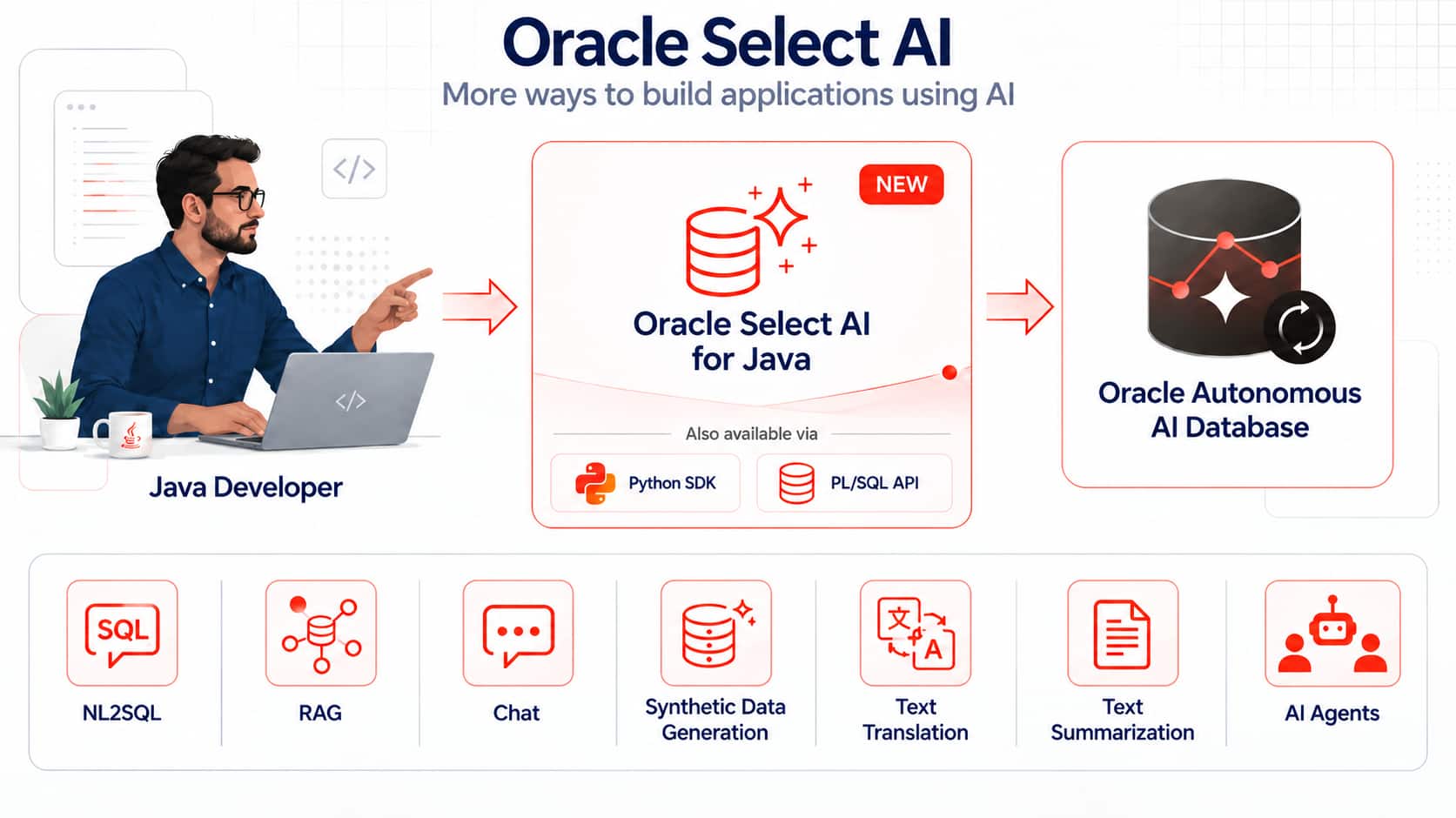
Oracle Select AI for Java main features
Oracle Select AI for Java exposes a broad set of capabilities through Java APIs, including:
- Choice of AI providers and models: Configure AI profiles for supported providers and models, including private endpoints and OpenAI-compatible APIs.
- Natural-language-to-SQL: Generate SQL from natural-language prompts, inspect it, explain it, run it against database data, or return a narrated answer. Provide profile-specific feedback about generated SQL to help guide future NL2SQL results.
- Chat: Use an LLM for content generation, question answering, recommendations, code generation, and other conversational experiences.
- Retrieval-augmented generation: Ground responses in enterprise content using Oracle AI Vector Search and Oracle Select AI vector indexes.
- Context-aware conversations: Preserve prompt history so follow-up questions can build on earlier turns.
- AI Agent Framework: Create, load, list, enable, disable, and drop agents, tasks, tools, and teams; describe and run tools; run teams; manage team state; and import or export team definitions. Grant other users access to your agent team for ease of deployment and management.
- Synthetic-data generation: Generate realistic data for one or more database tables for development and testing.
- Summarization and translation: Summarize inline or externally stored content and translate text through the provider configured in an AI profile.
- Java-native connection management: Use an application-managed DataSource for pooled applications or have the SDK manage a JDBC connection through DbConnectionConfig.
Ask your database questions using Java
Oracle Select AI profiles control how prompts are processed. A profile can specify the AI provider and model, credentials, database object scope, and other settings that shape a request. Profiles can be created through Java or other Oracle Select AI interfaces, and a Java application can open and use any profile visible to its database identity.
Once a profile is available, Java applications can use familiar method calls to generate, run, and explain SQL, or turn the result into a natural-language response:
import com.oracle.database.selectai.Profile;
import com.oracle.database.selectai.SelectAI;
import com.oracle.database.selectai.model.DbConnectionConfig;
import com.oracle.database.selectai.model.SelectAIException;

public final class SelectAIExample {
    public static void main(String[] args) throws SelectAIException {
        DbConnectionConfig config = DbConnectionConfig.builder()
                .dbUser(System.getenv("SELECTAI_DB_USER"))
                .dbPassword(System.getenv("SELECTAI_DB_PASSWORD"))
                .jdbcUrl(System.getenv("SELECTAI_JDBC_URL"))
                .build();

        try (SelectAI selectAI = SelectAI.create(config)) {
            Profile profile =
                    selectAI.profile(System.getenv("SELECTAI_PROFILE_NAME"));

String prompt = "How many customers placed an order this month?";

            System.out.println("Generated SQL: "     + profile.showsql(prompt));
            System.out.println("SQL explanation: "   + profile.explainsql(prompt));
            System.out.println("Query result: "      + profile.runsql(prompt));
            System.out.println("Narrated response: " + profile.narrate(prompt));
        }
    }
}
The method names mirror Oracle Select AI actions, which can help developers already familiar with the programming model. For applications that need a single generic entry point, generate accepts a GenerateAction such as showsql, runsql, explainsql, narrate, chat, summarize, translate, or embedding.
Your application doesn’t need to implement its own prompt templates, provider-specific HTTP calls, or SQL-generation workflow. Oracle Select AI supplies schema context, invokes the configured model, and runs the resulting database operation according to the profile and database permissions. This can help improve developer productivity and end-user experiences in applications where people need to ask questions in natural language rather than write SQL.
Configure AI profiles with typed Java objects
Oracle Select AI for Java includes typed profile and provider classes that reduce configuration boilerplate while preserving access to provider-specific settings. For example, an OCI Generative AI profile can define the model, region, credential, and database object scope using builder-based Java objects:
ProviderProfile providerProfile =
        ProviderProfile.OCIGenAIProviderProfile.builder()
                .model(System.getenv("SELECTAI_MODEL"))
                .region("us-chicago-1")
                .ociApiFormat("GENERIC")
                .build();

ProfileAttributes profileAttributes = ProfileAttributes.builder()
        .credentialName(System.getenv("SELECTAI_CREDENTIAL_NAME"))
        .providerProfile(providerProfile)
        .objectList("[{\"owner\":\"SH\"}]")
        .objectListMode(ObjectListMode.AUTOMATED.getValue())
        .enforceObjectList(true)
        .build();

Profile profile = selectAI.profile(
        "sales_profile",
        profileAttributes,
        "Sales profile for NL2SQL queries",
        ProfileStatus.ENABLED);

profile.create();
The SDK also exposes profile settings for additional instructions, comments, constraints, temperature, token limits, conversation behavior, provider endpoints, embedding models, and vector-index names. The showprompt method returns the augmented prompt that Oracle Select AI would send to the configured provider, which is useful when you need to understand how metadata and profile settings contribute to an AI request.
Add trusted content with retrieval-augmented generation
Many applications need to answer questions using information that isn’t stored in relational tables – for example, product documentation, operating procedures, support articles, or internal policies. Oracle Select AI for Java supports RAG using Oracle AI Vector Search and Oracle Select AI vector indexes.
A Java application can create and manage a vector index over supported document sources, associate that index with a RAG profile, and then request grounded answers. The application can remain focused on the user experience while Oracle Select AI handles retrieval, adds relevant content to the model request, and returns the generated response.
VectorIndexAttributes attributes = VectorIndexAttributes.builder()
        .location(System.getenv("SELECTAI_DOCUMENT_LOCATION"))
        .objectStorageCredentialName(
                System.getenv("SELECTAI_OBJECT_STORAGE_CREDENTIAL"))
        .profileName("embedding_profile")
        .vectorDbProvider("oracle")
        .enableSources(true)
        .build();

VectorIndexConfig config = VectorIndexConfig.builder("support_index")
        .description("Support documentation vector index")
        .vectorIndexAttributes(attributes)
        .waitForCompletion(true)
        .build();

VectorIndex vectorIndex = selectAI.vectorIndex(config);
vectorIndex.create();

Profile ragProfile = selectAI.profile("support_rag_profile");
String response = ragProfile.generate(
        "What is the escalation procedure for a failed deployment?",
        GenerateAction.narrate);
The enableSources setting can add source information to retrieval results, helping applications provide traceability for generated answers.
Build context-aware conversations
Oracle Select AI conversations store chat context so later prompts can refer to earlier turns. Java applications can create conversations with titles, descriptions, retention periods, and context-length settings, and then use that context for multi-turn interactions.
Conversation conversation = selectAI.conversation(
        ConversationAttributes.builder()
                .title("Support conversation")
                .description("Deployment support discussion")
                .conversationLength(10)
                .retentionDays(30)
                .build());

conversation.create();

try (Session session = profile.chatSession(conversation, true)) {
    System.out.println(session.chat(
            "What should I check after a deployment failure?"));

    System.out.println(session.chat(
            "Which of those checks applies to the database connection?"));
}
For agent workflows, conversation identifiers also play a second role: they enable a team workflow to preserve and resume database-managed context across separate application requests or pooled JDBC connections.
Build AI agent workflows from Java
Version 1.1.0 adds a dedicated Java entry point for Oracle Select AI Agent Framework. The SelectAIAgent client works with database-defined Agent, Task, Tool, and Team resources. These are Java representations of resources managed in the database, not an independent Java agent runtime.
That architecture supports database-centered management of agent resources and associated access control. The Java application communicates with Oracle AI Database over JDBC. The database validates resource definitions and permissions, manages team workflow and state, invokes configured tools, and interacts with AI providers as required. Your Java application can focus on application logic and user experience instead of recreating an orchestration layer.
Run an agent team with a few Java calls
Consider a sales application that already has a database-resident team designed to investigate sales performance. One agent might retrieve the relevant data, while another interprets the results and produces a response. Java can load and run that team using the same connection patterns as the rest of the SDK:
import com.oracle.database.selectai.agent.SelectAIAgent;
import com.oracle.database.selectai.agent.Team;
import com.oracle.database.selectai.model.DbConnectionConfig;
import com.oracle.database.selectai.model.agent.RunTeamRequest;

DbConnectionConfig config = DbConnectionConfig.builder()
        .dbUser(System.getenv("SELECTAI_DB_USER"))
        .dbPassword(System.getenv("SELECTAI_DB_PASSWORD"))
        .jdbcUrl(System.getenv("SELECTAI_JDBC_URL"))
        .build();

try (SelectAIAgent agentClient = SelectAIAgent.create(config)) {
    Team team = agentClient.team("SALES_INSIGHT_TEAM");

    String result = team.run(
         RunTeamRequest.builder()
                 .userPrompt(
                   "Which products have the largest quarter-over-quarter " +
                   "revenue decline, and what should we investigate?")
                 .conversationId(conversationId)
                 .build())
         .getRawValue();
    System.out.println(result);
}
The team, its participating agents, tasks, tools, AI profiles, and permissions remain database-defined and managed. Team.run and related APIs return the database-generated response as a JSON string, giving applications a stable boundary while the database manages the workflow.
Manage agents, tasks, tools, and teams as Java resources
The agent API follows the same resource-oriented model used elsewhere in the SDK. Java applications can create or load agents, tasks, tools, and teams; inspect their attributes and status; enable or disable them; update supported attributes; and drop resources when they are no longer needed. The listAgents(), listTasks(), listTools(), and listTeams() functions list resources owned by the connected database user. To discover teams available to that user, including shared teams granted to the user or their roles, use listAvailableTeams(). This discovery API returns read-only AvailableTeam objects rather than mutable Team resource handles.
Tools are also first-class resources. A Java application can describe a database-defined tool to retrieve its definition and input metadata, or invoke the tool directly with a JSON payload. Teams can be described, run, queried for state, and updated when a workflow is waiting for application or human input. Tools defined using Oracle Select AI Agent Framework can also be exposed as MCP tools using the Autonomous AI Database MCP Server.
Resume team workflows across web requests and pooled connections
Enterprise Java applications commonly use connection pools, and any two requests in the same business conversation may run on different physical database connections. Oracle Select AI Agent Framework supports this pattern with database-created conversation identifiers. Supply the same conversation identifier when you resume the team, and the database can continue the workflow across separate requests.
try (SelectAIAgent agentClient = SelectAIAgent.create(dataSource)) {
     String result = agentClient.runTeam(
         "AI_OWNER.SALES_INSIGHT_TEAM",
         RunTeamRequest.builder()
             .userPrompt("Now focus on the western region.")
             .conversationId(conversationId)
             .build()).getRawValue(); }
This is especially useful for Spring, Jakarta EE, application-server, and stateless service architectures. With DataSource mode, each SDK operation borrows a JDBC connection and returns it after the operation completes, while the conversation identifier preserves the team context in the database.
Reuse centrally managed shared teams
A team can be owned and maintained by one database user and granted for use by another. Java applications can run a shared team using an owner-qualified name such as AI_OWNER.SALES_INSIGHT_TEAM after the appropriate database-managed team access has been granted.
This supports a useful enterprise pattern: a central team can define, manage, and update reusable agent workflows, while application schemas invoke those teams without taking ownership of their definitions. Database authorization remains in force. Access to a shared team doesn’t automatically grant access to every underlying custom function, database object, credential, or external resource that the team may need.
Promote and reuse team definitions
The Java SDK can retrieve canonical definitions and supports team import and export. That enables teams and their related definitions to participate in promotion and deployment workflows across environments. The database remains the authority for semantic validation and authorization when definitions are imported or used.
Built for Java application architectures
Oracle Select AI for Java is designed to fit existing Java application patterns rather than introducing a separate client-side runtime model.
Use DataSource for application-managed pooling
For Spring, Jakarta EE, application servers, and multi-threaded services, pass an existing DataSource to the SDK. The application owns the DataSource; the SDK borrows a connection for each operation and closes that operation connection when it completes. With a connection pool, closing normally returns the connection to the pool.
try (SelectAI selectAI = SelectAI.create(dataSource)) {
    Profile profile = selectAI.profile("sales_profile");
    System.out.println(profile.chat("Summarize our sales performance."));
}

try (SelectAIAgent agentClient = SelectAIAgent.create(dataSource)) {
    System.out.println(agentClient.listTeams());
}
DataSource mode is the recommended pattern for concurrent independent operations. A long-running team run can hold a borrowed JDBC connection until the operation returns, so size connection pools and statement timeouts with agent workflow duration in mind.
Use SDK-managed JDBC for simpler programs
For command-line tools, samples, and simpler services, DbConnectionConfig enables the SDK to open and own a JDBC connection. The client reuses that connection until it is closed. This mode should generally be treated as single-threaded unless your application serializes access externally.
Configure JDBC query timeouts deliberately
SelectAIOptions can apply an SDK-level JDBC query timeout to statements. By default, the SDK doesn’t apply one. A JDBC statement timeout isn’t necessarily the same as an AI provider endpoint timeout, and a timeout doesn’t prove that server-side database or provider work has stopped. Applications should avoid blindly retrying state-changing agent or team operations after a timeout.
Security and management stay database-centered
The Java SDK operates within the applicable Oracle AI Database authorization model. Operations run with the privileges of the connected database user. AI profiles, agent resources, tools, team access, referenced database objects, credentials, and network resources remain subject to database security controls.
For normal application runtimes, use least-privilege database identities. Keep administrative operations such as package grants, network access changes, credential administration, and shared-team access management in controlled setup workflows. Oracle Select AI for Java exposes a separate DatabaseAdmin API for explicitly authorized administrative operations. Shared-team access is managed by the team owner through SelectAIAgent.grantTeamAccess() and SelectAIAgent.revokeTeamAccess(), or Team.grantAccess() and Team.revokeAccess(). These owner-scoped operations do not inherently require DBA privileges and are not exposed through DatabaseAdmin.
The SDK is designed to avoid intentionally logging sensitive information, including passwords, private keys, access tokens, credential secrets, prompts, generated responses, complete agent definitions, tool inputs, and team runtime values. Application owners still control their own logging, retention, redaction, monitoring, and alerting policies.
For custom agent tools, database privileges still matter. A team grant by itself doesn’t provide access to a custom function or the database objects that function uses. This separation supports the same least-privilege model you already apply to enterprise database applications.
Getting started
Oracle Select AI for Java requires JDK 17 or later, and Maven 3.8 or later is recommended for building the project. The SDK uses the Oracle JDBC Thin Driver and follows standard Java dependency and connection-management patterns.
The source is available from the Oracle Select AI for Java GitHub repository. Build and install the SDK locally with Maven:
git clone https://github.com/oracle/java-select-ai.git
cd java-select-ai
mvn clean install
Version 1.1.0 adds the public agent packages com.oracle.database.selectai.agent and com.oracle.database.selectai.model.agent. Use the public interfaces and factory methods in these packages rather than depending on implementation classes under com.oracle.database.selectai.impl or com.oracle.database.selectai.impl.agent.
Agent functionality requires an Oracle AI Database release that provides the corresponding Oracle Select AI Agent Framework capabilities. The repository includes runnable samples for core Oracle Select AI features and for agent, task, tool, team, shared-team, state, import, export, and cleanup workflows.
Open source
Oracle Select AI for Java is available as open-source software under the Universal Permissive License, Version 1.0. Oracle welcomes contributions through the Oracle Contributor Agreement and the project GitHub repository.
Start building with Oracle Select AI for Java
Java developers now have a direct path from enterprise application code to natural-language data interaction, RAG, and database-managed agent workflows. You can keep your application in familiar Java patterns while moving AI profile configuration, data access, retrieval, conversation context, agent definitions, tools, and team workflow closer to the data and the database security model that already controls it.
For teams modernizing existing Java applications, that means you can start with a focused capability such as NL2SQL or RAG and expand to agentic workflows while continuing to use familiar Java application patterns, potentially reducing the need for architectural changes. Oracle Select AI for Java provides the Java-facing programming model, while Oracle Select AI and Oracle Select AI Agent Framework provide the database-resident AI capabilities behind it.
Resources
- Oracle Select AI for Java documentation
- Maven Central for Select AI for Java
- Oracle Select AI for Java on GitHub
- Oracle Select AI documentation
- Oracle Select AI Agent Framework documentation
- DBMS_CLOUD_AI package documentation
- DBMS_CLOUD_AI_AGENT package documentation
- Oracle Select AI RAG documentation
- Oracle Autonomous Database Free Tier