
The July Oracle Database Release Update is now available. Oracle strongly recommends that customers running supported Oracle AI Database releases test and deploy the update promptly across their applicable database estates.
The update includes Oracle Database 19c RU 19.32 and Oracle AI Database 26ai RU 23.26.3, along with corresponding updates for Oracle Grid Infrastructure, database clients, and other applicable components. It contains important critical and high-severity security fixes. Those protections take effect only after deployment.
Oracle Update Advisor helps organizations turn that security message into an operational process. It helps teams understand their software posture, retrieve recommendations, select the appropriate security threshold, and create a repeatable path from recommendation to verified deployment.
Organizations can use Oracle Update Advisor through Oracle Fleet Patching and Provisioning (FPP), Database Configuration Assistant (DBCA), and AutoUpgrade. Customers can also call the Oracle Update Advisor REST APIs directly from their own custom clients, operational processes, automation, and agentic AI workflows.
From patch policy to rapid security updates
Many organizations have established maintenance policies that define their normal update cadence. Those policies remain useful for routine operations. However, when Oracle makes an important security Release Update available, the operational question changes.
The question is no longer simply whether a database is aligned with its selected policy. The question becomes:
- Which database homes and related components require attention?
- Which systems are behind the recommended update level?
- Which environments must be included in testing and deployment?
- What actions are needed to move quickly, safely, and with evidence of completion?
Oracle Update Advisor provides software health and recommendation capabilities that help make these questions actionable. It can help teams identify gaps, understand applicable recommendations, and establish a consistent view of software currency across a fleet.
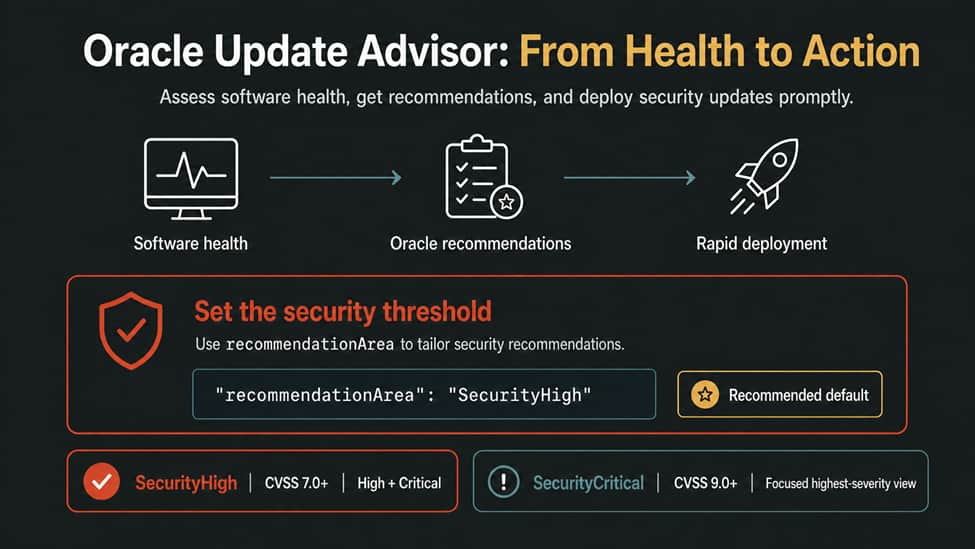
The objective is to shorten the time between the availability of an important update and its verified deployment.
Use the default SecurityHigh threshold for most July RU planning
Oracle Update Advisor lets customers specify the security threshold for software recommendations through the recommendationArea policy parameter.
For most customers, the recommended approach is to use the default: SecurityHigh. It helps to identify High and Critical security issues, meaning vulnerabilities with a CVSS score of 7.0 or higher. If no security-level directive is specified, Oracle Update Advisor automatically applies SecurityHigh.
This setting aligns with the July Release Update message. The July RU addresses both critical and high-severity security issues, so customers should not narrow their recommendation review to Critical issues only unless they have a specific need for that focused view.
The available security values map to Common Vulnerability Scoring System, or CVSS, thresholds:
| Security value | CVSS threshold | Typical use |
| SecurityCritical | 9.0 or higher | A focused view for organizations that want to evaluate only the highest-severity security issues. |
| SecurityHigh | 7.0 or higher | The default and recommended setting for most customers. It includes High and Critical issues. |
| SecurityMedium | 4.0 or higher | A broader review that includes Medium, High, and Critical issues. |
| SecurityLow | 0.1 or higher | The broadest security review. |
Security assessment cannot be disabled. Use one security-level value in recommendationArea; the parameter can also include functional recommendation directives, separated by commas.
For example, this explicitly uses the recommended default behavior:
"recommendationArea": "SecurityHigh" |
Use SecurityCritical only when the objective is a focused assessment of the highest-severity issues:
“recommendationArea": "SecurityCritical" |
A SecurityCritical request is not a substitute for the default SecurityHigh setting when the objective is to prepare for a Release Update that addresses both critical and high-severity issues.
To combine a functional recommendation area with the recommended default security threshold, use a comma-separated value:
"recommendationArea": "JDK,SecurityHigh" |
Make the complete estate visible
Rapid deployment starts with complete visibility. A patching program must account for more than production database instances. It should include applicable database homes, Grid Infrastructure installations, clients, drivers, management tools, disaster recovery systems, test and development environments, and supporting infrastructure.
Oracle Update Advisor can help teams identify where software health or recommendations require attention. That information should become a practical deployment worklist, not a dashboard that is reviewed and set aside.
For each system, teams should be able to identify the current software level, applicable update recommendation, owner, business priority, testing status, deployment plan, and any approved exception. This creates the operational discipline needed to act promptly when a significant Release Update is available.
Turn recommendations into a repeatable deployment process
A recommendation is valuable only when it leads to action. Organizations should integrate Oracle Update Advisor into a repeatable workflow:
- Inventory database homes, Grid Infrastructure, clients, and related components across the estate.
- Check software health and retrieve applicable recommendations.
- Use the default SecurityHigh threshold for the normal security recommendation review.
- Review affected systems and prioritize them based on exposure, business criticality, and operational dependencies.
- Prepare or obtain required software images and patches.
- Test quickly against representative application workloads.
- Deploy through established change, maintenance, and rollback procedures.
- Verify completion and continue monitoring for systems that remain behind.
This workflow should be practiced before an urgent update is released. Teams that already have inventory, ownership, testing, deployment, and exception processes in place are better able to reduce the time between release availability and verified deployment.
Continuously detect drift and aging exceptions
Patch readiness is not a one-time project. New databases are provisioned, software homes are added, systems are changed, and exceptions can accumulate.
Organizations should run regular Oracle Update Advisor checks and use the results to identify systems requiring attention, policy drift, and exceptions needing review. A software health result is an important operational signal, but it should not be treated as a safe-harbor classification. Health reflects alignment with a selected maintenance policy; the security significance of the available update and the recommended action must also be considered.
For important security updates, organizations should establish clear escalation, reporting, and accountability processes. Leaders should be able to see which systems are ready, which are in testing, which have been deployed, and which require an approved remediation plan.
Reduce deployment delay without compromising availability
Security and availability are not competing goals. The right architecture and operational practices can help organizations reduce downtime while applying important updates.
Depending on the environment, customers can use capabilities such as out-of-place patching, standardized gold images, rolling procedures, Oracle Real Application Clusters, Oracle Active Data Guard, Oracle GoldenGate, Fleet Patching and Provisioning, and application continuity technologies to support faster deployment with reduced disruption.
The appropriate approach depends on the architecture and the update being applied. Organizations should validate their procedures, maintain tested backups and recovery plans, and rehearse the path from recommendation to deployment before a critical update requires immediate action.
Make readiness measurable and actionable
The value of Oracle Update Advisor is not merely knowing whether software is current. Its value is helping teams make patch readiness measurable, repeatable, and actionable.
The July Release Update is now available. Organizations should use Oracle Update Advisor to identify applicable recommendations, use the default SecurityHigh threshold for the normal security review, test rapidly, and deploy promptly across applicable systems.
For more information, see:
- Prepare Now: Apply the Upcoming Oracle Database Release Update Immediately Upon Availability
- Streamlining Your Update Experience with Oracle Update Advisor (Documentation)
- Oracle Update Advisor Advanced Concepts and Use Cases (Documentation)
- Oracle Update Advisor API Reference and Integration Guide (Documentation)
- Recommendations to Help Protect Oracle Databases from Emerging AI-enabled Security Threats PNEWS3015