
The hard part of disaster recovery is rarely issuing the restore command. It is having trustworthy backups, a clear protection posture, and the operational evidence to make good decisions before an outage occurs.
This article explains how to protect an on-premises Oracle Database with Oracle Database Zero Data Loss Cloud Protect, monitor its recovery readiness, and use AI to make protection operations more repeatable.
Start with a recovery-ready protection posture
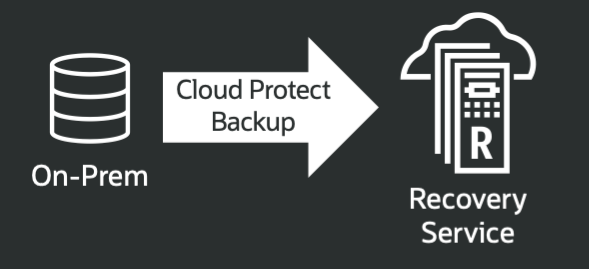
Oracle Database Zero Data Loss Autonomous Recovery Service provides managed data protection for Oracle databases across OCI, multicloud environments, and on-premises deployments. For on-premises databases, Cloud Protect sends backups to Recovery Service. The rcv commands in SQLcl, Oracle’s command-line interface for Oracle Database, manage the Cloud Protect workflows.
Before onboarding a database, establish the prerequisites:
- Supported database release
- Configured TDE wallet
- Current SQLcl
- OCI API authentication
- Correct operating-system and database privileges
A source database does not have to use Transparent Data Encryption, but its TDE wallet must be configured and open so RMAN can encrypt backups before sending them to Recovery Service. This protects backup data while it is transferred to and stored in Recovery Service.
Cloud Protect then does the following:
- Discovers database instances running on registered servers and creates the configuration needed to register them with Recovery Service for backups. Use rcv add database for registration because it runs the automated discovery and configuration workflow.
- Uses an incremental-forever backup model that creates a virtual full from each incremental run, avoiding the need for weekly full backups. During restore, Recovery Service uses the latest virtual full and applies archived redo, avoiding the need to apply a chain of daily incremental backups back to the last weekly full.
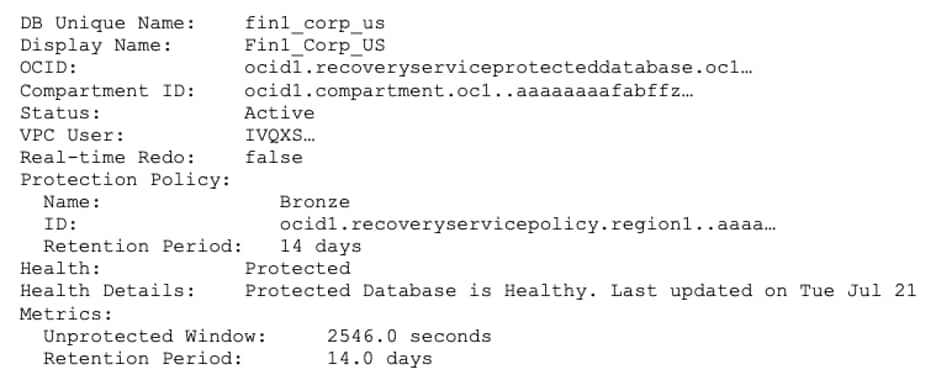
Once Cloud Protect is enabled, routinely validate recovery metrics. A quick rcv show database provides a point-in-time view of the following:
- Backup and compartment OCID
- Real-time redo setting
- Protection policy
- Retention period
- Unprotected window
- Backup health
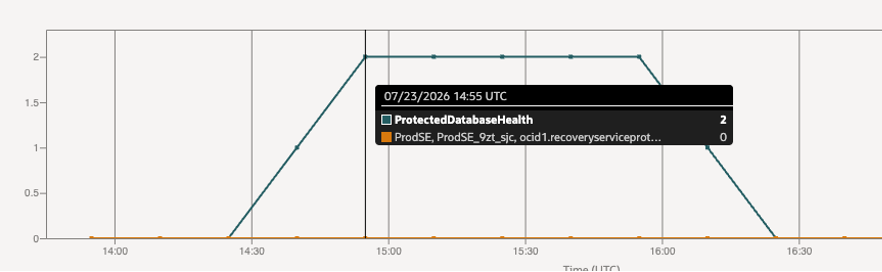
Backup health values are Protected, Warning, or Alert: Protected indicates recovery within the recovery window, Warning indicates increased potential data loss exposure or recovery time, and Alert indicates that the latest backup failed and recovery cannot be ensured within the current recovery window.
For Recovery Service definitions of Protected, Warning, and Alert, see Viewing On-Premises Database Protection Summary (https://docs.oracle.com/en/cloud/paas/recovery-service/dbrsu/viewing-premises-database-protection-summary.html). Recovery readiness should be monitored continuously, not discovered during an outage. Use rcv show database (figure 1) for an immediate view of one database.
Use OCI Metrics Explorer and Alarms to view time-series health, data-loss exposure, and recovery-window storage metrics across protected databases, and to notify the team when a metric crosses a defined threshold. Figure 2 shows a database during a maintenance outage. Its data-loss exposure increased, changing its backup health from Protected (0) to Warning (1) and then Alert (2).
Secure backup data and access
Backups are immutable by default, meaning backup data cannot be modified or deleted before the retention period specified in the policy. A retention lock can be enabled at the policy level to prevent the retention period from being lowered. Granular access controls can separate database administrators from protection-policy administration. In this architecture, backups pass through the customer tenancy but are stored in an Oracle-managed tenancy, creating a logical air gap.
For the full setup procedure, see the documentation for protecting on-premises databases with Cloud Protect (https://docs.oracle.com/en/cloud/paas/recovery-service/dbrsu/data-protection-premises-databases.html) and the database onboarding instructions (https://docs.oracle.com/en-us/iaas/recovery-service/doc/add-premises-database-recovery-service-using-cloud-protect.html).
Leverage AI to accelerate setup
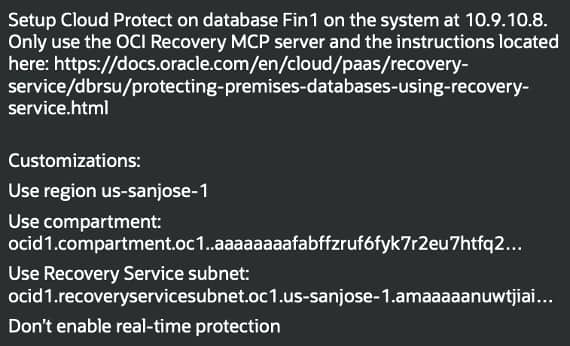
An AI client configured with the OCI Recovery MCP server can be used to simplify the overall Cloud Protect setup.
Use this setup sequence (figure 3):
- Limit the AI client to approved Recovery Service documentation and the MCP server.
- Provide only the required OCI configuration through your corporate approved secure mechanisms.
- Specify approved operational choices, such as the region, network settings, and whether to enable real-time data protection.
Use AI safely for recovery operations
Use AI within clear operational boundaries. AI can turn a multi-step procedure into a guided workflow, check prerequisites, assemble commands, and report what it changed. It should not receive unrestricted access or make unreviewed changes to production systems.
Consider these controls when applying AI to database protection and recovery:
- Use an approved, private AI environment and least-privilege OCI access.
- Restrict the AI to approved tools and authoritative Oracle documentation.
- Review every command and every reported change, especially changes to users, groups, networking, wallets, and database state.
- Keep sensitive recovery material out of prompts and use your corporate approved secure transfer and storage processes.
- Preserve an auditable record of the prompt, actions taken, validation results, and exceptions.
Scale a repeatable onboarding workflow
An AI-assisted setup can identify missing host prerequisites, complete SQLcl and authentication configuration, register the database with Recovery Service, and return a validation summary. The outcome is a visible, reviewable record that each database is protected, not merely faster configuration.
Once a setup prompt is established, it can be repeated across a defined list of systems, but repetition does not justify broad permissions. Keep the prompt scoped to the intended hosts, region, compartment, subnet, and protection choices. If an action needs sensitive connection material or would alter a destination database, state that approval explicitly and review it before execution.
Summary
Cloud Protect gives on-premises databases a managed protection model that is easier to monitor and harder to compromise. Establish prerequisites before onboarding, verify backup health continuously, protect access to backup data, and keep AI workflows constrained and reviewable. Together, these practices provide a dependable strategy for recoverability when it matters. In the next blog, recovery will be covered as a continuation in the series.