
Disaster recovery for mission-critical applications requires more than restoring database availability. Application services, connectivity, and recovery dependencies must also be coordinated to minimize downtime and ensure business continuity.
We’re excited to announce native support for OCI Database with PostgreSQL in OCI Full Stack Disaster Recovery (DR). OCI Database with PostgreSQL is Oracle’s fully managed, PostgreSQL-compatible database service, providing managed backups, patching, and high availability. PostgreSQL DB systems can now be added as members of DR protection groups, enabling coordinated database switchover and failover alongside application resources through Full Stack DR recovery plans.
This integration expands OCI Full Stack DR’s database coverage and simplifies disaster recovery for PostgreSQL-backed applications. Based on customer feedback, we’re also introducing two optional networking enhancements for Compute – Moving Instance: reserved private IP support in VNIC mappings and separate destination network configurations for DR drills.
These enhancements are now available across OCI commercial regions. Support for Oracle Alloy, OCI Dedicated Regions, UK Government Cloud, EU Sovereign Cloud, US Government Cloud, and US Defense Cloud is planned for rollout in the coming weeks.
1. Native Member Support for OCI Database with PostgreSQL
Recovering a PostgreSQL-backed application involves more than promoting the database. You also need to bring up application resources and reconnect them to the recovered DB system.
The new member type adds built-in PostgreSQL switchover and failover operations to Full Stack DR plans. Database and application teams can use the same plan to coordinate those tasks.
Why This Matters:
If you currently manage PostgreSQL recovery outside Full Stack DR, native integration brings those database operations into the same DR plan as your application resources. This reduces the need to coordinate separate recovery procedures and offers several benefits:
- Unified Recovery Management: Include PostgreSQL database operations alongside compute and other application recovery steps in Full Stack DR plans.
- Built-in Prechecks: Validate the DR plan and address reported issues before execution.
- Repeatable Operations: Use the same reviewed recovery sequence instead of coordinating separate procedures during an outage.
- Application-Level Coordination: Combine database operations with user-defined steps for application-specific actions, such as updating connection settings or DNS.
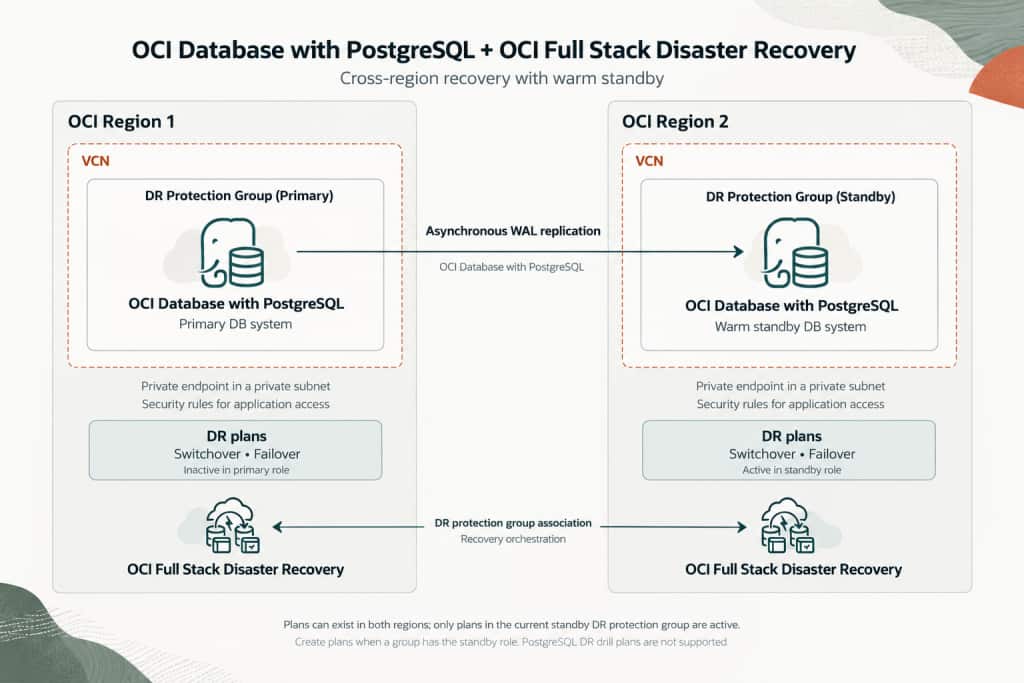
OCI Full Stack DR integration with OCI Database with PostgreSQL
This integration uses the warm standby feature of OCI Database with PostgreSQL. Before adding DB systems to Full Stack DR protection groups, configure a primary DB system in the Primary region and its warm standby in the DR region, with replication established and healthy.
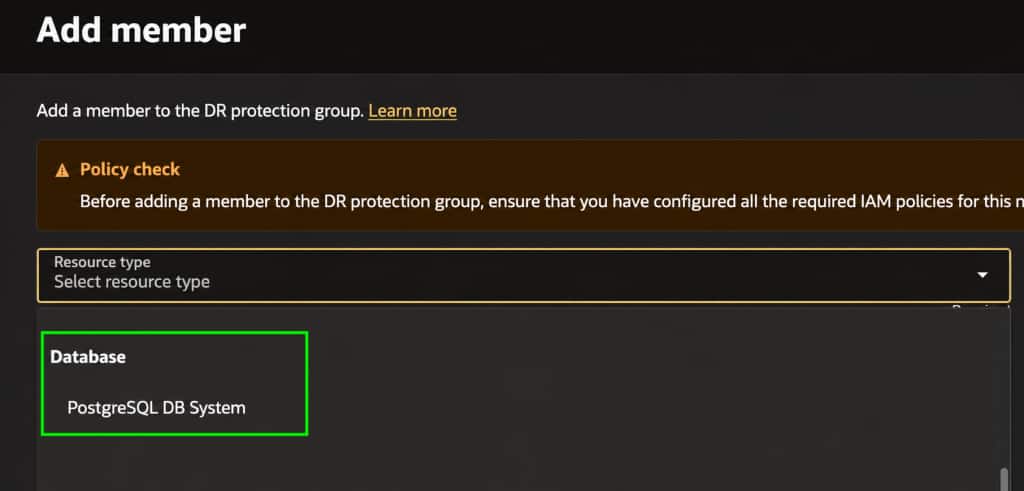
Prerequisites:
- Configure Warm Standby: Set up the primary DB system and its associated warm standby using the OCI Database with PostgreSQL warm standby feature.
- Verify Readiness: Confirm that both DB systems are active and replication is healthy.
- Prepare Access and Connectivity: Configure the required IAM policies for both OCI Full Stack DR and OCI Database with PostgreSQL, including resource principal permissions for Full Stack DR operations. Ensure application resources can access the DB systems’ private endpoints using appropriate network security rules.
For service configuration and requirements, refer to the OCI Database with PostgreSQL documentation.
From Member Addition to DR Plan Execution
Once warm standby replication is healthy, create and associate the DR protection groups in your primary and standby regions. This example uses London (LON) as primary and Frankfurt (FRA) as standby, but you can use other OCI regions.
| Resource | Region 1 — London | Region 2 — Frankfurt |
|---|---|---|
| OCI Database with PostgreSQL DB system | applon | appfra |
| DB system role | Primary | Warm standby |
| DR protection group | PSQL-LON | PSQL-FRA |
| DR protection group role | Primary | Standby |
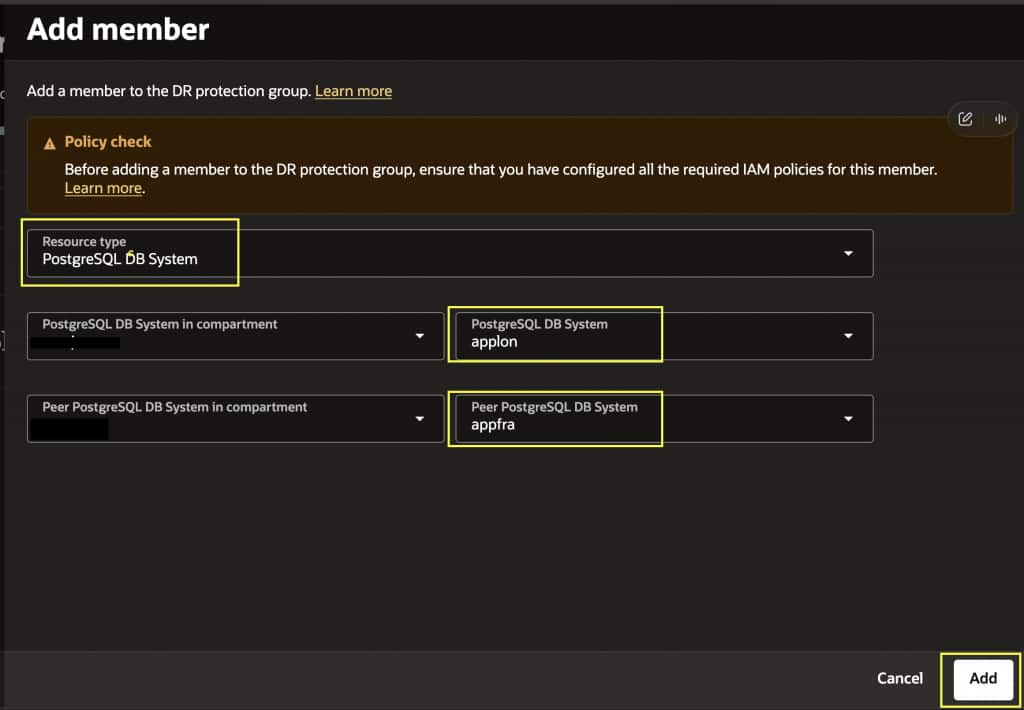
1. Add the primary DB system to the primary DR protection group.
In the London region, add the primary DB system applon to the primary DR protection group PSQL-LON.
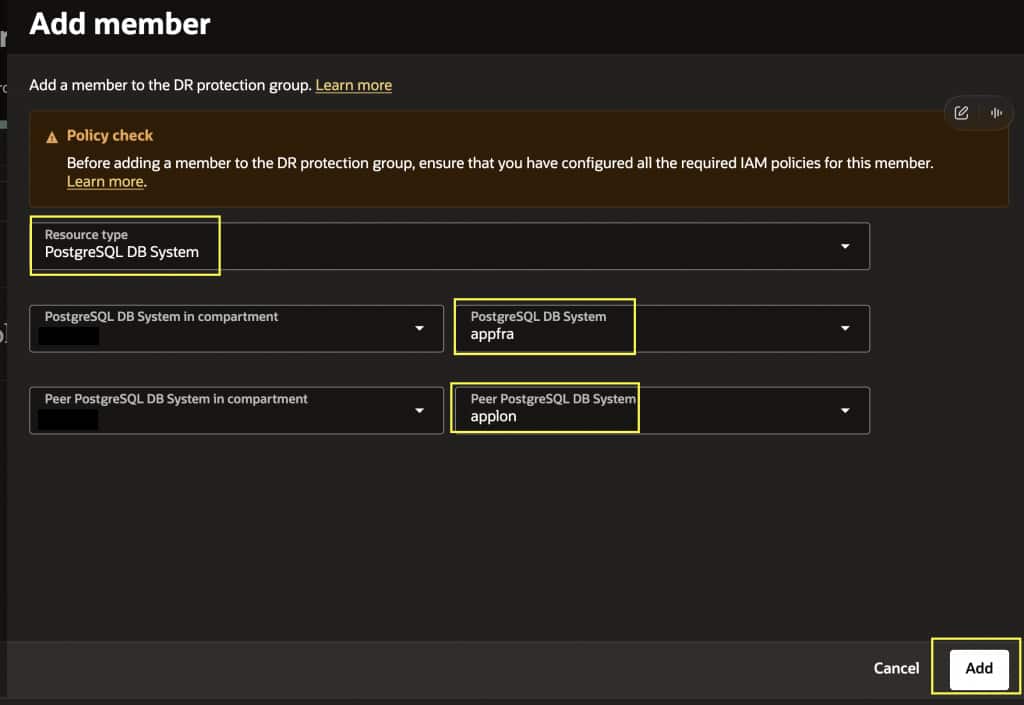
2. Add the warm standby DB system to the standby DR protection group.
In the Frankfurt region, add the warm standby DB system appfra to the standby DR protection group PSQL-FRA. Verify the PostgreSQL member configuration in both groups.
3. Create the DR plans in Region 2.
Open the PSQL-FRA DR Protection group in Frankfurt region and create Switchover and Failover plans. Full Stack DR generates built-in plan groups and steps for the supported PostgreSQL operations.
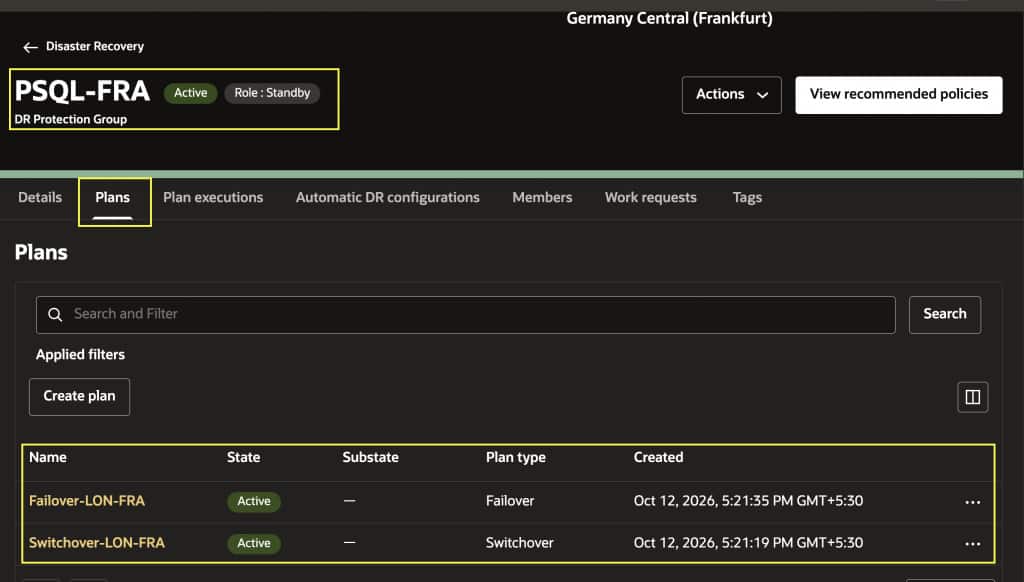
| DR plan | Built-in PostgreSQL steps | Database operation |
|---|---|---|
| Switchover | Generated | Switch roles between the primary and warm standby DB systems. |
| Failover | Generated | Promote the warm standby to a standalone, writable DB system. |
| Start Drill | Not generated | PostgreSQL DR drill operations are not supported. |
| Stop Drill | Not generated | PostgreSQL DR drill operations are not supported. |
Note: Built-in Start Drill and Stop Drill operations are not supported for OCI Database with PostgreSQL members.
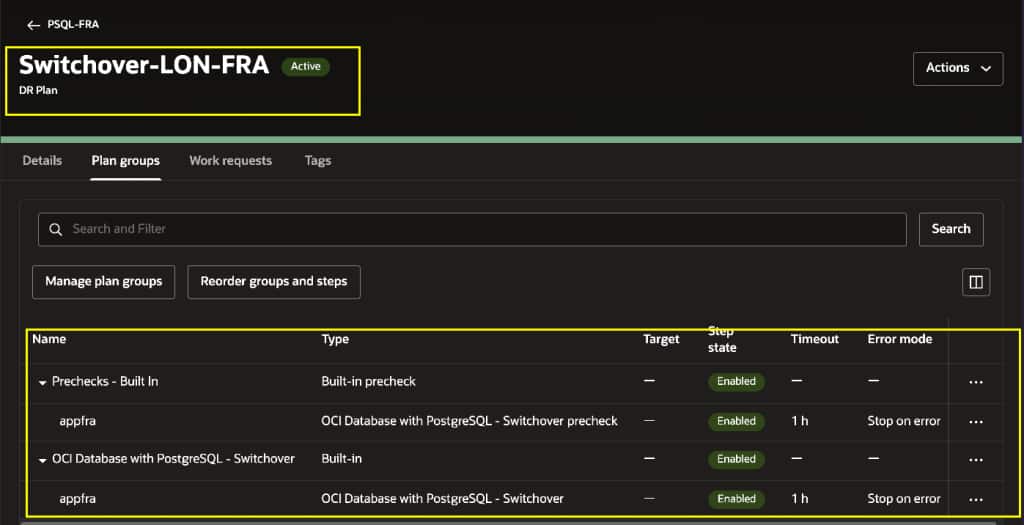
4. Review and customize the recovery plans.
Review the generated database recovery steps alongside the recovery steps for other application resources in the plan. Add user-defined steps for application-specific actions, such as updating database connection settings or DNS and starting application services. Arrange these steps according to your application’s recovery dependencies.
5. Run prechecks.
Run prechecks for the DR plan in the standby DR protection group. Review the results, resolve any reported issues, and rerun prechecks as needed before proceeding with execution.
6. Execute the Switchover plan.
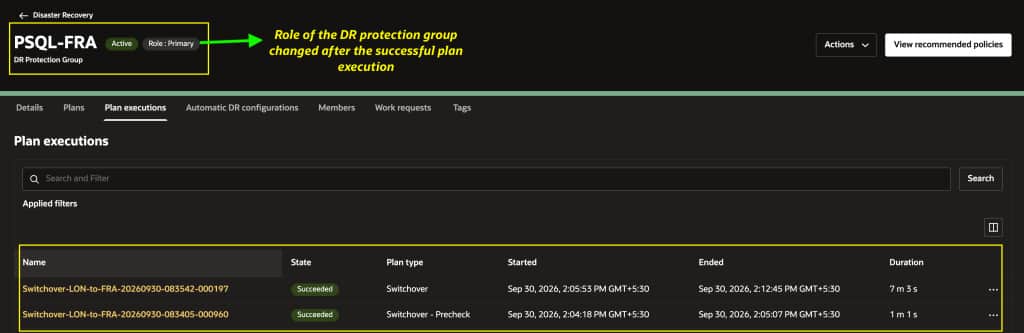
Execute the Switchover plan in PSQL-FRA and monitor the recovery steps. After completion, verify that appfra in Frankfurt is primary and applon in London is warm standby. If your plan includes application resources, confirm that the application connects to the new primary database and operates as expected.
The DR protection group roles also reverse: PSQL-FRA becomes primary, and PSQL-LON becomes standby.
7. Prepare DR plans in the new standby region.
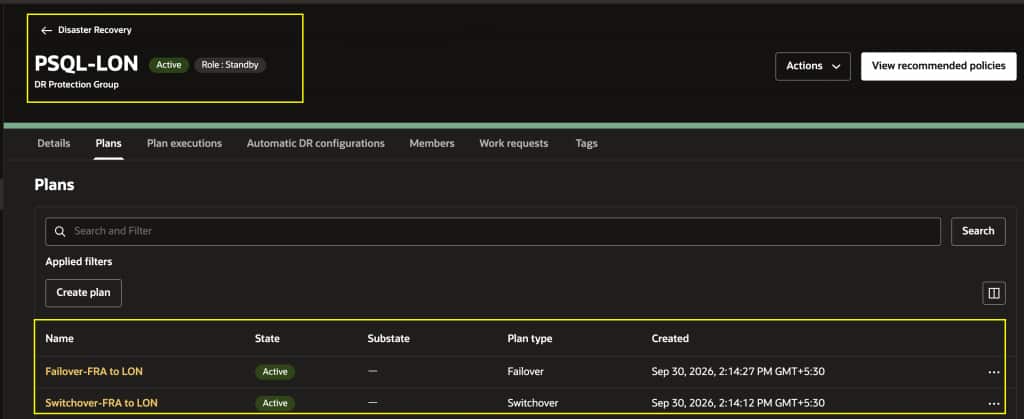
In London region, create Switchover and Failover plans in PSQL-LON for recovery back to London. If plans already exist, refresh and verify them, including any application-specific steps.
Plans can exist in both DR protection groups, but only plans in the group currently holding the standby role are active and available for execution.
For an unplanned outage, execute the Failover plan in the standby DR protection group to orchestrate promotion of the warm standby database to a standalone, writable DB system and the configured application recovery actions. Following failover, re-establishing replication and preparing the environment for subsequent recovery operations require additional configuration outside the built-in PostgreSQL failover operation.
For more details on OCI Database with PostgreSQL integration with Full Stack DR, watch this video demonstration. For additional details, refer to the OCI Database with PostgreSQL documentation.
2. Compute – Moving Instance Enhancements
Full Stack DR introduces two optional enhancements for Compute – Moving Instance: reserved private IP integration and separate destination networking for DR drills.
2.1 Reserved Private IPs for Moving Compute
This enhancement integrates Full Stack DR with the OCI Reserved Private IP feature. OCI lets you reserve a private IP address in a subnet independently of the compute instance that uses it. The address remains reserved even after the instance is terminated, so it can be reused.
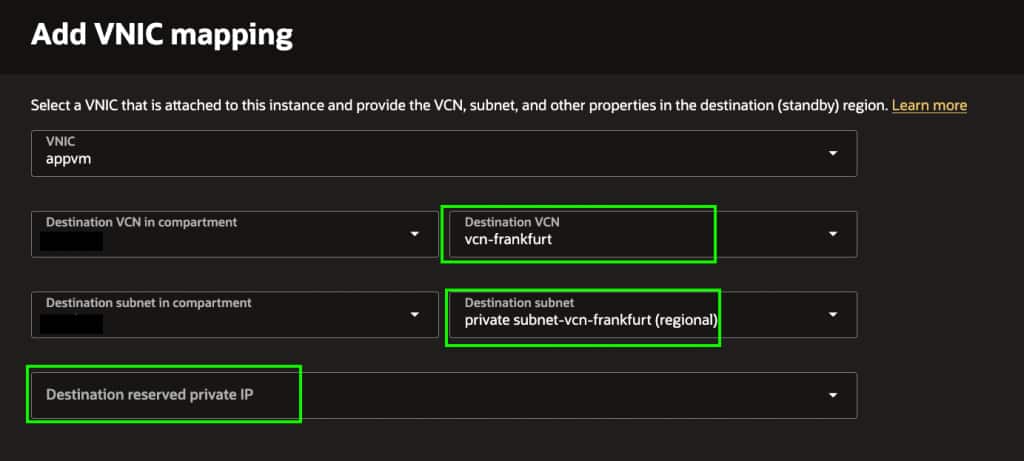
With Full Stack DR, you can configure a reserved private IP in the destination VNIC mapping for moving compute, allowing you to plan the recovered instance’s private IP address in advance.
Before configuring the VNIC mapping, create a reserved private IP address in the destination VCN and subnet in the DR region. When adding a Compute – Moving Instance member to a DR protection group, click Add VNIC mapping, select the destination subnet in the DR region, and specify the pre-created reserved private IP address to be used by the recovered instance during DR operations.
Why This Matters:
If another system allows connections only from a specific private IP address, an address change during recovery can require an access-rule update. Reserving the destination address lets you prepare that configuration in advance.
The address reservation applies to the destination subnet; it does not move an IP resource between regions.
2.2 Flexible Destination Networking for Moving-Compute DR Drills
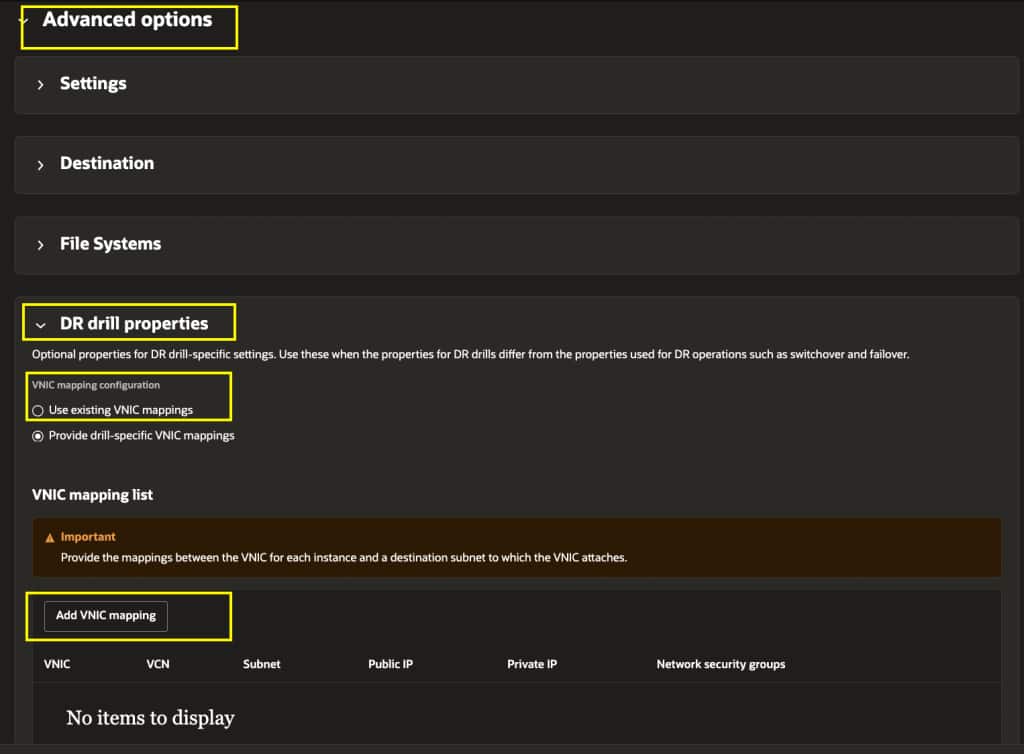
You can optionally configure a different destination network for moving compute during DR drills, allowing teams to plan drill connectivity separately from actual recovery connectivity.
While adding a Compute – Moving Instance member to a DR protection group, expand Advanced options → DR drill properties. Select Provide drill-specific VNIC mappings, then click Add VNIC mapping to configure the destination networking for DR drills.
Why This Matters:
During a DR drill, application instances may need access to test endpoints instead of live payment, notification, or other business services. A separate drill destination network, combined with appropriate routing, security rules, and application settings, gives teams more control over those connections.
Conclusion
Native support for OCI Database with PostgreSQL brings database recovery into the same DR plans as application resources, reducing the need to coordinate separate recovery procedures outside Full Stack DR. For Compute – Moving Instance, reserved private IP integration helps teams prepare predictable destination addressing, while separate drill networking lets them tailor drill connectivity to their testing needs.
Together, these capabilities help customers simplify database and application recovery orchestration, improve predictability of destination network configurations, and provide greater flexibility when conducting Moving Compute DR drills.
Learn More
To get started with OCI Full Stack Disaster Recovery, explore the resources below for configuration guidance, supported member types, recovery plan orchestration, and hands-on experience. The documentation also covers the new PostgreSQL integration and Moving Compute networking enhancements.
- OCI Full Stack DR product page: oracle.com/cloud/full-stack-disaster-recovery
- OCI Full Stack DR documentation: docs.oracle.com/en/cloud/iaas/disaster-recovery
- OCI Database with PostgreSQL: Service documentation
- OCI Database with PostgreSQL warm standby: Cross-region replication and warm standby
- Moving Compute configuration: Add a Moving Instance member
- IAM policy setup: Configuring IAM Policies for Full Stack DR
- OCI Full Stack DR LiveLabs: Explore hands-on labs