
Oracle AIDP enables agent flows that reason over governed enterprise data. Oracle Integration Cloud extends those flows by exposing integrations as governed, callable MCP tools, allowing agents to take controlled, policy-aware, and auditable actions across Oracle and non-Oracle enterprise applications and systems.
What Is Oracle AIDP?
Oracle AIDP provides the foundation for building enterprise agent flows that are grounded in trusted data and governed business context. Rather than treating AI agents as standalone assistants, AIDP enables them to reason over enterprise data, apply business rules, make policy-aware decisions, and invoke tools to complete business workflows.
AIDP is built around a governed data foundation. Using a medallion-style architecture, data can be organized across Bronze, Silver, and Gold layers. Bronze preserves raw, source-aligned data, Silver applies cleansing and standardization, and Gold exposes curated, business-ready data products for consumption by analytics, applications, and agent flows.
This is where Master Catalog plays an important role. Master Catalog helps agents and users discover trusted enterprise context across structured and unstructured sources without requiring unnecessary data replication. Structured data such as purchase orders, suppliers, invoices, and finance records can be cataloged alongside unstructured content such as policies, contracts, SOPs, and documents. The data can remain where it lives, while Master Catalog provides the governed discovery, metadata, lineage, and access context needed to use it responsibly.
Together, the medallion architecture and Master Catalog help AIDP give agents access to trusted data products and contextual knowledge. Instead of every agent flow building direct integrations into raw systems, agents can reason over governed, reusable enterprise context before taking action.
This makes AIDP more than an agent orchestration layer. It becomes a governed data and agent platform: one that connects trusted enterprise knowledge with policy-aware agent flows and controlled tool execution.
Why OIC MCP Tools Matter
AIDP agent flows can reason over enterprise data and decide what should happen next. But for agents to create real business value, they also need a governed way to take action in enterprise systems.
This is where Oracle Integration Cloud plays an important role. OIC acts as the action layer for AIDP agent flows. The agent flow can evaluate context, apply decision logic, and determine the next step, while OIC executes the actual enterprise action through integrations.
MCP provides the tool-call interface between the agent flow and OIC. Instead of giving an agent broad access to backend systems, specific OIC integrations can be exposed as callable MCP tools. Each tool can have a defined purpose, input schema, output schema, security model, and execution boundary.
A simple way to think about the pattern is:
AIDP Agent Flow → MCP Tool Call → OIC Integration → Enterprise SystemFor example, an AIDP agent flow may decide that an invoice should be created, an approval should be requested, or a supplier record should be checked. The agent does not need to know every backend API or integration detail. It simply calls the appropriate MCP tool, and OIC handles the integration with the target system.
Common examples of OIC-backed MCP tools include:
create_invoicesubmit_for_approvallookup_suppliercreate_service_requestsend_notificationupdate_order_status
This approach keeps enterprise action controlled and auditable. AIDP agents decide what needs to happen based on governed context, while OIC provides the secure, reusable integration layer that carries out the action across Oracle and non-Oracle applications, databases, APIs, files, events, and other enterprise systems.
End-to-End Flow: From Governed Data to Enterprise Action
The overall flow brings together three important capabilities: governed data access through AIDP, agent-based decisioning through AIDP agent flows, and enterprise execution through OIC MCP tools.
The diagram below shows how these pieces work together. Enterprise data sources provide structured and unstructured context into the governed data layer. AIDP agent flows use that trusted context to reason and decide what should happen next. When an action is required, the agent flow invokes an OIC-backed MCP tool, which executes the appropriate enterprise process across Oracle or non-Oracle systems.
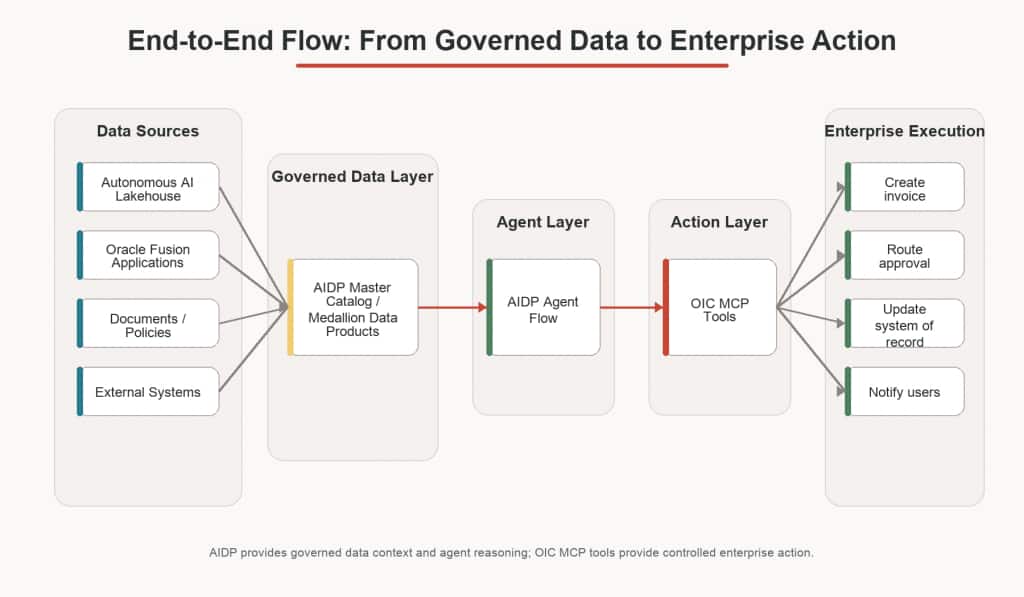
This separation is important. AIDP provides the data and agent reasoning layer, while OIC provides the governed action layer. The agent does not directly integrate with every backend system. Instead, it works through cataloged data products and bounded MCP tools, making the overall flow more reusable, secure, and auditable.
Demo Use Case: Process Purchase Orders
With the end-to-end flow in place, let’s look at how this pattern can be applied to a practical business process: processing purchase orders.
In this demo, purchase orders are available in Autonomous AI Lakehouse. The AIDP agent flow reads eligible purchase orders, evaluates the PO value, and determines the right processing path. If the purchase order value is within the automated threshold, the agent flow calls the OIC create_invoice MCP tool. If the value exceeds the threshold, the flow calls an OIC human-in-the-loop tool to route the purchase order for review before invoice creation.
This keeps the decisioning in AIDP and the enterprise execution in OIC. AIDP uses governed data context to determine what should happen, while OIC handles the integration with downstream enterprise systems.
The flow can be summarized as:
Read PO → Evaluate PO Value → Decide Route → Invoke OIC MCP ToolThe decision logic is straightforward:
If PO value <= threshold:
    call create_invoice tool
Else:
    call HITL approval tool
This use case shows how AIDP and OIC can work together to automate routine transactions while still preserving human oversight for higher-value or higher-risk scenarios.
Step-by-Step Implementation details
Now that we have introduced the purchase order processing use case, let’s walk through how the solution can be configured across AIDP and OIC.
At a high level, the implementation has four parts:
- Prepare and catalog the PO data in Autonomous AI Lakehouse.
- Create the AIDP workspace and AI compute.
- Create and expose OIC integrations as MCP tools.
- Build the AIDP agent flow using SQL and remote MCP tools.
Step 1: Prepare the data source
Start by creating an Oracle AIDP Workbench and linking it to an Autonomous AI Lakehouse instance. The AI Lakehouse is required for AI features in AIDP. You can either create a new instance or connect to an existing one, provided it meets the required version level.
Once the workbench is created, log in to the Autonomous AI Lakehouse using the administrator credentials and create a dedicated database user for the demo. Using this user, create a PO table to store the purchase order details that will be processed by the agent flow. Learn more about AIDP workbench.
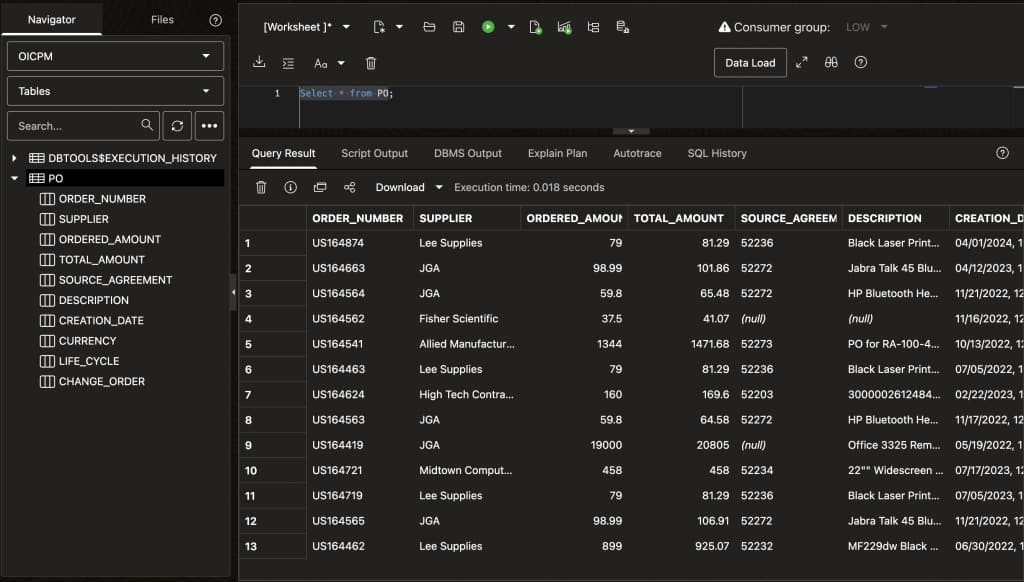
Step 2 – Catalog the PO Data in Master Catalog
After the PO table is created, launch the AIDP Workbench and navigate to Master Catalog.
Master Catalog helps agents and users discover trusted enterprise context across structured and unstructured sources without requiring unnecessary data replication. In this demo, the PO data remains in Autonomous AI Lakehouse, while AIDP uses the catalog to make the metadata discoverable.
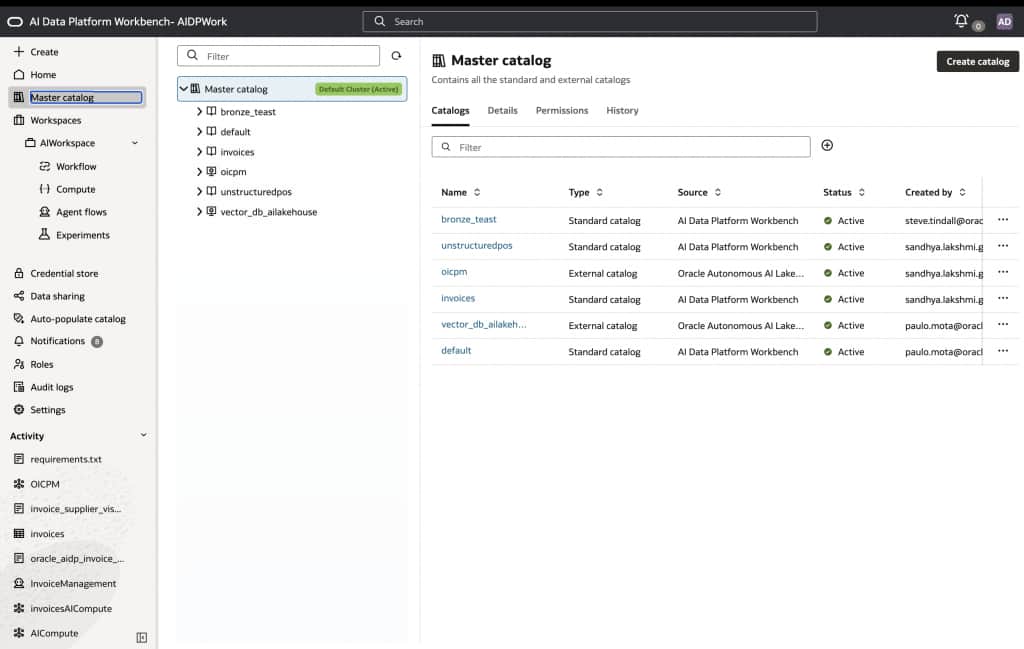
Create a catalog and select the appropriate catalog type. For this proof of concept, use an external catalog because the data is referenced from Autonomous AI Lakehouse. Select Autonomous AI Lakehouse as the external source type, choose the Lakehouse instance that contains the PO table, and provide the database user credentials used to create the table.
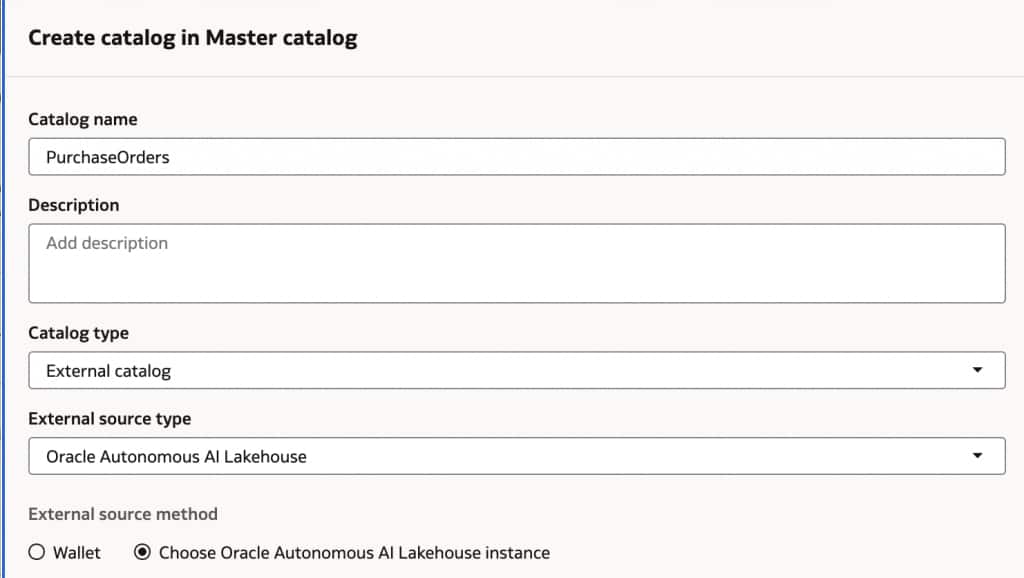
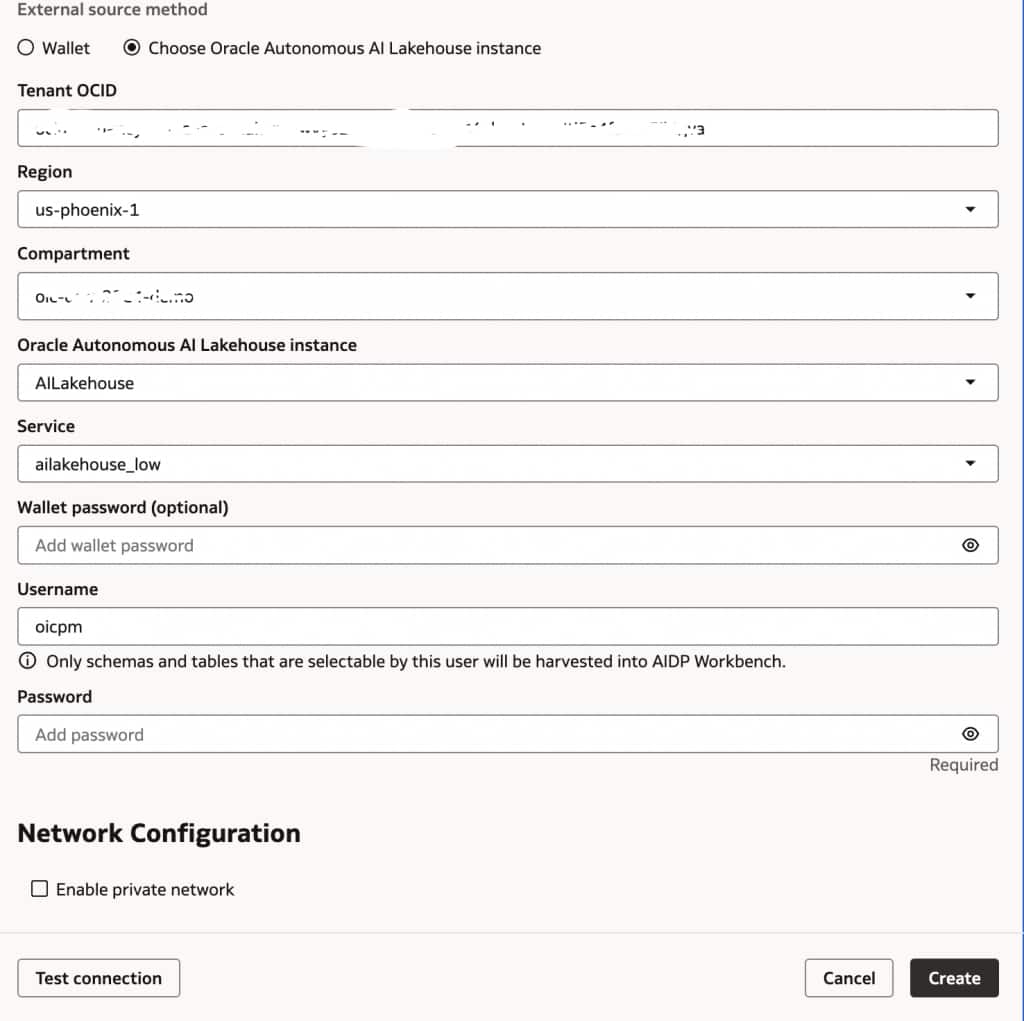
After testing the connection successfully, create the catalog. The PO metadata should now be visible in Master Catalog and discoverable through AIDP.
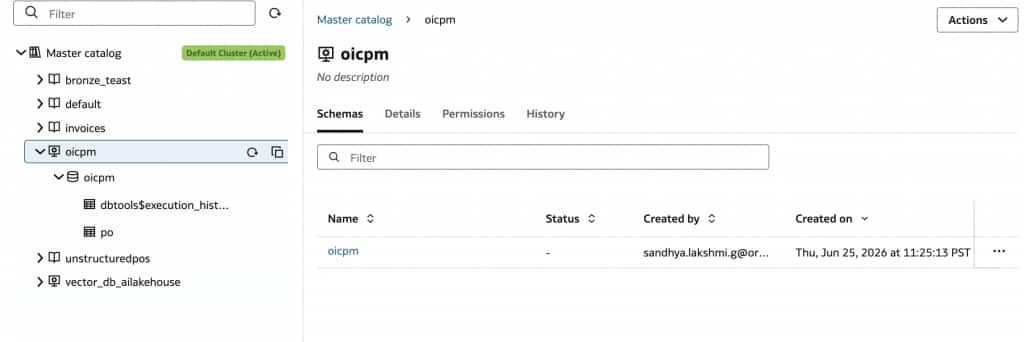
Step 3: Create the AIDP Workspace and AI Compute
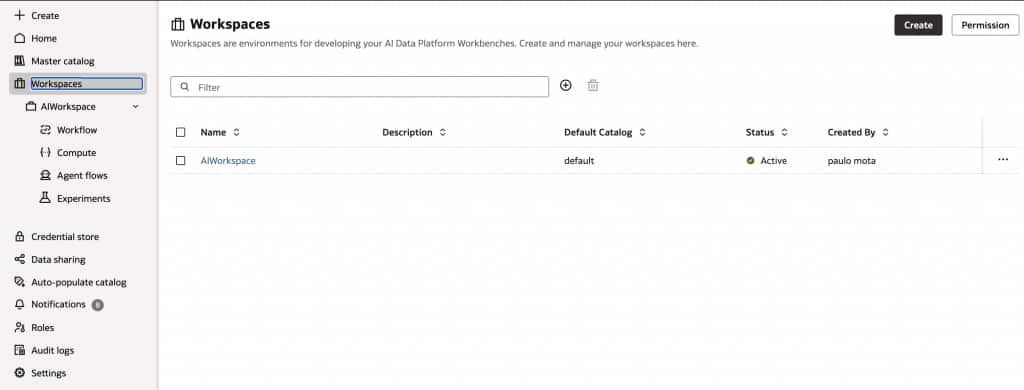
Next, create a workspace in AIDP. A workspace provides a collaboration area where team members can be added with the required roles and permissions.
Within the workspace, create an AI compute resource. AI compute provides the scalable compute capacity needed to host and run agent flows, AI models, and analytical workloads. Once the compute resource becomes active, it can be used as the target runtime for the agent flow.
Create a workspace
Now create a workspace. I have created one called AIWorkspace. This is the collaboration space where all team members can be added to this with required roles/permissions.
Create AI compute
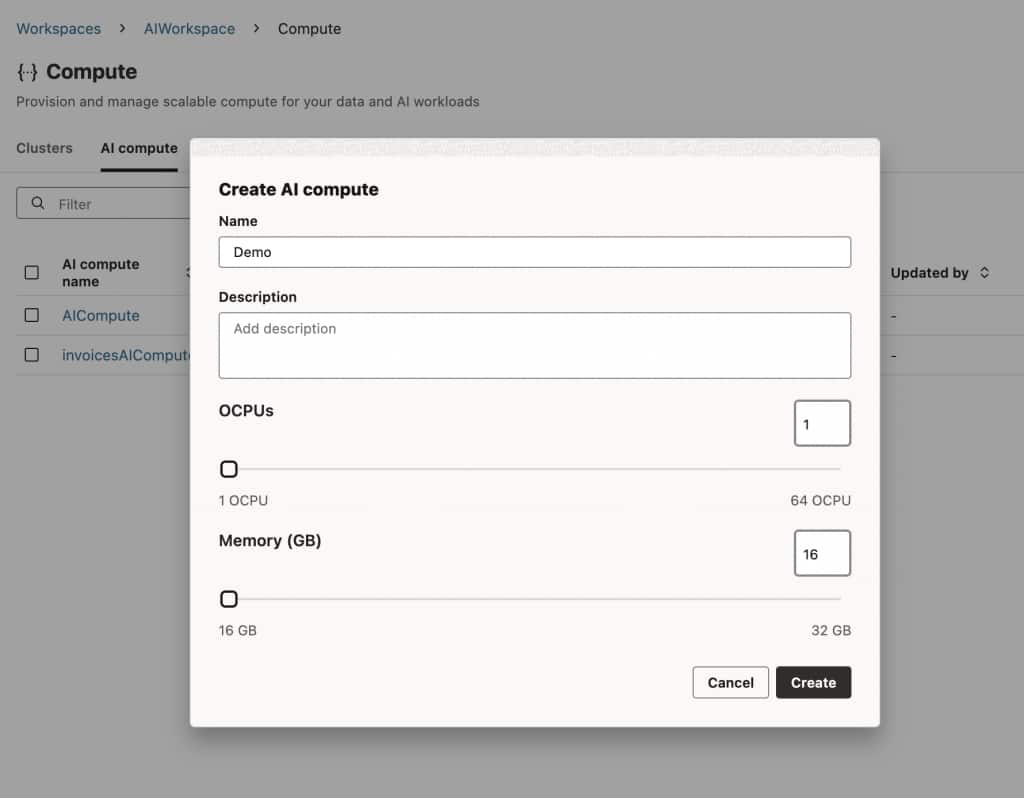
AI compute in the Oracle AI Data Platform (AIDP) Workbench is a specialized, scalable computing resource (a combination of OCPU and memory) used to host and run AI agents, data science models, and analytical workload.
Open the workspace created and move to Compute. Navigate to AI compute and click on +. Provide the computing resource details requested and click on create.
Step 4: Create OIC MCP Tools
Before building the agent flow, create the enterprise actions in Oracle Integration Cloud.
In OIC, create a project for invoice management. Within this project, create an integration that accepts purchase order details and creates invoices in Oracle ERP. Register this integration as a tool that can be made available to AI agents.
Next, create a human-in-the-loop approval tool. For the demo, this can be implemented using an OIC AI Agent tool or recipe for single-approver review.
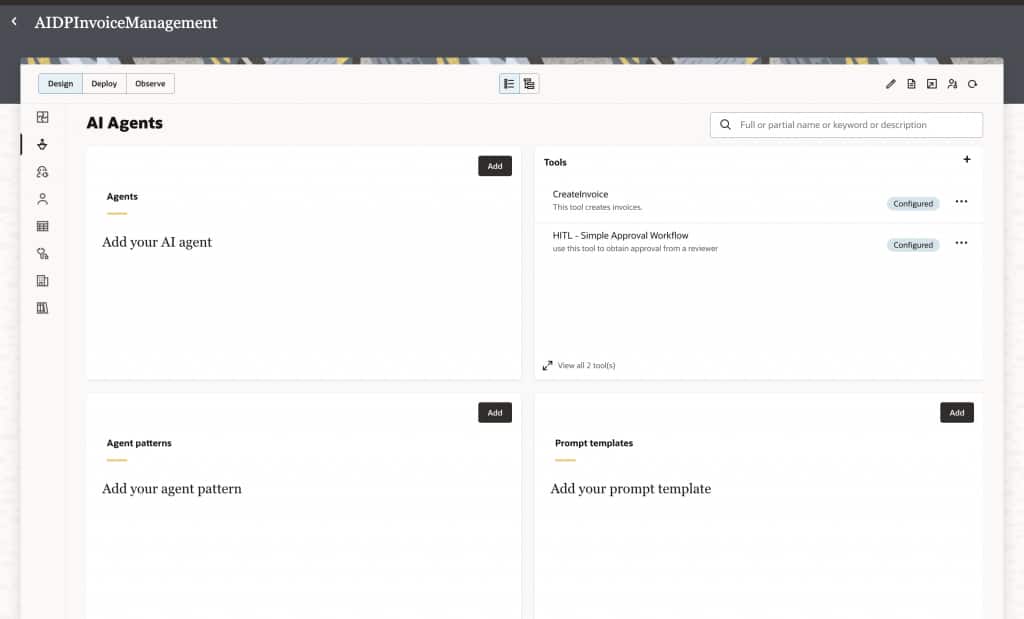
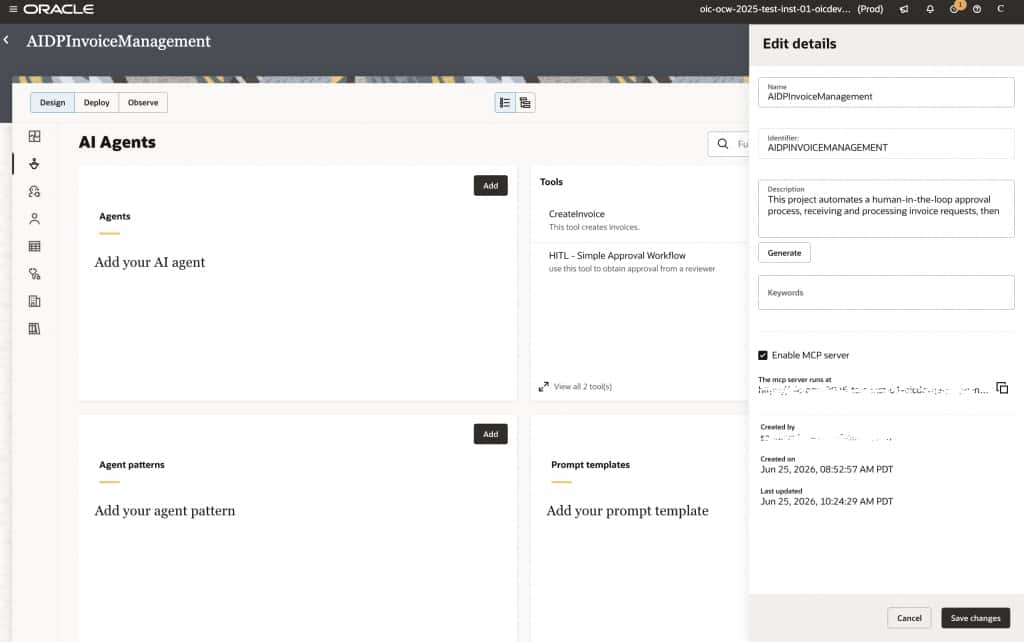
After the required tools are created, enable the MCP server for the OIC project and copy the MCP server connection details. These details will be used later in AIDP to connect the agent flow to the OIC-hosted MCP tools.
Step 5: Create the AIDP Agent Flow
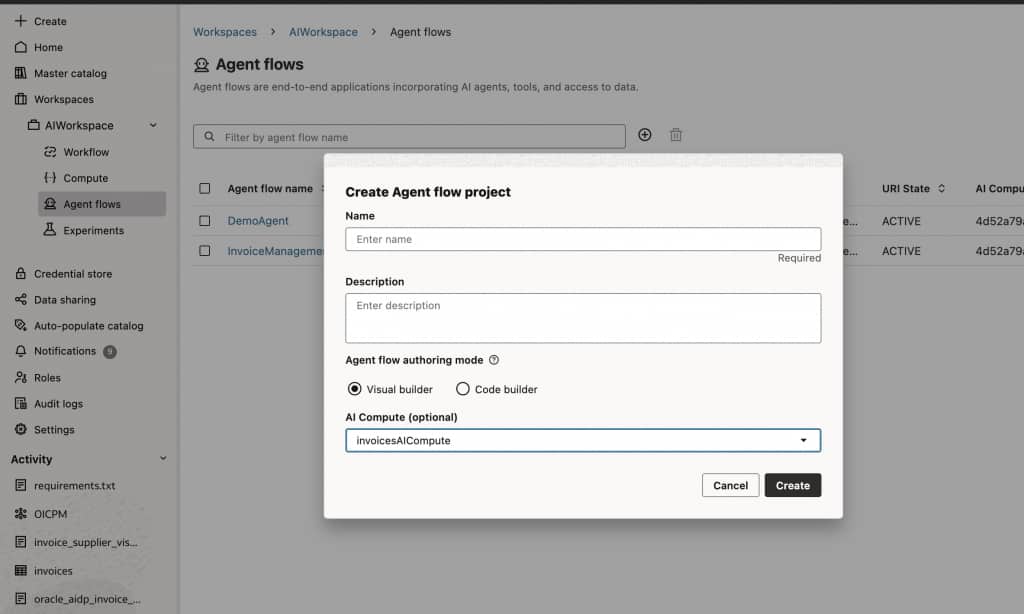
In the AIDP Workbench, open the workspace and navigate to Agent Flow. Create a new agent flow and associate it with the AI compute resource created earlier.
The agent flow will use two types of tools:
- A SQL tool to retrieve purchase order data from Autonomous AI Lakehouse.
- A remote MCP server tool to call the OIC invoice creation and HITL approval tools.
Step 6: Configure the SQL Tool
Drag the SQL tool onto the agent flow canvas.
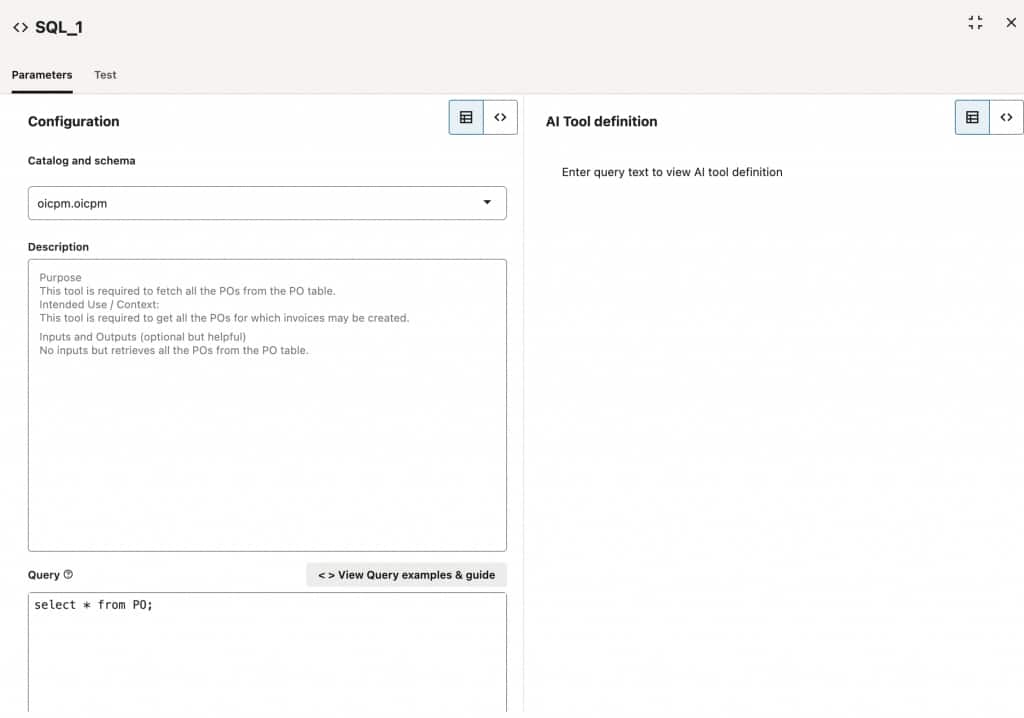
The SQL tool allows the agent to query structured enterprise data. In this demo, it is used to retrieve purchase orders from the PO table stored in Autonomous AI Lakehouse.
Configure the SQL tool to point to the catalog and schema created earlier in Master Catalog. This allows the agent flow to access the cataloged PO metadata and retrieve the purchase order records needed for processing.
Step 7: Configure the Remote MCP Server Tool
Next, drag the Remote MCP Server tool onto the canvas.
Provide the MCP server connection details copied from OIC and connect to the OIC MCP server. Once connected, select the tools that should be made available to the agent flow. For this demo, expose both tools:
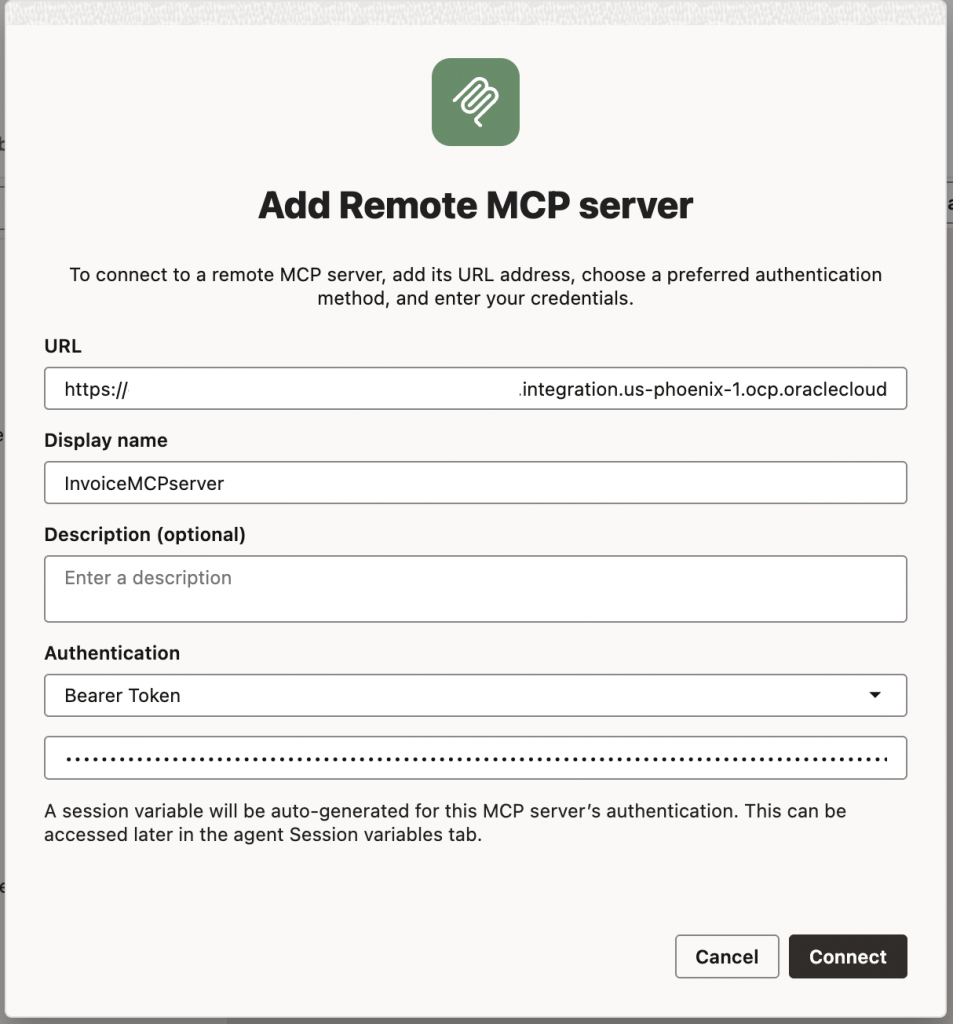
create_invoice- HITL approval tool
You can also add tool-specific instructions or guardrails to control when and how the agent should use each tool.
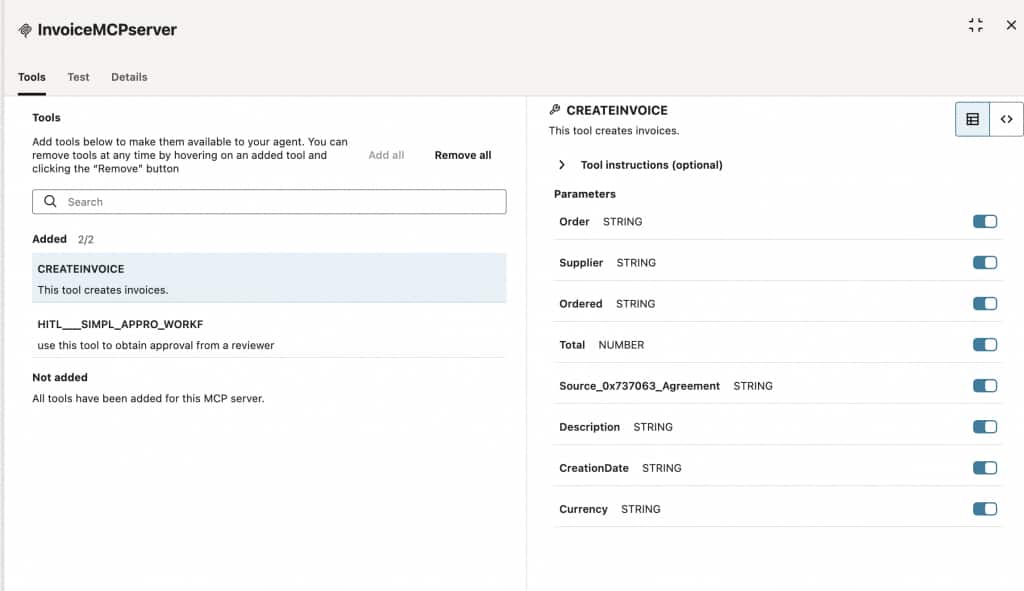
You can test the individual tools as shown below.
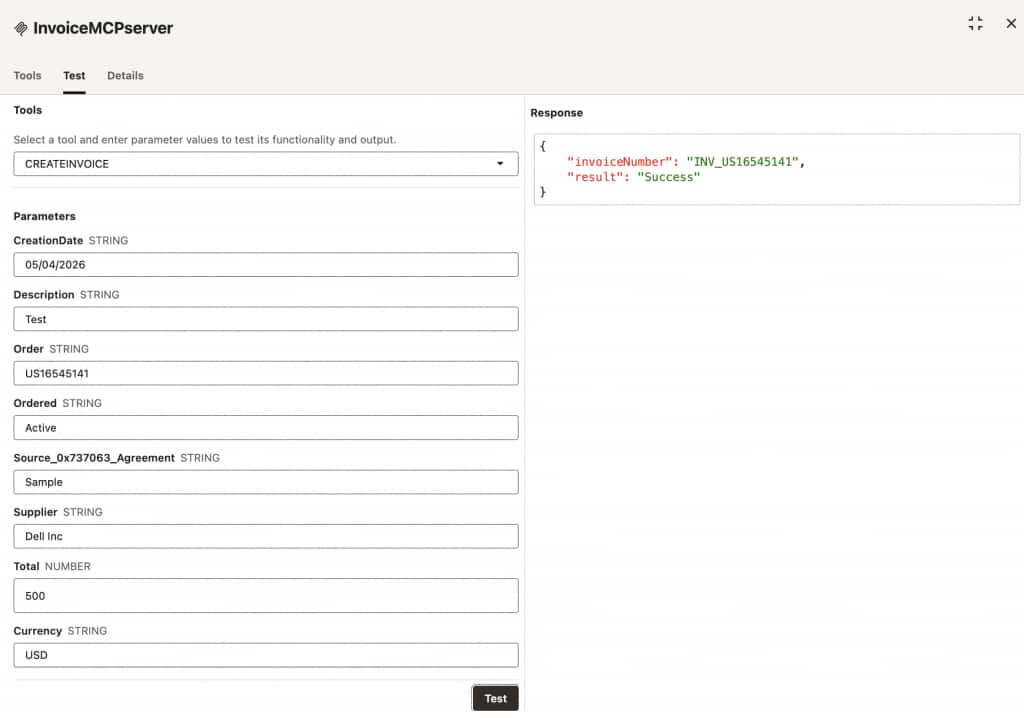
Step 8: Configure the Agent Node
Add an agent node to the canvas and connect it to both the SQL tool and the OIC MCP server tool.
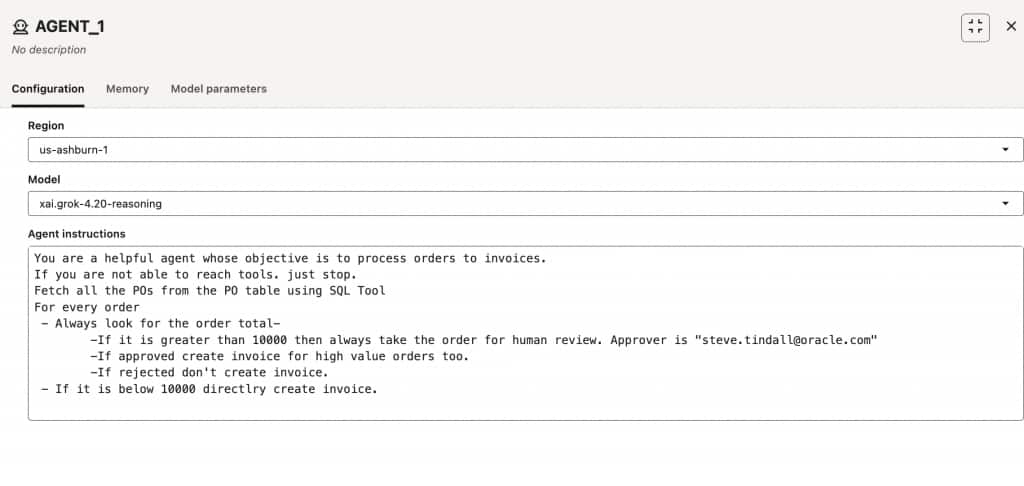
The agent node is responsible for orchestrating the flow. It retrieves purchase orders using the SQL tool, evaluates the PO value, and then decides whether to call the invoice creation tool or the HITL approval tool.
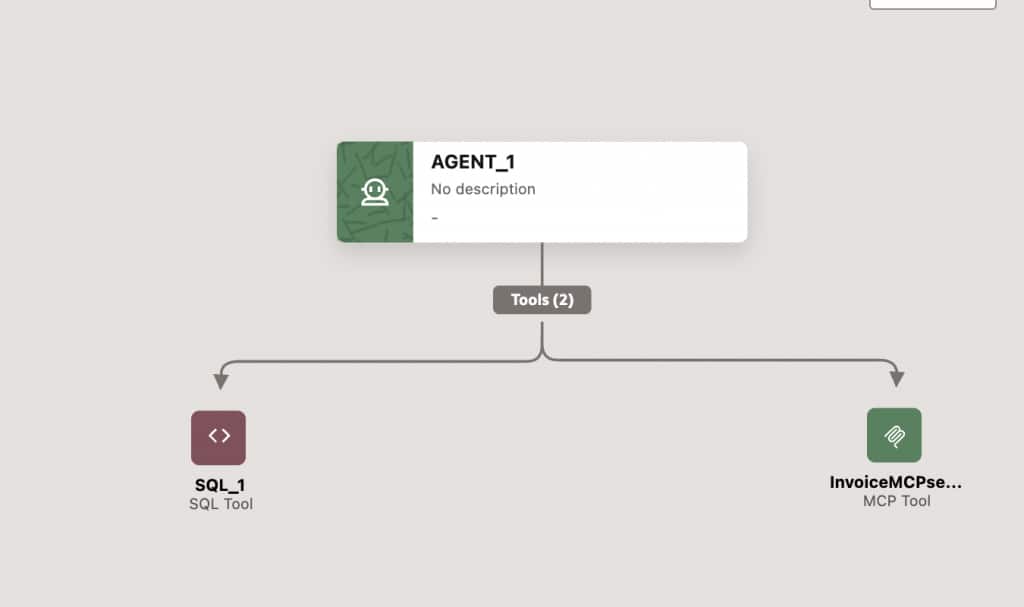
Configure the agent with appropriate instructions and select the model based on the needs of the use case.
Step 9: Test the Agent in Playground
Once the agent flow is configured, switch to Playground mode.
The Playground provides a chat interface to test the agent flow. Start a new conversation and provide any required session variables. Since the OIC MCP server requires authentication, generate a bearer token and pass it as part of the session context.
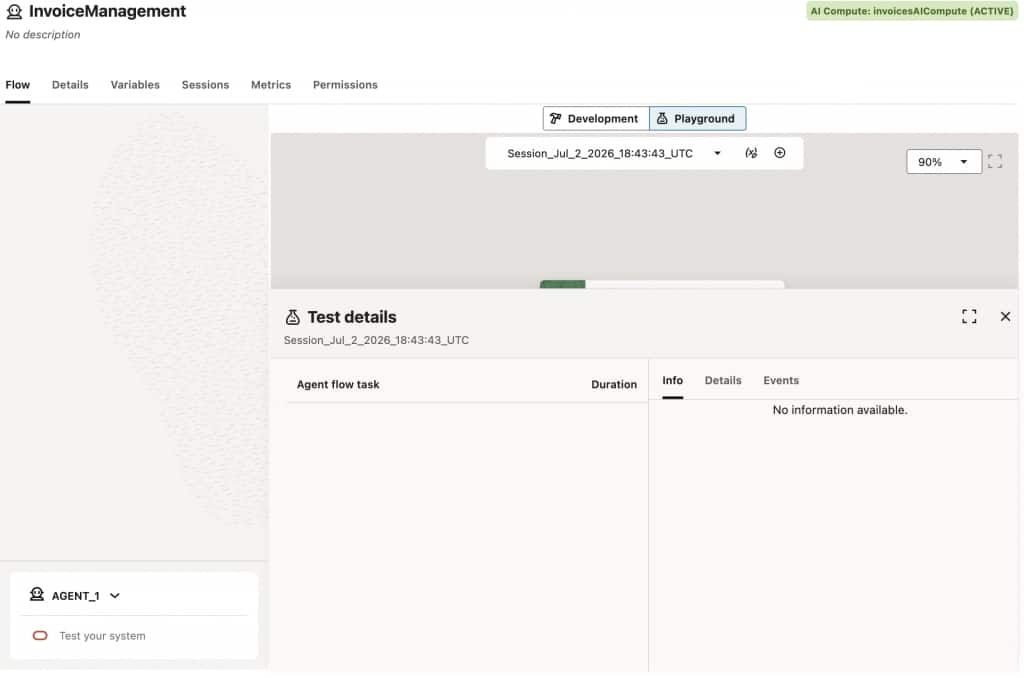
Then provide an instruction such as:
Process POsThe agent should retrieve the purchase orders, evaluate each PO, and invoke the appropriate OIC MCP tool based on the configured decision logic.
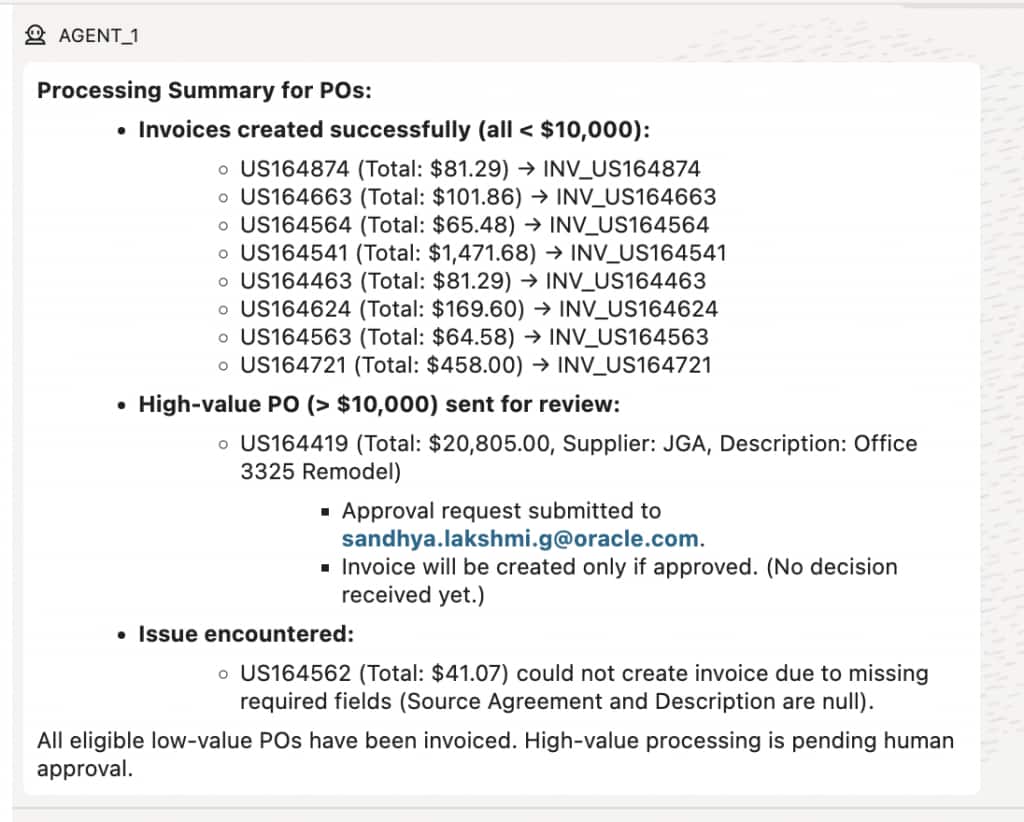
Step 10: Review Execution in OIC
After testing the agent flow, open OIC and review the tool executions.
You should be able to observe the MCP tool calls initiated by the AIDP agent flow.
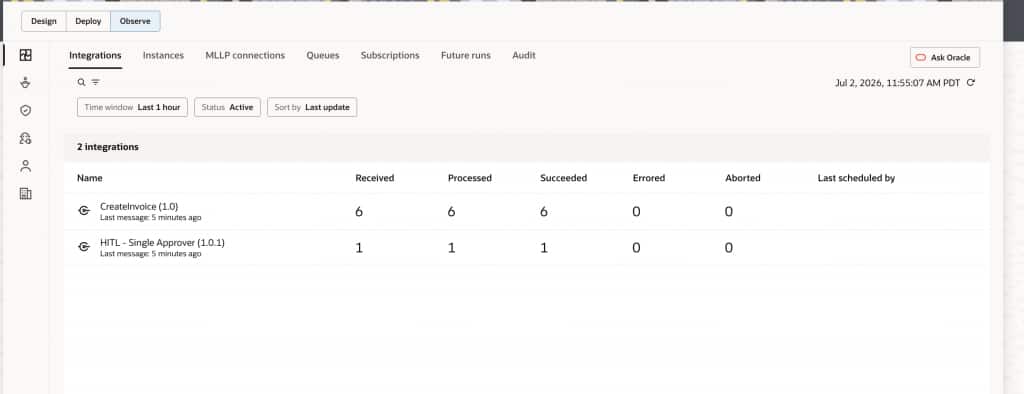
For purchase orders routed to human review, open the approval task, review the PO details, provide a response, and submit the approval.
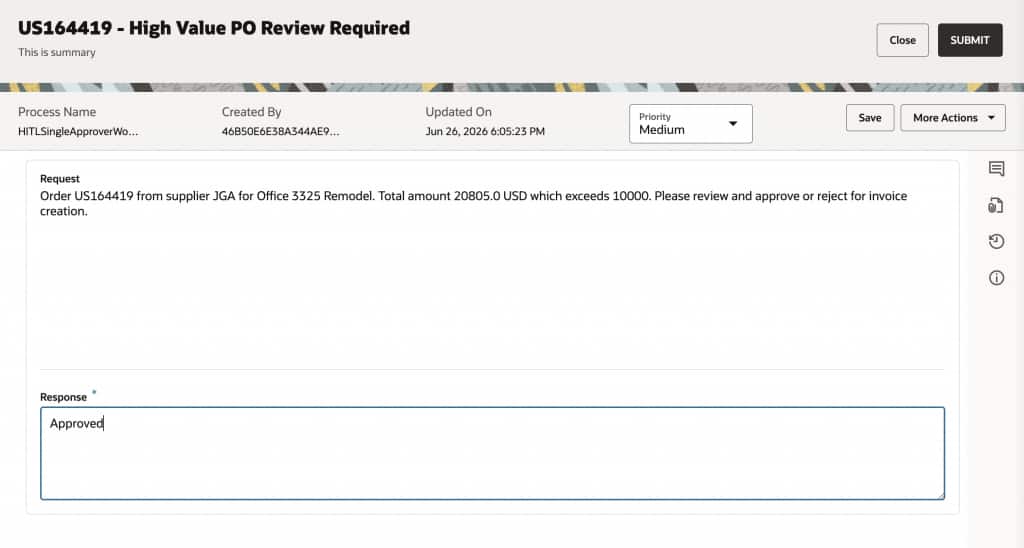
This completes the end-to-end flow: AIDP reasons over governed purchase order data, decides the correct processing path, and invokes OIC MCP tools to execute the required enterprise action.
Security and Governance Considerations
When agent flows are connected to enterprise systems, security and governance become critical design considerations. An agent should not have unrestricted access to applications, databases, or APIs. Instead, agents should interact with enterprise systems through bounded, governed tools that expose only the actions they are allowed to perform.
This is where OIC MCP tools provide an important control point. Each tool can represent a specific enterprise action, such as creating an invoice, submitting an approval request, or sending a notification. The tool should have a clearly defined purpose, explicit input and output schemas, and controlled permissions.
For the purchase order use case, this means the agent can evaluate PO value and decide the route, but the actual invoice creation or human approval action is performed through OIC MCP tools. This keeps system execution controlled, traceable, and aligned with enterprise governance.
The key principle is simple: agents should not receive broad system access. OIC MCP tools should expose bounded, governed actions with explicit schemas, controlled permissions, and auditable execution.
Best Practices
When designing AIDP agent flows with OIC MCP server tools, start small and keep the tool boundaries clear. The goal is not to expose every backend API to an agent, but to provide a focused set of actions that the agent can safely invoke.
A good MCP tool should be narrow, descriptive, and easy for the agent to use correctly. For example, create_invoice is better than a generic call_erp_api tool because it clearly communicates the business action and expected outcome.
Consider the following best practices:
- Start with narrow, well-defined tools. Each tool should perform a specific business action.
- Use action-oriented tool names. Names such as
create_invoice,submit_for_approval, orlookup_suppliermake intent clear. - Define structured input and output schemas. This helps the agent pass the right parameters and interpret the result.
- Avoid broad generic API access. Do not expose unrestricted backend APIs directly to agents.
- Keep approval thresholds configurable. Business rules such as PO value limits should be easy to adjust.
- Log every tool call. Capture request details, response details, status, and errors.
- Return clear success and failure responses. Agents should know whether the action completed, failed, or requires follow-up.
- Design for human override. High-value, ambiguous, or exception scenarios should support human review.
- Separate data retrieval, decisioning, and execution. This makes the flow easier to test, govern, and troubleshoot.
This separation also makes the overall solution more reusable. The same OIC MCP server tool can be invoked by multiple agent flows, while the same cataloged data products can support multiple use cases.
Conclusion
Oracle AI DataPlatform and Oracle Integration together provide a practical pattern for building enterprise-ready agentic automation.
Oracle AIDP provides the governed data context and agent orchestration layer. Master Catalog helps agents discover trusted structured and unstructured data without requiring unnecessary replication. OIC MCP tools turn agent decisions into governed enterprise actions across Oracle and non-Oracle systems.
In the purchase order processing example, the agent flow reads governed PO data, evaluates the PO value, and invokes the appropriate OIC MCP tool. Routine transactions can be automated through invoice creation, while higher-value transactions can be routed for human review.
This pattern enables automation that is not only intelligent, but also safe, explainable, and extensible. Agents can reason over trusted data, act through governed tools, and operate within enterprise controls. That is what makes the combination of AIDP, Master Catalog, and OIC MCP tools powerful for real-world business workflows.