
Oracle Integration continues to advance intelligent automation and enterprise connectivity with this release, delivering key enhancements across AI Native Actions and adapters. This update expands AI-driven integrations with custom model support in OCI Document Understanding and OCI Vision, enhanced generative AI capabilities with tools support, and expanded model options including OpenAI and xAI Grok. It also introduces the OIC AI Agent Invoke Native Action, enabling integrations to directly invoke AI agents and embed AI-driven decision-making into workflows.
This release also introduces new adapters—BigQuery, Databricks, MS Fabric, and ActiveMQ—extending analytics and messaging connectivity. In addition, multiple adapter enhancements improve security, connectivity, and runtime flexibility, including Multi-Key Header Authentication and dynamic REST endpoints in the REST Adapter, along with expanded capabilities across Microsoft SQL Server, Snowflake, Kafka, GCP Pub/Sub, SharePoint, NetSuite, Azure Event Grid, and the Shopify adapters. Certification updates are also included for the ATP, Kafka, RabbitMQ, and Shopify GraphQL adapters.

New Adapters
- BigQuery Adapter – Introduces native connectivity to Google BigQuery for loading, extracting, querying, and managing analytical data using outbound invoke connections.
- Databricks Adapter – Adds connectivity to Databricks SQL warehouses, schemas, and tables for database-style operations.
- ActiveMQ Adapter – Provides built-in connectivity to ActiveMQ Artemis brokers with support for message consumption (trigger) and message publish (invoke) patterns.
New AI Native Action
- AI Agent Invoke Native Action – Enables integrations to directly invoke OIC AI Agents from Oracle Integration flows.
AI Native Actions Enhancements
- OCI Document Understanding – Custom model support for classification.
- OCI Vision – Custom model support for processor job–based object detection and classification.
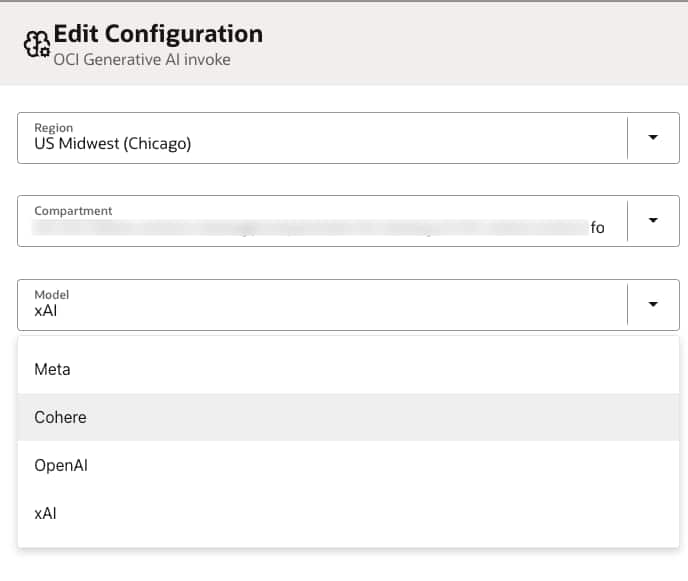
- OCI Generative AI – Tools support and expanded model options, including support for OpenAI and xAI Grok models.
Adapter Enhancements
- REST Adapter Enhancements – Supports Dynamic REST Endpoints at Runtime and Multi-Key Header Authentication.
- Microsoft SQL Server Adapter – Supports integration with MS Fabric.
- Snowflake Adapter – Adds connectivity agent support with OAuth 2.0 Client Credentials security policy, enabling integration with external IDMs.
- Apache Kafka Adapter – Introduces SASL SCRAM over SSL security policy (SCRAM-SHA-256 and SCRAM-SHA-512).
- GCP Pub/Sub Adapter – Supports dynamic topics and subscriptions at runtime.
- SharePoint Adapter – Adds site-level scoping using the Sites.Selected permission to operate on a specific site.
- NetSuite REST Adapter – Adds the JWT Client Credentials Assertion security policy and introduces Dataset operations.
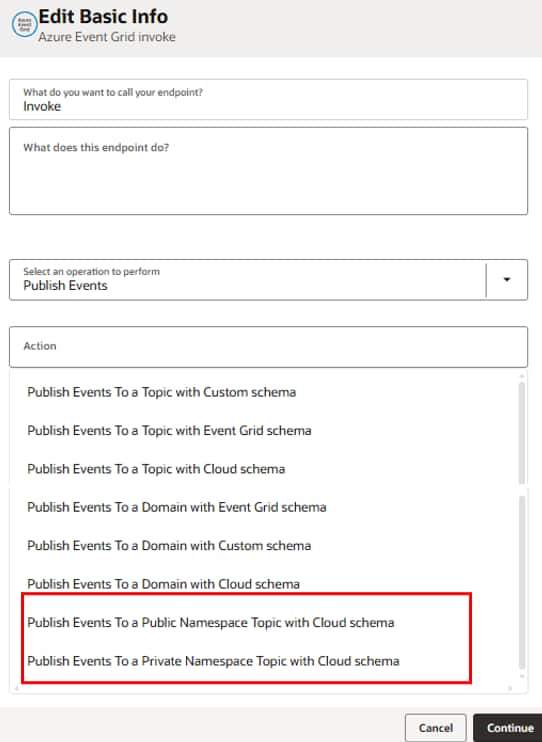
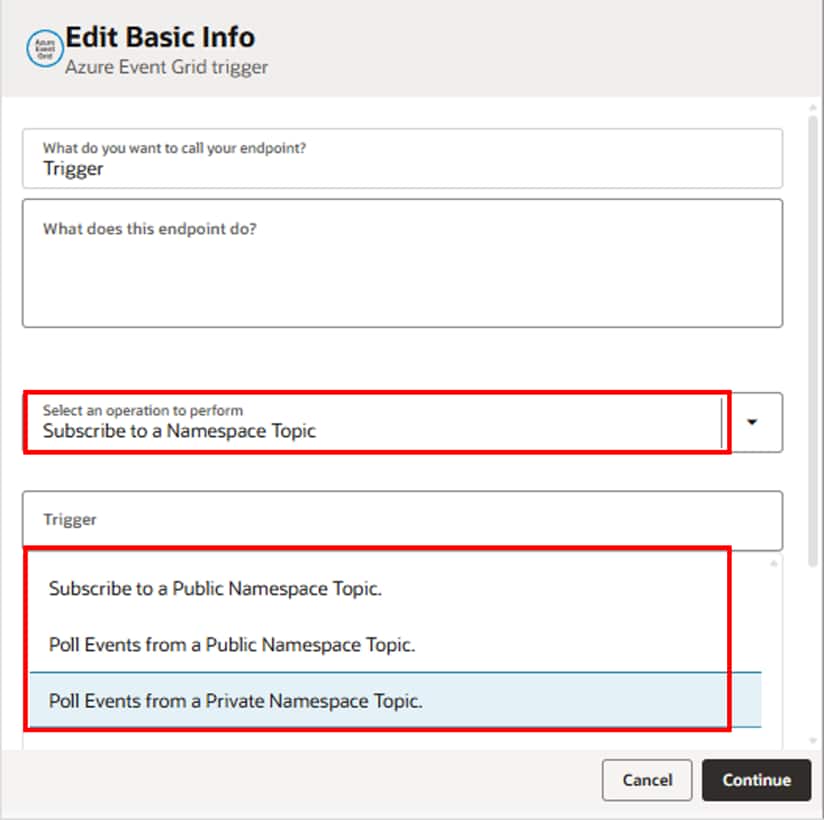
- Azure Event Grid Adapter – Adds support for working with public and private namespaces for trigger and invoke patterns.
- Shopify GraphQL Adapter – Supports more events, Bulk module enhancements, and Client Credentials security policy.
- Shopify Adapter – Adds support for Client Credentials security policy.
Certification Updates
- Oracle Database Adapters – Certified for Oracle Database version 26ai, including Oracle Advanced Queuing (AQ) Adapter, Oracle Advanced Queuing (AQ) JMS Adapter, Oracle Autonomous Transaction Processing (ATP) Adapter, Oracle Database Adapter, and Oracle DBaaS Adapter.
- Kafka Adapter – Certified for Apache Kafka 3.8.0, 4.1.1, Amazon MSK, and OCI Managed Kafka 3.7.0.
- RabbitMQ Adapter – Certified for Cloud instance version 4.2.2 and On-prem instance version 4.2.3.
- Shopify GraphQL Adapter – Certified for API versions 2024-07, 2024-10, 2025-01, 2025-04, 2025-07, 2025-10, and 2026-01.
Invoke AI Agents from Oracle Integration Flows
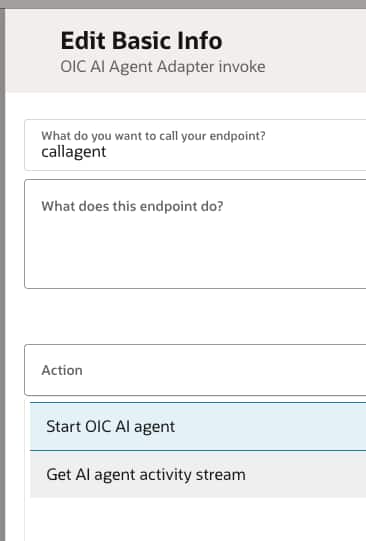
Oracle Integration Cloud (OIC) now introduces a powerful new capability — the AI Agent Invoke Native Action. This allows you to directly invoke OIC AI Agents within an integration flow, making it easy to embed AI-driven decisions into your business processes.
Instead of calling AI agents separately, integrations can now orchestrate them alongside other applications in a single workflow. This feature brings AI directly into integration workflows.
Example Use Case
Imagine a customer support request created in Salesforce. An OIC flow can:
- Invoke an AI Agent to analyze the request
- Identify its category and priority
- Automatically create a ServiceNow incident with an AI-generated summary
- Route it to the right support team
Simplified Agent Selection
The configuration is streamlined through a guided experience:
- Lists all available AI projects
- Shows only active agents within the selected project
This eliminates manual lookup and speeds up setup.
Flexible Inputs
You can customize how the agent runs using optional inputs:
- Prompt – Instruction sent to the agent
- Prompt Template ID – Predefined prompt configuration
- Conversation ID – Continue an existing interaction
- Payload – JSON input required for prompt templates
Conversation Tracking
Each invocation returns a Conversation ID, allowing you to track and continue interactions across multiple steps.
AI Native Actions Enhancements
This release introduces enhancements to OCI AI Native Actions, enabling greater flexibility through support for custom models and expanded generative AI capabilities.
OCI Document Understanding – Custom model support for classification, enabling integrations to use customer-trained models to classify documents based on business-specific categories.
OCI Vision – Custom model support for processor job–based object detection and classification, enabling large-scale image analysis using customer-trained models for domain-specific detection and classification scenarios.
OCI Generative AI – Supports both OpenAl and xAl Grok models, enabling agents to seamlessly interact with tools and systems, unlocking powerful reasoning, conversational, and tool-driven use cases.
BigQuery Adapter – New Adapter
As part of this release, we are introducing the BigQuery Adapter, expanding Oracle Integration’s data and analytics connectivity with native support for Google BigQuery.
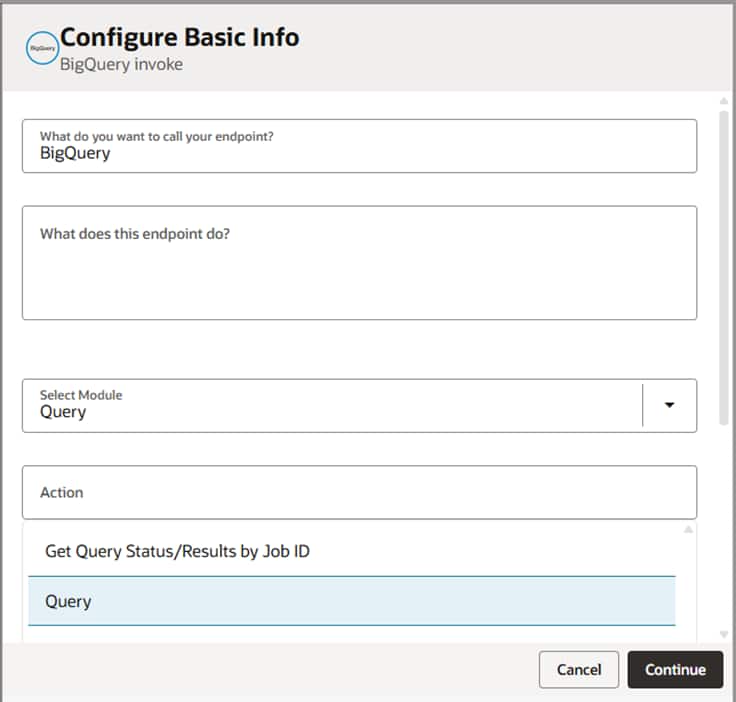
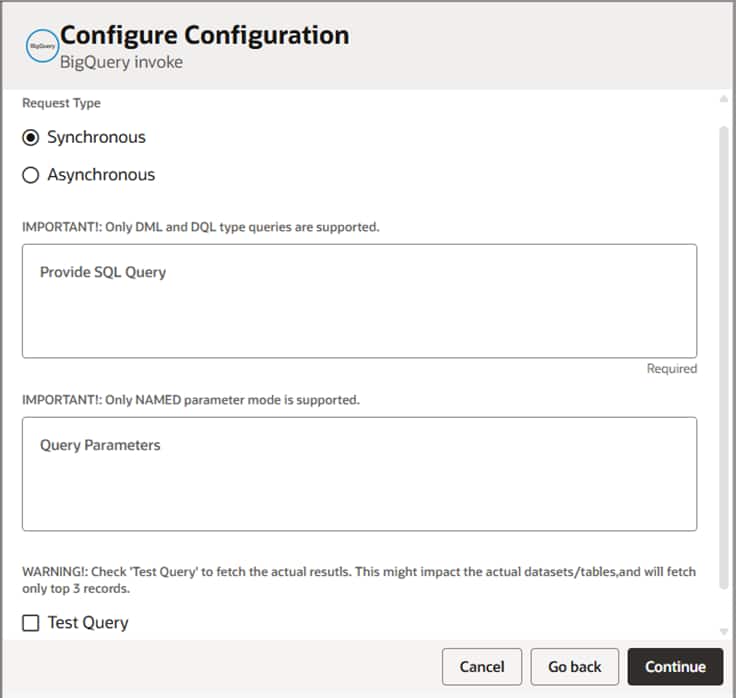
In this release, the BigQuery Adapter supports outbound invokes with the following capabilities:
- Bulk Load and Extract
Load data into or extract data from BigQuery tables using job-based processing. You can also check job status, list jobs, and cancel or delete jobs. - Query Operations
Execute SQL queries on BigQuery tables with support for both synchronous and asynchronous execution. - Table Operations
List table data and insert single or multiple rows into BigQuery tables. - Supports the OAuth 2.0 Authorization Code Credentials security policy
Databricks Adapter – New Adapter
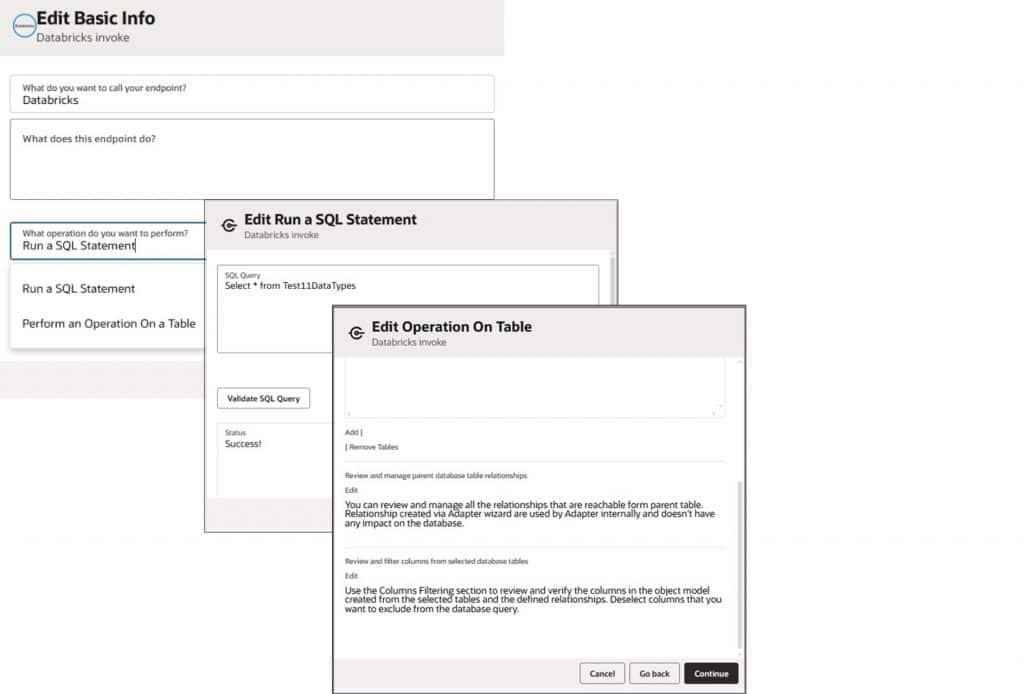
The Databricks Adapter is the newest addition to the Oracle Integration database adapters category. It allows seamless integration with Databricks, a cloud-based database built on the lakehouse architecture. This adapter supports configuration of SQL warehouses, schemas, and tables. It offers the following capabilities in the invoke role:
- Run a Query Statement – Executes and validates SQL queries to create, update, or retrieve individual records within one or more tables.
- Perform operation on Table
- Supports the following operations on single or multiple records across one or more tables:
- Insert
- Update
- Insert or Update (Merge)
- Select
- Supports the following operations on single or multiple records across one or more tables:
- It also provides additional capabilities to:
- Review and manage parent database tables relationships
- Review and filter columns from selected datable tables
- Review and edit a SQL Query
- This adapter uses Databricks Personal Access Token as the security policy. To establish a successful connection, you must provide the values for Host, HttpPath Port, Catalog and Personal Access Token. This adapter will support inbound integrations and cloud connectivity in the upcoming releases.
ActiveMQ Adapter – New Adapter
Modern integrations often rely on messaging to exchange data between applications efficiently. The new ActiveMQ Adapter in Oracle Integration (OIC) provides built-in connectivity to ActiveMQ Artemis brokers, making it easy to publish and consume messages between systems.
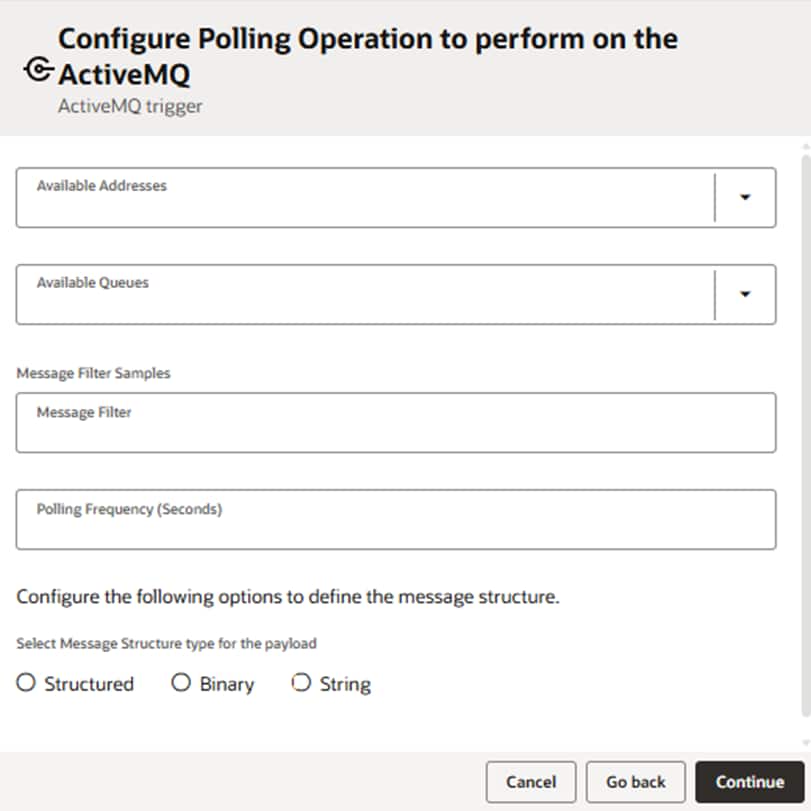
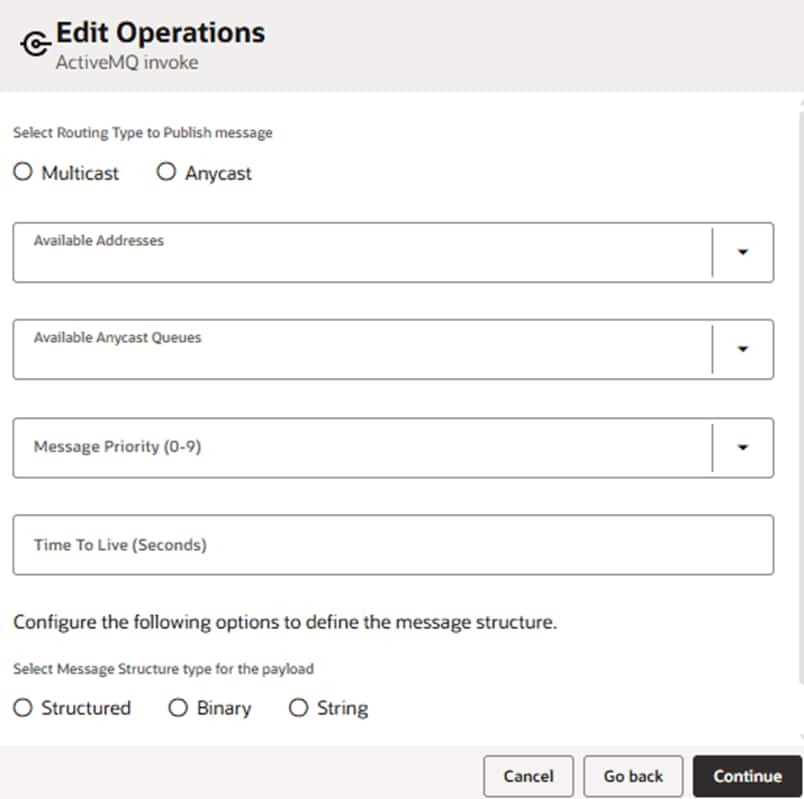
In this release, the ActiveMQ Adapter supports both outbound and inbound with the following capabilities:
- The ActiveMQ Adapter allows Oracle Integration users to connect to ActiveMQ Artemis instances and implement messaging patterns without custom code. It supports:
- Message consumption (Trigger)
- Message Publish (Invoke)
- Designed for cloud deployments, the adapter connects to ActiveMQ Artemis instances hosted on Microsoft Azure and Amazon Web Services (AWS).
- The adapter connects to ActiveMQ Artemis using the AMQP protocol.
- The ActiveMQ Adapter currently supports the Username and password–based security policy for secure connectivity.
- Address and Queue Selection:
- Dynamically lists addresses available or newly created in the ActiveMQ Artemis console.
- Displays available or newly created queues associated with the selected address.
- Addresses and queues are customer-specific, based on what exists in the ActiveMQ Artemis instance.
- Supports both Routing Types for delivering the messages from an address to the queue or queues bound to that address:
- Anycast
- Multicast
- Supports SQL-like filter expressions based on message headers for the Inbound operations.
- Supports XML, JSON, binary, and string message structures for both polling and producing the messages.
- Supports both Standard and custom headers. The headers and their corresponding values can be provided within the mapper.
Support for Dynamic REST Endpoints in REST Adapter
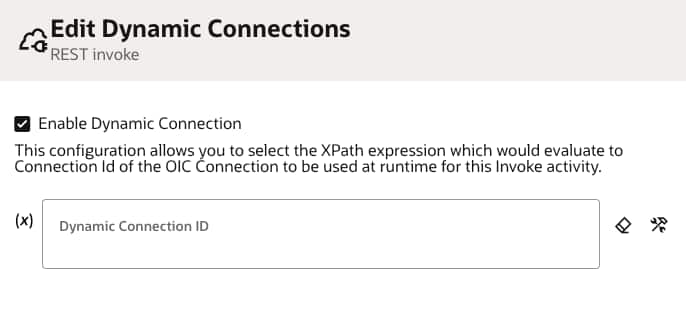
We are introducing support for Dynamic REST Endpoints in the REST Adapter, enabling integrations to determine the outbound REST endpoint at runtime. This enhancement provides greater flexibility by allowing integrations to dynamically route requests without requiring multiple connections or separate integrations.
Key Benefits:
Runtime Endpoint Flexibility: Dynamically determine the REST endpoint URI during runtime by mapping values to properties under ConnectivityProperties in the integration mapper.
Reduced Integration Complexity: Invoke multiple REST services that share the same request and response structure using a single integration and connection, eliminating the need to configure multiple invoke endpoints.
Improved Reusability: Build reusable integrations that can route requests to different REST services dynamically based on payload values or lookup results.
How It Works:
Configure the REST Adapter as an invoke connection and provide mappings to properties under ConnectivityProperties in the mapper.
For example, you can map a runtime value to AbsoluteEndpointUri to dynamically determine the endpoint URL that the REST Adapter invokes. Alternatively, you can selectively override specific parts of the endpoint such as BaseUri, RelativeUri, or individual URI components such as host, port, path, or query parameters.
When the integration is invoked, the REST Adapter uses the runtime values provided through these mappings to dynamically configure and invoke the target REST endpoint.
REST Adapter Enhancement – Support for Multi-Key Header Authentication
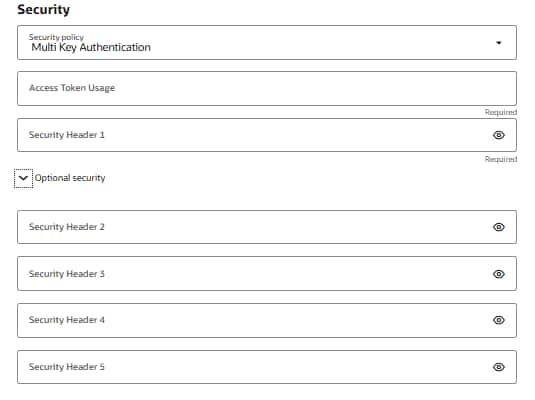
With this release, the REST Adapter now supports configuring multiple custom authentication headers at the connection level. This enhancement is useful for REST services that require more than one header value for authentication. Users can configure up to five key-value header pairs, which are then automatically applied to requests sent through the connection.
By moving these authentication headers to the connection level, users no longer need to manually configure them in each integration. This simplifies maintenance and makes it easier to update header values across multiple integrations when credentials change.
Support for Microsoft Fabric Using the Microsoft SQL Server Adapter
With this release, Microsoft SQL Adapter certified to integrate with Fabric.
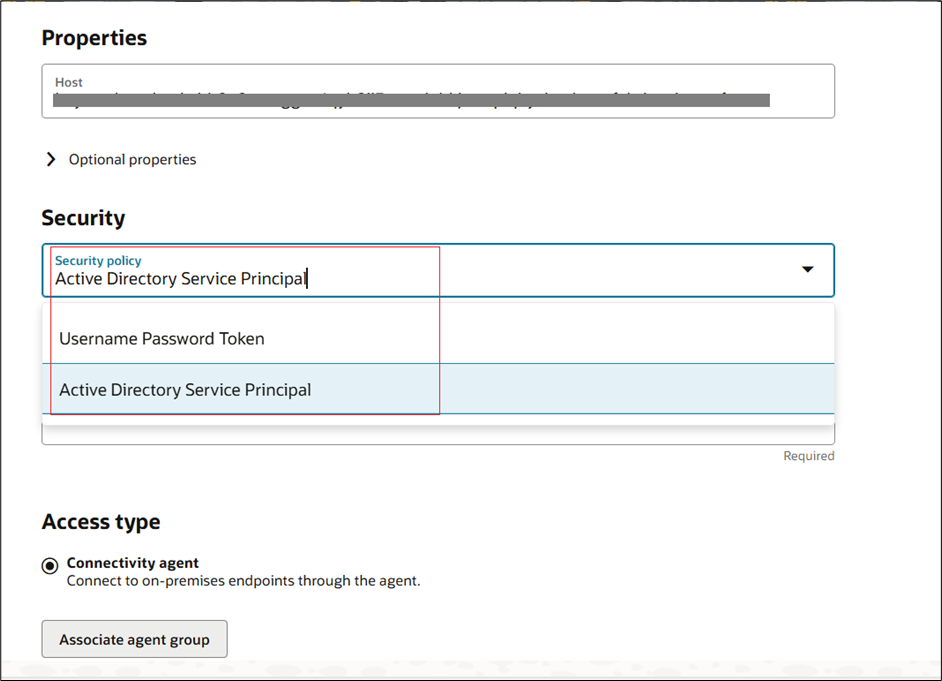
The Microsoft SQL Server Adapter now supports a new security policy: Active Directory Service Principal (AADSP), which enables connectivity to Microsoft Fabric SQL Database.
Unlike the Username Password Token policy, Active Directory Service Principal authenticates applications using secure tokens. It offers: A dedicated lifecycle for managing old credentials with support for automatic credential rotation. It allows administrators to grant applications or services on only the permissions they need, thus preventing security breaches.
To connect using this new security policy, provide the Host, Client Id, and Client Secret, enter any optional properties as needed, and select the appropriate Access Type.
Note: All connections are supported only using the connectivity agent; direct connectivity without the agent is not supported.
Support for Hyphen (-) in Database Names of Microsoft SQL Server Adapter
The Microsoft SQL Server Adapter has overcome its restriction of not supporting connections to database instances whose names contained a Hyphen (-).
Snowflake Adapter – Adds Connectivity Agent Support with Client Credentials to Enable Integration with External IDMs
With this release, the Snowflake Adapter now supports the Oracle Integration Connectivity Agent when using the OAuth 2.0 Client Credentials (two-legged) security policy with external identity providers such as Azure AD, Okta, or PingFederate. Previously, this security policy was supported only for cloud connectivity.
This enhancement enables secure access to Snowflake deployments in private or restricted network environments where Connectivity Agent–based connections are required.
The Connection page allows you to select the OAuth 2.0 Client Credentials security policy when configuring the adapter to use the Connectivity Agent.
Apache Kafka Adapter Enhancement – Introducing the SASL SCRAM over SSL Security Policy
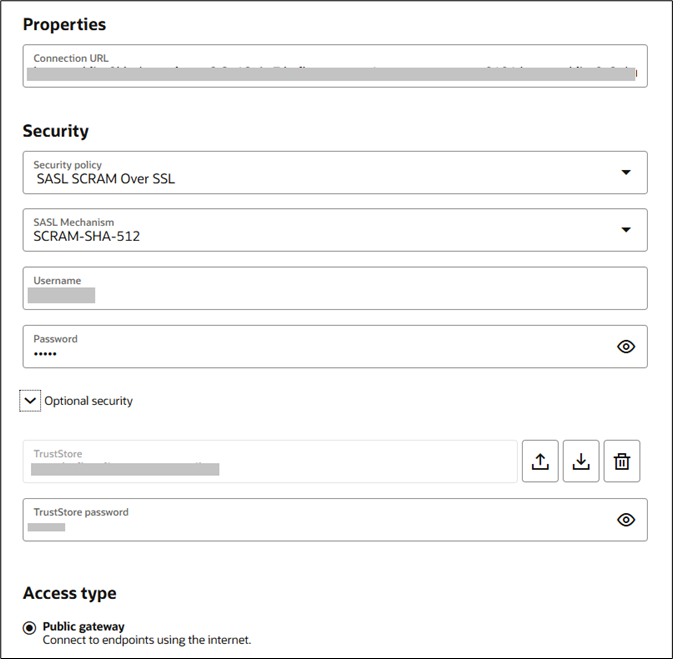
With this release, the Apache Kafka Adapter has enhanced authentication security with the SASL SCRAM over SSL security policy, delivering stronger protection for user credentials and offering secure communications.
With this configuration, both the user name and password are securely hashed before transmission. This means credentials are never sent directly through the SSL tunnel, significantly reducing the risk of interception and strengthening overall system security.
You can choose from the following secure hashing mechanisms:
- SCRAM-SHA-256 – Utilizes a 256-bit hash for secure authentication
- SCRAM-SHA-512 – Utilizes a 512-bit hash for even stronger cryptographic protection
To establish connections with this security policy in Oracle Integration, enter the following information on the Connection page:
- Select the SASL SCRAM over SSL security policy.
- Select your preferred SASL mechanism (SCRAM-SHA-256 or SCRAM-SHA-512).
- Enter your user name.
- Enter your password.
- Enable TrustStore and upload your truststore file.
- Enter and confirm your TrustStore password.
Once configured, your system will authenticate securely using hashed credentials within an encrypted SSL session.
GCP Pub Sub Adapter Enhancement – Introducing Dynamic Topics and Subscriptions
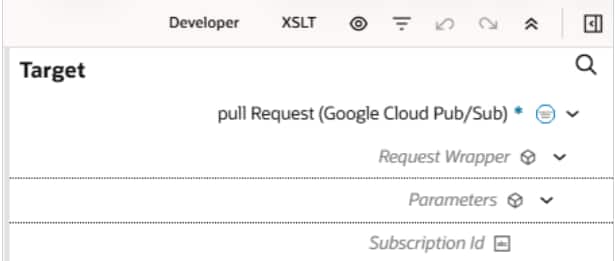
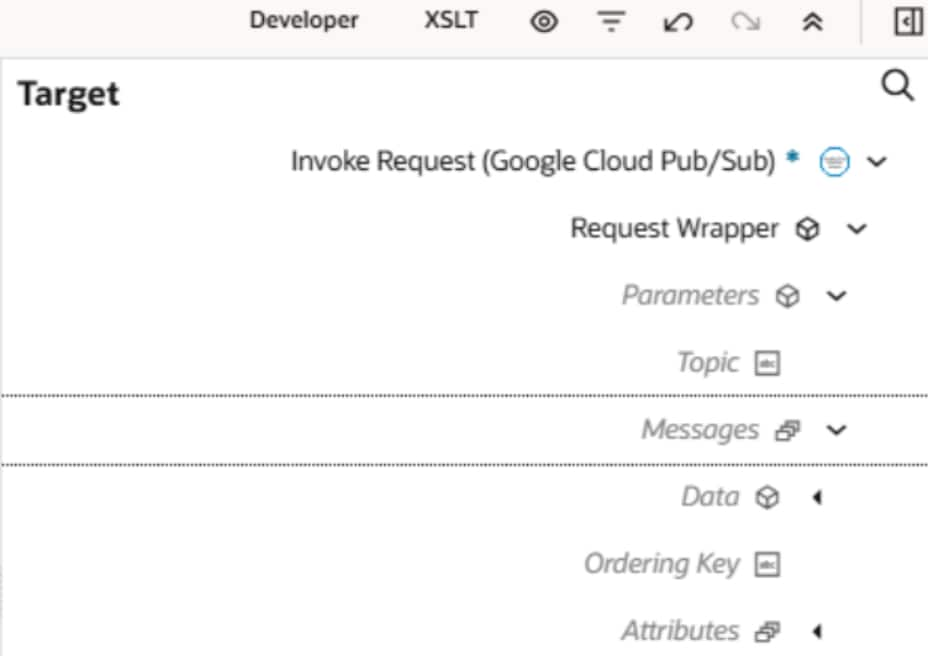
With this enhancement, users can now pass the topic name or subscription name dynamically at runtime through the mapper. Previously, the GCP Pub Sub Adapter required topics or subscriptions to be fixed at design time for publishing, pulling, or acknowledging messages.
This enhancement has thus reduced overhead by eliminating the need to recreate or modify integrations solely to switch topics or subscriptions in the invoke role.
Mapper (Pull) (Enter the subscription Id or map it to the subscription Id from the source)
Mapper (Push) (Enter the topic name or map it to the topic name from the source)
SharePoint Adapter Enhancement – Supports Configuration on a Particular Site
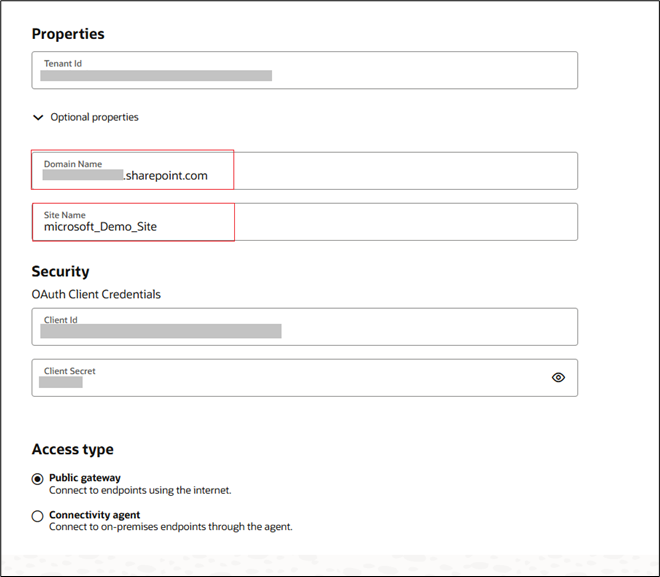
With this release, the SharePoint Adapter enables you to operate (in both Trigger and Invoke roles) on a specific site with minimal permissions.
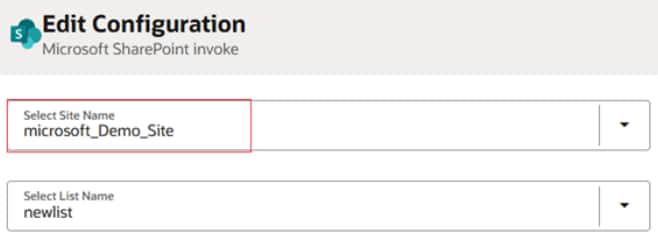
You can register the application and grant least privilege access by selecting Sites.Selected permission for a specific site. Follow this by entering the Domain Name (for example, https://*******.sharepoint.com) and the Site Name on which you want to perform Trigger or Invoke operations on the Connection page.
After configuration, only the specified site will appear under “Select Site Name” on the Configuration page. Refer to the image below for more details.
Connection Page (Tigger and Invoke)
NetSuite REST Adapter Enhancement – Supports JWT Client Credentials Assertion Security Policy
The NetSuite REST Adapter now delivers enhanced security and greater operational flexibility to support modern integration needs.
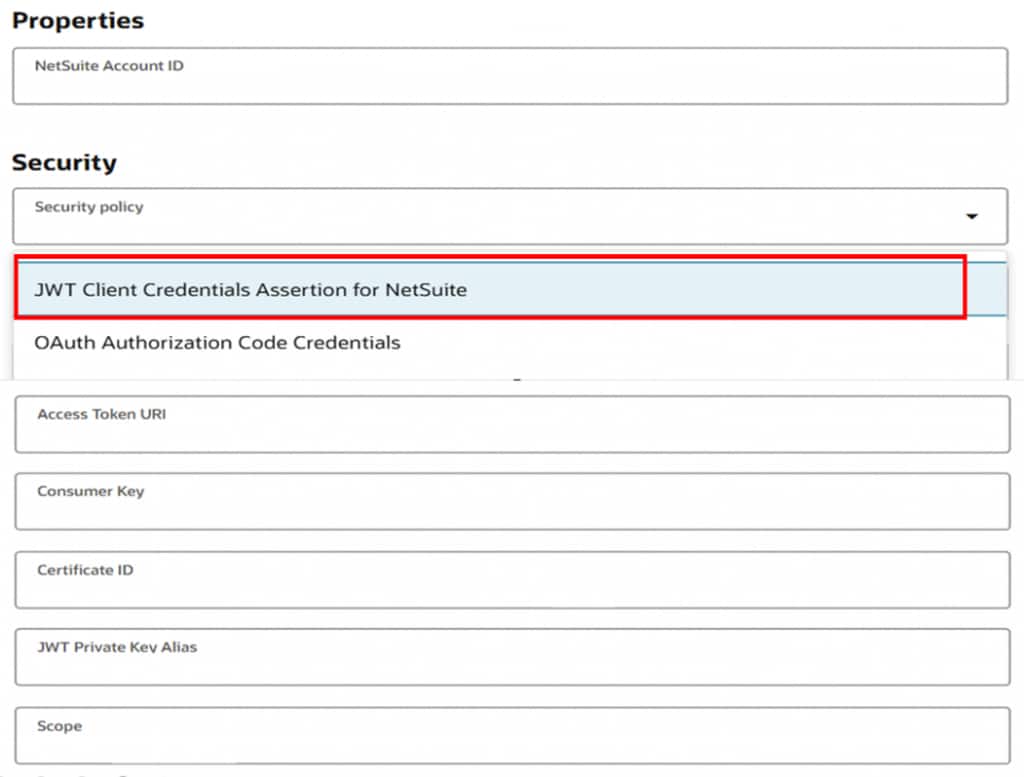
In addition to the existing OAuth Authorization Code Credentials security policy, the adapter now supports JWT Client Credentials Assertion, enabling more secure, token-based authentication when integrating with NetSuite, allowing secure invoke integrations with NetSuite services.
This release also introduces a new Dataset operation type on the Basic Info page. With this enhancement, users can seamlessly perform dataset-driven actions, such as Get List of Datasets and Execute Datasets, to simplify orchestration and improve operational efficiency.
Azure Event Grid Adapter Enhancement – Support for Namespace
With the rise of event-driven architectures, organizations increasingly depend on seamless and secure event distribution across services. To enable richer integration scenarios, Azure Event Grid provides powerful namespace capabilities, and our latest Azure Event Grid Adapter enhancement now brings full support for working with both public and private namespaces.
An Azure Event Grid namespace is a top-level resource that provides isolation, security, and management for event-driven workloads. It offers a dedicated endpoint and centralized control for multiple topics and subscriptions. Designed for enterprise-scale scenarios, it supports high throughput, pull-based consumption, fine-grained RBAC, and multi-tenant separation within a single resource.
With support for both public and private namespace topics, the Azure Event Grid Adapter now enables Secure event publishing, polling and subscription aligned to the network design, while supporting both trigger and invoke integration patterns.
Shopify GraphQL Adapter Enhancement – Support for New Events and the Client Credentials Security Policy
Inclusion of New Events
The adapter has also introduced new module “Bulk” and event” Bulk Operations Finish.” (Note: This operation is only supported by the following API versions: 2025-04,2025-07, and2026-01.)
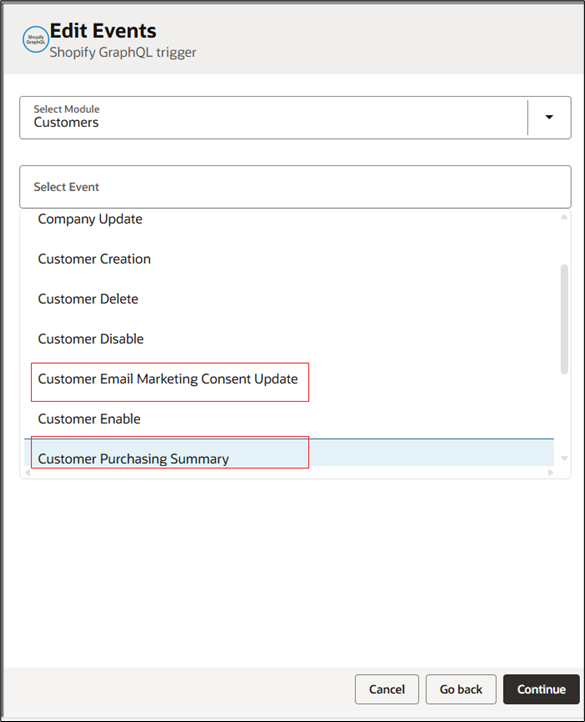
It now also supports additional events in the Customers module, namely:
- Customer Purchasing Summary
- Customer Email Marketing Consent Update
- Customer SMS Marketing Consent Update
- Customer Tags Added
- Customer Tags Removed
Shopify and Shopify GraphQL Adapters – Client Credentials Security Policy Support
The adapter now supports the Client Credentials security policy, in addition to the existing Shopify Access Token Policy and Shopify Security Policy.
The Client Credentials security policy will help to establish connections with the adapter using the newly created custom app. See Create custom app using Dev Dashboard.
The Shopify Access Token and Shopify Security Policies are used to manage connections using the existing legacy custom apps.
Note: Starting from 1st Jan 2026, you will no longer be able to create legacy custom apps. You can only manage them using Shopify admin. See Manage legacy custom apps.
Certification updates
- Following adapters are certified to support database version 26ai:
- Oracle Advanced Queuing(AQ) Adapter
- Oracle Advanced Queuing (AQ) JMS Adapter
- Oracle Autonomous Transaction Processing (ATP) Adapter
- Oracle Database Adapter
- Oracle DBaaS Adapter
- The Apache Kafka Adapter is certified to support Apache Kafka 3.8.0,4.1.1, Amazon MSK and OCI Managed Kafka 3.7.0
- The Rabbit MQ Adapter now supports integration with Cloud instance version 4.2.2 and On-prem instance version 4.2.3
- The Shopify GraphQL Adapter is certified to support the following API versions: 2024-07, 2024-10,2025-01, 2025-04, 2025-07, 2025-10, and 2026-01