
This is the second in our series of “Questions You Asked” and this time the question has to do with interval partitioning and whether newly created partitions will be populated into the IM column store.
We’ll begin our experiment by creating an interval partitioned table based on the SUPPLIER table from our SSB schema. I’ve added a key_no column to make the interval partitioning easy. We then insert data into three partitions and list the results. Note that the first partition is named p1 because we had to create at least one partition with our CREATE TABLE statement. The other two are system generated names and those partitions were created automatically as part of the interval partitioning feature when we ran the second and third insert statements:

Now let’s alter the table in-memory and see what happens:
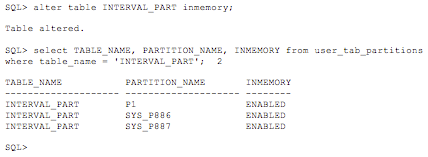
So far so good, our partitions are now enabled for
in-memory. What happens when the next partition is added?

So yes, newly created partitions will be added to the IM column store when using interval partitioning because the newly created partition inherits the INMEMORY attribute from the table.
Now we could stop there, but there are some subtleties with partitioning that we should explore if we really want to do this topic justice. For instance, what happens if we only want the current n number of partitions to be in-memory? How do we remove just one partition from the IM column store without removing all of them?
Let’s start with looking at the different data dictionary views associated with partitions:

Notice that in the user_tables view that the INMEMORY field is blank. Since the table we are interested in is a partitioned table, which is a logical entity in the database not a physical segment, the table level views doesn’t display the segment attribute. Instead we need to query the view USER_PART_TABLES and we see that there is a new column there called DEF_INMEMORY for default INMEMORY, and it is this column, or its attribute, that is controlling whether new partitions are being populated into the IM column store.
So the answer to the question of how do we remove “older” partitions for the IM column store is easily answered. We need to perform the action at the partition level. For instance, let’s remove the first partition we created, p1, from the IM column store:
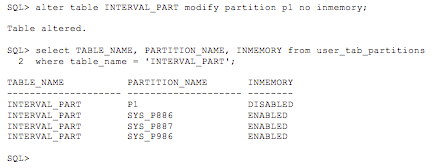
To follow on with this line of reasoning, if we had not altered the table to be INMEMORY, then the DEF_INMEMORY attribute would not be set, and we could have controlled whether a partition was populated into the IM column store manually by altering just the partition(s) that we wanted to populate. Of course, this isn’t what the original question was, but it is important to understand how partitioning works so that you can make the appropriate decisions for your environment.
Original publish date: November 13, 2015