
I was recently asked by a customer, “is it possible to force a query to use the In-Memory column store?” and I thought it would be a good idea to share the answer here on the blog.
The first thing that comes to mind when you starting thinking about forcing how the Oracle Database will execute a query is Optimizer hints. There is an INMEMORY hint available, but that hint just enables the use of the In-Memory column store (IM column store) if the INMEMORY_QUERY parameter has been set to DISABLE (default is ENABLE). If we look closer at the documentation for the hint, we see that it says “This hint does not instruct the optimizer to perform a full table scan. If a full table scan is desired, then also specify the “FULL hint“.
So it appears that the answer is that you have to use the FULL hint to ensure that the access method is a full table scan, which is a requirement for accessing the IM column store. If the INMEMORY_QUERY has been set to DISABLE then you would also need to use the INMEMORY hint. Of course this also assumes that the IM column store has been enabled and that the object has been enabled for in-memory.
Let’s try this solution out with some queries on the LINEORDER table. It has been fully populated into the IM column store, and it has a b-tree index on the LO_ORDERKEY column called STEP3_3. We will experiment with both values of the INMEMORY_QUERY parameter to show the effect of the INMEMORY hint.
The query we’re going to start with is the following:
SELECT Max(lo_ordtotalprice) most_expensive_order
FROM lineorder;
With the INMEMORY_QUERY parameter set to enable (the default) this should result in an access of the LINEORDER table via the M column store.
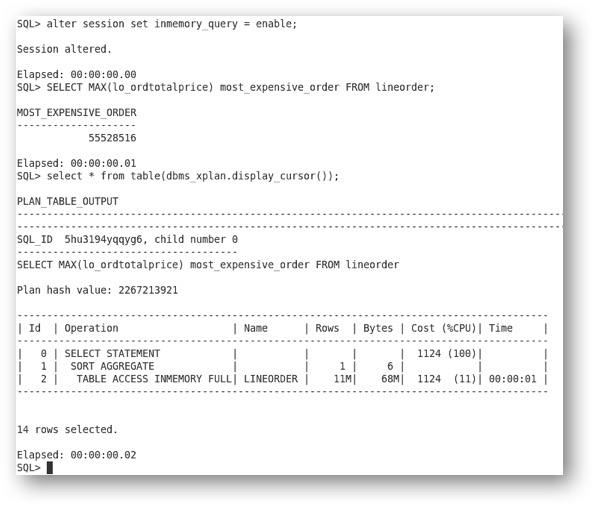
And it does, so we know that we can access the LINEORDER table via the IM column store. Now let’s run a query that will access a single row through an index that has been created on the LINEORDER table. The query is the following:
SELECT
lo_orderkey,
lo_custkey,
lo_revenue
FROM lineorder lo
WHERE lo_orderkey = 500000;
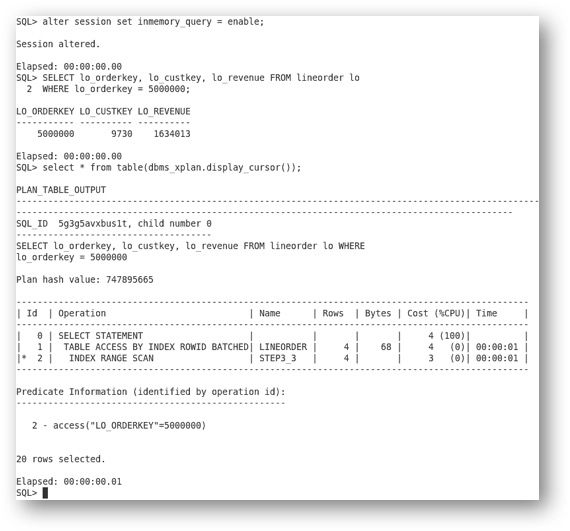
The lowest cost access path is to use the STEP3_3 index and we see that the Optimizer has chosen to use that index. Now let’s see what happens if we add the FULL hint.
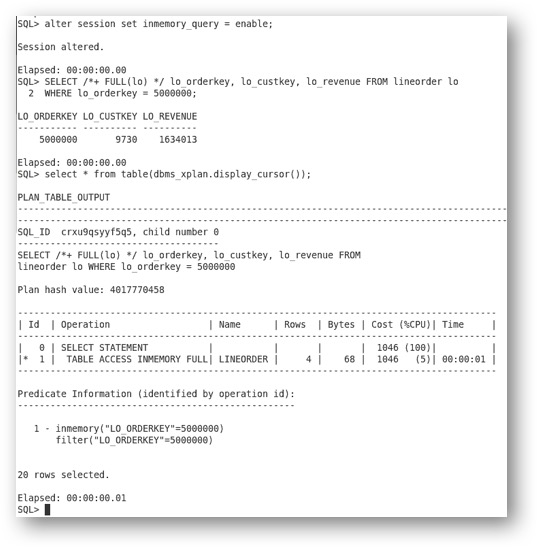
The FULL hint has changed the access path to a full table scan and this allows the use of the IM column store. Now let’s change the INMEMORY_QUERY parameter to DISABLE.

We see that we’ve performed a full table scan but we haven’t accessed the IM column store since we’ve disabled the ability to use the IM column store.
With the INMEMORY_QUERY parameter set to DISABLE we can now use the INMEMORY hint in combination with the FULL hint to force the use of the IM column store.

If you found this interesting, then there is a post on the Optimizer blog that covers other In-Memory hints that you might find interesting.
Original publish date: June 17, 2016