

Faster, leaner agents rarely come from one big change. They come from removing friction—trimming wasted context, simplifying decisions, and structuring work so the agent takes the shortest path from request to result, without ever trading away accuracy.
When an agent feels slow, inconsistent, or overly chatty, the instinct is to rebuild it. In practice, the biggest gains are a series of small, tactical adjustments: cut the work that doesn’t earn its place, narrow what the model has to read and decide, and reserve heavy reasoning for the moments that actually need it.
Before touching a single lever, it helps to be clear on what you are optimizing for—because the three performance dimensions are not equal.
Accuracy comes first. AI Agent Studio surfaces three performance dimensions—Accuracy (Quality), Latency (Performance), and Token Usage (Cost). A fast, cheap answer that is wrong is still a wrong answer. Optimize latency and cost around a correct result—never at its expense. The good news: most of the techniques below improve all three at once, because a focused agent is usually both more accurate and faster.
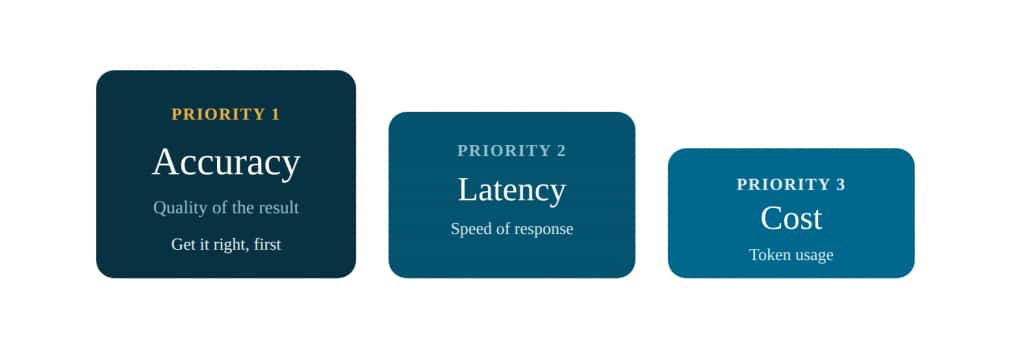
Optimize in priority order. Latency and cost improvements should sit on top of a correct answer, not replace one.
1. Trim what the model reads
Less input, more signal — the cheapest accuracy and latency win there is.
More context is not better context. Every extra token of instructions, history, and payload is something the model must process and weigh—and noise dilutes the signal it needs to act correctly. Tightening the input is where focus, speed, and cost improve together.
PROMPT LENGTH
Make the instruction set shorter and sharper
Long instruction blocks slow agents down and invite confusion. The model has to reconcile more rules, more exceptions, and more background that may never change its behavior.
- Remove duplicate rules and background that doesn’t change what the agent does.
- Keep the most important rules near the top; order matters—goal, then allowed sources, then schema and examples, then edge rules.
- Write direct instructions instead of layered, conditional prose.
- One job per call: extract or classify or transform—not all three.
A useful test: if a sentence doesn’t change what the agent does, it probably shouldn’t be in the prompt. And if you find yourself packing in dozens of edge cases, that’s a signal to split the task into steps or specialist agents rather than one overloaded prompt.
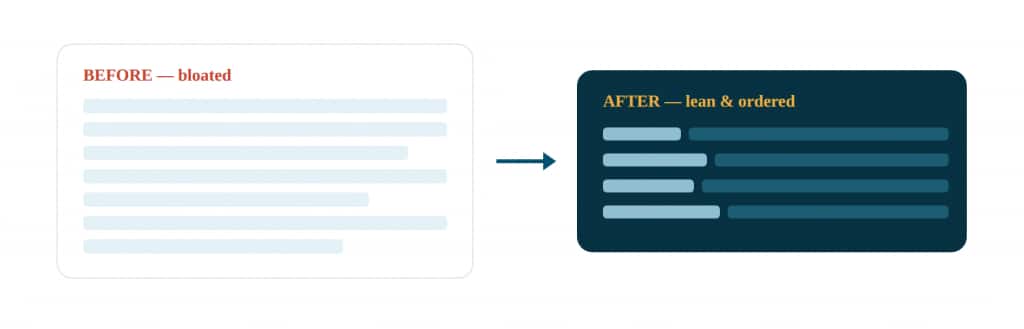
Goal → allowed sources → schema and examples → edge rules. A structured, deduplicated prompt is easier for both you and the model to follow.
CONTEXT DISCIPLINE
Reduce the amount of context the agent sees
- Send only relevant information—pass top chunks or specific sections, not entire documents.
- Trim old or low-value conversation history before it reaches the agent.
- Prefer structured, named JSON inputs over free-form text to remove ambiguity.
- Summarize upstream so the agent receives a clean, bounded input.
SUMMARIZATION
Summarize only when it earns its place
Summarization is useful, but it is also extra work. An agent that re-summarizes short, already-clear exchanges is paying a tax for nothing.
- Keep it for long-running conversations and stateful tasks where memory matters.
- Skip it for short, direct requests.
- Never re-compress context that is already clear.
2. Right-size the data your tools return
A tool that returns everything forces the agent to sift — and pay for — what it never needed.
Agents slow down when tools hand back more data than the task requires. Heavy payloads inflate token usage, lengthen processing, and bury the relevant fields in noise. The fix is to shape responses at the source.
BUSINESS OBJECT TOOL
Prune the response field list
The Business Object Tool lets you select exactly which fields a GET request returns. Choosing only the fields the agent needs is one of the highest-leverage performance moves available—it shrinks the response, speeds the call, and cuts token usage without changing behavior.
- Expose only the fields required to complete the task; drop the rest.
- Keep payloads light and avoid redundant API calls.
- Don’t repeat getUserSession more than once per session unless something genuinely changed.
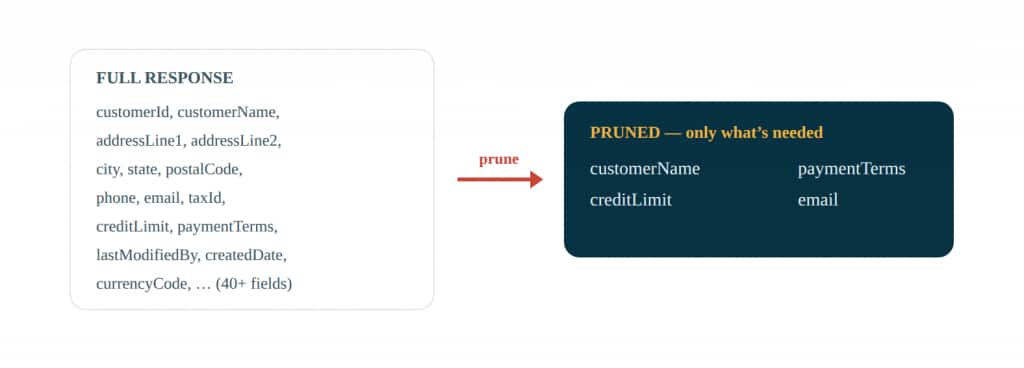
Selecting four fields instead of forty cuts response size, latency, and token cost in a single configuration step.
TOOL SELECTION
Use the simplest tool that does the job
- Expose only the tools the agent actually needs—fewer choices mean faster, more reliable tool selection.
- Make tool names obvious and keep descriptions short and precise (they’re injected straight into the prompt).
- Return helpful errors and null-safe outputs so the agent isn’t left guessing.
3. Pick the right brain for each task
Reserve high reasoning for where it changes the outcome — not everywhere by default.
Not every step deserves the heaviest model. Routing a simple classification through a high-reasoning model buys you latency and cost with no accuracy gain. The discipline is to match model strength to task difficulty—and to keep deterministic work out of the model entirely.
Match model to task
- Use a stronger, high-reasoning model for messy or high-stakes extraction and judgment—where correctness is hard and matters.
- Use a lighter model for simple classification, normalization, and formatting—it lowers latency and cost without hurting quality.
- Set standard defaults with clear upgrade criteria so behavior stays consistent across teams.
- Use the LLM mainly at decision points—not for deterministic actions.
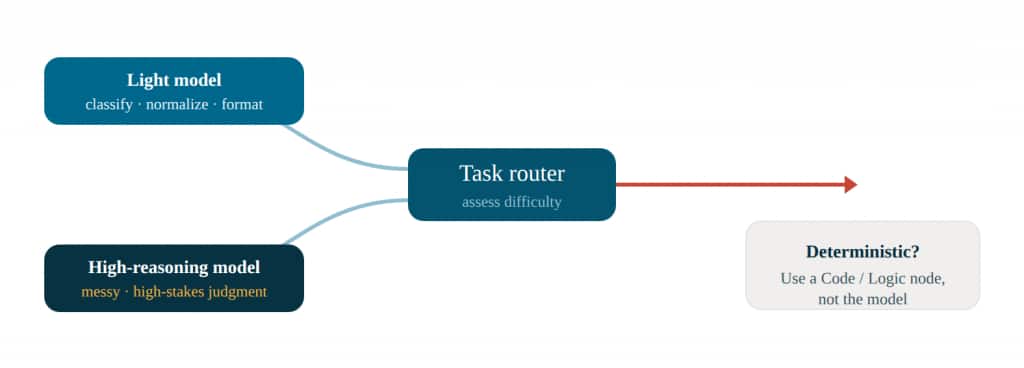
Send each step to the lightest capable brain. Push fixed transforms to Code and Logic nodes so the model only reasons where reasoning is needed.
MODEL CHOICE
Choose from the models on offer by capability, not by name
AI Agent Studio lets you pick from several models that trade reasoning depth against speed. Choose per step: default to a faster, lighter model, and reach for higher reasoning only on the hard, high-stakes steps that genuinely need it. Check modality too—if a step ingests images or documents, pick a model whose input profile supports it. And because the available models change over time, choose by capability profile rather than by a specific name.
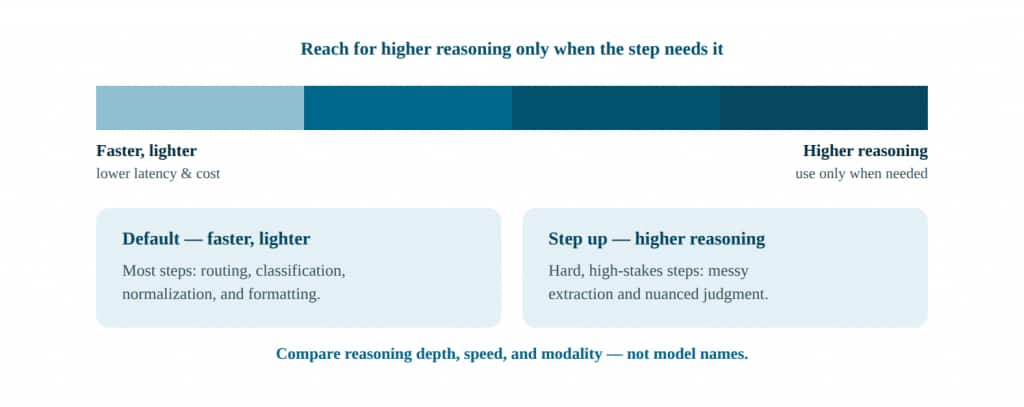
Default toward faster, lighter models; move toward higher reasoning only for the steps that need it.
OUTPUT CONTRACT
Constrain the model with an output contract
How you bound the output matters as much as which model you pick. A strict contract keeps results machine-parseable and—more importantly—keeps the agent from inventing answers.
- Define a JSON output schema and tell the model to return only valid JSON matching it—this eliminates chatter and formatting drift downstream.
- Make uncertainty explicit with fields like confidence, missing_fields[], and missing_reason so gaps surface instead of hiding.
- Define abstain behavior: return null when the answer isn’t in the input or context. This prevents hallucination and routes the exception to a clarification or approval path.
- Validate by parsing the response against the schema, so a malformed output fails fast instead of corrupting later steps.
Determinism tip: string reformatting, date math, JSON reshaping, and threshold checks belong in Logic and Code nodes. They run fast, cost nothing in tokens, and produce the same answer every time—which is itself an accuracy win.
4. Shape the orchestration
Clearer paths, the right node for each step, tighter teams — the agent reasons only when it has to.
A lot of latency is decision overhead: the agent weighing options it shouldn’t have to. Structuring the work—defining stable paths and keeping teams and tool sets small—removes that overhead and makes outcomes more repeatable.
WORKFLOW AGENTS
Use a Workflow Agent for repeatable tasks
When a task follows the same pattern every time, a Workflow Agent is usually faster than a free-form agent—the path is already defined, so it spends little time deciding what to do next. Reach for it when the process is stable, rule-driven, and easy to map step by step: routing requests, checking records, validating required fields, applying business rules, advancing to the next step.
A Workflow Agent’s real efficiency advantage is at the node level: because you assemble the path yourself, you choose the cheapest capable node for every step. The LLM node is the most expensive choice you can make—it costs tokens, adds latency, and carries input and output token limits. Much of what a workflow does isn’t reasoning at all; it’s parsing, math, validation, and shaping. Push that work to deterministic nodes and reserve the model for genuine decisions.
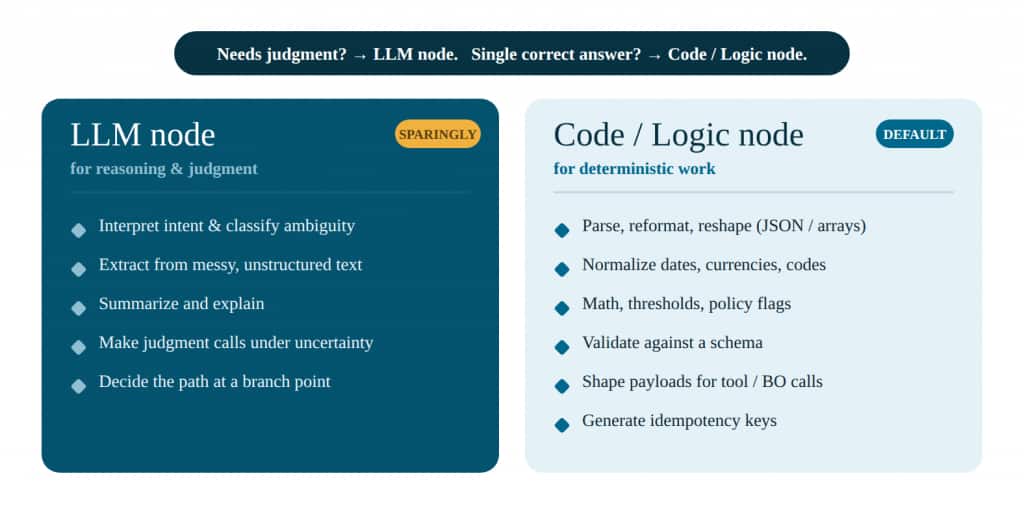
The dividing line is simple: if a step has one correct answer, it belongs in a Code or Logic node; if it needs judgment, it belongs in the LLM node.
NODE SELECTION
Use a Code node instead of the LLM for deterministic work
A Code node runs straight-line JavaScript: it returns the same result every time, costs nothing in tokens, runs in milliseconds, and—unlike the LLM—isn’t bound by token limits. Determinism is itself an accuracy win: a calculation or validation should never vary run to run. Reach for a Code node when the step is mechanical:
- Data normalization — convert dates, currencies, and codes into canonical formats (e.g., “Feb 1” → 2026-02-01; “USD 1,200” → {amount:1200, currency:”USD”}).
- Schema validation & guardrails — check extracted fields against a required schema; set needsClarification and route on failure rather than letting bad data flow downstream.
- Threshold & business math — compute policy flags such as overThreshold = amount > 500 or variancePct = (invoice – po)/po to pick the auto-fix vs. approval path.
- Payload shaping — map internal variables into the exact REST or Business Object update contract before a write.
- Idempotency keys — generate a stable key from {workflowRunId + objectId + action} to prevent duplicate writes when a step retries.
- Conditional logic & structuring — handle if-else branches not covered by predefined nodes, and reshape data into JSON, arrays, or HTML for the next step.
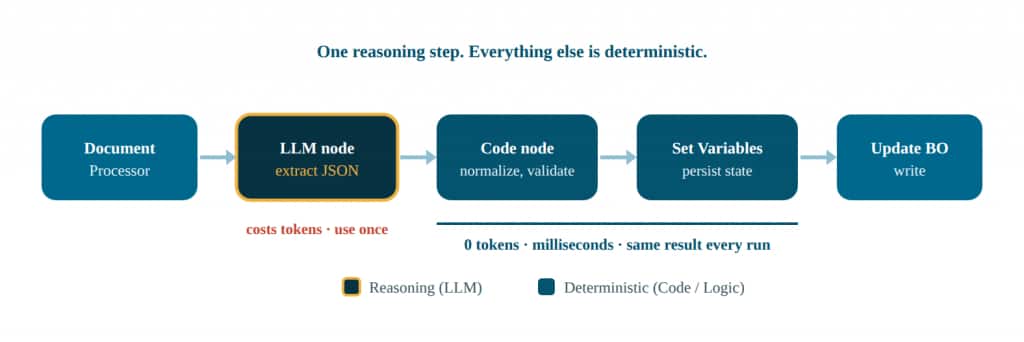
A typical extract-and-update flow: the LLM runs once to turn a document into structured JSON, then Code and Set Variables nodes do the parsing, validation, and state-keeping the model shouldn’t be paying tokens for.
LOGIC DISCIPLINE
Persist state with Set Variables, keep logic side-effect free
- Use Set Variables to persist IDs, decisions, extracted fields, and status—for example {currentStep, retryCount, exceptionType, approvalRequired}—so downstream Switch and Loop nodes route reliably without re-deriving the same values.
- Keep logic nodes side-effect free: no writes to systems of record. Let data nodes own the writes so retries and branches stay safe.
- Validate contracts early and fail fast with clear error messages, rather than discovering bad data deep in the flow.
- Centralize repeatable transformations into reusable helpers or subflows instead of re-prompting the model for the same shaping each time.
Know the Code node’s edges: it’s built for fast, straight-line logic—roughly a 5-second runtime ceiling, 10,000 iterations, and ~50 KB of output, with no external calls, imports, or side effects. It reads $context, $currentItem, and $currentItemIndex and returns a value rather than mutating state. Anything heavier—an API call, a large transform—belongs in a data node or a dedicated service, not the Code node.
AGENT TEAMS
Keep teams small and tool sets tight
In a supervisor / agent-team pattern, the supervisor’s job is to route to the right worker. The more agents and tools it must choose among, the slower and less reliable that routing becomes. Size the team deliberately:
- 3–7 agents per team. If you need more than seven, split into separate workflows to preserve clarity.
- 1–10 tools per agent for optimal performance—not more than ten. If an agent carries more than five tools, they should be closely related.
- Give each agent a distinct role or persona so the supervisor’s routing decision is unambiguous.
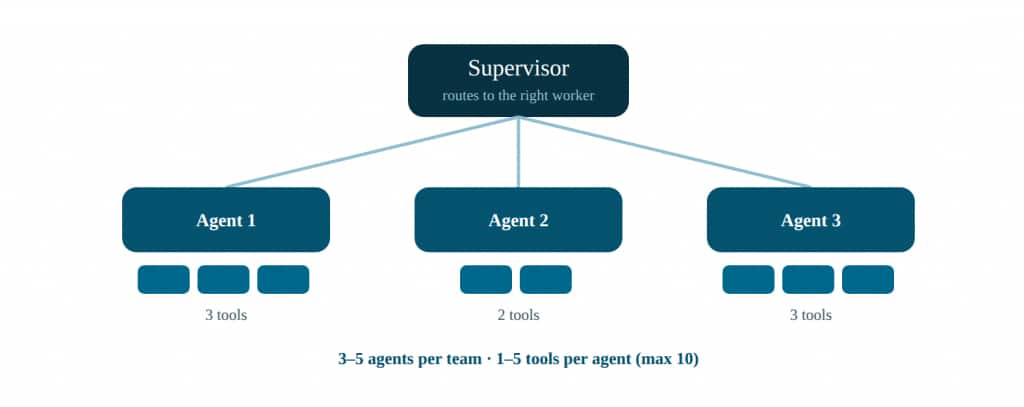
Small, well-scoped teams keep the supervisor’s routing decision crisp—and crisp routing is fast, accurate routing.
5. Run independent work in parallel
If two steps don’t depend on each other, there’s no reason to wait for one before starting the other.
Sequential execution is the right default only when steps depend on each other. When they don’t, the Run in Parallel node fans the work out and merges the results—cutting wall-clock time sharply for tool-heavy agents.
Good candidates for parallel execution
- Fetching two unrelated records at once.
- Pulling policy from one source and data from another.
- Validating multiple independent inputs simultaneously.
- Gathering reference material from several places, then merging into one decision payload.
The rule: parallelize reads and analysis—not conflicting system writes. Only fan out work that is genuinely independent. (Note that a Human Approval step can’t live inside a parallel branch, so keep approvals on the main path.)
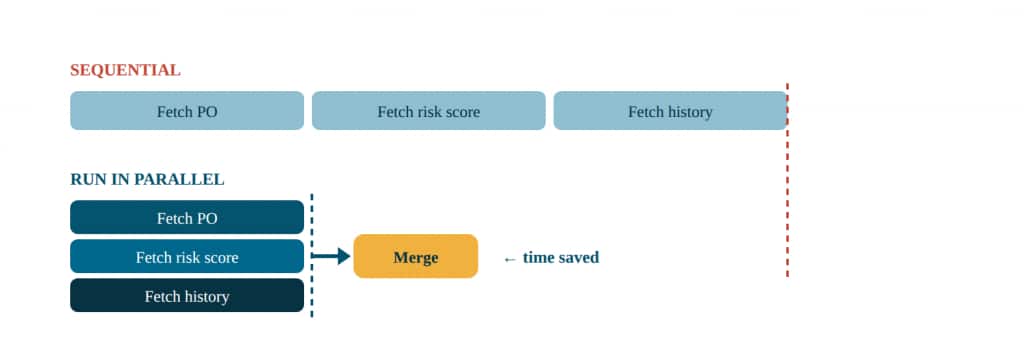
Three independent reads run concurrently and merge into one payload, collapsing three waits into one.
6. Measure, trace, and tune one change at a time
You can’t fix what you can’t see — and you can’t learn from changing five things at once.
Every change above should be verified, not assumed. AI Agent Studio’s METRO capabilities—Metrics, Evaluation, Tracing, Reporting, and Observability—let you find the real bottleneck and confirm that a fix helped accuracy without quietly hurting it.
Find the bottleneck before you tune
- Use the agent dashboard to watch Accuracy, Latency, and Token Usage together.
- Review the step-by-step trace timeline—sequence, duration, and status per step—to spot repeated tool calls, long pauses, unnecessary branching, and slow paths that only trigger in certain scenarios.
- Fix the single biggest bottleneck first; often one oversized payload or one redundant call is the real cause.
Tune deliberately, and guard accuracy with evaluations
- Change one thing, re-run the same test prompt, and compare both speed and output quality.
- Keep the change only if quality holds and performance improves.
- Maintain evaluation sets with reference answers (golden datasets) so a latency or cost optimization can’t silently regress correctness.
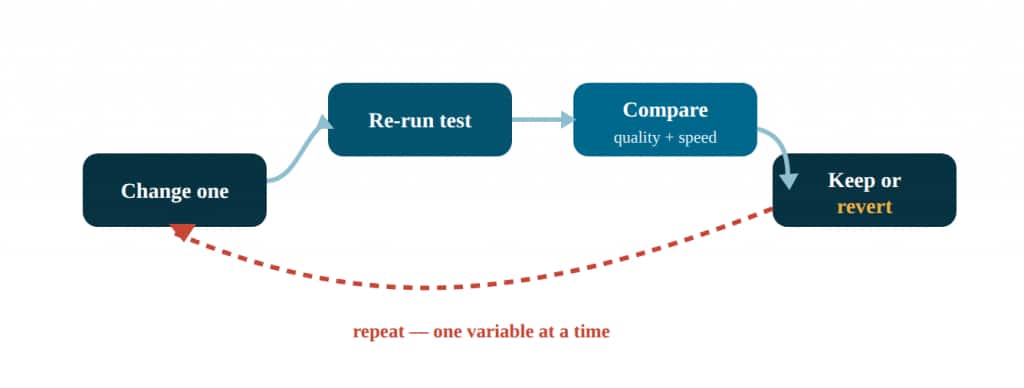
Isolating one variable per pass is slower at first, but it’s the only way to know which change actually helped.
The performance tuning checklist
Run through these when an agent feels slow—starting with the biggest bottleneck.
- Shorten and reorder the instruction set
- Summarize only when it adds value
- Trim context to the relevant chunks
- Prune Business Object response fields
- Expose only the tools the agent needs
- Reserve high reasoning for hard, high-stakes steps
- Push deterministic work to Logic / Code nodes
- Use a Workflow Agent for stable, repeatable paths
- Keep teams to 3–5 agents, 1–5 tools each
- Run independent reads in parallel and merge
- Trace to find the real bottleneck first
- Change one thing, evaluate, keep only if quality holds
The takeaway
Improving agent performance is mostly about removing friction. The fastest agent is rarely the one with the most logic—it’s the one with the cleanest instructions, the leanest payloads, the right model for each step, and the shortest path from request to result. Start with the biggest bottleneck, simplify the work, and keep testing—always confirming that speed and cost gains sit on top of a correct answer, never in place of one.